If you are visually impaired and are having difficulty navigating this site, please call our Customer Support line via our toll free number (800) 390-1119.

Newegg.com - A great place to buy computers, computer parts, electronics, software, accessories, and DVDs online. With great prices, fast shipping, and top-rated customer service - once you know, you Newegg.

If you are reading this message, Please click this link to reload this page.(Do not use your browser's "Refresh" button). Please email us if you're running the latest version of your browser and you still see this message.

Newegg.com - Computers, Computer Parts and Electronics

My Account

MyNeweggReviewsHelp & Info  
topNavRowBottom  
Hauppauge

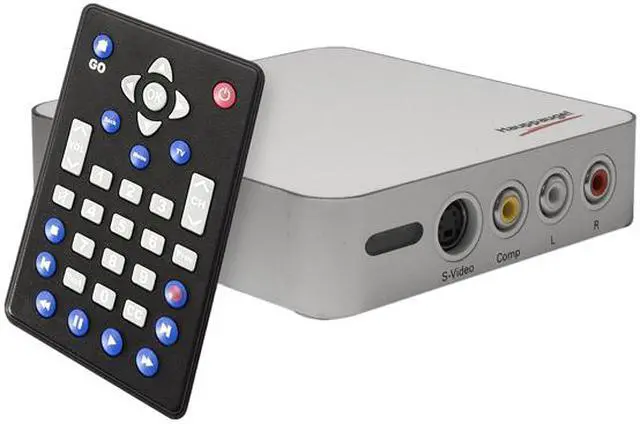
Hauppauge WinTV-HVR-1950 Hybrid Video Recorder 1192 USB 2.0 Interface - Retail

(limit 99 per customer)  what's this?

newegg
Original Price: $139.99
You Save: $10.00

$129.99

$7.56 Std. Shipping*
Add item to Cart
Add item to Wish List
Email This Page
Print This Page
Price Alert


Extended Warranty Available

expand for details

* Std. Shipping is not available to AK, HI and PR.

Special Offers

NPA

No interest for up to 12 months. Minimum purchase required.
Subject to credit approval. Details


BML

No Payments for up to 6 months.  Minimum purchase required.
Subject to credit approval. Details

Similar Items

Not the product you're looking for? We can make some suggestions to help you decide on a product that fits your needs.
view similar products

Manufacturer InfoReturn Policies

Manufacturer Warranty

Beyond any applicable Newegg return policy, this item is warranted independently by the product's Manufacturer. Below is a summary provided for convenience only and may not be accurate or current. Use this link for full details.

  • Manufacturer Limited Warranty period (parts): 720 days
  • Manufacturer Limited Warranty period (labor): 720 days

Manufacturer Contact Info

Return Policies

This item is covered by Newegg.com's VGA Standard Return Policy.

  • Return for refund within: 30 days
  • Return for replacement within: 30 days
OverviewCustomer ReviewSpecificationsProduct Tour
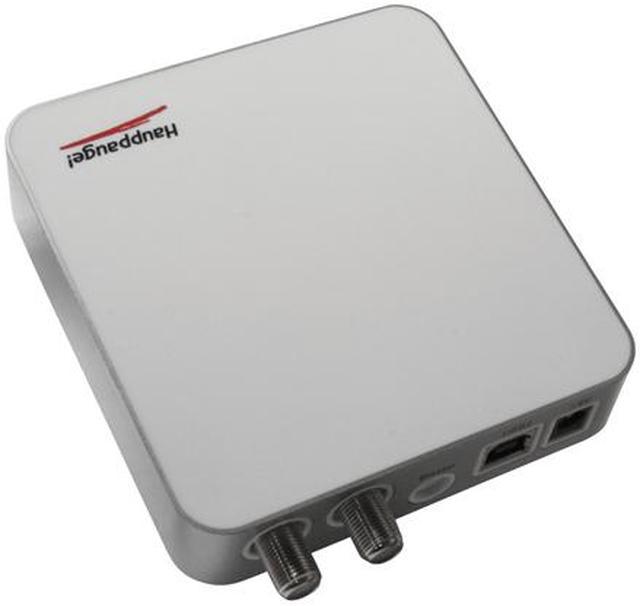
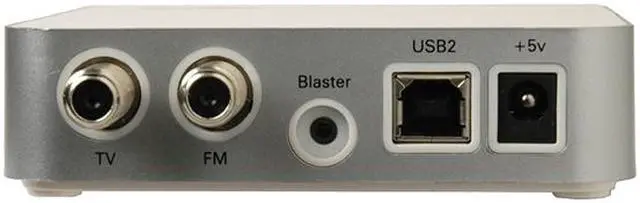
Hauppauge thinks outside the box with their WinTV-HVR-1950. This external TV tuner connects to your computer with a USB 2.0 connection so you don't have to open your case to get TV on your PC. The hybrid tuner can handle NTSC analog signals along with ATSC and Clear QAM digital signals up to 1080i. There is also an FM tuner so you can listen to the radio while you work.

The tuner is compatible with Windows Media Center so it's easy to control. A remote control lets you control the unit and Media Center from across the room. An IR blaster lets you use the included remote to change the channel of a compatible video source.

Review Summary (read more reviews, write a review)

5
newegg
29%
4
newegg
37%
3
newegg
17%
2
newegg
10%
1
newegg
7%
Product Rating:
Total Reviews: 30

How to make WinTV work.

white Reviewed By: Rabbitz on 9/4/2008
Rating + 3
Tech Level Tech Level: somewhat high - Ownership: less than 1 day
This user purchased this item from Newegg
Pros: Great tuner, Great picture quality.
Installs without a problem.. if you plan to use media center.

Works on a 64-bit OS with a download at hauppauge's website
Cons: WinTV on the other hand is a royal pain to install. After running setup on the disc (or the file from their site) it doesn't work. You have to go into the disc, and click more setup files it just forgets to install. (directions below)

Clear QAM doesn't work because the signal in my area is weak. But my TV picks them up just fine.
Other Thoughts: After installing from the main setup menu, browse the CD.
Open 'Pvr' and run both .exe's
Open 'SMD' run that .exe
Finally, if you get missing .dll errors,
open 'CD Setup' and on the desktop, right-click WinTV, and 'open file location' and drag and drop the files it says it's missing. At one point I had to rename a file HCWTVWND to HcwTVWnd.
Had to do this on both XP and Vista.

Hope this helps someone.. and I hope they fix this broken install.
12 out of 12 people found this review helpful. Did you? Yes No

Some good some bad

white Reviewed By: sabrejim on 8/5/2009
Rating + 3
Tech Level Tech Level: somewhat high - Ownership: 1 week to 1 month
Pros: If you upgrade to WinTV 7.0 it is an amazing device. High Def full screen on a laptop. Playback takes almost all the CPU power. Recording without playback takes little CPU. Haven't tried the Composite inputs yet. Recording shows using the online scheduler TitanTV is flawless. TitanTV is independent of Hauppauge but you click on the show to record in your browser and it runs a javascript or something to add to WinTV scheduler on your PC. So it works well as a PVR. I have only tried the over the air HD (ATSC) broadcasts.
Cons: Support for the 1950 is somewhat lacking. It comes with WinTV 6.0 which is a horrible piece of software. You can download a newer version which is a little better but still seems unfinished and buggy. WinTV7 is a vast improvement, but is not officially for the 1950 so you lose the IR blaster ability if you do upgrade. IR blaster cannot learn an IR remote so if your model is not in the database, you are out of luck. Records programs in .TS format which few other players will play. WinTV 7.0 does allow for saving recordings in MPG (I guess MPEG2?) but no H.264 format which is pretty standard.
4 out of 4 people found this review helpful. Did you? Yes No

Quick Specs (view all30)

Model1192
TypeExternal Tuner
TV TunerHybrid Tuner
TV StandardsATSC / ClearQAM / NTSC
FM TunerYes

Review Summary (read all 30 Reviews, write a review)

5
newegg
29%
4
newegg
37%
3
newegg
17%
2
newegg
10%
1
newegg
7%
Product Rating:
Total Reviews: 30

Excellent product!

white Reviewed By: PSH on 2/2/2010
Rating + 5
Tech Level Tech Level: high - Ownership: 1 week to 1 month
This user purchased this item from Newegg
Pros: This product works very well. Good quality video -- works great with Windows Media Center.
Cons: Bundled software isn't very good -- no problem because I bought it to use with Windows Media Center.
Other Thoughts: I previously bought an ATI TV Wonder USB 600 from another vendor. It was terrible -- had very glitchy video response. Had to return it.
Did you find this review helpful? Yes No

Sweet External Turner

white Reviewed By: mikeyd810 on 1/24/2010
Rating + 4
Tech Level Tech Level: high - Ownership: 1 week to 1 month
This user purchased this item from Newegg
Pros: Great capabilities
Works well with Windows 7 media center
Good picture
Cons: Price is about the only downside
WinTV software isn't that great but media center in Windows 7 makes up for it
Other Thoughts: Love this tuner, works great with Orb. Pics up great channel selection with my comcast service. Integrate very will in to Windows 7. Like the PVR functions as well.
Did you find this review helpful? Yes No

Works fairly well

white Reviewed By: Robot Room on 11/28/2009
Rating + 4
Tech Level Tech Level: somewhat high - Ownership: 1 day to 1 week
This user purchased this item from Newegg
Pros: * Doesn't consume a precious PCI slot

* Feels well-built and solid

* Picked up all of the HD and standard channels on Comcast. (I don't have any premium channels)

* Can be plugged in only when needed (no reboot required)

* Works in Windows 7 64-bit using Windows Media Center

* Changes channels quickly.
Cons: * Gets warm even when idle. I simply unplug it when not in use.

* Picture quality seems reasonable, but not as good as a dedicated TV.

* Windows Media Center crashed several times when showing the channel list. Not sure that was caused by to Hauppauge.

*
Other Thoughts: Based on other people's reviews, I never bothered to install any additional software of theirs, other than the drivers. I use Windows Media Center.

Some people have complained about how long it takes for Windows Media Center to grab all of the channels during setup. I don't think this is Hauppauge's fault. In any case, it is a one-time cost.
Did you find this review helpful? Yes No
Model
Brand Hauppauge
Model 1192
General
Type External Tuner
TV Tuner Hybrid Tuner
TV Standards ATSC / ClearQAM / NTSC
FM Tuner Yes
Remote Control Remote Included
Interface USB 2.0
Features
Features Watch, pause and record TV on your PC or laptop, in window or full screen
Watch ATSC HD digital TV, up to 1080i format
Watch clear QAM digital cable TV up to 1080i format
NTSC analog cable TV, 125 channel cable-ready tuner
Record ATSC digital TV or clear QAM digital cable TV in the original digital quality
Recording analog cable TV with the on-board MPEG-2 encoder, which allows your PC to run at full speed while recording
Dolby-TV stereo decoder
IR Blaster to control satellite and cable TV set top boxes
Schedule TV recordings with WinTV-Scheduler software
Specifications
Video Encoding Hardware MPEG-2 encoder
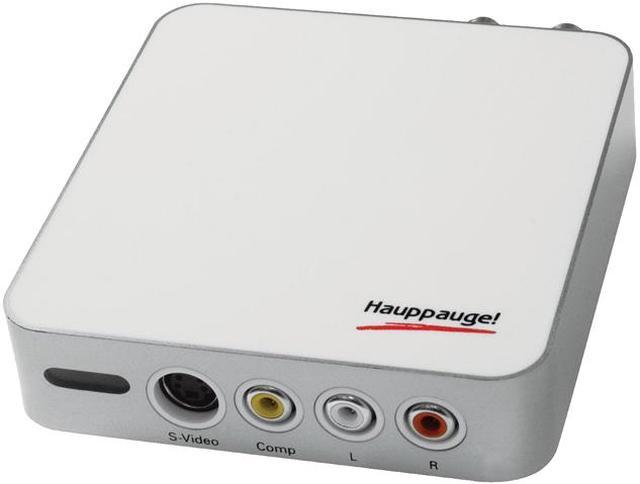
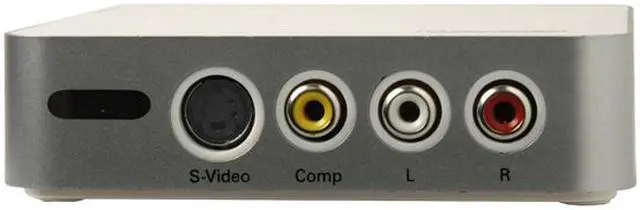
Ports In S-Video, composite video
Left and right audio via RCA jacks
Specifications Single tuner with the following broadcast formats supported:
- NTSC analog TV, with built-in hardware MPEG-2 encoder
- ATSC over-the-air digital TV, at video resolutions to 1080i
- Clear QAM digital cable TV, at video resolutions to 1080i
- FM radio
Audio/Video inputs:
- S-Video, composite video
- Left and right audio via RCA jacks
Hardware MPEG-2 encoder
- Conexant CX23417 encoder
- 2D comb filter
- Datarates: 2 to 12 Mbits/sec

Size: 4.0" wide x 4.1" deep x 1.1" high
Power: 5V to 12V at 2 amps
Weight: 6.5 oz
System Requirements
Processor 1.0 GHz Intel P4 or equivalent (for cable TV)
2.2 GHz Intel P4 or equivalent (for ATSC digital TV)
Graphics Card Graphics with 64MB memory (or greater)
Available Slot Available USB port
Operating Systems Supported Microsoft Windows Vista or Windows XP with Service Pack 2
Others Sound card for TV audio
Optional DVD burner for creating DVDs from your recordings
Packaging
Package Contents 1192
User Manual
Driver Disk
Power Adapter
USB Cable
Cables
Consumer Alert
Consumer Alert Clear QAM digital cable TV channels are not available on all cable networks. For more information, contact your cable TV provider.
Windows Media Center does not currently support clear QAM. To watch clear QAM channels, you should use the Hauppauge WinTV v6 application.
For analog cable TV reception, you need an analog cable TV connection. If you have a digital cable set-top box or a satellite box, the WinTV-HVR-1950 can connect via either Composite or S-Video inputs. Channel changing will be done using the IR Blaster.
For ATSC over-the-air digital TV reception, a high-gain antenna is recommended. To check the ATSC TV broadcasts in your area, go to TitanTV.com and enter your postal code. Note: depending on the strength of your antenna, you might not be able to receive all broadcasts listed at TitanTV.
To use the WinTV-HVR-1950 for TV with the Windows Media Center application, a Media Center certified DVD or MPEG-2 software decoder should be standard in your Media Center PC. If you are building a Media Center PC, check Microsoft’s website for a list of Media Center certified DVD decoders. The Windows Media Center application is included with Windows XP Media Center, Windows Vista Ultimate, and Windows Vista Home Premium editions only. Note: the enclosed remote control is not MCE certified and does not replace the Media Center remote control.
ATSC TV recordings are not 100% compatible with DVD, and therefore you cannot burn them directly to a DVD.
For use with Windows Vista, the WinTV-HVR-1950 is certified for use with Microsoft’s Media Center application. Not all included applications on the enclosed installation CD are currently certified for use with Windows Vista.
Manufacturer Warranty
Parts 2 years limited
Labor 2 years limited

Introduction

Hauppauge thinks outside the box with their WinTV-HVR-1950. This external TV tuner connects to your computer with a USB 2.0 connection so you don't have to open your case to get TV on your PC. The hybrid tuner can handle NTSC analog signals along with ATSC and Clear QAM digital signals up to 1080i. There is also an FM tuner so you can listen to the radio while you work.

The tuner is compatible with Windows Media Center so it's easy to control. A remote control lets you control the unit and Media Center from across the room. An IR blaster lets you use the included remote to change the channel of a compatible video source.

Highlights

newegg Enjoy HD/SD TV on Your Computer
The Hauppauge WinTV-HVR-1950 turns your computer into a true media center that receives worldwide analog TV, unencrypted digital ClearQAM cable TV and digital ATSC (up to 1080i), complementing your digital multimedia experience.
newegg Your Personal Digital Video Recorder
With the Hauppauge WinTV-HVR-1950, capture live TV shows directly to your PC's hard disk, or schedule your recordings on a daily, weekly or once only basis.
newegg Hardware Video Encoding
The Hauppauge WinTV-HVR-1950 features a built-in MPEG-2 hardware encoder to record high-quality analog cable TV without occupying CPU resources.
newegg Additional Video/Audio Inputs
The Hauppauge WinTV-HVR-1950 provides S-video, Composite and RCA Audio inputs so you can capture video or audio sources from other AV devices such as your VCR, game console, camcorder and more.
newegg Easy Operation with Remote Control
A multi-function remote control is provided so you can access every feature simply at a press of a button.

Photo Gallery

Hauppauge WinTV-HVR-1950 Hybrid Video Recorder 1192 - Retail
Hauppauge WinTV-HVR-1950 Hybrid Video Recorder 1192 - Retail Hauppauge WinTV-HVR-1950 Hybrid Video Recorder 1192 - Retail Hauppauge WinTV-HVR-1950 Hybrid Video Recorder 1192 - Retail Hauppauge WinTV-HVR-1950 Hybrid Video Recorder 1192 - Retail

Quick Specs

BrandHauppauge
FM TunerYes
InterfaceUSB 2.0
Remote ControlRemote Included
TV StandardsATSC / ClearQAM / NTSC
TypeExternal Tuner
Video EncodingHardware Encoding
NeweggBusiness
For Business Needs
EggXpert.com
Newegg Community
|NeweggMall.com
Shop Multiple Retailers
Shop by Region: United States | Canada | China
VeriSignReseller RatingsReliability Seal1This site protected by Trustwave's Trusted Commerce programInc500
Policy & Agreement | Privacy Policy | NeweggBusiness | Newegg Canada  © 2000-2010 Newegg Inc.  All rights reserved.
If the Adobe Reader does not appear when you click on a link for a PDF file, you can download Adobe Reader from the Adobe web site. nassau