If you are visually impaired and are having difficulty navigating this site, please call our Customer Support line via our toll free number (800) 390-1119.
Newegg.com - A great place to buy computers, computer parts, electronics, software, accessories, and DVDs online. With great prices, fast shipping, and top-rated customer service - once you know, you Newegg.
If you are reading this message, Please click this link to reload this page.(Do not use your browser's "Refresh" button). Please email us if you're running the latest version of your browser and you still see this message.
Beyond any applicable Newegg return policy, this item is warranted independently by the product's Manufacturer. Below is a summary provided for convenience only and may not be accurate or current.
Use this link for full details.
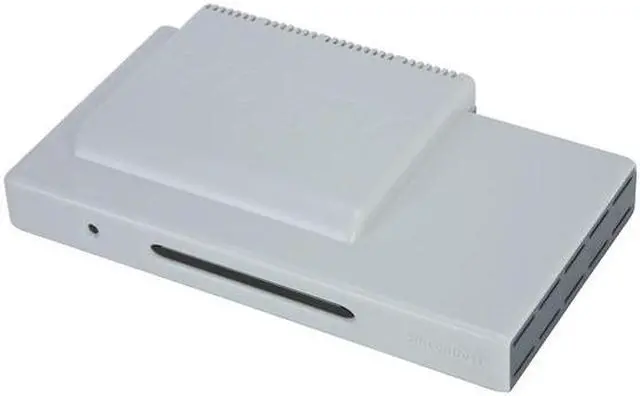
Turn any PC on your network into an HDTV with SiliconDust's HDHomeRun adapter. This dual tuner solution plugs into your network and lets you receive both over the air and unencrypted content from your cable company. The 5th generation tuners have increased sensitivity and gain so you pull in signals from farther away than ever before.
The HDHomeRun is compatible with Windows Media Center and many third party solutions for Windows, Macintosh and Linux. The included DVR software lets you record your favorite shows onto your hard drive so you can watch them whenever you want.
Pros: It actually works. I've tried the rest, don't waste your time. Just bite the bullet, spend a little more and be happy!
Cons: Somewhat expensive (but you do get two tuners). No analog support. There are no setup/manual or software in the box, just a card that points you to an internet page for setup, software, & driver downloads. The network tuner paradigm may not be for everyone (I resisted myself...)
Other Thoughts: I am tickeled to death! I have tried and returned 5 (count 'em...FIVE) ATSC tuner cards from Howpage (2 models), ATeye, Pintacle, Vista Vue. Although most worked OK, none of them were stable, some not even lasting a day before a reboot was required. The HDHR has now been plugged in for two weeks without a single tuner failure or failed recording. Reception is excellent and I thought the setup was quite easy. 100Mb eithernet IS NOT a con!! 1 ATSC channel is 15 Mb. There is room for two tuners with room to spare @ 100Mb.
106 out of 110 people found this review helpful.
Did you?
Thanks for the valuable feedback you provided!
Chineese Kwality Kontrol
Reviewed By: matt on 4/1/2008
Tech Level: somewhat high - Ownership: 1 day to 1 week
This user purchased this item from Newegg
Pros: Does not need to have PC case opened to return. Tunes OTA ATSC OK.
Cons: These are shipping with bad power supplies. If yours blinks when you plug it in, it's broke just like mine and you can either open a ticket or buy something of higher quality.
Other Thoughts: No Analog. Does not tune NTSC, so if you hook it up to cable to get HD on QAM, you don't get SD channels.
51 out of 123 people found this review helpful.
Did you?
Tech Level: somewhat high - Ownership: more than 1 year
Pros: 1. Two tuners. Decent sensitivity, but not necessarily the best. Much better than average though.
2. Very frequent firmware updates.
3. Very frequent driver updates.
4. Active and generally friendly forum community on their website. What you can't figure out, they probably can... and probably already have.
5. Very wide support between different operating systems and different media programs. This even supports the PC based Tivo software.
Cons: 1. Keep an eye on the AC adapter. The original one mine had failed, but Silicondust was very fast in shipping its replacement out for free, so this is hardly a con.
2. Yes it has two tuners. NO, you cannot watch on multiple PCs at one time. ONLY ONE AT A TIME. At seperate times, sure. They have a higher end model that'll let you do more than one (that costs twice as much)... or you could buy two or more single tuner units, two or more two tuner units, or some combination, and you can watch on multiple PCs.
Again, not a big con because it doesn't make the promise of watching on more than one PC at one time.
Other Thoughts: Sorry guys, as I mentioned above, this one will NOT allow multiple PCs to watch different streams from this unit at one time.
One thing to consider. If you do buy mulitple units, I'd recommend making all of your network components gigabit capable. A 100 megabit connection will support two channels... but I doubt it'll support three or more.
1 out of 2 people found this review helpful.
Did you?
Thanks for the valuable feedback you provided!
Excellent
Reviewed By: on 11/19/2009
Tech Level: high - Ownership: 1 day to 1 week
This user purchased this item from Newegg
Pros: 1: Relatively easy to install. As easy as setting up a wireless router
2: Works perfectly on Windows 7 ultimate
3:2 tuners and compression.
4: Uses streaming video to vlc
Cons: 1: ugly as sin. I mean REALLY ugly. We are talking The-Pogues-in-a-blender-on-fire-ugly.
2: Looks and feels cheap, not unlike The Pogues.
3: Pricier than other options, and less elegant than a card
Other Thoughts: If you are cascading routers, just plug a cable from the main router into any LAN port of the secondary router. I have about 3 4-port routers and 7 devices, so this is feasible, and lets them all see eachother, and, most importantly, the tuner.
To get Media Center to recognize the channels that the tuner can see, play, but does not have a name or guide number for, just enter the HD Setup, and go to Cable Channels tab. Then, you will see a big list of channels with a minority of them named. The rest will have a number like '100.5' . Just view each of the channels, figure out what they are, then click the box next to the channel number you want to edit, enter the new info for the Guide number, and Channel Name. Apply the setting, and try rescanning the channels from Media Center.
You can also just manually enter the channel and description in Media Center, under Options-> Guide -> Edit Channels, or similar. Then add the channel manually. Arduous, but gets you 4 times the channels.
0 out of 1 people found this review helpful.
Did you?
Thanks for the valuable feedback you provided!
Don't purchase until you know how many unencrypted digital channels your cable company delivers
Reviewed By: Windman on 11/19/2009
Tech Level: high - Ownership: 1 week to 1 month
This user purchased this item from Newegg
Pros: Small device. Physical setup easy. Software setup easy.
Cons: As a 28 year software developer, the software provided looks home grown, although I've seen many home grown software look better than professional. They could have designed it to minimize redundant functionality, reduced engineer lingo, provided a help system, ya-di-ya-da... MAJOR CON: My cable company delivers dozens of channels that my televisions can view without a cable box, however, HDHomeRun can only display 17 of those channels. To make matters worse, a nine of them are infomercials and public access. I didn't expect anymore channels that don't already receive, nor did I expect encrypted channels to be viewable. SiliconDust informed me that HDHomeRun can't display the channels that expected to see because they were analog or encrypted. Buyer beware, if your cable company's channels, like mine (Time Warner), then you will not have much use for this device.
Other Thoughts: Now to get an RMA
1 out of 2 people found this review helpful.
Did you?
Thanks for the valuable feedback you provided!
Model
Brand
SiliconDust
Model
HDHomeRun
General
Type
External Tuner
TV Tuner
Dual Tuner
TV Standards
ATSC(8-VSB) / ClearQAM (QAM64/256)
FM Tuner
No
Remote Control
No
Interface
Ethernet
Features
Windows Vista
Compatible
Features
Two Independent Digital Tuners(Both supports ATSC/QAM)
Watch and Record two channels at the same time
MCE/Vista QAM support(currently in Beta)
Microsoft's BDA 32/64-bit drivers offers
Works with popular DVR software
Compatible With: -Windows Media Center: -MCE 2005 32/64-bit -Vista MCE 32/64-bit -Elgato EyeTV - DVR for Mac -MythTV - DVR for Linux -SnapStream BeyondTV - DVR for Windows -SageTV - DVR for Windows -MediaPortal - DVR for Windows -GB-PVR - DVR for Windows -Pluto - Home automation & media system -VLC - Multi-platform media viewer -TSReader - MPEG-2 transport stream analysis
8-VSB (ATSC over-the-air digital TV) QAM64/256 (unencrypted digital cable TV) IR Receiver (signal PC with a standard remote control) 100baseTX high speed network
System Requirements
Processor
2.8 GHz Pentium 4 (or similar) for HD playback
Memory
512 MB RAM (1 GB recommended)
Operating Systems Supported
Windows XP/Vista
Others
100/1000base-T Ethernet network TV antenna to receive free over-the-air digital television (ATSC) Cable connection to receive unencrypted digital cable (Clear QAM) 2-4 GB per 1/2 hour of DTV recording
Packaging
Package Contents
HDHomerun Network Digital TV Tuner 2 RG-6 Coax cables High-speed Ethernet cable Low-profile pwoer adapter
Introduction
Turn any PC on your network into an HDTV with SiliconDust's HDHomeRun adapter. This dual tuner solution plugs into your network and lets you receive both over the air and unencrypted content from your cable company. The 5th generation tuners have increased sensitivity and gain so you pull in signals from farther away than ever before.
The HDHomeRun is compatible with Windows Media Center and many third party solutions for Windows, Macintosh and Linux. The included DVR software lets you record your favorite shows onto your hard drive so you can watch them whenever you want.
Highlights
Dual Digital Tuners With two built-in digital TV tuners, the SiliconDust HDHomeRun receives both free-to-air ATSC (up to 1080i) and ClearQAM unencrypted cable TV programs for an unsurpassed PC-TV viewing experience.
Works with 3rd Party DVR Software The SiliconDust HDHomeRun works with various 3rd party DVR software such as Windows Media Center, SnapStream BeyondTV, Elgato EyeTV, MythTV, SageTV, and MediaPortal, so you can enjoy added features such as TimeShift, scheduled recording, TV guide and more.
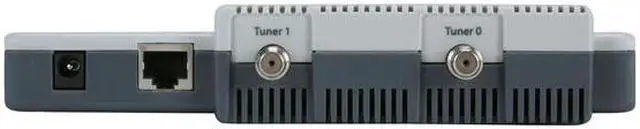
Ethernet Interface The SiliconDust HDHomeRun features an Ethernet port for connection to your home router or network, so you can share the TV turner function among multiple computers.