Skip to: |

Newegg.com - A great place to buy computers, computer parts, electronics, software, accessories, and DVDs online. With great prices, fast shipping, and top-rated customer service - once you know, you Newegg.

If you are reading this message, Please click this link to reload this page.(Do not use your browser's "Refresh" button). Please email us if you're running the latest version of your browser and you still see this message.

Newegg.com - Computer Parts, Laptops, Electronics, HDTVs, Digital Cameras and More!

  • | Wish List
  • Help
Networking
Search
Home
Home > 
Computer Hardware > 
Input Devices > 
KVM Switches > 
IOGEAR > 
Item#: N82E16817107407

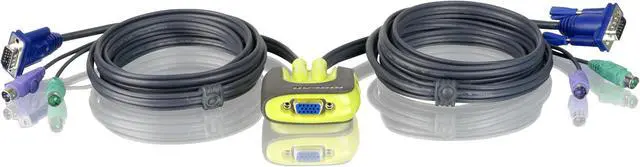
IOGEAR GCS62 MiniView Micro PS/2 KVM Switch with Cables

  • 2 Ports Computer Connections
  • 1 Port Monitor Connections
  • AutoScan Interval 5 seconds
  • Video Resolution 1920 x 1440; DDC, DDC2, DDC2B
  • Pin It
  • Email this page
ICON Loading...

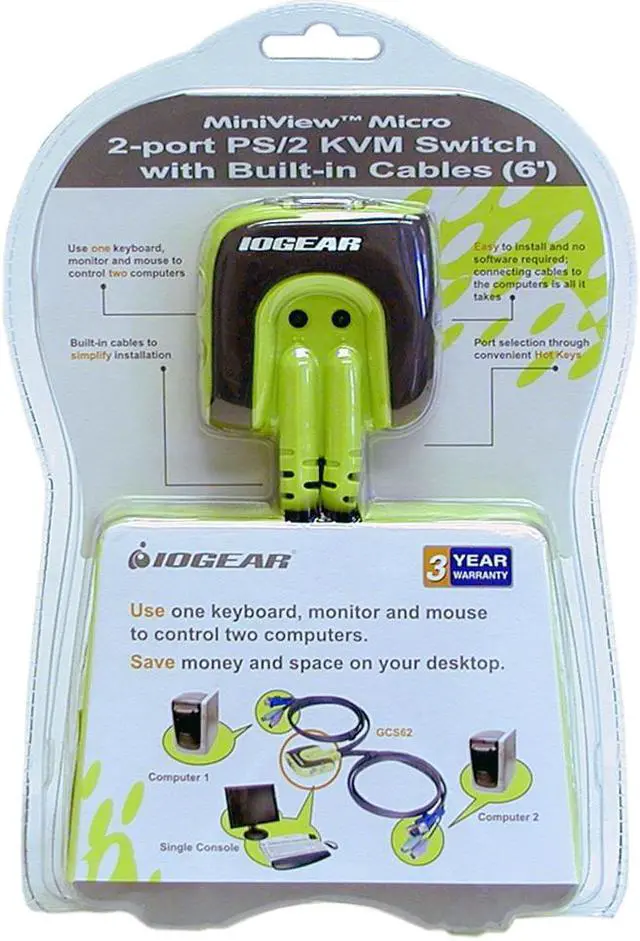
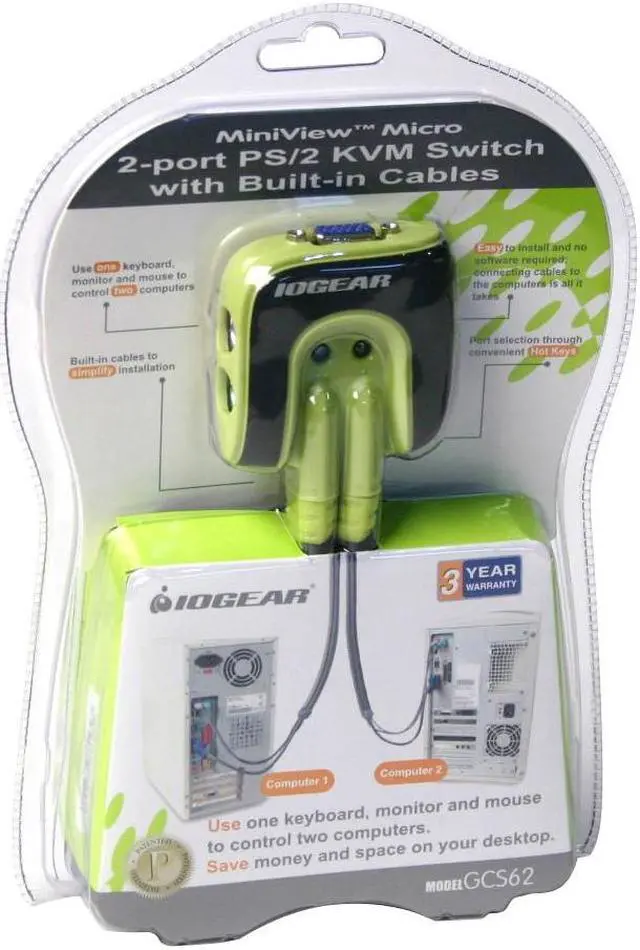
Introducing the two port MiniView Micro KVM switch from IOGEAR - a simple solution for those with more PCs than hands. Use one keyboard, one monitor and one mouse to control two PCs or Macintosh systems. This self-powered KVM switch features mouse & keyboard emulation to ensure smooth operation, as well as support for Plug-n-Play monitors and most wheel mice. The proprietary VSE Video Signal Enhancement technology provides rich, 32-bit color at resolutions up to 1920 x 1440. With KVM cables (6' long) molded into the unit, all you need to do is to plug it into your computers, and you've got a complete KVM solution from IOGEAR. (Macintosh support requires IOGEAR's Mac Adapter.)

  • newegg Ultra-Compact The sleek, ultra-compact IOGEAR GCS62 MiniView Micro is the smallest 2-port PS/2 KVM switch available in the market that allows you to use one keyboard, monitor and mouse to control two computers, helping save space and reduce desktop clutter.
  • newegg High Resolution Support The support for high video resolution up to 1920 x 1440 ensures best possible picture clarity.
  • newegg Convenient Setup & Port Switch Includes 6' long molded-in cables to simplify setup. The built-in AutoScan mode and hot Keys function allows easy and hassle-free switch between computers. LEDs allow for easy status monitoring.

Learn more about the IOGEAR GCS62

Model

Brand
IOGEAR
Model
GCS62

Spec

Type
D-Sub, PS/2
PC Connectors
Mouse 2x6 pin mini-DIN Female (PS/2)
Keyboard 2x6 pin mini-DIN Female (PS/2)
Monitor 2xHDB15 Male (Std. VGA/SVGA)
Console Connectors
Mouse 1x6 pin mini-DIN Female (PS/2)
Keyboard 1x6 pin mini-DIN Female (PS/2)
Monitor 1xHDB15 Female (Std. VGA/SVGA)
Computer Connections
2 Ports
Monitor Connections
1 Port
Video Resolution
1920 x 1440; DDC, DDC2, DDC2B
PC Selection
Hot Keys
AutoScan Interval
5 seconds
Dimensions
2.5" x 2.25" x 0.88"
Weight
1 lbs.

Features

Features
The smallest 2-port PS/2 KVM switch available
Use one keyboard, monitor and mouse to control two computers
6' long molded-in cables to simplify setup
Microsoft Intellimouse, Logitech FirstMouse+, MouseMan+, and most PS/2 mice are supported
Port selection through convenient Hot Keys
PS/2 mouse emulation for error-free boot-up
Save space and reduce desktop clutter
Plug-n-Play monitor support
Support video resolutions up to 1920 x 1440
No software required
Built in AutoScan mode
LEDs allow for easy status monitoring

Manufacturer Warranty

Parts
3 years limited
Labor
3 years limited

Quick Info

Warranty

  • Limited Warranty period (parts): 3 years
  • Limited Warranty period (labor): 3 years


Customer Reviews of the IOGEAR GCS62

Do you own this product? Write a Review

Filter Results

Go
  • Rob
  • 2/12/2013 7:42:10 AM
  • Tech Level: High
  • Ownership: 1 week to 1 month
  • Verified Owner

5 out of 5 eggsWorks Great!

Pros: Works just as described. Never fails. Greatly improved my productivity!

Cons: None...Wasn't free? lol

Did you find this review helpful? Yes No

  • N/A
  • 1/3/2013 9:43:03 AM
  • Tech Level: High
  • Ownership: more than 1 year
  • Verified Owner

3 out of 5 eggsGood-uses older tech

Pros: Works OK!

Cons: Only older VGA connections, no DVI. You have to use an adapter & the colors on an HD wide screen monitor are really poor.

Other Thoughts: You would think that Iogear would have DVI connections for the video display. They include audio & USB mouse/keyboard.

Manufacturer Response:

Thank you for choosing IOGEAR and we apologize for the inconvenience. We make a variety of KVM's to suite almost all needs. There is no guarantee it will work correctly with display adapters. Once again, thank you for choosing IOGEAR.

Did you find this review helpful? Yes No

  • maxolini
  • 10/23/2012 3:32:43 PM
  • Tech Level: High
  • Ownership: 1 day to 1 week

4 out of 5 eggsDont work with MSI FM2-A55M-E33

Pros: nice construction and nice 6' cables

Cons: dont work with MSI Fm2-A55M-E33, the mouse cable hangs up the machine and you cant even see the bios screen, maybe MSI rolls out a new bios or iogear updates its design, for now i need to use an USB mouse with that machine, so i have 2 mouses on the desktop :(

1 out of 2 people found this review helpful. Did you? Yes No

  • N/A
  • 8/15/2012 11:43:36 AM
  • Tech Level: High
  • Ownership: more than 1 year
  • Verified Owner

3 out of 5 eggsOkay

Pros: It works as it should.

Cons: The cables are really cheaply constructed with low-grade plastic and all the plugs are molded. The display quality on the second channel is quite poor compared to the first, so I would definitely not recommend this for anyone working with graphics.

Manufacturer Response:

Thank you for choosing IOGEAR and we apologize for the inconvenience. IOGEAR sells a wide variety of KVM’s to suite almost all needs. Your comments will be forwarded to the product manager for his review. To better service you and understand your set up, please feel to contact our customer support at 1-866-946-4327 or email us: support@iogear.com. Once again, thank you for choosing IOGEAR.

Did you find this review helpful? Yes No

  • WoodiE
  • 5/22/2012 5:13:26 AM
  • Tech Level: High
  • Ownership: more than 1 year
  • Verified Owner

5 out of 5 eggs

Pros: I've been using this KVM for a while now at work, never had an issue with it, always works flawlessly.

Cons: None!

Did you find this review helpful? Yes No

  • cheezcakep
  • 1/5/2012 9:20:41 AM
  • Tech Level: Somewhat High
  • Ownership: 1 week to 1 month
  • Verified Owner

5 out of 5 eggsKVM

Pros: It works well

Cons: Sometimes it doesnt recognize the keys to switch, not often though
No harrdware switch

Other Thoughts: Does well

Did you find this review helpful? Yes No

  • Doc
  • 8/4/2011 7:49:08 AM
  • Tech Level: Somewhat High
  • Ownership: 1 day to 1 week
  • Verified Owner

5 out of 5 eggsNo Problem Switch

Pros: Extremely simple installation - just plug everythin in. Works exactly as expected.

Cons: None.

Did you find this review helpful? Yes No

  • N/A
  • 7/9/2011 3:03:03 PM
  • Tech Level: High
  • Ownership: 1 week to 1 month
  • Verified Owner

5 out of 5 eggsGet a PS/2 rather than a USB

Pros: I have an Iogear USB KVM switch which is basically exactly the same except for the connection. And that is the point - when you boot PS/2 always works its built into the motherboard and its BIOS - no configuration - no conflicts. This is alegacy that has been part of the origional IBM specifacation from day 1. USB sometimes doesn't initiate causing problems and forcing reboots. So just use that PS/2 adapter that came with your mouse and with your keyboard and you'll live a much fess frustrated life.

Cons: None really. It takes about a second or 2 to switch over from one PC to another, which I am fine with. It is VGA adapter as opposed to digital but that's okay if you are using it in a repair environment. If you want it for Just switching between 2 PCs and want the killer video then don't order this one - order one with a DVI connection. You can use an adapter for DVI to VGA but its all VGA quality.

Other Thoughts: I like it and for the money it's a great purchase.

Did you find this review helpful? Yes No

  • kcdoodle
  • 6/23/2011 7:31:20 AM
  • Tech Level: High
  • Ownership: 1 week to 1 month
  • Verified Owner

1 out of 5 eggsMeh

Pros: Cables included. Simple design.

Cons: Set up between HP laptop docking station and generic desktop computer.
Does not see mouse on desktop unless focus is on the desktop WHILE IT BOOTS. Laptop works regardless. Sometimes loses mouse on desktop even when previously working.

Other Thoughts: I have had a few 2 port KVMs from various manufacturers and they were all a little quirky. My Zotac 4 port still outshines them all. Too bad NewEgg doesn't carry them anymore.

Manufacturer Response:

Thank you for choosing IOGEAR and we apologize for the inconvenience. To better service you and understand your set up, please feel to contact our customer support at 1-866-946-4327 or email us: support@iogear.com. Once again, thank you for choosing IOGEAR.

Did you find this review helpful? Yes No

  • N/A
  • 3/31/2011 8:49:54 PM
  • Tech Level: High
  • Ownership: 1 month to 1 year
  • Verified Owner

5 out of 5 eggsworks as expected

Pros: Easy to use. Works as needed.

Cons: None so far.

Did you find this review helpful? Yes No

ICON Loading...

Protect Your Investment!

    • (more options) read warranty details
Are you an E-Blast Insider? Subscribe Newegg e-Blast

Buzz

no complaints

5 out of 5 eggs
Long cable length, works with usb to ps2 adapter, simple hot key switching.

I have to wonder if I am the only one ...
— Jonboy 2/15/2011

Excellent 'legacy' KVM

5 out of 5 eggs
Been using one of these for a long time now.

- Small, unobtrusive
- Hands-free
- good cable length
- bundled ...
— rabbit 4/20/2010


PayPal
Shop without retyping payment details. Secure shopping made faster.
Check out with PayPal.

Financing


Home
Home > 
Computer Hardware > 
Input Devices > 
KVM Switches > 
IOGEAR > 
Item#: N82E16817107407
LOADING... LOADING...
Shop by Region: United States | Canada | China
Follow us:   RSS Feeds Youtube
VeriSign Reliability Seal1This site protected by Trustwave's Trusted Commerce program Inc500
Policy & Agreement | Privacy Policy  © 2000-2013 Newegg Inc.  All rights reserved.
If the Adobe Reader does not appear when you click on a link for a PDF file, you can download Adobe Reader from the Adobe web site. nassau