Skip to: |

Newegg.com - A great place to buy computers, computer parts, electronics, software, accessories, and DVDs online. With great prices, fast shipping, and top-rated customer service - once you know, you Newegg.

If you are reading this message, Please click this link to reload this page.(Do not use your browser's "Refresh" button). Please email us if you're running the latest version of your browser and you still see this message.

Newegg.com - Computer Parts, Laptops, Electronics, HDTVs, Digital Cameras and More!

  • | Wish List
  • Help
Home
Home > 
Computer Hardware > 
Computer Cases > 
External Enclosures > 
Mediasonic > 
Item#: N82E16817576012

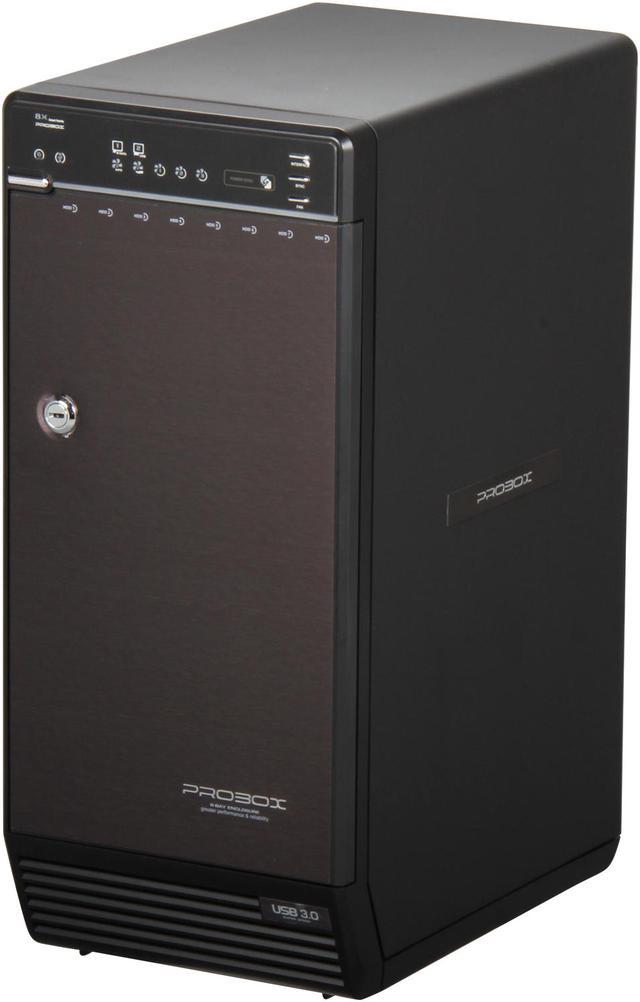
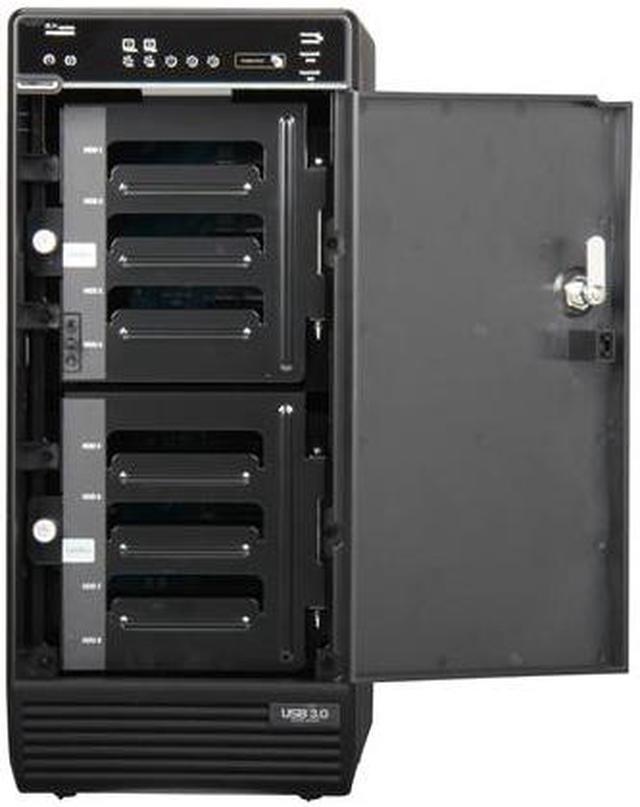
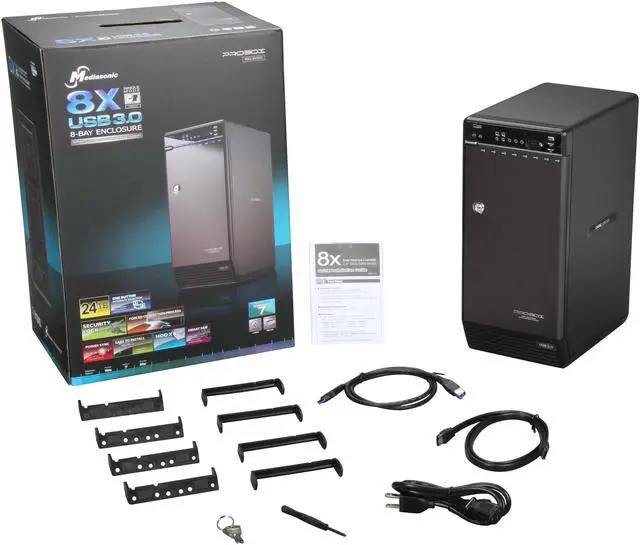
Mediasonic H82-SU3S2 3.5" Black USB3.0 & eSATA ProBox 8 Bay External Hard Drive Enclosure

  • 3.5"
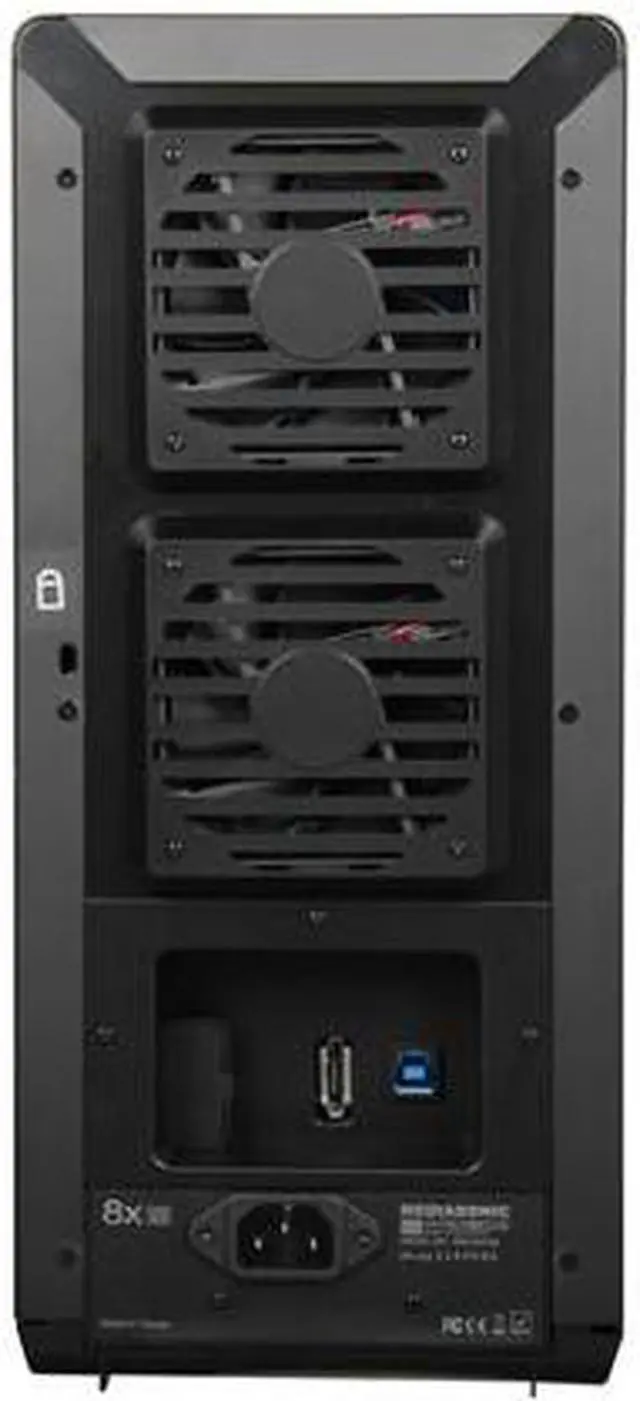
  • USB3.0 & eSATA
  • Up to 3TB
  • Pin It
  • Email this page
ICON Loading...

Learn more about the Mediasonic H82-SU3S2

Model

Brand
Mediasonic
Model
H82-SU3S2

Spec

Color
Black
Size
3.5"
AC Adapter
Yes
Internal Interface
SATA I/II/III
External Interface
USB3.0 & eSATA
Maximum Capacity (per Bay)
Up to 3TB
Fan
Yes
Specifications
Supporting OS

- Windows 2000 / XP / VISTA / Windows 7 (with MBR enabled, supports total capacity up to 2TB)
- Windows Vista / 7 32/64 bit (with GPT enabled, supports total capacity more than 2TB
- Mac OS 10.3 or later

Power Adapter: 100V to 240V

Safety Specification: CE / FCC / Rohs
Features
Support all brand of 3.5" SATA I / II / III hard disk drive up to 3TB per drive

Transfer rate up to 5.0Gbps via USB 3.0

Transfer rate up to 3.0Gbps via eSATA

Power Sync: Power off in synchronization with PC

Forced Convection Process

Smart Fan function:
- Thermal-Sensor built-in
- Auto & Manual mode
- 3 level of speed

One button interface selection: Switch USB 3.0 or eSATA interface by pressing one button

Dimensions & Weight

Dimensions
13.86" x 9.96" x 6.1"
Weight
11.02 lbs

Packaging

Package Contents
H82-SU3S2 Enclosure
eSATA Cable
USB 3.0 Cable
Power cord (US Type)
User manual
Screw driver x 1
HDD Handle x 8

Quick Info

Warranty

  • Limited Warranty period (parts): 1 year
  • Limited Warranty period (labor): 1 year


Customer Reviews of the Mediasonic H82-SU3S2

Do you own this product? Write a Review

Filter Results

Go
  • N/A
  • 2/28/2013 8:05:44 PM
  • Tech Level: Somewhat High
  • Ownership: 1 month to 1 year
  • Verified Owner

4 out of 5 eggsGood enclosure, not ideal for a media server

Pros: Excellent performance, quiet active cooling, efficient power use, makes it possible to put all those drives sitting around to use whenever you want. I have never had the drives drop off using a 2012 Mac Mini and USB 3.0.

Reading reviews there seems to be a lot of confusion about that this housing does with drives. It is NOT RAID and does not combine (span) the drives, but depending on your system you can do those with the OS. Spanning selected drives with the Mac OS works great.

Cons: I really only have one "con", which could also be a "pro" depending on your purpose. The enclosure puts the drives to sleep rather quickly when they are idle. This is great for a lot of cases where you have several drives installed which are only occasionally accessed, but my primary intent was to use this as a media server.

FWIW, I am using a 2012 Mac Mini Quad Core with iTunes defaulting to save to multiple drives which are OS configured to span as one volume. The issue is that when the drives go to sleep it causes problems using them to store media. First, you always have to wait for the drives (and sometimes successive drives) to spin up before the piece of media you want becomes available. Second and more importantly, iTunes seems to often believe the drives simply aren't available and starts refusing to save new content until the computer is restarted. I also suspect all the spinning up and down isn't good for the drives in the long run and with this particular use it would be better if they ran all the time.

Other Thoughts: Prior to getting this enclosure, I was using a 4 bay Vantec HX4 enclosure to house the media drives. With it the drives never spin down unless the computer is shut off, which works much better for the use I described above. I still have a lot of drives, some used to backup my critical content, including a full backup of the spanned media drives. So, what seems to have been my best solution is to use the Vantec enclosure for the media drives and this one for backup drives (I just un-mount them so they will spin down and not clutter the desktop when I don't need them) as well as some other drives which only get sporadic use, so they will automatically spin down when they aren't needed, which is most of the time.

It's probably also important to say I am using Samsung green drives for media. Some non-green drives may not spin down, but I also have several other non-green drives in this housing and they all spin down.

1 out of 2 people found this review helpful. Did you? Yes No

  • N/A
  • 2/27/2013 3:09:52 PM
  • Tech Level: High
  • Ownership: 1 month to 1 year
  • Verified Owner

5 out of 5 eggsHigh Quality 8 bay enclosure

Pros: Internal Power Supply
Automatic fan speed control
USB 3.0 support
Turns off automatically when PC is powered off
JBOD(No Builtin Raid) - More choices and less compatibility issues

Cons: No mechanism to have it power on when the PC is powered on although I think it does have an optional sleep mode.

Other Thoughts: This is the second device I've purchased after buying one about a year ago. I'm using the new unit with a 8 drive RAID 5 array connected via USB 3.0 to a PC running the lastest ubuntu LTS server. I've had the newest unit constantly copying and resyncing the RAID array for several days now without any drive failures.

I think this device is very,very sensitive to the exact USB 3.0 chipset, drivers, and hard drive models used especially if RAID is used. USB 2.0 appears to work with just about anything. Keep in mind that many hard drive brands intentionally do not work well in RAID arrays by design since they want you to buy the "enterprise" versions.

1 out of 2 people found this review helpful. Did you? Yes No

  • N/A
  • 2/22/2013 9:09:18 PM
  • Tech Level: Somewhat High
  • Ownership: 1 week to 1 month

2 out of 5 eggsVery Poor Performance

Pros: 8 Drives support
Built in (supposedly hardware) Raid
Pretty simple configuration

Cons: Performance is mediocre. I have an Asus P8Z68-V Pro/Gen3, I am using the onboard USB 3 on the back panel. 4x3TB seagate 7200rpm drive. Reading from a 8x2TB raid 5 setup. I get a consistant of 7 - 8MB write using USB3, file size ranging from 10Kb to 10Gb. Read is a bit faster at 50 - 60Mb. In comparison to my regular Seagate USB3 3TB drive, I get consistant of 40 - 50Mb write and 80 - 90Mb read.

I have purchase a USB PCIe card and waiting for that to come in. Hopefully that can boost the performance to at least 50 - 60Mb write. But at the moment, this is by far the most disappointing san/raid device I have used.

Other Thoughts: It would be nice if this raid system has some sort of diagnostic tools to show what is going on with the system. My other raid took 2 days to initialize 8x2TB raid 5, while this one is almost instant, so I am wondering if the poor performance is due to initial setup. But I have no indicator on the box nor do i have any type of software tools to figure that out. This device is a great idea, but poorly implemented and poorly supported. Company website has less information than newegg which is pretty sad.

0 out of 1 people found this review helpful. Did you? Yes No

  • jerrygildner
  • 1/23/2013 3:01:49 PM
  • Tech Level: Somewhat High
  • Ownership: less than 1 day
  • Verified Owner

1 out of 5 eggsHope the next one works

Pros: Its a really good idea

Cons: USB port wouldn't even work 3.0 or 2.0 switched it to esata only 3 of the 7 drives lit up, and I could not even get the drives to show up in windows

Other Thoughts: Sent for replacement $26 out of my pocket and if the next wont work Im out $52 then I will not be a happy camper Its not neweggs fault I will give mediasonic anthor shot I guess

0 out of 1 people found this review helpful. Did you? Yes No

  • user
  • 1/23/2013 2:50:14 PM
  • Tech Level: Somewhat High
  • Ownership: 1 month to 1 year
  • Verified Owner

3 out of 5 eggsneeds improve

Pros: Like everybody else said, it's quiet and efficient.

Cons: Every time when I copy many files (more than 100G), the connection gets lost after a while. I have tried everything I can, but it just keep happening.

Other Thoughts: They have a forum, and I've communicate with them many time. I would say the customer service is fine. it's just the product needs to be improved.

0 out of 1 people found this review helpful. Did you? Yes No

  • Joe
  • 12/17/2012 6:55:51 AM
  • Tech Level: Somewhat High
  • Ownership: 1 month to 1 year
  • Verified Owner

3 out of 5 eggsGood, not great

Pros: -Reasonable price for USB 3.0 external storage.

-Appreciate the auto shut down feature (turns off HD when idle and when computer shuts down).

-Can achieve some excellent data transfer rates.

-Very, very quiet!

Cons: -As some others have said, the bays that the hard drives fit into are slightly concerning, but they appear to hold the drive just fine

-DISCLAIMER: I've only tested the USB 3.0 connector, not USB 2.0 or eSata. I prefer to stay away from eSata due to some of the nightmares I've had with raids + eSata (hence the reason for the USB 3.0 connection), but it seems like problems still exist.

-If you plan on doing a lot of data transferring (hard drive to hard drive transfers), data compression, or simply doing any activity that requires extended amounts of read/writes, all hard drives within the enclosure WILL DROP OUT.

- To me, it seems like there is a bottleneck somewhere that causes all the hard drives to just drop out and MOST OF THE TIME, reconnect. If they don't reconnect, you do have to power cycle the enclosure (re-sync doesn't seem to do anything).

- Over the course of a month, I have have had this enclosure drop out on me probably 20+ times but keep in mind this has happened when transferring files from one hard drive to another, (transferring 1gb+ of data caused the enclosure to drop out 4 times!

Other Thoughts: When purchasing a product, I always read the reviews. Hopefully this will help others.

I think the 3 egg rating is appropriate despite the amount of issues I've had because:

-I have not tested any other medium (USB 2.0 or eSata)
-I cannot verify that this is a main board issue.

If the above were true, I would likely have given this 2 eggs.

I do have the latest 3.0 drivers for my main board and have never had a issue with any other 3.0 device connected.

Would not suggest high data reading/writing to this unit especially if writing/reading to/from multiple hard drives within this enclosure at one time.

Despite the issues, this isn't a horrible product and I do think its simply a USB 3.0 issue. Now that everything is setup and saved, the drop outs are minimal.

I have been able to watch several HD quality movies from hard drives within the enclosure with no issue.

Would I buy this product again? No
Would I recommend it to anyone else? Probably not

1 out of 1 people found this review helpful. Did you? Yes No

  • Jim R.
  • 12/5/2012 6:28:21 PM
  • Tech Level: High
  • Ownership: 1 day to 1 week
  • Verified Owner

5 out of 5 eggsSolves my storage problem!

Pros: Well-constructed. Holds EIGHT drives! Very easy to set up with USB 3.0 (which makes data transfers extremely fast!). This case makes accessing my current library of six external drives super easy. No more swapping them out to a dual drive open-case.

Cons: NONE!

Other Thoughts: In all honesty, I just got this case in today and I was so excited about it that I really wanted to get this review done. I've wanted something like this for a long time and final took the plunge. My computer, which is two years old, doesn't have any USB 3.0 connections, so I purchased a SYBA USB 3.0 (3+1) PCI-e Controller Card, Etron Chipset, Molex (IDE HD 4-pin) Built-iModel SY-PEX20135 (Item #N82E16815124117) to take care of that issue. As of now, I highly recommend this unit. When I eventually load it up with four more drives, I'll report back with an update if there are any negative issues. I don't expect any though.

0 out of 1 people found this review helpful. Did you? Yes No

  • N/A
  • 11/28/2012 3:30:36 PM
  • Tech Level: Somewhat High
  • Ownership: less than 1 day

5 out of 5 eggsJOBD or JBOD?

Pros: This enclosure is JBOD, not JOBD... First time I've seen "JOBD" used... had to look it up.

JBOD = Just A Bunch of Disks (8 drives, 8 volumes in OS)
JOBD = Just One Big Disk (8 drives, 1 volume in OS)

Worst acronyms ever.

Anyway, when you format the drives in windows (7 and 8...maybe vista) and create the volumes, you can create a dynamic "spanned" volume which will make it appear exactly as "Just One Big Disk".

Problem solved. JOBD or JBOD all in the same enclosure if you know what you're doing.

Cons: None that I can think of.

Did you find this review helpful? Yes No

  • Tommyk
  • 11/15/2012 3:03:41 PM
  • Tech Level: High
  • Ownership: less than 1 day
  • Verified Owner

4 out of 5 eggsNot JOBD

Pros: Does what the title states. It is an external drive enclosure. Gives access to the drives in the enclosure.

Cons: I read in the reviews that it works just fine as a JOBD. So I bought it assuming it can do that (be one really big disk), it cannot. If you have 8 drives you will 8 drives in the OS. It does not aggregate the drives into one, for that you need the next version up with a RAID controller. Did have to reseat the drives as the first time it did not recognize the drives.

Other Thoughts: I should have read the manual which does not indicate it can do JOBD.

0 out of 2 people found this review helpful. Did you? Yes No

  • jvbunte
  • 9/9/2012 11:31:55 AM
  • Tech Level: High
  • Ownership: 1 month to 1 year
  • Verified Owner

5 out of 5 eggsLinux ZFS ok on USB3 and eSATA

Pros: Compact size for holding 8 3.5" drives, USB3 or (single) eSATA connector, pretty solid construction. I don't mind the plastic door at all, how often do I really need to open it? Once, to install drives. Variable Fans (or auto), custom power off settings (15sec, sleep, or never off).

Cons: I had to actually read the included instructions to figure out how to disable the auto-power off, but after that, nothing really.

Other Thoughts: I installed 8 1.5TB seagate drives first with USB3 using ubuntu 12.04 + ubuntu-zfs. Had a bit of a problem with drives going to sleep after inactivity but I blame seagate, for not supporting APM flags on the drives, not the enclosure. I switched to eSATA just to see and I can't tell any difference for normal home media serving use. If you use eSATA your eSATA controller must support port multiplying.

4 out of 4 people found this review helpful. Did you? Yes No

ICON Loading...
Are you an E-Blast Insider? Subscribe Newegg e-Blast

Buzz

Does the job!

5 out of 5 eggs
Excellent product so far, I'm running 8 x 2TB. Good construction (nice metal case w/ some minor plastic additions ...
— bigdaddynull 10/1/2011

Great upgrade from the 4-bay model

4 out of 5 eggs
Perfect for WHSv1 expansion due to it is JBOD.

Single connection interface, not like the competition where they include ...
— Specter 5/8/2012


PayPal
Shop without retyping payment details. Secure shopping made faster.
Check out with PayPal.

Financing


Home
Home > 
Computer Hardware > 
Computer Cases > 
External Enclosures > 
Mediasonic > 
Item#: N82E16817576012
LOADING... LOADING...
Shop by Region: United States | Canada | China
Follow us:   RSS Feeds Youtube
VeriSign Reliability Seal1This site protected by Trustwave's Trusted Commerce program Inc500
Policy & Agreement | Privacy Policy  © 2000-2013 Newegg Inc.  All rights reserved.
If the Adobe Reader does not appear when you click on a link for a PDF file, you can download Adobe Reader from the Adobe web site. nassau