Natural selection: the weak die young. And that's the idea behind Geil's burn-in process: stress those chips so the ones prone to failure die before they ever get to the customer. In short, what high-end manufacturers normally bring to mil-spec components is now coming to inexpensive memory.
Okay, there's not a lot about memory that is genuinely exciting, and when it is, it's usually the wrong sort of exciting. Geil's burn-in testing is intended to make certain that your memory is as boringly reliable as you could hope for. Between their burn-in testing and aluminum heat-spreaders to help keep it cool, they're confident enough that Geil offers a lifetime warranty.
But don't take our word for it. Do the research yourself and make up your own mind. If this is the perfect choice for you, we'll still be here when you get back.
Natural selection: the weak die young. And that's the idea behind Geil's burn-in process: stress those chips so the ones prone to failure die before they ever get to the customer. In short, what high-end manufacturers normally bring to mil-spec components is now coming to inexpensive memory.
Okay, there's not a lot about memory that is genuinely exciting, and when it is, it's usually the wrong sort of exciting. Geil's burn-in testing is intended to make certain that your memory is as boringly reliable as you could hope for. Between their burn-in testing and aluminum heat-spreaders to help keep it cool, they're confident enough that Geil offers a lifetime warranty.
But don't take our word for it. Do the research yourself and make up your own mind. If this is the perfect choice for you, we'll still be here when you get back.
 DDR2 800DDR2 800 delivers incredible performance and platform compatibility with up to 6.4GB/s per channel memory bandwidth for the ultimate work and gaming power!
 Dual Channel Kit for Extreme GamingDesigned for today's hardcore gamers, the GeIL Ultra DDR2 GX24GB6400UDC kit provides dual channel configuration to double the effective memory bandwidth, taking your gaming experience to the next level!
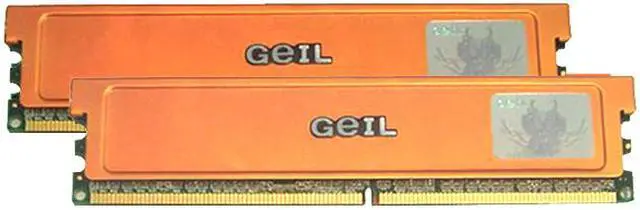
 Racing Orange Aluminum Heat SpreadersThe high-performance aluminum heat spreaders effectively dissipate heat from the memory module to ensure system stability.





 DDR2 800DDR2 800 delivers incredible performance and platform compatibility with up to 6.4GB/s per channel memory bandwidth for the ultimate work and gaming power!
 Dual Channel Kit for Extreme GamingDesigned for today's hardcore gamers, the GeIL Ultra DDR2 GX24GB6400UDC kit provides dual channel configuration to double the effective memory bandwidth, taking your gaming experience to the next level!
 Racing Orange Aluminum Heat SpreadersThe high-performance aluminum heat spreaders effectively dissipate heat from the memory module to ensure system stability.