-
Deactivated Item
-
-

-
Manufacturer Contact Info
|
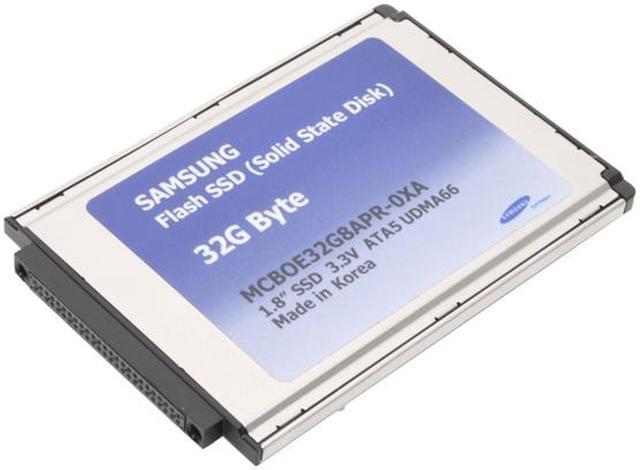
Do you put your hard drives in some rough environments? Maybe you want to check out this solid state hard drive.
With no moving parts and no delicate head to bounce around, this little gadget is much tougher than a conventional hard drive, even one of the vibration-hardened drives for laptops. And it looks exactly like a standard IDE (ATA) drive to your computer, so there's need for a fancy new interface. Light weight, low power consumption, and high reliability (two million hours mean time between failures [MTBF]) make this drive perfect for surviving in a less than perfect world.
I can't recommend jumping out of planes without a parachute with this drive, but if you did, your data would be in better shape than you would be. Check it out and decide for yourself, but I think I want one for my laptop!
-
- 5
-

- 60%
- 4
-

- 18%
- 3
-

- 11%
- 2
-

- 4%
- 1
-

- 7%
| Product Rating: |
   
|
| Total Reviews: |
28 |
Simply amazing!
- Pros: Fast, fast, FAST! My tablet PC powers on to login in less than 30 seconds now - less than half the time with the hard disk! Overall usability is immensly improved, with applications loading in less than 5 seconds (vs. 15-30 previously). Power jury is still out, although power consumption seems to be better on battery (I need to replace the battery, though, as the one I'm using is a "deader" that I keep for 100% mains powered use - can't find my "good" batteries...hiding somewhere...)
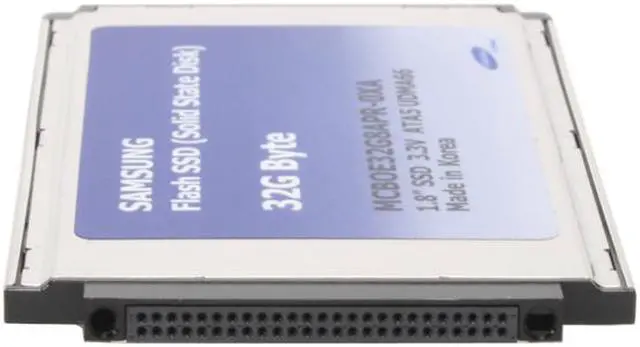
- Cons: Only one, and it could be a show-stopper to some. The 1.8" form factor package is a "fat" package: there is a bulge on the back of the unit that increases the thickness to double that of the single-platter MK2004GAL drive. This means that any device that has an inflexible opening for the original drive will NOT be able to use this SSD. The NEC Versa LitePad has just enough "play" in the disk compartment and the 50 pin connector to accept this package and still operate, although it does require some "stuffing" to keep the drive seated while moving it about.
- Other Thoughts: An incredibly fast 32GB disk that works in my ancient NEC Versa LitePad tablet. I have been trying to upgrade the original 20GB Toshiba 1.8" drive since I bought the tablet new in 2003: unfortunately there is a BIOS problem in recognizing any disk with more than 2 heads. Since the geometry of the SSD is a single platter drive, I thought this would solve the problem. And it DID!
Not only does the table work with the new SSD, and work FAST, the performance improvement has eliminated my preceived lack of memory (512MB max installed) as an application performance issue. Apparently I/O request queuing was killing my performance - this has eliminated the performance lag that has frustrated me for the past 4 years!
(BTW, this is truly and "apples-to-apples" comparison: I dd copied my old disk to the new, so everything was EXACTLY what the hard drive had before the exchange. All performance gains are directly attributable to the new disk.)
Replacement notebook drive
- Pros: I replaced the 1.8" drive in a Toshiba R100 with this 32 GB Samsung drive. It runs like a dream. Much faster response times to load programs, web page refresh, boot up, etc. And absolutely dead silent. You don't know what silence and lack of vibration in a lightweight notebook is like until you experience it. Get this drive now for about $400 instead of paying $3000 for the new Toshiba R500 with SSD. Sit back and wait for the prices of SSD-equiped notebooks to fall while you enjoy this upgrade.
- Cons: Obviously, small 32 gb capacity limits storage, but plenty large enough for OS, Office, etc.
| Model | MCBOE32G8APR-0XA00 |
| Form Factor | 1.8" |
| Capacity | 32GB |
| Interface Type | PATA |
| Connector | 50 Pins |
-
- 5
-

- 60%
- 4
-

- 18%
- 3
-

- 11%
- 2
-

- 4%
- 1
-

- 7%
| Product Rating: |
   
|
| Total Reviews: |
28 |
220.64% increase in average Read from stock HDD!
- Pros: I purchased this product to replace my Sony Vaio X505's 1.8" HDD. The factory unit has a 20GB drive. I have two notebooks so I was able to do a side by side - clean install using the different drives. The difference is amazing. The read went from 15.5 MB/s to 49.7 MB/s, and it was a steady reading from 0-32 GB. The 32GB SSD drive is 220.64% faster then the 20GB drive! I couldn't ask for more!
- Cons: Price. You pay more per MB then you would otherwise. Also, I had to remove the drive from the outer casing for it to fit in the notebook, but that wasn't a big deal.
- Other Thoughts: This isn't the world's fastest drive by any means, but if you have a notebook with a 1.8" drive, and you have the money, you're nuts if you don't try this.
New Life to an Old Laptop
- Pros: Very fast. My laptop now boots in less than half the time it did before.
Low heat output. I used to have to have a fan to cool the laptio, but with the new SSD drive I no longer need the additional cooling. Longer battery. Without having moving parts, the battery in my laptop last far longer than before.
- Cons: Didn't fit snugly since my old drive was a 2.5", but not a big deal. I just cut some cork and now it stays in place.
- Other Thoughts: If NewEgg has another sale on these, I'll probably buy a couple.
Not worth the price
- Pros: Good for laptops and low power environments. Very responsive (low latency) disk access, as you'd expect form a SSD.
- Cons: The price for starters. *Major* early adopter premium here.
Not sure where the hell people are getting "as fast as a 7200 RPM drive" or a "WD Raptor" from. No matter what cabling I tried I couldn't get any higher than udma2 in Linux, which seems correct. Sequential write/read speeds were ~20 MB/sec, which is pathetic compared to an IDE disk and a joke compared to a Raptor. This speed is mediocre at best.
I've had problems with this disk recently causing my system to freeze. These freezes required in-kernel soft resets and have occurred across multiple kernels (2.6.22 to .24) and new PSU/cable/connectors. I'm definitely not impressed for a $500+ disk that's only 32 GB; the low latency times don't justify the cost.
Doesn't come with a connector and required the purchase of two adapters to get it to work with a normal IDE cable. Seriously, for this price is it too much to ask to get the connectors?
- Other Thoughts: Don't get this expecting a huge performance increase. If this truly obeys the udma2 spec, the max possible transfer rate is a paltry 33MB/s, where as a Raptor should easily do twice that. Fast USB sticks are comparable in speed.
Instead of wasting money on such an expensive product, purchase more RAM, WD Raptors (if you don't already have them), or if you have Vista, consider giving ReadyBoost a try. This is great if you need a low power disk for a laptop, especially one running Windows. If you're going to use this in an embedded environment I'd look elsewhere, ESPECIALLY if you'll be using Linux.
| General |
| Brand |
SAMSUNG |
| Model |
MCBOE32G8APR-0XA00 |
| Device Type |
Internal Solid state disk (SSD) |
| Dimensions |
| Width |
2.1" |
| Depth |
2.8" |
| Height |
0.2" |
| Weight |
1.4 oz. |
| Expansion / Connectivity |
| Form Factor |
1.8" |
| Capacity |
32GB |
| Interface Type |
PATA |
| Connector |
50 Pins |
| Performance |
| Max Shock Resistance |
1500G |
| Max Vibration Resistance |
20G |
| Power Consumption (Active) |
typical 200mA |
| Power Consumption (Idle) |
typical 20mA |
| Sequential Access - Read |
57MB/s (max) |
| Sequential Access - Write |
38MB/s (max) |
| MTBF |
2,000,000 hours |
Introduction
Do you put your hard drives in some rough environments? Maybe you want to check out this solid state hard drive.
With no moving parts and no delicate head to bounce around, this little gadget is much tougher than a conventional hard drive, even one of the vibration-hardened drives for laptops. And it looks exactly like a standard IDE (ATA) drive to your computer, so there's need for a fancy new interface. Light weight, low power consumption, and high reliability (two million hours mean time between failures [MTBF]) make this drive perfect for surviving in a less than perfect world.
I can't recommend jumping out of planes without a parachute with this drive, but if you did, your data would be in better shape than you would be. Check it out and decide for yourself, but I think I want one for my laptop!
Highlights
 |
SSD Storage Technology Acting without any moving parts, the Samsung MCBOE32G8APR-0XA00 solid state drive (SSD) boasts multiple advanced features including zero mechanical noise, faster data rates compared to conventional HDDs, over 2-million-hour life span, ultra-low power consumption and impressive shock, vibration and extreme temperature resistance. With these breakthrough capabilities, the SSD meets all the demanding requirements for high-performance mobile computing.
|
 |
1.8" Form Factor Featuring a 1.8" form factor, the Samsung MCBOE32G8APR-0XA00 provides an ideal replacement option for reliable mobile storage - just plug the SSD card into an existing IDE slot on your laptop, data recorder or computer!

|
Quick Specs
| Brand | SAMSUNG |
| Device Type | Internal Solid state disk (SSD) |
| Form Factor | 1.8" |
| Capacity | 32GB |
| Interface Type | PATA |
| Sequential Access - Read | 57MB/s (max) |
| Sequential Access - Write | 38MB/s (max) |
|