Skip to: |

Newegg.com - A great place to buy computers, computer parts, electronics, software, accessories, and DVDs online. With great prices, fast shipping, and top-rated customer service - once you know, you Newegg.

If you are reading this message, Please click this link to reload this page.(Do not use your browser's "Refresh" button). Please email us if you're running the latest version of your browser and you still see this message.

Newegg.com - Computer Parts, Laptops, Electronics, HDTVs, Digital Cameras and More!

  • | Wish List
  • Help
Home
Home > 
Computer Hardware > 
Input Devices > 
Keyboards > 
Microsoft > 
Item#: N82E16823109245

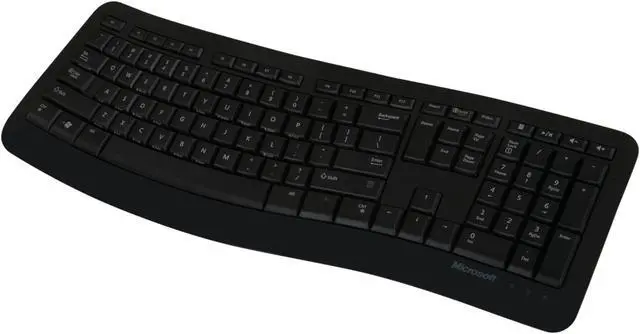
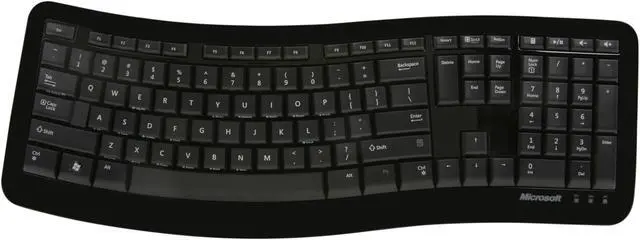
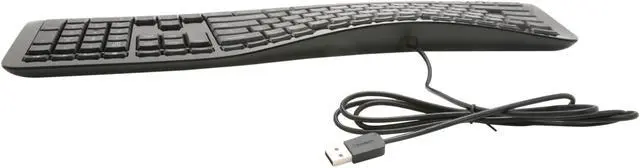
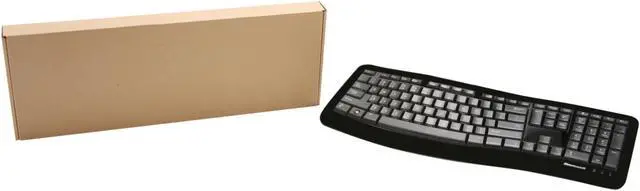
Microsoft 3XJ-00001 Black 104 Normal Keys USB Wired Ergonomic Comfort Curve Keyboard 3000 for Business

  • 104 Normal Keys
  • USB Wired
  • Easy-Access Media Keys
  • Pin It
  • Email this page
ICON Loading...

  • newegg Contour: It’s Familiar, Yet Modern All the keys are the same size and in a familiar place, even with the Comfort Curve. The slim, glossy design saves space and makes a statement on your desktop.
  • newegg Ergonomist-approved Comfort Curve Design The Microsoft Comfort Curve encourages natural wrist posture, plus it is easy to use.
  • newegg Easy-Access Media Keys Control your music and videos, and open the Calculator with the touch of a key.

Learn more about the Microsoft 3XJ-00001

Model

Brand
Microsoft
Model
3XJ-00001

Keyboard Connection Type

Keyboard Interface
USB

Keyboard SPEC

Design Style
Ergonomic
Normal Keys
104
Keyboard Color
Black
Dimensions
18.5" x 6.89" x 1.29"

Type

Type
Wired

Mouse Included

Mouse Included
No

OS / System Requirement

Operating System Supported
Windows 7, Windows Vista, or Windows XP (excluding Windows XP 64-bit)
System Requirement
1 USB Port

Features

Features
Contour: It’s familiar, yet modern
All the keys are the same size and in a familiar place, even with the Comfort Curve. The slim, glossy design saves space and makes a statement on your desktop.

Ergonomist-approved Comfort Curve design
The Microsoft Comfort Curve encourages natural wrist posture, plus it is easy to use.

Easy-Access Media Keys
Control your music and videos, and open the Calculator with the touch of a key.

Quick Info

Warranty

  • Limited Warranty period (parts): 3 years
  • Limited Warranty period (labor): 3 years


Customer Reviews of the Microsoft 3XJ-00001

Do you own this product? Write a Review

Filter Results

Go
  • Hulk701
  • 4/24/2013 4:18:50 PM
  • Tech Level: Somewhat High
  • Ownership: 1 week to 1 month

1 out of 5 eggsToo Small & No Stand, U get what U pay 4

Pros: It was black which is easy to clean. It was also very cheap. It looked very nice. It gleamed alot.

Cons: Too small, keys stuck and no tilt stand.

Other Thoughts: I got this keyboard on at a well known online auction house for 18 bucks. I thought it was a great deal until I got it. Then I discovered how small it was. My fingers had difficulty finding the keys. Some of the keys also stuck together. Another major problem was there were no legs for the keyboard making it lie flat with no tilt.

I thought that by buying a Microsoft ergonomic keyboard I would be purchasing something similar to my Microsoft Natural Elite. I WAS WRONG. Do not buy this for that reason. Spend the extra money and get something you can use. This had too many hidden problems.

Right now I am using it as a backup and am purchasing a more expensive one.

Did you find this review helpful? Yes No

  • Burr
  • 2/1/2013 12:22:33 PM
  • Tech Level: Average
  • Ownership: 1 day to 1 week
  • Verified Owner

4 out of 5 eggsFinish untouchable

Pros: Nice Keyboard, Nice High gloss finish. Smooth and Confortable. Quiet keys.

Cons: An untouchable finish. The ultra high gloss finish around the keys ships protected with plastic flim over it. Removing it reveales a gloss to rival the sun. However, couple days after using I notice some dust collection, so what do ya do? wipe it off with your finger. Bad move. Scratched it. Now its dull and I cant get it back to the shine it once was.

I used a microfiber cloth on a section I didnt wipe earlier, helped, but still scratched and dulled. So, if shinny gonna make or break you purchase of this, dont get it, or get it and never wipe it. Otherwise its not a biggie, but felt I had to report it and drop an egg.

Did you find this review helpful? Yes No

  • N/A
  • 9/11/2012 12:26:52 PM
  • Tech Level: High
  • Ownership: 1 week to 1 month
  • Verified Owner

4 out of 5 eggsAwesome for the price

Pros: Very nice keyboard. I went from a Comfort Curve 2000 to this after many years of loyal service, and I'm impressed. I was first weary of the "hill", but it was an extremely quick adaptation. Also is extremely quiet.

Cons: Extremely glossy. I actually took it apart and sanded it with 2000 grit paper to get it to a nice smooth finish that wasn't glossy, since it looked pretty disgusting with all the fingerprints on it.

Did you find this review helpful? Yes No

  • Joe Mc
  • 9/7/2012 5:44:04 PM
  • Tech Level: High
  • Ownership: less than 1 day

1 out of 5 eggsWorst Keyboard Ever!

Pros: Pretty

Cons: Mid Keyboard Bump or Divide made the number six key hard to reach and the F6 key impossible without moving your whole body. Keyboard was generally uncomfortable to use. No height adjust function, i.e. legs.

Other Thoughts: I have own two 2000, one for home, one for work. I code for hours at work. I code, surf, and play BF3 for hours at home. Comfort is a necessity!

Ordered one of these as after buying two "Microsoft Comfort Curve Keyboard 2000" thinking it was an upgrade. So aweful, I used the 3000 just long enough to login then replaced it with partially functioning 2000 to return the 3000 and buy a new 2000.

Pretty is for unproductive mousy mac lovers. I don't know what I was thinking trying out the 3000.

0 out of 1 people found this review helpful. Did you? Yes No

  • Aevum
  • 6/18/2012 8:14:31 AM
  • Tech Level: High
  • Ownership: 1 month to 1 year
  • Verified Owner

4 out of 5 eggsDecent keyboard

Pros: Its comfortable and silent when typing. The keys have a nice soft touch feel to them.

Cons: No tilt legs and the key spacing can be a little odd at first

Other Thoughts: I'm not a fan of the raised wave shape. I was stupid and didnt read close enough when ordering. I thought it was just a normal comfort curve. Oh well!

Did you find this review helpful? Yes No

  • N/A
  • 4/13/2012 5:20:03 PM
  • Tech Level: Somewhat High
  • Ownership: 1 day to 1 week
  • Verified Owner

4 out of 5 eggsNice Keyboard

Pros: Comfortable to type on, good build quality, quieter keys, calculator button, shortcuts printed on bottom of keys

Cons: No flaps to raise the keyboard, only one Windows key

Other Thoughts: Keyboard has a nice feeling to it. The keys are elevated to match how a hand settles on the keys.

Did you find this review helpful? Yes No

  • N/A
  • 12/12/2011 9:39:30 AM
  • Tech Level: High
  • Ownership: 1 week to 1 month
  • Verified Owner

3 out of 5 eggsAcceptable

Pros: Sleek, black and comfortable keys. Relatively quiet, compact and no worries about destroying the keyboard angling legs as its passively angled.

Calculator key! (that alone got it one extra egg)

Cons: No mute key. Up/down/l/r arrow keys could be better spaced. No. mute. key. Could have been angled slightly more. Sometimes the keyboard reqired you to 'flex' it a bit so its sits without wobbling (mine sits just fine 98% of the time after flexing it lightly to lay flat)

Biggest con is no mute key followed distantly by arrow key spacing.

Other Thoughts: Id like to give this 3.5 eggs, because for the money it is a good board, but not good enough for 4 eggs, as anything I rate 4-5 eggs I would buy again. I would not buy this board again as it feels more like a transitional or backup device, and in that it does a fine job and with style.

Did you find this review helpful? Yes No

  • N/A
  • 12/9/2011 4:18:05 PM
  • Tech Level: High
  • Ownership: 1 day to 1 week

2 out of 5 eggsNot a gamer's keyboard

Pros: It's pretty

Cons: WASD combination is crucial for gaming keyboard design and the layout of those keys are not comfortable. The W key is closer to the A key than the S key, which makes the forward and back motions painful on the fingers. Lookin at it most of the keys are offset by a good margin, which made me lose accuracy in typing. While I'm sure I could just get used to it, it still doesn't feel comfortable. Finally, the keys in the center felt a bit too narrow.

I've been a huge fan of the Comfort keyboard 2000 and recommended them to everyone. I'm glad Microsoft is keeping their budget keyboards in mind, but I would ask that they keep the key widths and positioning same from the 2000 line.

Other Thoughts: I would love if Microsoft made a higher end wired keyboard line mirroring the 2000 width and positioning

2 out of 2 people found this review helpful. Did you? Yes No

  • Trifler
  • 10/28/2011 3:01:11 AM
  • Tech Level: Somewhat High
  • Ownership: less than 1 day
  • Verified Owner

4 out of 5 eggs

Pros: Easier on the wrists than a standard keyboard.

While I like the Microsoft Natural Elite keyboard better, this is a good keyboard for those who don't like having the split down the middle. It also doesn't require the time for adjusting your typing skills that the Natural Elite does.

The construction seems pretty solid. It isn't flimsy.

Cons: It doesn't have the two fold-out flaps on the back that most keyboards have to raise the top of the keyboard up.

It's not spill resistant.

Other Thoughts: Probably a good ergonomic keyboard for OEM and for offices to provide to all of their employees.

Did you find this review helpful? Yes No

  • schwars1
  • 9/20/2011 9:35:01 AM
  • Tech Level: High
  • Ownership: 1 day to 1 week

4 out of 5 eggsLooks awesome, bit of a learning curve (pun intended)

Pros: - Awesome design
- Calculator function key
- Silent

Cons: - Fingerprint / dust magnet, especially near the spacebar in the glossy bezel area
- No flip-out legs underneath, you just have to use it at the height it comes
- Non-standard configuration and alignment on board of DEL/Home/End/Page Up/Page Down keys

Other Thoughts: I owned the previous version of this keyboard and loved it. I could type considerably faster and the keys just seemed to be where they were supposed to be. This new version looks much sleeker but I'm having a bit more trouble adjusting to the "curve" on this. I like it, but I have to re-train my fingers where certain keys are. Overall, a superior keyboard and I hope it will be the envy of anyone who walks past my desk.

Did you find this review helpful? Yes No

ICON Loading...
Are you an E-Blast Insider? Subscribe Newegg e-Blast

Buzz

Not a gamer's keyboard

2 out of 5 eggs
WASD combination is crucial for gaming keyboard design and the layout of those keys are not comfortable. The W key is closer ...
— 12/9/2011

Too Small & No Stand, U get what U pay 4

1 out of 5 eggs
Too small, keys stuck and no tilt stand.
— Hulk701 4/24/2013


PayPal
Shop without retyping payment details. Secure shopping made faster.
Check out with PayPal.

Financing


Home
Home > 
Computer Hardware > 
Input Devices > 
Keyboards > 
Microsoft > 
Item#: N82E16823109245
LOADING... LOADING...
Shop by Region: United States | Canada | China
Follow us:   RSS Feeds Youtube
VeriSign Reliability Seal1This site protected by Trustwave's Trusted Commerce program Inc500
Policy & Agreement | Privacy Policy  © 2000-2013 Newegg Inc.  All rights reserved.
If the Adobe Reader does not appear when you click on a link for a PDF file, you can download Adobe Reader from the Adobe web site. nassau