If you are visually impaired and are having difficulty navigating this site, please call our Customer Support line via our toll free number (800) 390-1119.

Newegg.com - A great place to buy computers, computer parts, electronics, software, accessories, and DVDs online. With great prices, fast shipping, and top-rated customer service - once you know, you Newegg.

If you are reading this message, Please click this link to reload this page.(Do not use your browser's "Refresh" button). Please email us if you're running the latest version of your browser and you still see this message.

Newegg.com - Computers, Computer Parts and Electronics

My Account

MyNeweggReviewsHelp & Info  
topNavRowBottom  
Home
Home. > 
Computer Hardware0_. > 
Input Devices1_. > 
Keyboards2_. > 
IOGEAR3_. > 
Item#:N82E16823176018
IOGEAR

IOGEAR GKM561R Black 2.4GHz Wireless Multimedia Keyboard with Laser Trackball and Scroll Wheel - Retail

newegg
IOGEAR Black 2.4GHz Wireless Multimedia Keyboard with Laser Trackball and Scroll Wheel - Retail
Image Viewer

IOGEAR Black 2.4GHz Wireless Multimedia Keyboard with Laser Trackball and Scroll Wheel - Retail IOGEAR Black 2.4GHz Wireless Multimedia Keyboard with Laser Trackball and Scroll Wheel - Retail IOGEAR Black 2.4GHz Wireless Multimedia Keyboard with Laser Trackball and Scroll Wheel - Retail IOGEAR Black 2.4GHz Wireless Multimedia Keyboard with Laser Trackball and Scroll Wheel - Retail

$54.99

$7.87 Std. Shipping*
Add item to Cart
Add item to Wish List
Email This Page
Print This Page
Price Alert

* Std. Shipping is not available to AK, HI and PR.

Special Offers

NPA

No interest for up to 12 months. Minimum purchase required.
Subject to credit approval. Details


BML

No Payments for up to 6 months.  Minimum purchase required.
Subject to credit approval. Details

Similar Items

Not the product you're looking for? We can make some suggestions to help you decide on a product that fits your needs.
view similar products

Combos & EssentialsManufacturer InfoReturn Policies

Manufacturer Warranty

Beyond any applicable Newegg return policy, this item is warranted independently by the product's Manufacturer. Below is a summary provided for convenience only and may not be accurate or current. Use this link for full details.

  • Manufacturer Limited Warranty period (parts): 3 years
  • Manufacturer Limited Warranty period (labor): 3 years

Manufacturer Contact Info

Return Policies

This item is covered by Newegg.com's Standard Return Policy.

  • Return for refund within: 30 days
  • Return for replacement within: 30 days
  • Restocking Fee: Yes
OverviewCustomer ReviewSpecificationsProduct Tour
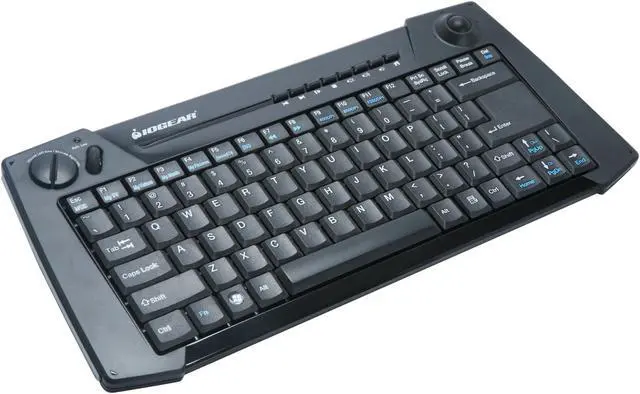
Iogear revolutionizes the home theater PC experience with the versatile GKM561R Wireless Multimedia Keyboard. Now you can control every aspect of your HTPC, Windows Media Center applications and next generation game consoles from one convenient location.

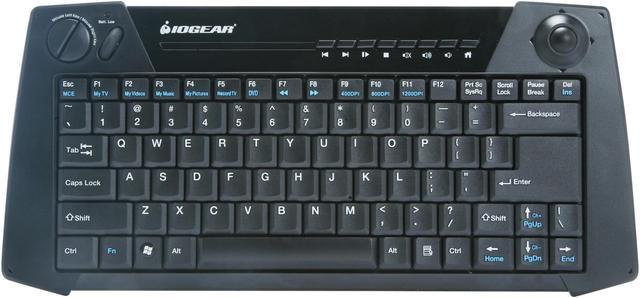
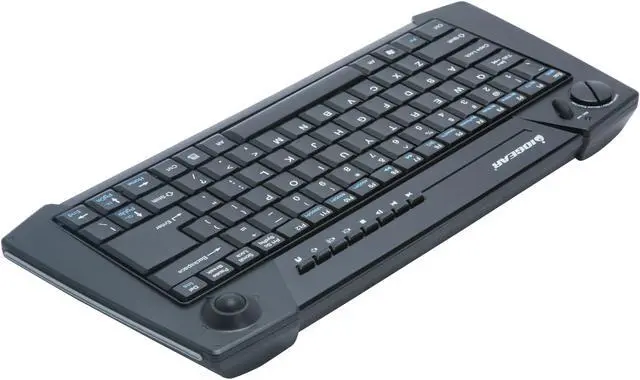
The GKM561R features an all-in-one solution by packing a full QWERTY keyboard and a built-in laser trackball on the same unit. You can even adjust the sensitivity of the pointer by selecting from 400, 800 or 1200dpi choices. The GKM561R also features left and right mouse buttons as well as a scroll wheel so navigating long documents or Web pages is a breeze.

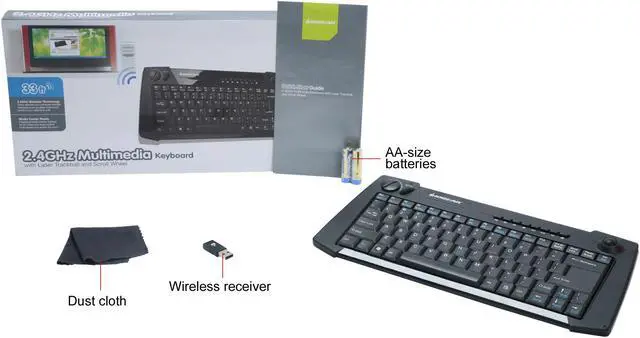
You’ll also appreciate the 2.4GHz wireless connectivity, allowing you to control your system from up to 33 feet away. Additionally, the GKM561R is able to hop frequencies, which avoids interfering with WiFi, Bluetooth and other wireless devices. Lastly, there are no drivers to install. Simply plug in the USB RF receiver and you’re set. Add wireless convenience to your living room HTPC or boardroom presentation today!

Review Summary (read more reviews, write a review)

5
newegg
48%
4
newegg
26%
3
newegg
7%
2
newegg
11%
1
newegg
8%
Product Rating:
Total Reviews: 72

great RF keyboard & trackball

white Reviewed By: on 8/28/2009
Rating + 5
Tech Level Tech Level: high - Ownership: 1 day to 1 week
Pros: Small, relatively silent, lightweight, easy to handle, great range, well designed and put together (not cheap feeling), everything is in the right place (ctrl, fn & del keys, etc.) & buttons have good feel.
Cons: Scroll wheel is up and down only - no side to side. no trigger style buttons (like the ADESSO WKB-3000UB - see other thoughts). Trackball could be bigger, heavier and tighter as it feels loose.
Other Thoughts: I have both this keyboard and the similar ADESSO WKB-3000UB. This one is definitely better. The Adesso is a bit larger and heavier and it's range is shorter and it frequently misses keystrokes. Only benefit to the Adesso is its trigger buttons..
7 out of 7 people found this review helpful. Did you? Yes No

Great buy, poor service

white Reviewed By: Kasper on 9/8/2009
Rating + 5
Tech Level Tech Level: high - Ownership: 1 day to 1 week
This user purchased this item from Newegg
Pros: Great keyboard. Great price. Love the feel of it and the option to change the sensitivity of the mouse with just a push of a button.
Cons: Came with two letter V's and missing the C. I called IOGear and asked them to send me the C key but after being on hold for about 45 minutes they refused to do it and said I would have to ship the whole keyboard back. Which costs me or Newegg time and money so I will probably just cover up the letter V and write a C on it.
Other Thoughts: Newegg is a great company and they would probably take care of everything for me but it isn't Newegg's problem it is IOGear. It can't be that hard to mail a key to me.
Manufacturer Response:Thank you for choosing IOGEAR and we are glad that you love our keyboard. Sorry to hear that you have a keyboard with 2 Vs and no C. We do understand your concern about all the time and shipping cost to send a keyboard back and forward, therefore, we will send you a C key so you can replace it with the extra V. Please contact our tech support with your ticket number via email at support@iogear.com and we would definitely help you complete the request. Once again thank you for choosing IOGEAR and sorry about the inconvenience.

4 out of 4 people found this review helpful. Did you? Yes No

Quick Specs (view all30)

ModelGKM561R
Keyboard ColorBlack
TypeRF Wireless
Tracking MethodTrackBall

Review Summary (read all 72 Reviews, write a review)

5
newegg
48%
4
newegg
26%
3
newegg
7%
2
newegg
11%
1
newegg
8%
Product Rating:
Total Reviews: 72

Best Deal

white Reviewed By: Magic-Box on 2/8/2010
Rating + 5
Tech Level Tech Level: high - Ownership: 1 month to 1 year
This user purchased this item from Newegg
Pros: This is a great keyboard. I have been testing keyboards for a home entertainment computer. This one performs better than some of the 70-100 dollor keyboards. The range is the same as any other 2.4ghz keyboard out there (about 10meters). The track ball is the best way to navigate the screen i have seen. Dont get joystick mice. The keys all work as expected.
Cons: I really dont see why some people give bad reviews on cheap items that work as advertised. It is cheap this is the only con. It may fall appart on you or stop responding at times, but this is the same as any other more expensive unit out there.
Other Thoughts: If you want a cheap wireless keyboard this is your best bet.
Did you find this review helpful? Yes No

Don't Buy

white Reviewed By: Power User on 2/7/2010
Rating + 1
Tech Level Tech Level: high - Ownership: 1 week to 1 month
This user purchased this item from Newegg
Pros: Good range, light weight.
Cons: Trackball fits REAL loose in the socket. Already it is getting sticky. It stops rolling and you have to roll backwards to go forward. No way to clean the trackball?
Other Thoughts: Unless you work in a cleanroom this keyboard is going to give you fits. With the 1/16 in gap all around. I don't see it lasting very long.
Manufacturer Response:Thank you for choosing IOGEAR and sorry about your experience. The cursor should not go the opposite direction of what you roll the trackball, if you do, you might have a bad unit. Since this unit is backed by IOGEAR’s 3 year warranty, please feel free to contact our tech support at 1(866)946-4327 and we would be glad to assist you. Once again, thank you for choosing IOGEAR.

Did you find this review helpful? Yes No

Works good.

white Reviewed By: lewi on 2/5/2010
Rating + 5
Tech Level Tech Level: high - Ownership: 1 day to 1 week
This user purchased this item from Newegg
Pros: This is one of the best that I could find for the price. As far as the trackball goes... I think it works good. Sure it loose, but you don't want it tight were its a pain to move it. 3-year warranty.
Cons: Got a nick in it...
Other Thoughts: Good range 30 ft through 3 walls
Did you find this review helpful? Yes No
Model
Brand IOGEAR
Model GKM561R
Keyboard SPEC
Keyboard Color Black
Type
Type 2.4GHz Wireless
Wireless
Power Supply 2 x AA Alakline Battery
Distance Up to 10m (33 ft.)
Mouse SPEC
Tracking Method TrackBall
OS / System Requirement
Operating System Supported Windows XP Windows Vista 32/64
Mac* OS X or later (*Multimedia keys not supported)
Features
Features Ultra-slim ergonomic wireless 2.4Ghz keyboard with built in laser trackball, left / right buttons and scroll wheel features.
2.4Ghz technology offers greater range up to 33 feet away from your computer
Built-in laser trackball with 400, 800, and 1200 dpi selections
Built-in left and right mouse buttons with built-in scroll wheel
19 hotkeys for multimedia functions
Slip Resistant design on both sides with rubber grip
78 channels for Keyboard with unique ID to avoid interference (automatically switches)
The perfect solution for Digital Living Rooms
ON/OFF switch for battery saving
Manufacturer Warranty
Parts 3 years limited
Labor 3 years limited

Introduction

Iogear revolutionizes the home theater PC experience with the versatile GKM561R Wireless Multimedia Keyboard. Now you can control every aspect of your HTPC, Windows Media Center applications and next generation game consoles from one convenient location.

The GKM561R features an all-in-one solution by packing a full QWERTY keyboard and a built-in laser trackball on the same unit. You can even adjust the sensitivity of the pointer by selecting from 400, 800 or 1200dpi choices. The GKM561R also features left and right mouse buttons as well as a scroll wheel so navigating long documents or Web pages is a breeze.

You’ll also appreciate the 2.4GHz wireless connectivity, allowing you to control your system from up to 33 feet away. Additionally, the GKM561R is able to hop frequencies, which avoids interfering with WiFi, Bluetooth and other wireless devices. Lastly, there are no drivers to install. Simply plug in the USB RF receiver and you’re set. Add wireless convenience to your living room HTPC or boardroom presentation today!

Highlights

newegg 2.4GHz Wireless Technology
The Iogear GKM561R is armed with advanced 2.4GHz wireless technology to provide an extended operating range of up to 33 feet for extra workspace freedom and presentation flexibility.
newegg Multi-functional Keyboard
The Iogear GKM561R combines a full-sized keyboard, multimedia control, laser trackball, left and right mouse buttons and a built-in scroll wheel into a single unit, providing full control of your presentation and dedicated computer.
newegg Low Profile
The Iogear GKM561R features notebook-like low profile keys for soft-touch typing.
newegg 3 DPI Settings
The Iogear GKM561R provides three mouse cursor speeds (400 dpi, 800 dpi and 1200 dpi) for use in different applications from pixel-precise targeting to fast-twitch maneuvers.
newegg Hotkeys
The Iogear GKM561R features 19 hotkeys for instant access to media file playback functions.

Quick Specs

BrandIOGEAR
TypeRF Wireless
Tracking MethodTrackBall
Home
Home. > 
Computer Hardware0_. > 
Input Devices1_. > 
Keyboards2_. > 
IOGEAR3_. > 
Item#:N82E16823176018
NeweggBusiness
For Business Needs
EggXpert.com
Newegg Community
|NeweggMall.com
Shop Multiple Retailers
Shop by Region: United States | Canada | China
VeriSignReseller RatingsReliability Seal1This site protected by Trustwave's Trusted Commerce programInc500
Policy & Agreement | Privacy Policy | NeweggBusiness | Newegg Canada  © 2000-2010 Newegg Inc.  All rights reserved.
If the Adobe Reader does not appear when you click on a link for a PDF file, you can download Adobe Reader from the Adobe web site. nassau