Skip to: |

Newegg.com - A great place to buy computers, computer parts, electronics, software, accessories, and DVDs online. With great prices, fast shipping, and top-rated customer service - once you know, you Newegg.

If you are reading this message, Please click this link to reload this page.(Do not use your browser's "Refresh" button). Please email us if you're running the latest version of your browser and you still see this message.

Newegg.com - Computer Parts, Laptops, Electronics, HDTVs, Digital Cameras and More!

  • | Wish List
  • Help
Motherboards
Search
Home
Home > 
Computer Hardware > 
Motherboards > 
AMD Motherboards > 
ASUS > 
Item#: N82E16813131733

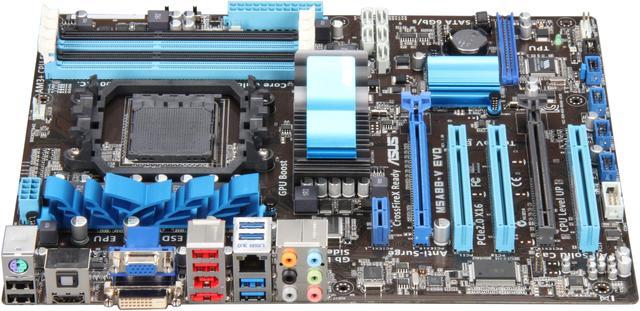
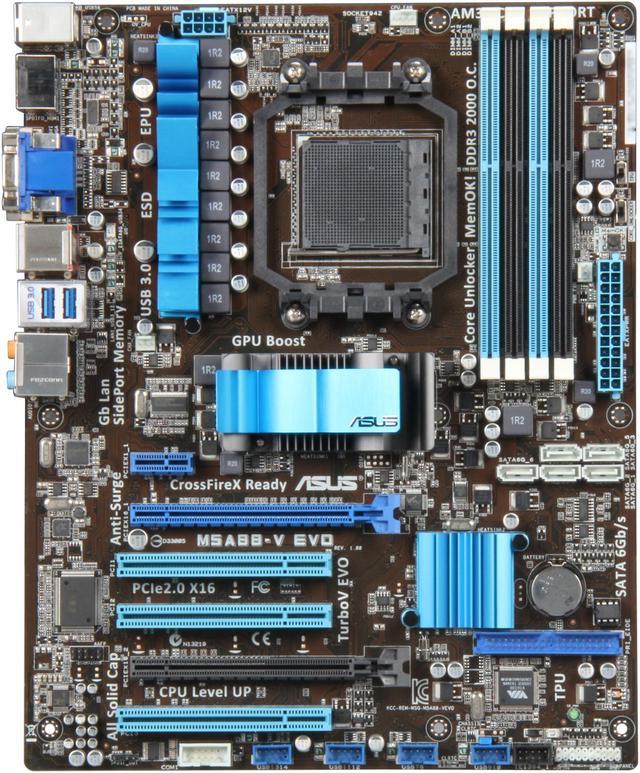
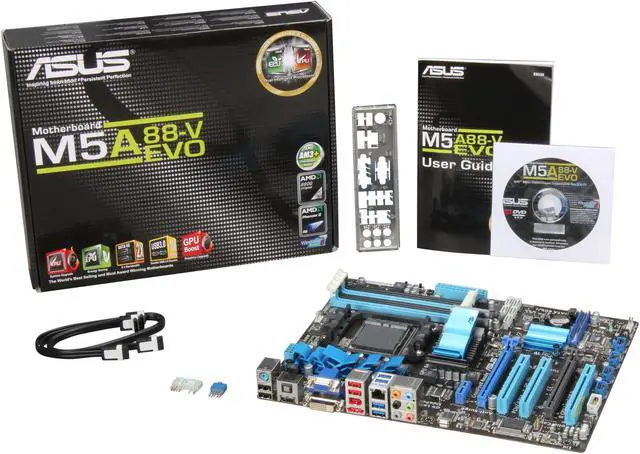
ASUS M5A88-V EVO AM3+ AMD 880G HDMI SATA 6Gb/s USB 3.0 ATX AMD Motherboard

  • AM3+
  • AMD 880G
  • 4×240pin DDR3 2000(O.C.)/1866(O.C.)/1600(O.C.)/1333/1066
ICON Loading...

Take advantage of the powerful multi-core AMD Phenom II and Athlon II processors with this board's AM3 socket. ASUS Core Unlocker activates AMD CPU's latent cores with just a simple switch to enjoy high performance. You'll also have access to more powerful and faster video processing around when you install a discrete ATI video card that will work in conjunction with the onboard GPU for a unique Hybrid CrossFireX configuration. The GPU boost instant overclocks the integrated GPU in real time for the best graphics performance. With Dual Intelligent Processors TPU & EPU, it maximizes performance and optimizes energy.

ASUS is an industry leader known for making innovative and reliable motherboards. Bring home the experience and craftsmanship and build your next system in confidence today!

  • newegg AMD FX /Phenom II /Athlon II /Sempron 100 Series Processors Support This motherboard supports AMD AM3+ multi-core processors with unique L3 cache and current AMD Phenom II /Athlon II /Sempron 100 Series processors. The AMD 880G Chipset is designed to support up to 5200MT/s HyperTransport 3.0 (HT 3.0) interface speed and PCI Express 2.0 x16 graphics.
  • newegg Core Unlocker ASUS Core Unlocker activates AMD CPU's latent cores with just a simple switch so you can enjoy a performance boost without performing complicated BIOS changes.
  • newegg CrossfireX Support ATI’s CrossFireX boosts image quality along with rendering speed, eliminating the need to scale down screen resolution to get high quality images. CrossFireX allows higher antialiasing, anisotropic filtering, shading, and texture settings. Adjust your display configurations, experiment with the advanced 3D settings, and check the effects with a real-time 3D-rendered previews within ATI Catalyst Control Center.
  • newegg Instant GPU Boost GPU Boost overclocks the integrated GPU in real time for the best graphics performance. User-friendly UI facilitates flexible frequency and voltage adjustments. Its ability to deliver multiple overclocking profiles also provides rapid and stable system-level upgrades.
  • newegg Dual Intelligent Processors – TPU and EPU The TPU chip offers precise voltage control and advanced monitoring through Auto Tuning and TurboV functions. Auto Tuning offers a user friendly way to automatically optimize the system for fast, yet stable clock speeds, while TurboV enables unlimited freedom to adjust CPU frequencies and ratios for optimized performance in diverse situations. The EPU chip provides a real-time, dynamic power saving by automatically detecting current PC loadings and intelligently moderating power consumption. This also reduces fan noise and extends component longevity!
  • newegg Support SATA 6Gb/s and USB 3.0 Revolutionary SuperSpeed USB 3.0 technology delivers up to 5Gbps bandwidth, which is 10x faster than USB 2.0 and boosts data transfer rate between PC and USB devices. AMD SB850 Southbridge natively supports next-generation SATA storage interface, which provides up to 6Gb/s data transfer rates.

Learn more about the ASUS M5A88-V EVO

Model

Brand
ASUS
Model
M5A88-V EVO

Supported CPU

CPU Socket Type
AM3+
CPU Type
FX / Phenom II / Athlon II / Sempron 100 Series
FSB
2600MHz Hyper Transport (5200 MT/s)

Chipsets

North Bridge
AMD 880G
South Bridge
AMD SB850

Memory

Number of Memory Slots
4×240pin
Memory Standard
DDR3 2000(O.C.)/1866(O.C.)/1600(O.C.)/1333/1066
Maximum Memory Supported
16GB
Channel Supported
Dual Channel

Expansion Slots

PCI Express 2.0 x16
2 (x16, x4)
PCI Express x1
1
PCI Slots
3

Storage Devices

PATA
1 x ATA133 2 Dev. Max
SATA 6Gb/s
5 x SATA 6Gb/s
SATA RAID
0/1/5/10/JBOD

Onboard Video

Onboard Video Chipset
ATI Radeon HD 4250

Onboard Audio

Audio Chipset
Realtek ALC892
Audio Channels
8 Channels

Onboard LAN

LAN Chipset
Realtek 8111E
Max LAN Speed
10/100/1000Mbps

Rear Panel Ports

PS/2
1 x PS/2 keyboard/mouse combo port
Video Ports
D-Sub + DVI
HDMI
1 x HDMI
USB 1.1/2.0
4 x USB 2.0
USB 3.0
2 x USB 3.0
IEEE 1394
1 x IEEE 1394a
eSATA
1 x eSATA 6Gb/s
S/PDIF Out
1 x Optical
Audio Ports
6 Ports

Internal I/O Connectors

Onboard USB
8 x USB 2.0
Onboard 1394
1 x 1394a
Other Connectors
1 x IDE connector(s)
1 x COM port(s) connector(s)
1 x IEEE 1394a connector(s)
1 x CPU Fan connector(s)
1 x Chassis Fan connector(s)
1 x Power Fan connector(s)
1 x S/PDIF out Header(s)
1 x 24-pin EATX Power connector(s)
1 x 8-pin ATX 12V Power connector(s)
1 x Front panel audio connector(s) (AAFP)
1 x System panel(s)
1 x MemOK! button(s)
1 x TPU switch(es)
1 x Core Unlocker switch(es)

Physical Spec

Form Factor
ATX
Dimensions
12.0" x 9.6"
Power Pin
24 Pin

Features

Features
AMD 140W CPU Support

AM3+ CPU Support Ready

Dual Intelligent Processors - TPU & EPU

Core Unlocker - Unlock the Potential, Turbocharge your Performance!

GPU Boost Instant - iGPU Level Up!

Turbo Unlocker - On demand real-time system tuning

Quick Info

Warranty

  • Limited Warranty period (parts): 3 years
  • Limited Warranty period (labor): 3 years


Customer Reviews of the ASUS M5A88-V EVO

Do you own this product? Write a Review

Filter Results

Go
  • N/A
  • 2/19/2013 9:09:57 AM
  • Tech Level: Average
  • Ownership: 1 month to 1 year
  • Verified Owner

4 out of 5 eggsUSB3 causes lockups at shutdown; otherwise good

Pros: ACPI S3 standby (aka suspend to RAM) works reliably. This was important to me. Kill-A-Watt measures about 4W in this mode.
Inclusion of 1 IDE port and firewire by using an added VIA VT6330.
has 1 PS2 port.
Can power up by pressing space bar on PS2 keyboard (probably doesn't work on USB though).
PWM controlled 4pin CPU fan

unlocks cores. Was able to unlock a Sempron 140 to a dual easily.
Used this board to upgrade a family member's computer using their old drives and case, and they are very happy with it.

Cons: Only 1 PS2 port. But that's a lot better than 0.

The number of USB board headers is overkill and prevents potentially useful legacy ports from being offered. I seriously wonder how it can even be convenient to hook 12 USB devices directly to the motherboard. USB was designed to support hubs, and there comes a time in a man's life when he needs to get one.
All these USB headers prevent inclusion of various legacy ports which, despite what some people think, are in fact useful. Some legacy connections do not work perfectly with addon cards and need to be native on the board. Many people make resourceful use of old high end devices, such as $1000 EPROM programmers, laser printers, UPS units, etc which use these connections. Legacy ports are also much more practical for people who build DIY devices (that's not a common thing, I realize).
I know it's typical for modern motherboards to be mega-USB at the exclusion of everything else, but I find it unnecessary and it's a con for me.
I do again want to give credit though, for the fact that there is at least a single PS2 port still provided, and an IDE port.


The "ASMedia" ASM1042 USB3 controller, or it's drivers, cause lockups when shutting down Windows XP. Ironic, considering the first-gen NEC controllers work great, but now that cheaper suppliers are in the market we seem to have regressed to bad implementations.

When shutting down WinXP, with ASMedia USB3 drivers installed, the system locks up without powering off. The USB devices all power off but the system freezes.
The same thing happens if nothing is plugged into the ports.
USB related BIOS options didn't fix the issue.
Same thing happened on 2 fresh installs of WinXP. Unlocking is not a factor, CPU was running in default configuration. Prime95/memtest86 pass.

I have experimented with this extensively and found that the problem occurs only after installing the ASMedia USB3 drivers. The first shutdown will work fine, but after that, it's broken. Removing that driver or disabling in BIOS is the only way to "fix" it.

In addition to the driver that came with the board, I've tried several updated drivers for the ASMedia 1042 USB3. None fix the issue.

I did notice that ASMedia has some firmware updates for this ASM1042 chip. Besides admitting they failed WHQL testing (big surprise, that), they also mention a deadlock issue. It's up to Asus to integrate these firmware updates into the motherboard BIOS. I don't know if they have done so, but I did update the motherboard BIOS to latest version and the lockups remained.

If Asus wants to be a premium brand, they should have stayed with a reputable chip supplier (NEC) instead of switching to cheap ASMedia chips and drivers. Using a dodgy chip is worse than having none at all.

This build didn't require USB3 so it wouldn't be a big deal, except I hated giving this machine to the user with nonfunctional ports on the back.

Other Thoughts: In S3 standby mode, the hard drive and power LEDs blink in an alternating fashion. It might look cool depending on your case layout.

Other than the USB3 issue described above, this has been a reliable board thus far and the person I built it for is very happy with it.

Compatible with a semi-nonstandard ATX case which only allowed for 6 expansion slots. The x16 slot (important for video upgrades) lines up with a case opening. This had been a concern on some older boards I looked at in the past.

Did you find this review helpful? Yes No

  • Herry
  • 2/7/2013 9:06:06 PM
  • Tech Level: High
  • Ownership: 1 month to 1 year
  • Verified Owner

3 out of 5 eggsmiddle of the road

Pros: Lots of features, many ports and capabilities.

Cons: Some compatibility issues, (no pinout for the front USB ports on the case, despite it being the same form factor). Oh well, thats why they make USB hubs.

Other Thoughts: Decent overall, just wish I would have known about the USB thing ahead of time.

Manufacturer Response:

Dear Valued Customer,

Thank you for your feedback on this motherboard. The onboard USB are intended for rear or front panel USB modules that do not use separate pins but rather whole USB connectors. This was done for ease of installation as well as to avoid incorrect installation. However, if your case's USB connector does use separate pins, you should still be able to fit them within the enclosure. Please refer to the manual on page 2.8.3 for pin locations. Thank you.

Regards,
Benson
ASUS Customer Loyalty
cl-benson@asus.com

Did you find this review helpful? Yes No

  • Sqeaky
  • 2/2/2013 4:18:20 PM
  • Tech Level: High
  • Ownership: 1 day to 1 week
  • Verified Owner

1 out of 5 eggsBroken on Arrival

Pros: I can find no tangible pros. It appears to be sturdily built from the best components but this only means something if it works correctly and the quality construction keeps it working.

Cons: When I got it, it appeared to work. But I always memtest (among other diagnostics) every new machine I build. This board could pass memtest. I tried 6 different DIMMs each one passed in another board, but none passed on this board in a variety of configurations. I also tried swapping CPUs they did had no issue when used in another board. Then got a replacement baord and it worked. I had similar issues with another ASUS board in the M5A88 line.

Other Thoughts: Multiple Mobo failures, makes me question all of Asus's Q&A.

Manufacturer Response:

Dear Valued Customer,

Sorry to hear about the experience you had with the first motherboard. We are glad that memtest errors are not present on the second board. Please let us know if you have any questions or concerns, need support or service in the future on this motherboard or other ASUS motherboards by calling us at 1-812-282-2787 or email me at cl-benson@asus.com (reference #C1037-8424 in the subject line). Thank you.

For support information, please visit http://support.asus.com. For service, visit http://service.asus.com. For motherboard warranty, visit http://www.service.asus.com/warranty.aspx#!Motherboard%20Warranty/c1c20; Refurbished: http://www.service.asus.com/warranty.aspx#!refurbished-warranty/c16us. For RMA status, visit: http://am.eservice.asus.com/rmaweb/search/rmCustomerQueryAction.do?.

Regards,
Benson
ASUS Customer Loyalty

Did you find this review helpful? Yes No

  • jbeta
  • 1/18/2013 10:13:09 AM
  • Tech Level: High
  • Ownership: more than 1 year
  • Verified Owner

4 out of 5 eggsGood Legacy/Modern Compromise

Pros: flexible with IDE controller and sufficient SATA and USB ports.
At least partial Windows 8 support. Full Windows 7 support.
Decent RAID.
USB3.0. (but I have no such devices yet)

Cons: No LPT port.
Onboard graphics support is sketchy with Windows 8, particularly if you also have a GFX card. I have to do that currently because 2 of my 3 monitors are DSUB/VGA connections.
eSATA port had problems booting up, but newer BIOS seems to have fixed that.
The hybrid crossfire feature is worthless and I think AMD discontinued support for that.

Other Thoughts: I have had no problems with RAID, but no failed disks either, other than a test unplug. My previous mobo had poorly implemented RAID that wasn't even worth using.
I had to buy an external adapter separately to use the COM port.
Don't pair with a GFX card listed as supported for hybrid crossfire, instead get a better/newer card and disable onboard one.

Did you find this review helpful? Yes No

  • N/A
  • 1/14/2013 7:30:38 AM
  • Tech Level: Average
  • Ownership: 1 week to 1 month
  • Verified Owner

5 out of 5 eggsGreat MOBO

Pros: Great motherboard, no complaints so far.

Cons: None

Other Thoughts: The aluminum frame for the backing was a bit tricky to put on, but with a little patience it fit like a glove.

Did you find this review helpful? Yes No

  • Superman
  • 1/9/2013 8:37:59 AM
  • Tech Level: High
  • Ownership: 1 week to 1 month

5 out of 5 eggsGreat Board!

Pros: Highest transport speed, SATA 6GBS, USB 3.0, 1394 Firewire Connection. Fits FX processors. The Q-Connector is a great addition for installing case pins. Using aftermarket heatsink and no problems w/ memory getting in the way. Love the color scheme! Asus has not let me down yet.

Cons: Cheap I/O Shield

Other Thoughts: Another successful build! Was a little skeptical about this board from the other reviews but I use only Asus or Gigabyte boards so went with it - I wanted the Sata 6 for my SSD drive and the price was right. No problems besides wrangling around with the cheap I/O shield included to fit the back of the case.

FX-4170 Processor
Gigabyte 2 x 4gb Ripjaws series
2 x Sata 1TB's
1 x OCZ 128gb SSD
1 x Asus Bluray burner
2GB Sapphire 7870

Did you find this review helpful? Yes No

  • jimjam426
  • 1/5/2013 10:49:07 AM
  • Tech Level: Somewhat High
  • Ownership: 1 day to 1 week
  • Verified Owner

5 out of 5 eggswell it works

Pros: really good for the price, works beautifully, love the color scheme, and of course it's ASUS so it's pretty good quality

Cons: the only problem i have is that my stock CPU fan that came with my CPU is really close to the memory slots other than that there's nothing wrong

Other Thoughts: really wish they CPU socket was at least a 1/4 further away from the memory slots, but hey i can buy a new CPU fan that's not as invasive

Did you find this review helpful? Yes No

  • N/A
  • 12/29/2012 11:12:34 AM
  • Tech Level: Average
  • Ownership: more than 1 year

4 out of 5 eggsgood motherboard, may cause some issue

Pros: pros: usb 3.0, decent onboard sound, supports my 8gb of ram with ease.Good color scheme, if that is important to anyone

Cons: con: ever since i built my rig about a year ago, i sometimes get random screen freezes/shutdowns, which may be because of the motherboard, but i cant be sure

Did you find this review helpful? Yes No

  • jerry6
  • 12/27/2012 8:51:11 AM
  • Tech Level: High
  • Ownership: 1 week to 1 month
  • Verified Owner

5 out of 5 eggsA good board

Pros: It works , good layout ,onboard video , like that it has the old style ide connection , get to use one of my old DVD burners , instead of throwing it out or buying an adapter .
Runs well with the AMD 1090t , 120 gb SSD drive and 3 2 tb hard drives .
Like the case wire adapter , easy to attach case wires and snap it into board , wish all boards had this . It's a real pain getting those wires on and off those header pins .

Cons: price , a bit expensive for an old generation board , no extra USB 3 header on MB , Wol like that so I could run a USB 3 panel on front of case

Other Thoughts: A good board , typical Asus quality .

Did you find this review helpful? Yes No

  • Nick
  • 12/24/2012 9:20:42 PM
  • Tech Level: Somewhat High
  • Ownership: more than 1 year
  • Verified Owner

4 out of 5 eggsI laugh at these reviews

Pros: Supports everything I have ever added to it, AMD fx-4100 3.9ghz turbo, Radeon HD 6870, 2x4GB Corsair Vengence Gaming Memory, 2 sata hard drives, 1 IDE hard Drive, couple of fans, 600W Power Supply and an ASUS DVD-RW drive.

The motherboard allows me to add upgrades that i could not originally purchase, EX: SSD

Never have a problem with keeping my Northbridge/memory cool.

Cons: Memory is a little too close to the CPU if you are using the stock cooling for the Cpus. Video card blocks access to the External USB port connector, this isn't a big deal because of how many are on the back.

Other Thoughts: Was hoping the OBG would run along side a video card, but they don't(the specs never said it did so no loss).

Had some hick-ups with memory clocks. Randomly wouldn't boot with memory clock. Thankfully the memcheck helps me reset that and allow me to get into my bios to reset easily.

I have 3 hard drives running off it, 2 sata and one IDE. Works perfectly.

Southbridge does seem to get quite hot, still under 60c, when my video card is active during gaming.

This was my first time building a PC from individual parts, this motherboard made it easy for me. Ive been reading the reviews people are posting and have never seen ANY of the problems they have. The only review that was close, was about the bios updates. I updated my bios but then quickly reverted when I had some serious stability issues. Be careful with your updates! Don't fix what aint broke!

1 out of 1 people found this review helpful. Did you? Yes No

ICON Loading...
Are you an E-Blast Insider? Subscribe Newegg e-Blast

Buzz

5 out of 5 eggs
I had 0 problems getting this board booted. I chose this board because of the usb3.0, 6gb/s sata, and onboard
video.
— pipecutr 6/2/2011

DOA & DOA no video x 2 Service?

1 out of 5 eggs
Still No Working System - Over $600 tied up
TOO LATE TO RMA TO NEWEGG
No Video
ASUS Solution - BIOS Not compatible ...
— Lost Time & Money 1/27/2012


PayPal
Shop without retyping payment details. Secure shopping made faster.
Check out with PayPal.

Financing


Home
Home > 
Computer Hardware > 
Motherboards > 
AMD Motherboards > 
ASUS > 
Item#: N82E16813131733
LOADING... LOADING...
Shop by Region: United States | Canada | China
Follow us:   RSS Feeds Youtube
VeriSign Reliability Seal1This site protected by Trustwave's Trusted Commerce program Inc500
Policy & Agreement | Privacy Policy  © 2000-2013 Newegg Inc.  All rights reserved.
If the Adobe Reader does not appear when you click on a link for a PDF file, you can download Adobe Reader from the Adobe web site. nassau