If you are visually impaired and are having difficulty navigating this site, please call our Customer Support line via our toll free number (800) 390-1119.

Newegg.com - A great place to buy computers, computer parts, electronics, software, accessories, and DVDs online. With great prices, fast shipping, and top-rated customer service - once you know, you Newegg.

If you are reading this message, Please click this link to reload this page.(Do not use your browser's "Refresh" button). Please email us if you're running the latest version of your browser and you still see this message.

Newegg.com - Computers, Computer Parts and Electronics

My Account

MyNeweggReviewsHelp & Info  
topNavRowBottom  
Browse WebSite Computer Hardware Electronics PCs & Laptops Cell Phones Digital Cameras Networking Gaming Software Home & Garden Specials
Home
Home. > 
Computer Hardware0_. > 
Input Devices1_. > 
Keyboards2_. > 
Microsoft3_. > 
Item#:N82E16823109148
Microsoft

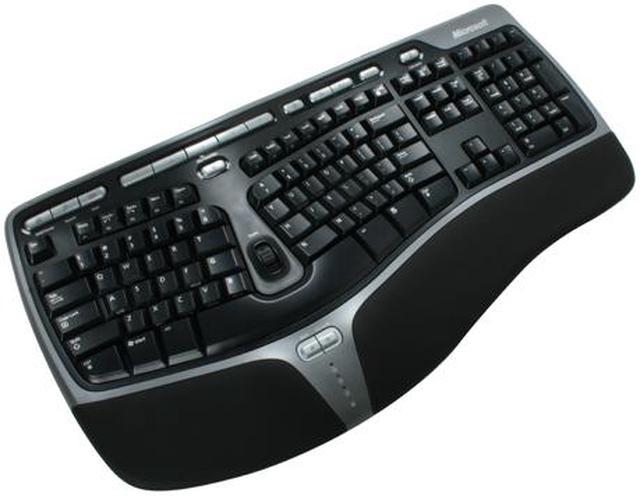
Microsoft Natural Ergonomic Keyboard 4000 - Retail

newegg
Microsoft Natural Ergonomic Keyboard 4000 - Retail
Image Viewer

Microsoft Natural Ergonomic Keyboard 4000 - Retail Microsoft Natural Ergonomic Keyboard 4000 - Retail Microsoft Natural Ergonomic Keyboard 4000 - Retail Microsoft Natural Ergonomic Keyboard 4000 - Retail
360 View

$54.99

Free Shipping*
Add item to Cart
Add item to Wish List
Email This Page
Print This Page
Price Alert


Extended Warranty Available

expand for details

* Free shipping not available to AK, HI and PR.

Special Offers

NPA

No interest for up to 12 months. Plus, New Preferred Account Customers: Save $20 off $100.
Subject to credit approval. Details


BML

No Payments for up to 6 months.  Minimum purchase required.
Subject to credit approval. Details

Similar Items

Not the product you're looking for? We can make some suggestions to help you decide on a product that fits your needs.
view similar products

Combos & EssentialsManufacturer InfoReturn Policies

Combo Deals(view all)

ASUS VH196T Black 19" 5ms  Widescreen LCD Monitor w/HDCP - Retail Microsoft Natural Ergonomic Keyboard 4000 - Retail
ASUS VH196T Black 19" 5ms Widescreen LCD Monitor w/HDCP - Retail 
Microsoft Natural Ergonomic Keyboard 4000 - Retail 
Original Price: $174.98
Discount: -$16.00
Combo Price: $158.98

Manufacturer Contact Info

Return Policies

This item is covered by Newegg.com's Standard Return Policy.

  • Return for refund within: 30 days
  • Return for replacement within: 30 days
  • Restocking Fee: Yes
OverviewCustomer ReviewSpecificationsProduct Tour
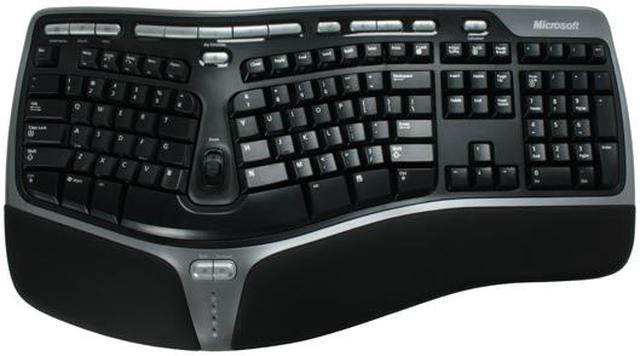
For making day-to-day tasks easier with a more natural wrist alignment, the Microsoft Natural 4000 keyboard has contoured keys that naturally fit the hands of the user for greater comfort and protection against repetitive motion injury(RMI). The Natural 4000 is part of the Ergonomics series and can significantly reduce Carpal Tunnel Syndrome symptoms. The new Gull Wing design features a 14-degree gable, a natural arc and a curved key bed — bringing the keys closer to your fingers to reduce reach and unnecessary motion, while encouraging a more natural typing position.

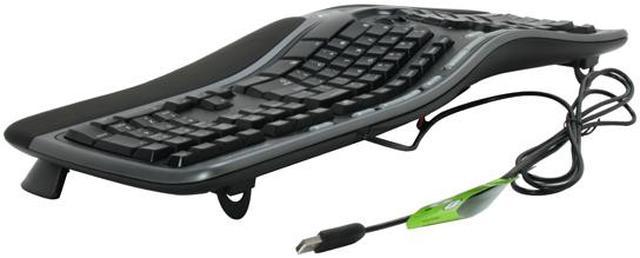
It also comes equipped with an optional palm lift for a seven-degree reverse slope and a cushioned wrist rest that encourages better arm and wrist alignment. Assign your favorite document, page, folder, or image to anyone of the five My Favorites Keys for easy one-button access later. The Zoom Slider lets you easily zoom in/out of your documents, pages, or images. It's conveniently located at the center of the keyboard for easy access. The forward and backward keys ease your web-page navigation and eliminate the need to move your hands from the keyboard to navigate.

The Natural 4000 comes with a 7 mm tall soft-cushion wrist rest that offers better comfort and greater support while you work. Its advanced design reduces fatigue caused to a user from hours of tiring computer usage. Make your days at the keyboard easier, whether you're working or gaming!

Review Summary (read more reviews, write a review)

5
newegg
63%
4
newegg
16%
3
newegg
7%
2
newegg
9%
1
newegg
5%
Product Rating:
Total Reviews: 419

Very nice

white Reviewed By: Dragon83 on 12/1/2005
Rating + 5
Tech Level Tech Level: high - Ownership: 1 week to 1 month
Pros: This keyboard is sweet. I had the MS ergo keyboard from way back when, when there were no extra buttons at the top. I thought that it was all going downhill with their latest release before this keyboard, del/ins/home, etc all in the wrong place...but they are back again, phew!

the zoom feature is convenient when editing things in PS.
Cons: keystrokes are a little "cushier" than I would like: I like them to spring back a little more than this keyboard does, but it's still fine...just takes some getting used to.
Other Thoughts: All in all a worthy buy. You might want to test it out at a B&M store before buying to make sure you like the feel of the keystroke.
35 out of 35 people found this review helpful. Did you? Yes No

Best keyboard ever

white Reviewed By: Goodeye on 10/19/2006
Rating + 5
Tech Level Tech Level: high - Ownership: more than 1 year
This user purchased this item from Newegg
Pros: This is by far the best keyboard I have ever used. I have a bit of carpal tunnel, and have used a split keyboard for years. This one shines over all the others. The downward angle keeps my wrists straight, the palms rests are comfortable, and now I use the little back key in front as a habit - can't go back. But beyond the ergonomics, the key pressing is so smooth, it's amazing. Your fingers will literally feel like they are gliding as you type. Whether you use anything else, the key press alone is reason enough to use this. I don't use the new keys above the numeric pad, just out of lack of habit, but I love that the six insert/home/etc keys are in the standard configuration (some extended keyboards are rotating the arrangement). The mute and calculator keys are handy (reassign the calc to a better program), but I only occasionally remember to use the other keys up top.
Cons: Just two nitpicks:
I use the F keys as F keys, not as the alternate functions, so I'd prefer the F label to be on top of the key instead of the front, to make it easier to read.
Also, the number 6 key is on the left hand, which is a change that took some getting used to.
Other Thoughts: You'll never use another.
27 out of 27 people found this review helpful. Did you? Yes No

Quick Specs (view all30)

ModelB2M-00012
Keyboard InterfaceUSB
Design StyleErgonomic
Keyboard ColorBlack
TypeWired

Review Summary (read all 419 Reviews, write a review)

5
newegg
63%
4
newegg
16%
3
newegg
7%
2
newegg
9%
1
newegg
5%
Product Rating:
Total Reviews: 419

white Reviewed By: on 11/13/2009
Rating + 5
Tech Level Tech Level: high - Ownership: 1 month to 1 year
This user purchased this item from Newegg
Pros: replaced an old logitech with this one, and i'm happy with this one. very comfy, the keys aren't "cushy" and have just the right amount of resistance. very sturdy.
Cons: it's big. make sure that if you want to use the bottom attachment to maintain the tilt of the keyboard, that if you're using a pull out drawer to hold your board on your desk, that you have plenty of clearance.
Other Thoughts: wish it had fast forward / rewind buttons on it. it's got volume, mute, and play/pause, but no ff/rw. baffling.
Did you find this review helpful? Yes No

Weird, but in a good way

white Reviewed By: on 10/29/2009
Rating + 5
Tech Level Tech Level: somewhat high - Ownership: 1 month to 1 year
This user purchased this item from Newegg
Pros: High quality keyboard. Strong ergonomic design. Two employees no longer have sore hands.
Cons: Keyboard design takes a little getting used to. You will make more typing mistakes at first.
Other Thoughts: I purchased two of these. Neither were for myself, but for employees who type a lot and complained of sore hands and fingers. In both cases switching to this keyboard fixed the problem. One employee even purchased one for his own use at home.
Did you find this review helpful? Yes No

Great keyboard! While it lasts...

white Reviewed By: db367 on 10/24/2009
Rating + 2
Tech Level Tech Level: high - Ownership: more than 1 year
This user purchased this item from Newegg
Pros: Great keyboard. Feels great. Has many functions and features. Easy to use and seems quality.
Cons: Breaks after about a year. First one broke 1 month before my 1 year replacement warranty expired through newegg. RMAed without a problem. 1 year later the new one broke again! "Seems" high quality but isnt.
Other Thoughts: I cant remember why the first one broke. Not sure if all keys stopped working or if just one. The most recent failure is due to the "o" key stopped working. Took it apart and there doesnt seem to be any reason for the malfunction. Kinda hard to type when you are missing a vowel. Not in warranty, so im stuck.
Did you find this review helpful? Yes No
Model
Brand Microsoft
Name Natural 4000
Model B2M-00012
Keyboard Connection Type
Keyboard Interface USB
Keyboard SPEC
Design Style Ergonomic
Palm Rest Integrated
Normal Keys 107
Function Keys 17
Keyboard Color Black
Windows Vista Certified for Windows Vista
Type
Type Wired
Mouse Included
Mouse Included No
Features
Features Feel the comfort of the Gull Wing design, the best way to understand the comfort is to experience it yourself.
Snap in the optional palm lift to experience the seven-degree reversed slope.
As you type, rest your wrists on the supportive, integrated palm rest. The palm rest makes typing for long intervals more comfortable.
Open a spreadsheet and move the Zoom Slider up and down to zoom in and out.
Save the spreadsheet and then assign it to a My Favorites Key by pressing and holding one of the five keys.
Close out of the spreadsheet, and then press the My Favorites Key you assigned it to, to quickly access it again.
Open your Web browser and click around on a few pages. Use the Back and Forward keys to navigate pages without ever having to remove your hands from the keyboard.
Packaging
Package Contents Natural 4000 Keyboard
User Manual
Driver Disk

Introduction

For making day-to-day tasks easier with a more natural wrist alignment, the Microsoft Natural 4000 keyboard has contoured keys that naturally fit the hands of the user for greater comfort and protection against repetitive motion injury(RMI). The Natural 4000 is part of the Ergonomics series and can significantly reduce Carpal Tunnel Syndrome symptoms. The new Gull Wing design features a 14-degree gable, a natural arc and a curved key bed — bringing the keys closer to your fingers to reduce reach and unnecessary motion, while encouraging a more natural typing position.

It also comes equipped with an optional palm lift for a seven-degree reverse slope and a cushioned wrist rest that encourages better arm and wrist alignment. Assign your favorite document, page, folder, or image to anyone of the five My Favorites Keys for easy one-button access later. The Zoom Slider lets you easily zoom in/out of your documents, pages, or images. It's conveniently located at the center of the keyboard for easy access. The forward and backward keys ease your web-page navigation and eliminate the need to move your hands from the keyboard to navigate.

The Natural 4000 comes with a 7 mm tall soft-cushion wrist rest that offers better comfort and greater support while you work. Its advanced design reduces fatigue caused to a user from hours of tiring computer usage. Make your days at the keyboard easier, whether you're working or gaming!

Quick Specs

BrandMicrosoft
Design StyleErgonomic
Keyboard ColorBlack
Function Keys17
Normal Keys107
Keyboard InterfaceUSB
Palm RestIntegrated
TypeWired
Home
Home. > 
Computer Hardware0_. > 
Input Devices1_. > 
Keyboards2_. > 
Microsoft3_. > 
Item#:N82E16823109148
NeweggBusiness
For Business Needs
EggXpert.com
Newegg Community
|NeweggMall.com
Shop Multiple Retailers
Shop by Region: United States | Canada | China
VeriSignReseller RatingsReliability Seal1This site protected by Trustwave's Trusted Commerce programInc500
Policy & Agreement | Privacy Policy | NeweggBusiness | Newegg Canada  © 2000-2009 Newegg Inc.  All rights reserved.
If the Adobe Reader does not appear when you click on a link for a PDF file, you can download Adobe Reader from the Adobe web site. nassau