Skip to: |

Newegg.com - A great place to buy computers, computer parts, electronics, software, accessories, and DVDs online. With great prices, fast shipping, and top-rated customer service - once you know, you Newegg.

If you are reading this message, Please click this link to reload this page.(Do not use your browser's "Refresh" button). Please email us if you're running the latest version of your browser and you still see this message.

Newegg.com - Computer Parts, Laptops, Electronics, HDTVs, Digital Cameras and More!

  • | Wish List
  • Help
Search all
Search
Home
Home > 
Computer Hardware > 
Input Devices > 
Keyboards > 
Cooler Master > 
Item#: N82E16823129003

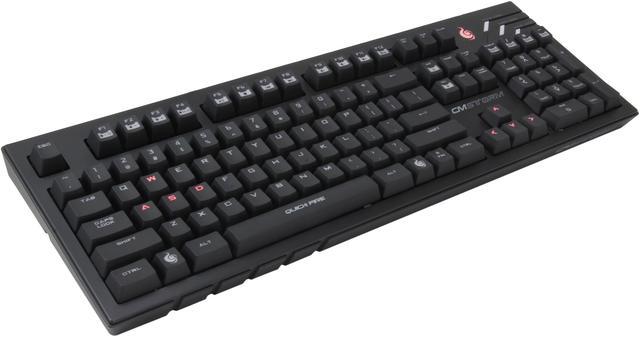
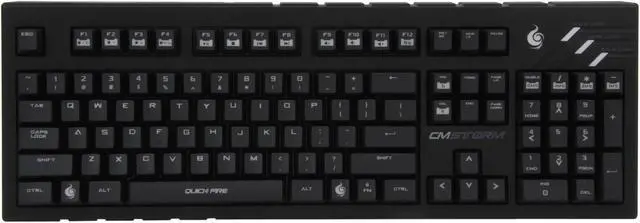
Cooler Master CM Storm QuickFire Pro Mechanical Gaming Keyboard CherryMX Brown Switch USB

  • USB 2.0 Full Speed Wired
  • Black
  • 17.9(L) x 6.1 (W) x 1.2(H) inch
  • Pin It
  • Email this page
ICON Loading...


CM Storm QuickFire Pro Mechanical Gaming Keyboard

Mechanical keyboards are becoming an essential piece of hardware for anyone who takes their PC gaming seriously. CM Storm aims to provide gaming enthusiasts the ultimate gear to assure them victory. The QuickFire Pro comes equipped with ultra-durable mechanical Cherry MX switches, guaranteed to survive at least 50 million taps. The anti-ghosting tweaked matrix, NKRO support VIA USB, and backlit gaming cluster ensures that you never miss your opportunity to win – even in the dark.

The QuickFire Pro is available in 4 versions (Black, Brown, Blue, or Red Cherry MX switches) so no matter what type of feedback you’re looking for, we got you covered. The competition begins and ends with the QuickFire Pro.

CHERRY BROWN SWITCH
Cherry MX Brown key switches deliver a quiet, fast response for each key. A popular choice for its soft bump, 50 million key press lifecycle, and reduction of fatigue from long term typing or gaming.
N-KEY ROLLOVER FUNCTION
The QuickFire Pro can have multiple keys pressed at the same time through a USB connection without conflict, providing an incredible advantage for gamers.
EXTRA KEY-CAPS BUNDLED WITH KEYCAP TOOL
The QuickFire Pro comes with extra key-caps and keycap tool for added customization.
GAME MODE
Disable your Windows keys to prevent accidental interruption of your gaming sessions.
REMOVABLE BRAIDED USB CABLE WITH CABLE ROUTING
Prevents tangled wires and provides extra flexibility for your keyboard positioning.
MULTIMEDIA SHORTCUTS
Take total control of your music and video playback.

Additional Information

  • 1000Hz driverless polling/1ms response time
  • 104 Keys (Numpad included)
  • Laser-etched keycaps
  • 18K gold plated USB Connector

What's Included

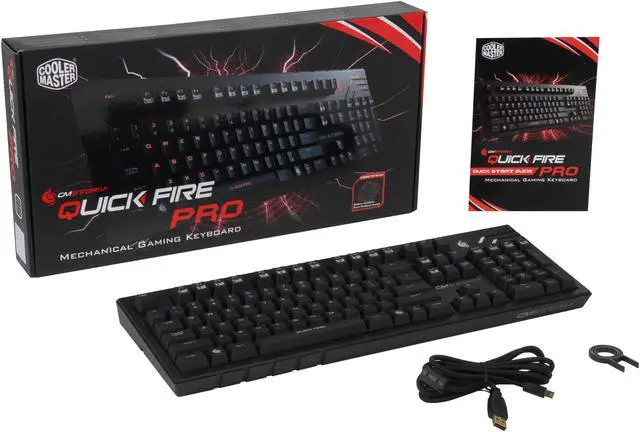
  • QuickFire Pro Mechanical Gaming Keyboard
  • Keycap remover
  • Mini USB Cable with gold plated connectors
  • Quick Start Guide

Compatibility

  • PC with available USB 2.0 port (500mA)
  • Windows XP / Vista / 7 / 8

Choose Your Switch Type

Key Feel Tactile Smooth Tactile Smooth Tactile
Feedback Bump Bump Click Bump Click
Actuation Point 45g 45g 50g 60g 80g

Item Comparison

Model CM Storm QuickFire Rapid CM Storm QuickFire Pro CM Storm QuickFire TK CM Storm Trigger
Switch Type               
Key Roll Over NKRO/PS2 NKRO/USB NKRO/USB 6 KRO
Total Keys 87 104 (Numpad) 92 (Numpad) 109 (Numpad)
Backlit   Partial - Full -    Full -
Extra Feature       USB Hub/Wrist Rest
Best For FPS / RTS / LAN FPS / RTS FPS / RTS / LAN FPS / MMO


  • newegg Mechanical Cherry MX switches The Cherry brown key switches deliver quiet, fast response on each key, soft tactile feeling, 50 million life cycle, and comfortable typing for long term use.
  • newegg N-key rollover function in USB mode The N-key rollover function permits keys to be pressed at the same time in USB mode without conflict, a great advantage for gamers.
  • newegg Multimedia shortcuts With the multimedia shortcuts, control the volume, play back or pause music or videos at the touch of a button.
  • newegg Removable braided USB cable with cable routing The removable braided USB cable with cable routing prevents tangle wires and provides extra flexibility.
  • newegg Windows Keys disabled GAME mode Gaming mode disables both Windows keys to prevent accidental activation of the Windows Start function so your game won't be interrupted.

Learn more about CM Storm Quick Fire Pro

Model

Brand
Cooler Master
Name
CM Storm Quick Fire Pro
Model
SGK-4010-GKCM1-US

Keyboard Connection Type

Keyboard Interface
USB 2.0 Full Speed

Keyboard SPEC

Design Style
Standard
Palm Rest
N/A
Keyboard Color
Black
Dimensions
17.9(L) x 6.1 (W) x 1.2(H) inch

Type

Type
Wired

Mouse Included

Mouse Included
No

Features

Features
Mechanical CHERRY MX switches: CHERRY Brown

NKRO in USB mode: 6/Full N Key

Multimedia shortcuts

1000Hz/1ms response time

Windows key disabled in game mode

Partial Red LED backlight (WASD + QERZXC + 12345 + F1 F2 F3 F4 + Arrow Keys+ Esc + Spacebar)

Removable 1.8m braided USB cable with cable routing

Quick Info

Warranty

  • Limited Warranty period (parts): 2 years
  • Limited Warranty period (labor): 2 years


Customer Reviews of CM Storm Quick Fire Pro

Do you own this product? Write a Review

Filter Results

Go
  • N/A
  • 6/1/2013 7:34:18 PM
  • Tech Level: Somewhat High
  • Ownership: 1 month to 1 year
  • Verified Owner

4 out of 5 eggsGreat Keyboard

Pros: Fully mechanical keyboard (no non mechanical keys)
Cherry MX Brown switches
Small
Nice soft rubbery feeling
N Key rollover
1 MS response time
Media Keys

Cons: Not fully back-lit keys, it's just stupid of Cooler Master to not just make the whole keyboard back-lit. I really never used the back-lit keys, personally it acts as more of a distraction then anything. Just don't make you decision on the back lighting. If you want a back-lit keyboard this is not the keyboard for you.

Other Thoughts: I really didn't like brown switches in all, they just feel to mushy to me. I like the tactile feel of the blue switches. Its all up to personal preference. If you don't like the sound of the Cherry MX blue switches, then this is the keyboard for you. The brown switches have kind of the same "bump" which is the activation point, but they just don't have the clicky tactile feel that the blues have. If you are looking for more of a smoother switch to mechanical keyboards, then something like a red or a black switch is for you. The reds are a "light" switch with a very smooth feel. The blacks are pretty much the same, except they are more "heavy", meaning they take a little bit more force than the other keys to activate.

Did you find this review helpful? Yes No

  • Kyle
  • 5/31/2013 7:49:11 PM
  • Tech Level: Somewhat High
  • Ownership: 1 month to 1 year

3 out of 5 eggsGreat switches, subpar performance

Pros: I got this keyboard on sale with a mail in rebate for $50 dollars. Has a back light for most gaming keys. Has all cherry brown switches. The keys feel amazing. A braided cord is always a welcome sight.

Cons: The height from the table to the top of the keys is fairly large and makes typing without a wrist wrest fairly uncomfortable (I think this is a trait of a mechanical keyboards but I could be wrong). The keys like to pick up smudges as you type. The keyboard goes into a constant state of hitting the back button on internet browsers every two or so weeks.

Other Thoughts: To stop the infinite back command, I press n and the insert or delete key (this is how you switch to a different key rollover). To get into the bios, you should have it on the 6 key rollover mode so the keyboard commands can be registered quickly enough. Since these keyboards are built to last, I would like to change colors to match my new builds (assuming that I change colors).

Did you find this review helpful? Yes No

  • Sean
  • 5/26/2013 2:46:39 AM
  • Tech Level: Average
  • Ownership: 1 week to 1 month
  • Verified Owner

5 out of 5 eggsExcellent Keyboard

Pros: Comfortable
Buttons sound and feel great
Red lights can be controlled with F-keys
Mechanical
Great Price!

Cons: None

Other Thoughts: It's the perfect keyboard as long as you don't want something too technical.

Did you find this review helpful? Yes No

  • N/A
  • 5/25/2013 3:20:26 AM
  • Tech Level: High
  • Ownership: 1 week to 1 month

3 out of 5 eggsBuggy on some computers

Pros: I love Cherry MX Brown tactile feedback. The keyboard is slimmer than my full size TTesports Meka G1, so it fits on my smaller desk better.

Cons: Media keys did not work when function key active. Has something to do with the computer booting. Tried the USB Hub trick and it worked for a while until I restarted computer. If I start my computer with the keyboard unplugged and wait until the computer boots into Windows then plug in. Everything works for me every time. (Windows 7 64 bit)

Other Thoughts: I tried it on two computers same behavior. CMStorm support did offer to RMA. I find it odd that others have similar problems, and that my other USB keyboards work fine. I feel there might be a firmware bug.

Did you find this review helpful? Yes No

  • dylix
  • 5/16/2013 11:24:17 AM
  • Tech Level: High
  • Ownership: 1 month to 1 year

3 out of 5 eggsSpamming keys after 6 months

Pros: It feels very solid, I like the mechanical aspect of the keyboard.

Cons: Would be nice if the entire keys lit up, but I knew this before I bought it.

Like many others, the "]" key would constantly spam itself. I had it 6months. I sent RMA, cost me $18 to ship it. Should be receiving the new one on Monday (5/20). Hopefully this keyboard will last, but its defiantly the last Coolermaster product I'm ever buying.

Did you find this review helpful? Yes No

  • Michael C.
  • 5/11/2013 10:23:24 AM
  • Tech Level: High
  • Ownership: 1 week to 1 month
  • Verified Owner

1 out of 5 eggsLess than a month later...

Pros: Worked perfectly for a month.

Cons: I praised it in my previous review. Everything worked right out of the box and it felt like a solid product.

Suddenly my multimedia keys starting malfunctioning. If I pressed a multimedia key (volume/playback buttons), a "back" command would be spammed to my computer! Meaning my internet and file browsers would start navigating BACK to their starting points! Tried plugging it into another computer that I've never plugged into before and I get the same issues. Everything works fine until I press a multimedia key. I have to unplug and replug my keyboard to get it working correctly again. No stuck keys, both ends of the USB cords are securely fastened to their ports, tried different ports... definitely something wrong with the keyboard itself.

Other Thoughts: Being my first mechanical keyboard, Cooler Master has definitely disappointed me. I've paid much less for regular keyboards with all their features 100% functional for years, while this keyboard starts losing some functionality in less than a month. Thinking about doing an RMA but I'm NOT looking forward to paying for shipping to repair a product I barely used. Either way, I may be looking to another brand for my next keyboard.

Manufacturer Response:

Dear customer,

We sincerely apologize for the trouble. Please contact us asap so we can make this right via the Live Chat link below.

Respectfully,


CMUSA Customer Support.

Did you find this review helpful? Yes No

  • noctisguy
  • 5/7/2013 8:50:33 PM
  • Tech Level: High
  • Ownership: less than 1 day
  • Verified Owner

5 out of 5 eggsWonderful

Pros: -Feels great to type on
-Responsive
-The lighting makes it so that I can play games in the dark
-I don't have to press the keys all the way down to get a response
-Feels high-quality

Cons: -Not all the keys are backlit .
-The keys are a bit taller than I'm used to (but I'm already adapting to the difference)

Other Thoughts: -This is my first mechanical keyboard, and I'm loving the switch from rubber dome to cherry brown.

Did you find this review helpful? Yes No

  • Marvin
  • 4/29/2013 6:36:11 PM
  • Tech Level: Average
  • Ownership: 1 week to 1 month
  • Verified Owner

5 out of 5 eggsGreat Keyboard

Pros: It's very sturdy and the all the LED's are bright. The LED's only light up on the left side of the keyboard and have two settings. The lights light up all of the left side or just "wasd," "esc," etc. Also, it is very quiet (no louder than a non-mechanical keyboard). If you want a clicky keyboard, you probably want the MX Blue switches.

Cons: Not all of the keyboard lights up. Only the frequently used gaming keys light up. It doesn't bother me too much though. I honestly think that keyboard lighting is gimmicky.

The MX Brown switches have a pretty far key press distance. But, it takes only a fraction of that distance to activate the switch. It took me a while to get used to it.

Other Thoughts: I got it on sale and, for the price, it's fantastic!

Did you find this review helpful? Yes No

  • Michael C.
  • 4/25/2013 8:40:57 PM
  • Tech Level: High
  • Ownership: 1 day to 1 week
  • Verified Owner

5 out of 5 eggsGreat keyboard

Pros: -Small footprint without all those extra multimedia keys as those are accessed via a FN key.

-Construction seems solid.

-Removable braided USB cable a definite hidden gem I didn't realize until just a few moments ago.

-Backlit keys (partial) definitely help for night owls.

Cons: -Keyboard is high compared to my previous keyboards. I get lazy and tend to rest my palms down when I'm not actively typing a lot so it takes getting used to for me. Guess I need one of those palm rests.

-A lot heavier than your average keyboard of the same size. Not too important, but I planned to take this overseas with me. Just an observation for those who never owned a mechanical keyboard.

Other Thoughts: My first mechanical keyboard. Really have no complaints. Everything works out of the box. Seems like good quality, feels like it could last a good while.

Did you find this review helpful? Yes No

  • N/A
  • 4/24/2013 1:54:09 PM
  • Tech Level: High
  • Ownership: 1 month to 1 year
  • Verified Owner

1 out of 5 eggsCoolermaster reabtes are a scam

Pros: Would be OK if Coolermaster did not rip me off on the rebate. I know rebates aren't part of the product itself - but these products have so many rebates and people buy these products because of the rebate so often, I think people have a right to know about coolermaster's poor ethics when dealing with them on rebates.

Cherry MX switches feel very responsive and allow you to type faster. The actual keys around the switches wiggle a little (build quality issue), making the keys feel slightly unstable when pressing. I have a feeling the Cherry Blue switches work better in this case because of decreased actuation pressure. The increased Cherry Brown actuation pressure requires more press which results in more wiggle which results in feeling less solid.

Cons: Website says rebate has been processed. I waited a month and did not get anything. Finally called the rebate center and they said that the rebate was approved and card sent - BUT - because Coolermaster had closed the promotion they cannot reissue that card.

Rebate company did NOT know the number of the card that was issued.
Rebate company did NOT know when they sent the card out
Rebate company was unable to re-issue the card

They told me there was nothing they can do and nothing I could do. Basically, I should just give up!

For all I know, they never had any intention of sending the card. Maybe they just tell people that they sent it and if you did not receive it, they cannot reissue.

It's only a $10 rebate, but Coolermaster rejected a rebate in the past by claiming that they did not receive the UPC. Even though I had all documentation and scan of the UPC, they would not allow me to re-submit!

I think that people should be aware of unfair business practices by this company.

Other Thoughts: Cooler Master (CMSCA)
Cooler Master Storm QuickFire Pro (Brown)
Promotion #44418
Your submission has been processed and your response has been mailed. You should receive it by February 28, 2013. If by this date you have not received your response, please contact us at 1-800-317-1518. Thank you.

Manufacturer Response:

Dear customer,

Please contact us via the Live Chat link below so we can rectify this situation for you. We sincerely apologize for any inconvenience.

Respectfully,


CMUSA Customer Support.

2 out of 4 people found this review helpful. Did you? Yes No

ICON Loading...
Are you an E-Blast Insider? Subscribe Newegg e-Blast

Buzz

Very solid keyboard

5 out of 5 eggs
I am very satisfied with my purchase so far.

-very affordable mechanical keyboard (especially after the rebate)
-mx ...
— Brett K 9/29/2012

Great Keyboard

4 out of 5 eggs
If you're looking for a sturdy, matte, and Cherry browns, look no further.
-Backlighting is awesome
-Feels very ...
— 9/17/2012


PayPal
Shop without retyping payment details. Secure shopping made faster.
Check out with PayPal.

Financing


Home
Home > 
Computer Hardware > 
Input Devices > 
Keyboards > 
Cooler Master > 
Item#: N82E16823129003
LOADING... LOADING...
Shop by Region: United States | Canada | China
VeriSign Click for the BBB Business Review of this Computers - Supplies & Parts in Whittier CAThis site protected by Trustwave's Trusted Commerce program Inc500
Policy & Agreement | Privacy Policy  © 2000-2013 Newegg Inc.  All rights reserved.
If the Adobe Reader does not appear when you click on a link for a PDF file, you can download Adobe Reader from the Adobe web site. nassau