

Your Browsing History


Richard C.
Joined on 01/10/03
1
0
product reviews
- 50
A very worthy upgrade
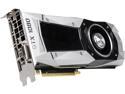
EVGA GeForce GTX 1080 Founders Edition, 08G-P4-6180-KR, 8GB GDDR5X, LED, DX12 OSD Support (PXOC)
Pros: - Owned mine since June (2016) - zero issues - flawless performer - Notable fps increase over the 980 it replaced and all games at maxed settings now - Lower Power Requirements - Works great with my AOC 144Hz monitor - - Works great with my Oculus - Future proofed for a long time. - Its very Quiet
Cons: There aren't really any cons I can give
Overall Review: Running on an i7 4790k OC 4.4Ghz - I'm maxed out in settings for all games, playing at 1080 @144Hz, I'm future proofed for quite a while. I lucked out following Newegg on Twitter. Bought mine in June and the price has gone up?
8/23/2016See more detail
Why did they change the mounting system?
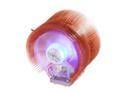
ZALMAN CNPS9500A-LED 92mm 2 Ball CPU Cooler
Pros: I've used this Zalman 9500A model in eight systems I currently use. Great CPU fan until they changed the mounting system - see below.
Cons: The new mounting bracket system has alot to be desired. It departs from using the screws to set the fan in place. THe new system is a two piece leveraged push bracket which requires more room. The new bracket is a hard fit if your motherboard has heatsinks that sit high on the back end of the fan.
Overall Review: I had to take apart another system to get the fastener with the screw version. The new 2 piece leveraged version is unworkable on my ASUS Rampage board. Two eggs only as this new mounting system needs allot more room to properly seat the fan. Great CPU Fan, bad mounting system. Now I have to consider a new CPU fan for future builds.
10/27/2008See more detail
Works as good as expected
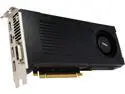
MSI GeForce GTX 960 2GB GDDR5 SLI Support ATX Graphics Card GTX 960 2GD5
Pros: The card only uses one 6pin connector so its ideal for small form factor PCs. I bought this card to fill a very specific purpose. I have an older Alienware X51 with a 330Watt PSU. This card runs perfectly for that need. I can even OC it and still not exceed the power draw. If you have a low power PSU, consider this card.
Cons: The card is only going to get you decent 1080p performance. More of a side grade for some older PC's With 2GB, You're not exactly future proofing your system
Overall Review: If your need a low power GPU and are building a small form factor gaming PC, this card should do the trick.
2/15/2015See more detail
Amaziing CPU - Great OC long term reliability
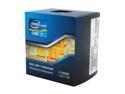
Intel Core i7-2600K - Core i7 2nd Gen Sandy Bridge Quad-Core 3.4GHz (3.8GHz Turbo Boost) LGA 1155 95W Intel HD Graphics 3000 Desktop Processor - BX80623I72600K
Pros: I purchased two of these on 5/31/2011 - Yes 2011. They both are OC'd to 4.8GHz and are running solid and reliable on air cooling. I'm running EVGA SC 640GTX running Titanfall @ max settings. See my system specs below - I built a system with i7-3770K Ivy Bridge 3.5GHz in 2013 and only achieved 4.4GHz.
Cons: Virtually no cons with the exception that the price has barely changed for such an old CPU. Consider that newer CPUs (i7-3770K Ivy Bridge 3.5GHz) are priced the same. If you are looking for Long Term, this chips bast days may be behind it, but it's more OC friendly then newer Ivy Bridge CPUs.
Overall Review: I've not had systems as future proofed as these were. Sys specs when built in 2011 - ASUS MAXIMUS IV EXTREME (REV 3.0) - Cooler Master MegaFlow 200 Sleeve Bearing 200mm - G.SKILL Ripjaws X Series 16GB (4 x 4GB) - CORSAIR Gold AX1200. Originally had a EVGA 580GTX upgraded to 680GTX
4/29/2014See more detail
Tight fit on the ears and Tiny Sound
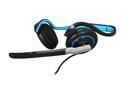
Corsair Vengeance 1100 3.5mm/ USB Connector Supra-aural Communication Headset
Pros: Very solid chord - doesn't feel cheap or flimsy Volume and mic controls are at a good length from the headset Plastic construction overall is solid, lightweight and feels sturdy More solid construction than the Logitech G330
Cons: Sound is not impressive - compared against the Logitech G330 the sound lacks mid range or base response There is no way to widen the head band so the headphones push a little too snugly on the ears. If you have hair partially over your ears, you'll be in for an even tighter fit.
Overall Review: I purchased these on a Newegg sale deal for $24.99 and at that price I'm not satisfied. The sound quality is Frequency response is supposed to be 20Hz–20KHz yet my Logitech G330 headset delivers much better mid range and lows and is rated at 40 Hz–18 kHz The angle of the ear pieces is too snug and there is no way to widen them. Wearing them for extended periods pressed against your ears starts to feel uncomfortable. At the full $39.99, I can't recommend these - you should definitely consider another brand/model
7/3/2012See more detail
Updated Review
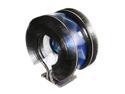
ZALMAN CNPS9900MAX-B 135mm Long life bearing CPU Cooler Blue LED
Pros: I had time to compare two other high rated coolers and this one is hands down the best CPU Cooler for keeping OC'd temps down for the i7 2600k. *i7 2600k @ 4.8GHz - Idle 34 - Load 82 *Other fans breached 90 on load *Better than the Noctua NH-D14 120mm & 140mm SSO *Much much better than COOLER MASTER Hyper 212 Plus RR-B10-212P-G1 *Price to performance excellent That's not saying this is the easiest CPU Cooler to install. It is NOT: See other thoughts
Cons: *Use of sticky/double sided tape to mount on motherboard instead of screw in hardware mounts. *very small print images on instructions - requires viewing youtube video to make proper sense *lack of clarity on air flow in instructions *Increased difficulty install on motherboards with tall heatsinks around CPU
Overall Review: I've Never had a let down on install using Zalman fans in 10 builds. This fans outperforms other high rated fans I purchased to compare. I'm dumbfounded why Zalman went with the sticky/double sided tape solution. If you aren't installing on an ideal motherboard (low heat sinks around CPU) getting an angle on the install screws while applying pressure can be a serious challenge/frustration. Once I got passed the anxiety of the install (the 2nd time) I realized how good a performer this fan is. Performance trumps Frustration - I huge star taken off for documentation and install issues System Info Intel Core i7-2600K Sandy Bridge 3.4GHz (3.8GHz Turbo Boost) LGA 1155 ASUS MAXIMUS IV EXTREME (REV 3.0) LGA 1155 Intel P67 G.SKILL Ripjaws X Series 16GB (4 x 4GB) 240-Pin DDR3 SDRAM DDR3 1600 EVGA SuperClocked 015-P3-1582-AR GeForce GTX 580 CORSAIR Professional Series Gold AX1200 (CMPSU-1200AX) 1200W Antec Twelve Hundred V3 Black Steel ATX Full Tower
6/20/2011See more detail