
Your Browsing History


William W.
Joined on 04/22/04
0
0
product reviews
- 19
Cyberpower CP1350AVRLCD
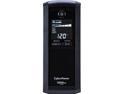
CyberPower Intelligent LCD UPS CP1350AVRLCD 1350 VA 815 Watts 10 Outlets UPS
Pros: Cyberpower's inclusion of a conventional DB9 serial port on a consumer grade UPS is invaluable if you still happen to need one. USB connectivity is also present. Other UPS makers have largely stopped including standard serial ports on anything other than business grade or large capacity UPS models. The status display is large and reasonably informative (but see "cons"). The UPS itself seems to work pretty well, and it's compatible with any operating system that has generic USB HID UPS drivers built in (Windows, BSD, Mac OS X, most Linux distros) for basic assisted powerdowns.
Cons: Cyberpower's software was a little difficult to get installed. I'm using this UPS with an older computer running Windows 2000, and every time I tried to run the installer, it would complain of an issue with the installer's digital signature. The Cyberpower website has nothing on this issue, luckily the solution came up after a few web searches and a visit to the Symantec/Verisign web site. Although the LCD status display is something I look for whenever I'm buying a UPS, and it's nice that Cyberpower included one, it could be more informative. Instead of providing load readings in volt-amps or wattage, it displays the information in kilowatts. This is rather curious since this model would never stand a 1 kilowatt load. The display also does not show a collected number of power failure or disturbance events as some competitors do. Silencing the alarm or changing other more advanced settings requires you to install the provided software. Fortunately, the setting sticks even if you remove the software or set it from another computer. A physical button to silence the alarm would be appreciated. Other than using it to disable the alarm, I didn't have any significant interaction with the software. It seemed serviceable enough at a glance, and certainly no worse than competing software products. It would be nice to have an option to leave the display illuminated at all times when power conditions are normal.
Overall Review: I never used to be a fan of Cyberpower's power conditioning products. All of the old models I saw had bizarre software with counterintuitive GUIs. Worse than that, every example I saw had developed serious reliability problems. Outlets that no longer functioned and units that had overheated to what I consider a dangerous extent were common. Since then, I think Cyberpower has really stepped up their game on quality control and engineering. This UPS seems well made and I hope it lasts quite a while. I don't understand the complaints of issues with those using power supplies having active power factor correction circuits. I have used these UPS units with new computers and old ones alike that have active PFC power supplies and not a one has ever skipped a beat when the power went out. If you are by some chance affected by this issue, Cyberpower has a few true sine wave output models that are good for devices (such as electric motors) where use of a modified sine-wave UPS such as this could cause problems. These true sine-wave output models are much more reasonably priced than their competition, at least as of this writing.
10/12/2014See more detail
SanDisk could do better than this...
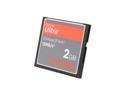
SanDisk Ultra 2GB Compact Flash (CF) Flash Card
Pros: Coming from SanDisk, this card ought to be a good product. The low price for this much storage in a CompactFlash card is unbelievable. Performance while it worked was good and met the advertised spec nearly all of the time.
Cons: If you plan to use this card as a boot device for a computer, you may be heading for trouble. Most CompactFlash cards in CF to IDE adapters will happily allow you to connect another IDE device as a slave on the same cable. This SanDisk card does not allow that, which can be a problem if you need to attach an optical drive to the only PATA channel in a system. It's not possible to change the operating mode of this card if you need to do so. SanDisk does at least acknowledge that CF cards have different operating modes, but they state that they will not offer a utility to change the mode of their cards. This is something to think about if you have an older or finicky IDE controller that you plan to use this card with.
Overall Review: Unfortunately, this card failed while I was working with it, so I've got to see about getting it replaced with another. As I have many SanDisk products that work very well and have proven to be excellent value for the money, I would call this an unfortunate fluke and not a common problem.
10/23/2009See more detail
Tried it, and so far, I'm really pleased!
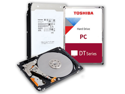
Toshiba DT01ACA050 500 GB Hard Drive 3.5" Internal SATA 7200 RPM
Pros: I picked up this Toshiba 500GB SATA drive with some trepidation due to all the bad reviews...and several months later, it's still going along perfectly in a Dell Optiplex 780 tower.
Cons: While I can't say anything bad about the drive itself, Toshiba's support site is a complete farce. Although they have a category for storage products, all avenues to support demand that you provide the model or serial number of your product. In the case of this drive, Toshiba's site claims that both are invalid! This would have greatly complicated migrating from my old drive to this one were it for the fact that I'd done so in the past and had software already installed on the computer for that task! (There are also plenty of free and low-cost options.)
Overall Review: The bad reviews of this Toshiba 500GB hard drive made me very nervous. For me, this drive has worked out perfectly well. I test all my hard drives aggressively before putting them into service using GRC's SpinRite testing tool, and this drive took the longest of any hard drive I can remember to get through the maximum testing level. I don't know why--it didn't reallocate any sectors during the test, and it's quite fast in normal use.
10/12/2014See more detail
WD20PURX 2TB Success Story
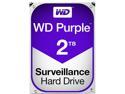
WD Purple 2TB Surveillance Hard Disk Drive - 5400 RPM Class SATA 6Gb/s 64MB Cache 3.5 Inch WD20PURX
Pros: I popped this drive into a newly installed four channel standard definition surveillance DVR system after giving it a good workout in a personal computer with GRC SpinRite. It got through the tests without issue and has been recording video nonstop for a little over a month now (relative to the posting date of this review). So far, the WD20PURX drive is working without incident.
Cons: None so far.
Overall Review: The troubling reviews of this drive made me wonder if purchasing it was a good idea. So far, its performance has been flawless under 24/7 use. If it were going to break down, I would have expected it to do so by now. Maybe WD did have quality control problems with these early on?
10/12/2014See more detail
Simple and to the point...
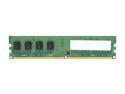
AllComponents 2GB DDR2 667 (PC2 5300) Desktop Memory Model AC2/667X64/2048
Pros: Pricing is definitely a plus, this DDR2 memory module is pretty much the cheapest thing going. I used it with an Intel D201GLY2 motherboard and had no problems. Though not at all glitzy or adorned with fancy heat sinks, the module I got seems well made. If you're overclocking or otherwise pushing your computer's memory to the extreme, you might want to look elsewhere. For average computers and uses, though, this module seems hard to beat.
Cons: None that I can think of. Well, maybe it's a little pricey, but not bad when you consider that few if any other inexpensive upgrades can boost your computer's performance like a RAM upgrade.
Overall Review: The only real unknown here is reliability. I haven't owned the module long enough as of this writing to know if it will last. Theory says if it works when you put it in, it should work for a good long time. Reality is sometimes a bit different.
11/22/2013See more detail
Complete Trash
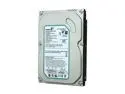
Seagate BarraCuda 7200.10 RFHST380815AS 80GB 7200 RPM 8MB Cache SATA 3.0Gb/s 3.5" Internal Hard Drive Bare Drive
Pros: None at all.
Cons: I bought this drive for a future project, figuring it would work just fine (after all, it had been refurbished, right?). When the time came, I unboxed it, hooked it up and discovered that the drive was completely bad. It would fail to operate correctly within a few minutes of power up and eventually stall the system. From what I could tell, the failure seemed to be with the drive electronics. I was past the Newegg return policy and Seagate's (very) limited warranty on the drive, but I put in a call to Seagate anyway. The people I spoke with were very polite but adamant that nothing could be done even though the drive was just past their warranty by a day or two. I finally threw the drive away after taking my frustrations out on it.
Overall Review: I was very surprised that this drive didn't work straight out of the box. Seagate had changed the label to indicate it was refurbished, so I would have hoped they tested it afterward to be sure it worked. (Admittedly, this failure could have been caused by something in the handling process as it found its way to me. Given that the failure seemed to be electrical and not mechanical, though, I doubt it.) I bought another refurbished drive from another maker at the same time I bought this one. That drive still works perfectly. I think I'll steer clear of Seagate's refurbished drives in future.
10/8/2013See more detail