
Your Browsing History
 Holiday Shipping Details & Extended Holiday Returns Holiday Shipping Details & Extended Holiday Returns

Joined on 05/05/11
Best Budget APU for HTPCs or basic users
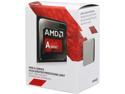
Pros: -3.1 GHz Quad core CPU with a 3.8GHz Turbo -Decent R7 graphics -65 Watt TDP -Cheap
Cons: -The stock cooler is fine, for the most part. It cools the processor fine until you put some significant load on it. Then the Temperature spikes from about 30C - 60C+. -Not overclock-able -R7 iGPU is more like an R5 sorta -Depending on the board, the iGPU will hog 2GBs of your total system memory. 8GB+ @ 1866MHz is recommended.
Overall Review: The APU alone bundled with 1866MHz RAM can play smaller games like Minecraft, Left 4 Dead 2 and League of Legends at 1080p with High or so settings and achieve around 45FPS or so (Perfect 60+ on Vanilla Minecraft 1.8+).
Works as it should
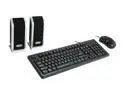
Pros: Speakers, Keyboard and mouse in a cheap all in one combo for this insanely cheap price = steal.
Cons: The speaker quality is the lowest of the low. Sound quality is terrible and it feels like a toy. Also much smaller than it looks. Keyboard has a small delete button. Keyboard has shortcut keys for power, sleep and wake. This would be better if there were hot keys located on the top of the keyboard or away so your finger won't accidentally press the power key and turn off your PC or put it too sleep.
Overall Review: Should have came packed with a mouse pad for a complete package. That and some minor tweaks to the keyboard and some much better speakers and this would be a must have.
Great budget case!
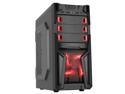
Pros: -ATX Form factor that allows you to fit in pretty much any ATX sized or lower motherboards -Hard drive cage is removable for large or multiple graphics card installation -Has 3 USB ports in the front with one USB 3.0 port included -Easy to remove 5.25 drive bay covers -Good enough space on the back of the board tray for your cables and some holes to squeeze them through without interrupting airflow -Drive cages has rounded metal ends to prevent cuts -A very light case, easy to lift up and carry if needed (Depending on the other components installed -A mount for two 2.5 Data drives. Best for SSDs
Cons: -Included fans only serve as a cosmetic appearance and doesn't perform their function, that is to push and pull air, very well. In-fact, they suck -Front LED fan is nowhere near as bright as the picture shows. You'll barely even notice it. -Fans require a Molex connector for power and cannot be connected to board for any fan controlling. However seeing how bad the fans are this shouldn't matter. -In order to install any addon cards, two screws need to be removed followed by an unnecessary metal bar. -The power and Hard drive activity LEDs are far too bright and can come off as blinding and distracting if placed in certain a position.
Overall Review: The power supply is mounted on the top. Depending on the user this may or may not be a problem, this also means no top mounted fans or radiator mounts. The fans are useless but at least they are included and gives an overall cool aesthetic to the overall case design. The case actually has more features then you bargain for with pretty much everything you need to get started and then some. The metal is extremely flimsy and feels like it could break and bend very easily but you get what you paid for and in a way. That could be a good thing, because it makes the entire case very light making it easy to pick it up and move it somewhere if needed. Also, this is a desktop case. It's not meant to be moved too much so if you just build your machine with a bit extra care, The flimsy metal isn't a problem. The reset button is kinda hard to press and actually requires you hold it down to do a force restart. I personally love this as it's makes an accidental presses of the restart button a lot harder to do. Especially if you have trolly friends or children. The biggest issue is the lack of color options. So far, newegg only sells this case in Red. It would be nice to see this in more color options but Red is your favorite color. Then go for it, goes well with alot of ASUS ROG boards and video cards.
Kingston has done it again for me
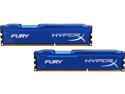
Pros: -2 x 8 Gigabyte Modules (16GB total) For sub $100 -1866 MHz, great for AMD APUs or APUs in general -Effective heat sink and with a simple design and style that makes it appealing without taking up too much room in your case -Comes in a different colors
Cons: -Not a serious issue but, different colors for some reason is at a different price
Overall Review: Installed the modules and it was detected at full speed right away with zero configuration.
Great starter CPU with one problem
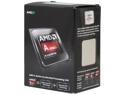
Pros: -Quad Core CPU @ 3.9GHz -Fairly decent internal Graphics -At the right price point for anybody
Cons: -The stock Heatsink and Fan is by far the worse I've seen yet. The temp of the CPU is idling at around 65C - 70C even in a room that is cooled by an AC on max speed (56F Temp in the room). I am not impressed at all by this abysmal CPU Cooler. You need an aftermarket cooler to really use it. I played Minecraft for 30 mins before it crashed giving me a Driver error on Windows 7. Checked the Temp and it peaked at 102C and was running at 95C+ the entire time. Limiting the FPS to 60 or even 30 does nothing. It seems other people are getting mixed results with this cooler but I can assure you that this thing runs a lot hotter than it needs to be. So depending on your situation. Prepare for the worse cause this is NOT good AMD.
Overall Review: Buy an Aftermarket cooler even if you are getting little to no issues with that stock cooler. Because it doesn't even look like it'll last very long.
Astonishing
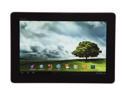
Pros: -Light weight -Good battery life -Vibrant, beautiful screen -Micro-HDMI -MircoSD -Powerful CPU -Great ASUS support -Keyboard dock-able to be used as a netbook -Amazing camera (Both front and back) My first Tablet. What a choice....This thing is beyond superb in every manner. Looks nice, feels nice, performance is great. And it's by far one of the greatest tablets I've ever used. Micro-HDMI Port. While it doesn't come with the cable, it means you could easily connect this to your HDTV and use it sorta as a Media center if you want. Or simply watch movies or even game on the device through a big screen TV. Expandable memory with MircoSD. Smart choice to keep this, some tablets seem to miss this. I find this convenient as you could add more storage with MircoSD cards. For the power it's boasting, this guy is very thin and lightweight. About the same as an actual 300 page notebook almost (In terms of weight). The design seems simply from the front. But the rear shows other wise. This nice metallic style finish gives it a nice touch and beats those glossy finger-printed infested ones. Although, this one does attract finger prints but not as much. The Terga 3 Chip is a monster. Graphics in games (Supported by Terga 3) looks beyond amazing. Perhaps, near Xbox 360 quality in certain aspects. All games run butter smooth on this and with a 1920 x 1200 HD screen. Everything pops out and it gives a perfect balance of colors and pixels. Also, the view angle is great as you could see the screen clearly even from a 50 degree angle.
Cons: -1GB of RAM shows it's limitations to some extent -Limited Android flexibility -A little longer than usual start-up time from power on -4.0.4 bugs -Mono speaker This guy does has it's share of problems. When I got it, It had Android 4.0.4. Not sure if I got a somewhat bugged version but: Performance got spotty under power saver mode. The Device screen wouldn't turn on when the brightness was lower than around 10 or so. Keyboard lagged the device sometimes. However, after one update. all of the problems were gone. It's now more rock solid than ever. Wish ASUS did more to the Android O/S. This one comes with a pretty much stock Android Ice cream sandwich. Unlike the Galaxy Tab 10.1 for example, you can't do certain useful features like delete an empty home page (Or I just can't seem to get it to do it or whatever). The 1GB of RAM. While fast, does show it's limits to some extent. Multitasking can cause the device to slow down a little bit. Unlike the Galaxy Tab 10.1, sometimes it can't seem to properly handle multitasking. But it's not bad enough to knock any Eggs for this. The speaker has good quality to it and is loud enough to hear it. However, there's only one, and it's placed on the right hand side where you would place your fingers over when holding it. The sound can get a bit muffled because of this. Somewhat of a bad design on ASUS part.
Overall Review: One monster android tablet by ASUS. Some minor design flaws and some starter software issues. But no where near is it bad enough to ruin the experience. If ASUS added an extra GB of memory, solved some design issues. And added a more flexible edition of Android. Then it would've been king easily. Either it be gaming, multimedia, social media, music, school work, or all of that and more. The ASUS transformer Pad Infinity is a solid choice.