
Your Browsing History


melvin s.
Joined on 10/24/01
0
0
product reviews
- 6
Best board I own - beautiful as well
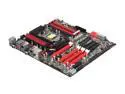
ASUS Maximus IV Extreme-Z LGA 1155 Intel Z68 USB 3.0 Extended ATX Intel Motherboard
Pros: Board is flawless, runs 2600K chips 100Mhz higher than my ASRock Extreme4. Looks fantastic in the case, if you get this board, you must have a window on your case, the ROG backlit badge and LEDs are so good, I removed the other Corsair LEDs and just let the ROG showoff. Plenty of PCI ports, awesome bundled software (Love the ROG CPU-Z).
Cons: None. Even fits in my Corsair 600T. The only thing I'd improve is the Overclocking profiles. That screen is pretty hokey. I'm a programmer and I could do much better.
Overall Review: Perfect board for the serious gearhead, nerd, enthusiast. Voltage monitoring points as well. Think I will also buy a Gene-Z for bench work. The ROG team deserve a raise. Motherboards haven't ever been this fun.
10/18/2011See more detail
Should have expected problems for this price
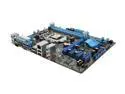
ASUS P8H61-M LX (REV 3.0) LGA 1155 Intel H61 Micro ATX Intel Motherboard with UEFI BIOS
Pros: Nice and compact. Smaller than Micro-ATX so gives room to play with a HTPC build. ASUS UEFI BIOS and AI software suite are great. Runs Corsair DDR3 at 1600 fine. Nice price. But...
Cons: AI Suite software reported the BIOS images aren't available, so no update. My other ASUS boards can update find using the same Suite. Secondly, the board won't reboot properly. Anytime I reset, reboot, power off, etc. it will power off and stay that way. I have to either hold down power to fully recycle, or I have to switch off the power supply. Haven't had this with other models. A 2600K chip won't run at 3.8 Turbo in this board. It runs fine in other boards, so I assume the H61 is throttling it down for power or thermal reasons. Yeh, its dumb of me to try a 2600K in it, but I had an extra. Stick with the i5 2400 for this board. Finally, missing SATA 6Gb, DVI and a 2nd full PCI slot which the ASRock gives at the similar price. All in all, a waste of time. Pay $10 more for the next model up, or buy the ASRock.
Overall Review: I love ASUS boards (usually). I tried this board for a cheap second build for my wife. I also run an ASUS Maximus Extreme Z68, and in general I love ASUS and ASRock boards. This H61 board isn't up to snuff. Trying to exchange up to another model.
10/18/2011See more detail
Needs mouse buttons like the K400r
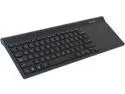
Logitech Wireless All-in-One Keyboard TK820 920-005108 USB RF Wireless Keyboard with Built-in Touch Pad
Pros: Full laptop size keyboard, and trackpad is spacious. Well built. Looks sleek if your main goal is to accessorize a media center.
Cons: 1 - 100 dollar keyboard and no drivers includes, requires you to go online to download required driver / utils (Logitech Setpoint and Unifying). Trust me you dont want to use it without these, not smooth at all plus you need Unifying to setup a 2nd mouse, etc. I'm not rural, but lack cable at home, so stuck with satellite and 1mb DSL and it was Sunday evening on the Internet, took me 15 minutes to download. In an ideal world, the mini receiver would contain a few MB of flash to store the stock drivers. 2 - Missing tactile mouse buttons are a deal breaker. I own both the TK820 and the smaller, much cheaper brother K400r, and the K400r is more usable despite its size due to its mouse buttons. The infatuation the marketing world has with "gestures" and "virtual" is beyond me. I write software for a living and sometimes code from bed and have gotten in trouble a few times with sciatica by resting a heavy laptop in my lap night after night, so I had to get a remote keyboard. Tried one night writing C# and C++ in Visual Studio with the TK820 and gave up. Ended up having to disable all of the edge gestures, and still, the lack of a tactile left and right mouse button caused me to slow way down. Mainly hold and drag, and right click are just not accurate, resulting in repeated typos, dragging stuff to the wrong place, early drops, etc. Not good. 3 - No home/end/page up/page down keys (you use function key with arrows). For techies that spend all day at a PC or laptop, switching gears to this keyboard isn't trivial unless you just want to chat. Save your money and get the K400r.
3/2/2014See more detail
Cut corners on a $450 board
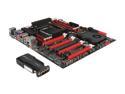
ASUS Rampage IV Extreme/BATTLEFIELD 3 LGA 2011 Intel X79 SATA 6Gb/s USB 3.0 Intel Motherboard with USB BIOS
Pros: Haven't really identified any yet. The board is what it is.
Cons: Single ethernet port on a $450 board doesn't compute. I also own the Maximus Extreme-Z which has 2, and I had expected as much with the Rampage IV. If all you want is 3-way SLI, the Deluxe board may be the better board.
Overall Review: Too much focus on useless fluff gadgets like Bluetooth / smartphone overclocking - I would trade that all for a 2nd LAN port and an onboard Soundblaster chip. I have buyer's remorse for the first time, and this is my 3rd ROG board. I did not feel this way about my Maximus or Gene-Z, I think the Rampage is overpriced for what it delivers.
11/26/2011See more detail
Beware quality control issues
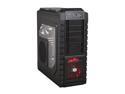
Cooler Master HAF X - High Air Flow Full Tower Computer Case with Windowed Side Panel and USB 3.0 Ports
Pros: 9 slots, great cooling, room for 240mm (or more) radiator at top.
Cons: Quality control passed a case that wasn't properly constructed. Two of the sheetmetal seams aren't true, and a corner wasn't completely folded, so the case is out of square. The motherboard tray isn't 100% flat, causes my Rampage MB to flex when mounting. Out of square also would not allow my graphics cards to seat fully into the PCI slots, nor would they flush against the back slot, so the case has to go back. -3 eggs for sending me a poorly constructed item and delaying my build.
Overall Review: I have two other rigs with Corsair (600T and 650D) as well as a HAF 912. The Cooler Master cases are better priced, but are inferior in construction to the Corsairs.
11/26/2011See more detail
Feels like a new car
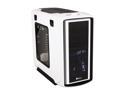
Corsair Graphite Series 600T Arctic White Steel / Plastic ATX Mid Tower Computer Case
Pros: Quality, looks, compatibility with Hydro series coolers, elbow room, drive cages. Buying a few more of these for my firm.
Cons: None, except perhaps having the pay more for the Special Edition White for clear panel.
9/30/2011See more detail