
Your Browsing History


Anonymous
Joined on 12/30/12
0
0
product reviews
- 9
Excellent motherboard
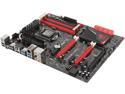
ASUS MAXIMUS VI HERO LGA 1150 Intel Z87 HDMI USB 3.0 ATX Intel Motherboard
Pros: Great packaging, great quality, easy to use, easy to install, simple (but with depth) BIOS.
Cons: It isn't free
Overall Review: Writing this review for the benefit of other users as I frequently read Newegg comments myself before deciding to buy a new component. I have just finished installing this motherboard on a Cooler Master Cosmos RC-1000 Case (2008 model). Installation went fine like a breeze. Everything working perfectly, incl front panel USB 2.0 connections, Firewire, Esata, Speakers and Microphone. I am using a Thermaltake Frio OCK CPU cooler. Installed fine and works fine. Another thing, some ppl complain there's only 3 fan headers + 1 CPU Fan header. Not so!!!! There is the CPU Fan Header AND four (4) additional fan headers. CHA1, CHA2, CHA3 AND CPU OPT!!! So, You install your chassis fans on CHA1, CHA2, CHA3 and then finally you install your fourth chassis fan on CPU OPT. I installed the bottom, exhaust and top fan 1 on CHA1, CHA2, and CHA3 and top fan 2 on CPU OPT. Your CPU cooler will connect to CPU FAN (the fifth fan connection). Hope this helps ppl. I am using 2 HDD's non-raid (cba), one of which is from 2008, a SATA 3GB/s. If you have one of those, It will work fine with your new mobo, just make sure you use one of the sata cables that come with your new mobo to connect it. Also, if you used your HDD's in IDE mode, make sure to switch to IDE mode in the BIOS prior to booting up b/c the board is set to AHCI default. About the RAM sockets: I upgraded from a Socket 775 Asus P5Q Deluxe. The RAM socket design has changed, and one of the two clips is now unmovable. Only the top socket clip secures and releases the RAM module. Be gentle and you will have no issues. My build is notable b/c I kept and reused many of my previous build components. Hope this helps others in the same spot with me. CPU: i7-4770k CASE: Cooler Master COSMOS RC-1000 (2008 model) CPU Cooler: Thermaltake Frio OCK (2011 model) PSU: Silverstone Strider Gold SST-ST85F 850W Mod (2011 model) HDD's: WDC WD5000AAKS-00TMA0 500GB (2008 model) WDC WD5000AAKX-001CA0 500GB (2011 model) GPU: Gigabyte Nvidia GTX 580 SOC Windforce 3X
12/25/2013See more detail
Unfortunately I got the short end of the stick with this board-Not happy
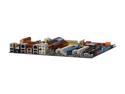
ASUS P5Q Deluxe LGA 775 Intel P45 Intel Motherboard
Pros: Reliable, stable, trouble free operation for 7 months. The jumpers they have are very handy and allow for easy reset without having to remove the battery. Board looks great, almost an art piece with those heatsinks. EPU works well and is very convenient. Great at power savings with EPU 6 engine.
Cons: 1. You can't set Memory:FSB ratio from the BIOS. Board only works at 5:6 and 1:1 ratio. Getting 1:1 is extremely complicated and annoying. 2. When overclocked, the CPU's C1E support gets automatically turned off by the BIOS and it also disappears from the BIOS so you can't switch it back on. C1E is the CPU feature that automatically reduces your multiplier when you aren't doing something CPU intensive thereby easing the workload on the CPU and increasing power savings. 3. When overclocked outside of the EPU-6 engine, the CPU works CONTINUOUSLY at the overclocked speed. (see above) Say you overclock it to 3.8 GHz. The CPU will work at 3.8 GHz ALL THE TIME with this board regardless of load. Very bad both for the lifespan of the CPU as well as for your power bill. It's like having your car idle at 5000 RPM. 4. ASUS Express Gate is useless and I have turned it off.
Overall Review: If you'r trying to decide between ASUS and Gigabyte and you are an overclocker, go for Gigabyte Socket 775 boards. Gigabyte's DES (Dynamic Energy Saving) feature works better than ASUS', saves more power, is more overclockable, and what is more Gigabyte's BIOSes on Socket 775 MOBOS allow for direct setting of FSB:DRAM ratio and can also AUTO OVERCLOCK with C1E on, saving more power and helping your CPU work better for longer time. My QX 9650 auto overclocked with Gigabyte's EP35-DS4 mobo to 3.79 GHz with C1E on and NO HASSLE at all compared to the hassle I've had overclocking my CPU on this board with EPU-6 on so that I could also get power saving features. Good board if you are NOT an overclocker. If you are an overclocker, steer well clear.
12/30/2012See more detail
SILVERSTONE Strider Gold SST-ST85F-G 850W
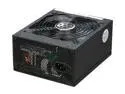
SILVERSTONE Strider Gold ST85F-G 850W ATX 12V v2.3 / EPS 12V 80 PLUS GOLD Certified 100% Modular, Active PFC Power Supply
Pros: Quiet & reliable
Cons: No power off switch
Overall Review: This PSU has been working in my rig since the 6th of June, 2015, that is to say 2.5 years. So far I have had no issues with it. After reading Johnny Guru's (aka Oklahoma Wolf) reviews on the net about this PSU, I was very worried that this unit might fail but thank the good Lord this has not happened so far. On the other hand, I do not believe that my PSU was ever loaded beyond, say, 600 W, and my usual power draw should be around 200W. Here's my system: =============== Intel Core i7-4770k (Haswell) @stock Gigabyte NVIDIA GTX 780 Ti GHz edition @stock Asus Maximus VI Hero ROG Z87 Express motherboard Samsung 840 EVO 500 GB SSD 2X WD Green 2TB HDD's 4 System fans (140mm) 2X4GB G.SKILL ARES 2133 MHz RAM@2200 MHz My previous system that my PSU worked with was an Intel Core 2 Extreme QX9650 on an ASUS P5Q Deluxe motherboard with a Gigabyte NVIDIA GTX 580 SOC GPU, 2 WD Blue 500 GB HDD's, and 4X2GB G.SKILL Trident DDR2-1100 MHz RAM. No issues with that either.
2/28/2015See more detail
CM Cosmos RC 100: Still working flawlessly after 7 yrs
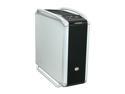
Cooler Master COSMOS 1000 RC-1000-KSN1-GP Black/ Silver Steel ATX Full Tower Computer Case
Pros: 1. Two bottom ventilators with filters. 2. Extremely well made, 3. Sleek, 4. High Quality, 5. Looks wonderful, 6. Ample Space, 7. Allows for a quiet system
Cons: No SSD bays. (SSD's did not exist back in 2007) You have got to use an aftermarket 5 1/2 inch tray to house your SSD in one of the 5 1/2 inch bays.
Overall Review: I bought this case in March 2008. Fast Fwd 7 years later, the only thing that's left of my original Intel Core 2 Extreme QX9650 on a GA-P35-DS4 & Gigabyte NVIDIA GTS-8800 GPU is the case. I re-used this case for my new build which is an ASUS Maximus VI Hero, i7-4770k, GTX 780ti GHz Edition, a Samsung 840 EVO SSD and two 2TB WD Green HDDs. The system is powered by a Silverstone Strider Gold 850W PSU. All computer ports (USB ports, mic, etc) and every mechanical part in my case still work perfectly. I am sure I will reuse this case with my next major update cycle after 4 years or so. This case is one of those things that are always in style, like a Harley-Davidson.
1/15/2015See more detail
GTX 780 Ti GHZ Edition @ASUS Maximus VI Hero Z87 & i7-4770k
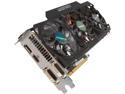
GIGABYTE GV-N78TGHZ-3GD G-SYNC Support GeForce GTX 780 Ti 3GB 384-Bit GDDR5 PCI Express 3.0 HDCP Ready Video Card
Pros: Faster than the Gigabyte GTX 970 G1 Gaming, matches the EVGA GTX 780 Ti KINGPIN Edition when overclocked.
Cons: None that I can think of.
Overall Review: I have owned this card for about 2 months now. I am very happy with it. This card is extremely fast. Here's some proof: 1. 3D Mark Fire Strike GRAPHICS SCORE at Stock Clocks: 13010 2. 3D Mark 11 GRAPHICS SCORE at Stock Clocks: 16888 When slightly overclocked, which this card does with ease, this card matches or exceeds EVGA GTX 780 Ti KINGPIN 3D Mark 11 Graphics Score of 17300 3D Marks. To understand just how fast this card is, a GTX 690 scores 17600 3D Marks (Graphics Score) at 3D Mark 11. Currently, this card is No 6 at 3D mark COM "Best Graphics Cards December - 2014 ". A GTX 980 scores 18050 3D Marks Graphics Score at 3D Mark 11 COM. I have had zero problems with my card, which I bought as "open box". I own a high quality PSU that features a very strong 12V rail@70 Amps. Full System Specs for ppl who are having issues with this card to compare with: -CPU: Intel Core i7-4770K @ 4GHz Multi Core Turbo. -MOBO: ASUS Maximus VI Hero ROG Intel Z87 Express BIOS Version 1301, Jan 2014. (My BIOS is one year old) -PSU: Silverstone Strider Gold 850W -CASE: Cooler Master COSMOS RC-1000 -RAM: G.SKILL ARES DDR3-2133 MHz.@2200 MHz -CPU FAN: Thermaltake FRIO OCK A further note, this card's Windforce cooling so so effective that I am able to run the GPU with ALL my four case fans switched off and only the CPU FAN running at lowest revs. This allows for a COMPLETELY SILENT system. The card never exceeds 59 Celsius. (My Cooler Master COSMOS RC-1000 case features additional sound proofing material and was designed to be silent). So, 17k 3D Marks and a completely silent system, this sounds perfect to me. Hope this post helps ppl.
12/28/2014See more detail
Good choice to revive an old laptop
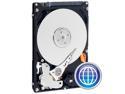
Western Digital Scorpio Blue WD2500BEVE 250GB 5400 RPM 8MB Cache PATA 2.5" Internal Notebook Hard Drive Bare Drive
Pros: Reliable and quiet. Runs cool too.
Cons: Only 250 GB capacity.
Overall Review: This drive has been working on my work laptop which is a 2003 model Toshiba Satellite S1950-801 for abt 3 years. The motherboard is based on the Intel 845 chipset which was released in Jan 2002. I work as an officer on board ocean-going merchant vessels, and this drive has been through a lot of engine produced vibration and vessel listing 15 degrees to port or starboard and still works fine. It is a great choice to revive your old laptop for use at work. It can run MS Office, Firefox, Acrobat etc very well. Highly recommended. A word to the wise: If you plan to have your laptop run 24/7, use a laptop cooling pad. Highest temperature noted for the drive was 41 C/106 F in Jeddah, Saudi Arabia, at an ambient of abt 38 C/100F. In non-desert temperatures, the drive runs at about 32 C/90 F. Checked with CPUID Hardware Monitor. I hope this post helps ppl.
10/24/2014See more detail