
Your Browsing History
 Holiday Shipping Details & Extended Holiday Returns Holiday Shipping Details & Extended Holiday Returns

Joined on 08/27/06
Boomsauce
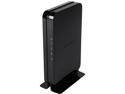
Pros: Perfect modem for the new TWC Maxx internet. I have their ultimate internet and get 320 down and 22 up on average here in Charlotte. This will pay for itself in one 18 months as TWC charges 7 freaking dollars a month to use their modem. It was a really easy install and time warner had it added and working within 5 minutes, so kudos to them on that part at least. Haven't had a single issue since plugging this modem in. This paired with my Netgear 6300v2 as been a fantastic combo. I highly recommend this modem. It is also the cheapest of the TWC approved 16/4 modems (which you need to get more that 100 mb/s)
Cons: None, other than it would be nice if it were a bit cheaper, but you get what you pay for.
Good for the price, but you better hope you don't forget the password!
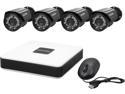
Pros: Cheap. 4 cameras. Very long cables. I was able to run to each corner of my house (2300 sq ft) with ease. Great iPhone app interface.
Cons: Horrible interface. Super slow if you want to view video from the actual unit. You definitely need to use your iPhone or android device. Web browser interface is substandard. Video quality is well below advertised. Night vision is really really low quality. I understand that night vision isn't the best on any camera. But it is way worse on this one compared to a friend's setup (same cost range).
Overall Review: For Pete's sake don't forget your password! I takes an act of congress to get it reset. Laview support is poor. Never returned calls. Never returned online requests. Hardware alone I would give it 4 eggs because of the price and somewhat decent quality. Software and support I would give it zero eggs if I could. It is asinine that there isn't a password reset option available on the device. They will claim that security, but to me it is just extremely poor software implementation.
Cheap and works, but I wish I had 4 hands to give the air flow 4 thumbs down.
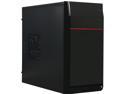
Pros: Cheap Clean look Pretty easy to build in.
Cons: Plastic thumb screws Airflow is absolutely terrible. I have to leave the side panel off when playing games with a GTX 1060. With the side panel on, I have to limit the gpu to 83 celsius max. With the side panel off, its max is 72 c.
Overall Review: If you are not going to game, this case is great. But if you are, look elsewhere unless you want to leave the side panel off. Would be 5 stars for the price if airflow was better. Minus two eggs for that.
Fantastic cooling. Switched from an orginal h100i. No Ragrets
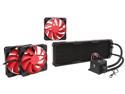
Pros: I had an h100i that was not performing well. Not sure if it was wearing out or what, but my 4790k was throttling big time at stock speeds. I decided to pull the trigger on this since it is the cheapest 360 rad that I have seen. The performance of this thing is just fantastic! I was able to overclock my 4790k to 4.8 stable. It runs at about 60 degrees Celsius when gaming. Prime 95 it tops out at about 85. Which for a 4.8 OC, that's fantastic. At stock speeds it runs about 50 degrees in gaming and tops out about 70 in prime 95. The fans on this thing are high quality as well. It is also a good looking cooler. The pump has a red pulsing LED and a clear tube to let you know that is working. The tubes are quite long so it could be front mounted or top mounted in just about any case with ease. Comes with it's own fan splitter that has 4 inputs. So the 3 fans that come with it and 1 extra if your mobo runs out. Super easy to install.
Cons: About the only thing negative that I have to say about it is that the tubes have that cheap ribbed plastic on them. Not a fan of that, but it in no way impedes functionality or performance.
Overall Review: My h100i was really good with my old 2600k, but time and more heat from the 4790k forced this upgrade, but it has been one of the best that I have done in a while.
27" 1440p for $215? Uh, yes please!
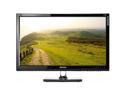
Pros: Price. $215 (shell shocker) is flat out a steal for what you get. 1440p! Gorgeous colors. Was able to over clock to 115hz. Tried to get 120 but got artifacts, but still. 115 is pretty awesomesauce. Shipped fast considering it comes from Korea and had no dead pixels on arrival. Matte black finish instead of gloss. Personal preference for sure but I hate glossy plastic. Its' an actual Samsung panel, and it looks brilliant!
Cons: A little bit of backlight bleed as others have described. But honestly, I don't notice it at all except for black scenes, and even then, it really doesn't bother me much. Not worth docking the monitor for in any way IMO. The fact that you have to remove the bezel to take off the stand is pretty much the dumbest thing ever..... Not really much more you can say about that. Only has a DVI-D connection. But really doesn't affect much as long as you have a graphics card with a DVI-D or DVI-I connection. Can't use cables that are, for example, dvi-d to display port, or dvi-d to hdmi. You have to use active adapters. Not a big deal if you just have one of these. But if you wanted to run a multimonitor config you would run in to problems if you didn't have enough dvi ports. Everything other than the actual lcd panel is pretty much cheap-o cheap stuff. 8ms response time. Not horrible, but not great.
Overall Review: This is hands down probably the best bang for the buck that you can get. Yes it does come with some faults, but for what you get, they are very easy to look over. Overclocking is super easy using CRU and the nvidia control panel. If I had the money I would buy 2 more of these to run triple screens! Maybe one day.
Somewhere between Meh and junk.
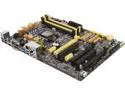
Pros: It works just fine, but it is far from special in any way. Cheap.I got this board basically for free as a combo with a 4790k.
Cons: Gets super hot. Does not overclock well at all. Horrible yellowish baby poop color. NFC reader that came with it is completely and utterly useless. It works, sometimes, and when it does it takes several tries to get it to read. It is slower than using a password, so i pretty much just dumped it. iOS app is total garbage.
Overall Review: If I didn't get this board for basically nothing I would never buy it or recommend it.