
Your Browsing History


Murad K.
Joined on 08/02/02
0
0
product reviews
- 24
Long in the tooth but gets the job done
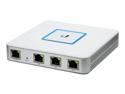
Ubiquiti Networks USG-US Enterprise Gateway Router with Gigabit Ethernet
Pros: Works with UniFi controller and is relatively easy to manage Gives you that full chain in the unifi controller (full unifi stack with the switch and wifi)
Cons: Many of the more complicated configurations are not possible via the unifi controller and require more in-depth knowledge of configuration. This unit is also quite old and given that the price has not dropped, I would now consider it 'overpriced'. But this is the cheapest option you currently have to have a complete unifi setup. Runs hot -- the passive cooling doesn't seem adequate at times. Onboard storage uses an internal usb-stick which, according to forum reports, has died requiring people to look for replacement and recover.
Overall Review: This is the cheapest option in the unifi stack for routing but given the hardware seems quite expensive. Ubiquiti's edge-line, while more command-line driven has a cheaper option (EdgeRouter X) which is around half the price of this unit but very capable. If you want to have a unifi full stack solution, but don't want to shell out for a higher-level router, this is your only choice. Also, if you absolutely do not want to deal with a command-line this is also probably a good choice. For all others, I would recommend taking a look at the EdgeRouter X or an alternative solution.
11/2/2019See more detail
Don't Buy
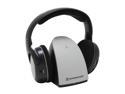
Sennheiser RS 110 Home Audio & TV Wireless Headphones
Pros: Relatively Cheap price Basic Wireless Headphones
Cons: Extremely difficult to tune Uses frequency that is already rather cluttered Users must manually tune the headphones to the frequency - this is very difficult to get right and there is no capability to fine tune. Analog - more prone to audible degradation
Overall Review: Unfortunately, I bought this on an impulse since it was at a great price (something like 50% off) but if I had done more research I probably would not have bought these headphones. I live in a relatively urban area where there are plenty of other wireless signals. Without turning on the receiver I seem to be able to hear some radio stations or something. Either way tuning this seems near impossible to get spot on. I can get both (left and right) channels working relatively well but there seems be to be one tiny sliver in the spectrum that is ideal (the proper volume, no interference, etc) and since I have to manually tune and since there is no way to fine tune it usually takes me a good 30-40 minutes to tune and any small impact seems to remove the headphones from this frequency. I probably would have been better off getting a pair of bluetooth headphones since they'd be easier to configure (yes it's an overused frequency, but at least the signal is digital and no manual tuning to do).
12/8/2008See more detail
Defective by Design
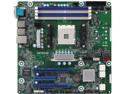
AsRock Rack X470D4U Micro ATX Server Motherboard AM4 Ryzen & Ryzen 7nm PGA1331 AMD X470
Pros: Great specs on paper
Cons: Spacing between CPU socket and RAM slots is un-commonly close, making it extremely difficult to find a cooler that will fit while allowing usage of all 4 RAM slots. Even coolers that guarantee compatibility such as most of those from Noctua will have difficulty fitting. I've seen people recommend Noctua NH-U12S, but many pictures on forums show that the mounting bracket sits over the RAM slot and is within 1mm of touching the chips on a RAM stick. If you have RAM with a heastink, don't even bother. It's pretty clear ASRock's engineers weren't paying attention when they designed the layout of this board. Unfortunately, it looks like I'm going to have to do a lot of hunting to find a cooler that will fit and not interfere with the RAM slots and hope I won't have to break out the dremel
Overall Review: Do not buy this board if you expect to use all 4 RAM slots. Edit: I've found Noctua's NH-C14S fits without blocking RAM slots. Note though that the cooler overhangs the top of the board by maybe 1/4 inch, so if you go with this cooler double check your clearances. Also, people should not be excusing the lack of compatibility due to 'server rack' compatibility. I've bought a bunch of Supermicro (Intel) boards over the years and this is my second ASRock Rack board (I got the X399D8A-2T about a year or so ago). Server rack mobos change the orientation for airflow purposes (front to back), they don't change the available board space. Consider that a *stock* cooler for a 3600 (Wraith STEALTH) will not fit on this board without blocking a RAM slot and further consider that the successor board the X570D4U does not have this problem. If it wasn't for the X570D4U's limited physical PCIe configuration (it has physical x16, x1, x8 whereas this board has x16, x8, x16), I would have gone with that board in a heartbeat (fyi, this board seems to sacrifice M.2 lanes for more PCIe slot lanes).
1/3/2021See more detail
The Gold Standard for Prosumer Wireless

Ubiquiti Networks AC Pro (UAP-AC-PRO) Access Point
Pros: At this point in time, a lot of people already know of how well, Ubiquiti's UniFi lineup is for wireless. I've setup multiple installs of their wifi components and it usually works flawlessly and provides a number of features you'd never get with regular consumer level products
Cons: The UniFi system requiring a controller is a double-edged sword in that you need something to configure everything. This is the only real 'con' I can think of using this AP
Overall Review: For anyone looking to deploy a more complete wireless solution, UniFi is probably the best you could choose. I would not say this is meant for the layman though and should only really be deployed by enthusiasts or small/medium businesses. If you're looking to deploy a plug and play home setup, I'd recommend looking at Ubiquiti's Amplifi line or similar ones from competitors (Google Wifi, Netgear Orbi, Eero, etc).
11/2/2019See more detail
Form over Function
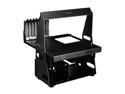
LIAN LI PC-T60B Black Aluminum ATX / Micro-ATX TEST BENCH Computer Case
Pros: In typical Lian Li fashion the case is made of entirely aluminum and does look amazing
Cons: Design, while it looks cool is impractical. Rear leg is an odd choice since you can't tilt the bench back and worse, you can't reach the psu screws to swap out a psu when the leg is installed. Case has holes for usb ports, but doesn't come with one (it's an optional accessory). The 5.25 and 2.5 bays require pre-installation, removal of these or swapping the installed drives would require a considerable amount of disassembly of the case. No or minimal holes for routing cables around The instructions are pretty bad, it's not impossible or difficult to figure out but you'll probably be staring at the pictures in the instructions for a while. While the handle is nice in being able to carry or move the case, it slightly gets in the way of motherboard installation
Overall Review: My old test bench (made of acrylic) broke when I dropped something on it, so I needed something to replace it and found this was on sale. The point of this case is to be a test bench, which means it should be easy to access and swap out different components, in this regard lian li just straight up fails, most components require some disassembly of the case to replace the part. The psu for example, the two right screws (from the back) cannot be accessed when the rear support leg is installed, requiring removal of said leg to swap out the psu. It's pretty clear when lian li was designing this they were aiming on making a stylish test bench instead of a useful one. Edit (11/2019): For anyone looking to buy this case, as far as I can tell, the I/O add-on has been discontinued -- take that into consideration when looking at this case
11/2/2019See more detail
Adequate Case, Overpriced
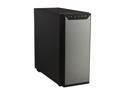
Antec P280 Black Aluminum / Steel Super Mid Tower Computer Case
Pros: Large grommets and backside opening for cable routing. Uniform coloring (all black). Easily accessible/removable filters for cleaning. Dedicated slots for two SSDs Good space for HDDs USB 3.0 ports Strong magnet to hold the front cover
Cons: Somewhat cheap construction. Coming from the P182 this case felt and is definitely cheaper in design and construction than what Antec used to make. Case feet are cheaply made and can easily fall off or break. Front door feels cheap. Power and reset buttons are oddly placed on top away from front panel. Drive cage is not removable. 120mm fans instead of 140 (given the current market of cases and this price, it's a valid gripe). Sound dampening compared to the Antec P180 series is horrible, but those cases were built like tanks. Recently, my audio jacks broke (I was plugging in a pair of headphones and they just fell into the case).
Overall Review: I bought this case in 2012, iirc. At the time it was a pretty good case, but it has not aged well at all compared to other offerings out there. Other brands have popped up and become popular such as NZXT and Fractal that offer a **much** better value at lower price points. Unless you can buy this case for cheaper than a similar Fractal, NZXT, CM, etc (and unless you're enamored with the design), I'd recommend against getting this case.
9/29/2015See more detail