
Your Browsing History


James W.
Joined on 09/28/04
0
0
product reviews
- 8
Great drive
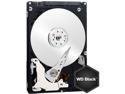
Western Digital Scorpio Black WD1600BEKT 160GB 7200 RPM 16MB Cache SATA 3.0Gb/s 2.5" Internal Notebook Hard Drive Bare Drive
Pros: Excellent drive. Never have had a problem with one yet. I order these drives constantly to replace in customers laptops (seems like OEMs like to use Hitachi and Maxtor, which always DIE). Have not had one die on me yet. They are extremely fast, quiet, and stable.
Cons: When people's hard drives fail, they want their computer back up and running instantly. Also, it seems like laptops always crash on Fridays, which means nothing is shipping till Monday. Anyways, the major con is that we have to wait!
Overall Review: Shipping jokes aside, this is a quality product at an excellent price provided through the best reseller of computer and technology hardware in the world (Newegg).
12/16/2009See more detail
Terrible
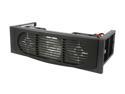
StarTech FANDRIVE2BK Plastic 5.25" Drive Bay Hard Drive Cooler -2 Fans
Pros: It's made by Star Tech, which are usually decent for what you pay.
Cons: Flimsy, a hard drive mount needs to be sturdy so that it can suppress the vibration of the hard drive. There is no instruction booklet in the case or on Star Tech's website and it is not as straight forward as you would think... also loud.
Overall Review: Over half the comments on here are of people who "jimmy rigged" this product to get it to work.
12/22/2010See more detail
Worth The Price
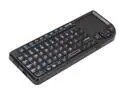
VisionTek Candyboard 900319 Black 69 Normal Keys USB RF Wireless Keyboard
Pros: Works as intended. Perfect size. Recharges from standard USB cable (included). Must have for anyone who is using their computer from the couch (via television display.)
Cons: The remote was unable to communicate with the USB RF receiver when it was plugged in the back of the computer. To be fair, the computer is a large solid aluminum box and my television stand is also metal. I believe there was too much interference.
Overall Review: Because I do not have USB ports on the front of my computer, I had to string a USB extension cable (Male A to Female A) behind the television and mount the receiver on the wall above the display. Keep this in mind if you have a similar setup so that you can order the appropriate cable.
8/15/2012See more detail
Home Theater PC
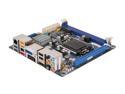
Intel BOXDH77DF LGA 1155 Intel H77 HDMI USB 3.0 Mini ITX Intel Motherboard
Pros: Windows 7 Pro x64 working perfectly on this. Extremely fast. My television now has a computer more powerful than the rest of the machines in my house put together.
Cons: Why only two SATA3 ports? Why aren't all of the ports SATA3? And why only 4 ports? I had to buy a Mini PCIe 2 port SATA II controller in order to house all of my hard drives. Unfortunately, I have 6 SATA III capable drives, but only 2 of them are benefiting from SATA III speed.
Overall Review: The SATA problem is universal across all ITX motherboards. The audio chip on this motherboard is the same as the more expensive ITX motherboards which claim to have all kinds of fancy surround sound nonsense once you read the fine print. If you're building ITX, this is the motherboard that you want.
8/10/2012See more detail
Almost Perfect
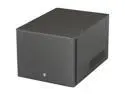
Fractal Design Array R2 Black Aluminum Mini-ITX Desktop Computer Case 300W SFX PSU Power Supply
Pros: I built a Home Theater PC using this case and it is perfect. From my couch, it is completely silent. I also love how much room is inside of the case to store so many hard drives while still keeping a small footprint.
Cons: 2.5inch drive mount is unusable as it comes. Pictures and explanation: http://www.flickr.com/photos/mrwatt/7751819826/in/set-72157630999273894/ This is a huge oversight for the manufacturer. I purchased this case BECAUSE I intended to use 6 hard drives and 1 SSD, but was forced to mount the SSD along with the hard drives, losing valuable space. This problem could potentially be resolved with extra long screws and a spacer, which I may fabricate on my own eventually. Another annoyance with this case is the extremely bright blue LED on the front. If you are using this as a media center computer, the light will be pointed straight at you. The best solution I found was to cut an octagon shaped piece of double sided tape, affix it to the power button, and then attach an American dime to the front of that. No one even notices that it is't supposed to look that way!
Overall Review: If you're going to use this case, I suggest getting an ITX motherboard with a mini PCI-E slot. Purchase an SSD for it and use that as your boot drive instead of bothering with a 2.5" SSD. If you do get an SSD and need all of your 3.5" bays open for hard drives, you'll need to pickup extra long laptop screws and some kind of washers/spacers to give the SSD a 2-5mm lift. I give this 4/5 eggs, despite the huge manufacturing problem, because this case is otherwise perfect. Furthermore, both of my problems had solutions. If the manufacturer is reading this, I'd bump my review to 5/5 if your power button had a dimmer setting and you included the correct screws/spacers for mounting an SSD. It's just frustrating to spend the money on one of the most expensive cases to have problems like this.
8/10/2012See more detail
Designer is an idiot
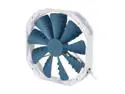
Phanteks PH-F140TS_BL 140mm Case Fan
Pros: If this thing was being graded on appearance alone, it would get 5 eggs.
Cons: As I said before, they focused on appearance. Unfortunately, appearance is worthless if the product doesn't work. The designer, in an attempt to make this look neat, cut off the corners of the fan. So, instead of the screw holes being where they are suppose to be (in each corner), they are in much further. So, if you are replacing a standard 140mm fan, which will obviously be mounted via standard screw holes in the corners, you will NOT be able to use this fan. I also looked through the box to find an adapter or bracket, but one was not provided. These should ALL be removed from NewEgg until the manufacturer corrects this problem.
Overall Review: Didn't bother going through RMA over $20.
8/10/2012See more detail