
Your Browsing History
 Holiday Shipping Details & Extended Holiday Returns Holiday Shipping Details & Extended Holiday Returns

Joined on 09/25/07
Best Bang for the Buck
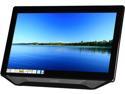
Pros: Beautiful, bright touchscreen monitor for the same cost as a non touchscreen monitor. I don't see any of the sparkly coloring I've noticed on older touchscreens. Windows 7 loaded the touchscreen drivers instantly. Adequate speaker sound, but at least they included speakers. Most monitors don't. This monitor uses a wall wart to provide 12 volts to the monitor. Therefore, it can be used as a 12 volt monitor on a boat or RV with the right cord. With a DVI to HDMI cable, this may be a cheaper alternative than purchasing the HDMI version of this monitor. It has a more stable stance than most monitors using a stand.
Cons: Wide frame around screen, rear facing menu buttons. Touchscreen did not work on an older XP computer (no surprise).
Overall Review: Reviewers that say this monitor is not clear for text probably don't have it set for it's optimum resolution (1920x1080). Can you drive this high resolution with your computer? Every computer I connected except for a small Asus 701 netbook was able to reach the optimum resolution. I decided to purchase this monitor even after reading the poor reviews here because I had good luck with a Hannespree TV in the past. I'm glad I did. Also, reviewers who are complaining about the poor sound quality from the speakers seem to expect more than I do from monitor speakers. Hey, I'm just happy to have speakers!
You Need 3rd Party Software
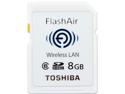
Pros: Works well at downloading pictures from your camera to your PC and is easy to set up. Uses your internet browser to download pictures. However, with a PC you have to save each picture individually unless you get a 3rd party software program not mentioned by Toshiba.
Cons: Will not bulk save all of your pictures to a PC unless you use an outside program. Go to flashair-developers.com and download "Snowy" to accomplish this. If Toshiba included this free program, I would have given the product 5 stars.
Overall Review: Nice product. Never fails to connect to my PC (Windows 7). Set it up to have a 1 minute sleep time (just enough to connect). This will save your camera battery. With the above Snowy software, you turn on your camera, connect your PC to the camera WIFI, start Snowy, download your pictures. Simple and quick.
This Thing Rocks!
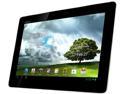
Pros: Bright, white screen with ultra bright sunlight setting if you need it. Extraordinarily sharp and clear. Great as a reader. Three times faster than my old TF101 Asus. Automatically updates to Jelly Bean 4.2.1 shortly after you turn it on. Although refurbished, it came without a mark on it. Came with a true Asus charger, not a generic.
Cons: Slick back makes it hard to hold onto. Needs a cover for safety. Jelly Bean update takes the tablet up to Build 10.6.1.14.10 and makes it harder to root. Had to downgrade to 10.6.1.14.08 and then used Motochopper to root.
Overall Review: Purchased this tablet to update my older TF101, which still works fine. This tablet is lighter, faster, smaller and has a much better screen. It looks like it is brand new.
A Mini Tablet When You Need It
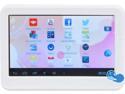
Pros: Runs all the Apps that I've thrown at it including all of my favorites that I run on my 10" Asus Transformer. Has a great selection on Google Play too. Fairly fast with most programs. Small screen is a plus if you need a small reader for your Kindle books in the doctor's office or if you're waiting for a plane. Lightweight, unobtrusive, fits easily in a shirt pocket. Plays videos extremely well.
Cons: Screen resolution is not the greatest. Seems to be fine for videos but is just adequate for reading books, news items or using programs. As every other reviewer has mentioned, the battery life is its "Achilles Heel". With barely an hour and a half with the screen at full brightness, make sure you are near the charging cable. Bluetooth or GPS would be a nice addition.
Overall Review: Well worth the money if you need a small form factor. The strength of the unit is in its small size.
Inexpensive Scan Tool
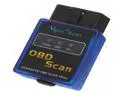
Pros: In addition to reading trouble codes, the software also provides 8 pages of engine sensor data. More information than the $50 scanners from Harbor Freight.
Cons: Must have a Windows computer/laptop with bluetooth capability to use the unit out of the box. Provided no software on the included CD disk for Palm, PDA or smartphone as indicated in the ad. Only for Windows. I was able to download "Torque Lite" to my android tablet from the Google Play (Market). This is a free generic OBD-II reader program that seems to work with the unit. The provided Windows software was better, however.
Overall Review: Simple straight forward software. However no information provided on how to use it.
These Rock!
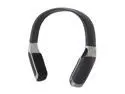
Pros: Clean sound with decent bass and excellent highs, good volume, good distance from the transmitter before breaking up ( about 30 ft.). This is a quality product with a quality feel.
Cons: Tend to fall off your head when you look down.
Overall Review: I have excellent speakers in a poor listening room. When I want to really "rock" I put these things on and turn up the volume instead of my room speakers. The neighbors don't complain and I can enjoy loud music without the disadvantages.
Good Transaction
Nicely packed. Shipment took 17 days from China. Did not provide the software mentioned in the ad (Palm, Smartphone, Mobile). Product works well. Good price.