
Your Browsing History
 Holiday Shipping Details & Extended Holiday Returns Holiday Shipping Details & Extended Holiday Returns

Joined on 02/14/04


Amazing VR experience
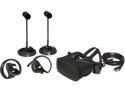
Pros: - Intuitive controls. Seeing your virtual hands on screen feels like using your real hands. - Tracking system is smooth. - Plenty of games. There's a decent selection on Oculus' store, and even more in Steam. You can even use VorpX to play existing games that were not designed for VR. - The guardian system is a nice safety feature. You can establish your play area ahead of time and then in game, you can look down to see lines that indicate your physical play area. This is a nice way to ensure that you don't walk too far or end up smashing something around you. - Audio headphones included which makes the experience nicer. I don't have to put on separate headphones. - Free games included - Easy to setup - Graphics quality is overall pretty nice, however, there is noticeable chromatic aberration.
Cons: - This is probably a problem with all VR headsets, but one con is that it can make your face feel warm after a while and moisture from your face can cause condensation buildup on the lens. - The very first time I started it up, I didn't have any audio, even though my playback device was set to the Rift headset. A restart of my machine fixed the problem. - The Oculus app along with games you download cannot be installed onto a partition formatted with the ReFS filesystem. I have a SSD formatted with NTFS and a RAID array that I use for storage formatted with ReFS. I had to use up my SSD drive that doesn't have as much storage space. - Not a con of this system, but some games can be uncomfortable to play and cause motion sickness or dizziness. - There is no way to adjust the focus. You can adjust the spacing between eyes, but not the focus. I have the option to adjust focus on my Gear VR, but not on the Oculus. Surprisingly, this hasn't been much of an issue as long as I make sure that the headset sits properly on my face.
Overall Review: I also have a Google Cardboard set along with Gear VR so I have experience with VR. The Gear VR is pretty nice but I do like the Oculus Rift much better. The tracking system along with the controls makes it more enjoyable, and of course, the Oculus Rift is connected to a fast PC with lots of storage compared to a mobile device. I'm using this on a really old CPU and motherboard and Oculus keeps showing a warning that my PC doesn't meet the specs, but it is still working fine. PC Specs: Graphics: NVIDIA GeForce GTX 1080 CPU: Intel Core i7 980X RAM: 24 GB DDR3 Motherboard: ASUS P6T7 WS SuperComputer
Having some problems after a year
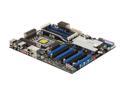
Pros: Plenty of PCI-e slots, well constructed, and easy to overclock with. There are many pros to this board that you can read about in the specs and other reviews, so I won't repeat them.
Cons: After owning this board for a little less than a year, I'm now experiencing some issues. Worked really great initially. For one, the reset functionality no longer works. My reset button physically works as I swapped the power and reset connectors and confirmed that the reset button works. After a little while of using my computer, my system will start to lock up, applications will stop responding. Have to perform a power down and turn back on to use it again. No legacy slots (PCI-e only, no PCI), which meant I had to buy another sound card, no IDE ports either. Great for moving forward I suppose, so maybe not a con. ASUS doesn't do a good job of keeping the BIOS and drivers up to date on their website. Really wish it had an EFI BIOS. The fins on the heat-pipes would work great if you use an OEM CPU fan since it would blow air through it, but for watercooling, they should include the option to use an additional fan for the fins.
Overall Review: Overall, I've been happy with this board's performance, but disappointed that I'm having problems with it now. Some of the highest 3D mark scores were obtained using this board.
New drive?
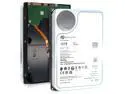
Pros: - 0 power-on hours when I got these, perhaps these were brand new and not refurbished? - Compatible with QNAP NAS - Good performance for a mechanical drive
Overall Review: I bought a couple of these at a great price as refurbished. However, when I look at the power on hours, it only adds up to the amount of time that I have been using it for. I am pleasantly surprised. They are working great in my QNAP NAS. At the time of this writing, they are now out of stock which makes me wish I had purchased a couple more.
So far so good. Read speeds are as advertised
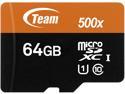
Pros: - Get 80+ MB/s read speeds
Cons: - Slower write speeds of around 40 MB/s
Overall Review: - So far this microSDXC card is holding up well. After reading the other reviews here, I'm a bit hesitant to trust this with any important data so this will be used to run some non-critical Raspberry Pi computers. I mostly use my Raspberry Pi units as servers for 3D printers which allow me to operate and monitor them remotely.
Great value motherboard
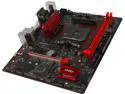
Pros: - Works well - BIOS is easy to setup
Cons: - I wish the pin connectors were marked on the motherboard (like the HDD LED, Power LED, power sw, etc), but the manual makes this clear
Overall Review: I bought this to build my daughter's first computer. She'll be using it for some light gaming, watching videos and school work. I've paired it with a AMD RYZEN 5 1500X CPU, and Radeon RX 550 graphics card. This setup is working great for her and I'm pretty pleased with the performance. - If you read up on the AMD CPUs, you'll see that only the AMD "APUs" will support the integrated graphics capability. If you want to put a Ryzen in here, you'll need a separate graphics card.
Great case that was well thought out
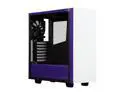
Pros: - Great cable management - Filtered intake - Comes with 2 quiet case fans - Nice clean design - The purple HDD LED is a nice touch. - USB ports and audio ports on the top are easily accessible for a floor mounted PC. If you are putting this on top of a desk however, this may be a bit of a nuisance.
Cons: - If you want to add/remove an expansion card (eg PCIe card), there's a small panel you have to remove first. Not a huge deal as you just have to loosen two screws, but a little annoying. This seems like it was an intentional design so I'm sure there's a good reason for it. - This case does not come with screws to mount a SSD, and neither did the Samsung SSD. You'll need to make sure you pick up some screws to secure your SSD or HDD. - No reset button
Overall Review: This is the 2nd NZXT S340 case I've purchased. I bought one for my son a year ago, and now the White/Purple one for my daughter. I've built many PCs for myself and for other people since the early 2000's and I have seen how much cases have improved over time. This case is no exception as they provide many convenient places to run your wires and easily hide them. This case offers great value and doesn't sacrifice quality.
Sold counterfeit product
Speed Shop sold a counterfeit product. The charger didn't use the typical transformer that the Battery Tender normally uses, but to fill in the missing weight, they actually used form-molded cement to fill in the space in order to add more weight. For it being a counterfeit product, it did actually work, and Speed Shop did send it out in a timely manner, however I'm still not happy that it was not a genuine product. Fortunately Deltran (the manufacturer) was made aware of this and was nice to send out genuine replacements free of charge.