
Your Browsing History
 Holiday Shipping Details & Extended Holiday Returns Holiday Shipping Details & Extended Holiday Returns

Joined on 06/19/06
I voided a warranty so you don't have to!
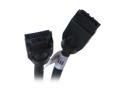
Pros: The cable length is nice and flexible, and the connectors (and clips) are a good Goldilocks fit.
Cons: Chubby. There's a bulge at the cable-end (not connector-end) of each connector fitting, which makes it hard to fit two of these next to each other in adjacent motherboard SATA ports. This can be a major problem running RAID. I'm installing on a GB X58A-UD3R, and I squeezed them in but both were bent off-center due to the bulge. That's not cool, you could break something. It's not a ferrite bead, tho it kinda looks like one.
Overall Review: So, I had bought extra. Good thing. Having a couple extra meant it wouldn't ruin my day to cut into one to see about that bulge. It's just plastic. No ferrite bead, no shielding, no conductors of any kind in that bulge. I found this out by shaving it down with an X-acto hobby knife. I shaved it down plenty far enough to have no more fit conflicts, and exposed nothing of consequence. One caveat: It's possible that this design "bug" is a "feature" in order to keep people from stacking them too close, and thereby causing cross-talk. I believe I may be having cross-talk issues as well, no matter what cables I use, so I'm bodging up some hobo shielding with aluminum and electrical tapes. I thought these were shielded, but I may have been mistaken. Hard to tell.
As advertized
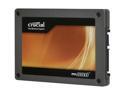
Pros: I couldn't be happier with the speed. It's been a long time now (since installing this drive) since I was bothered by having to restart Windows. Now if there's an update, or I have to mess with drivers, I just restart. Why the heck not?- it'll only be a few seconds. With my Win7 Pro, after it gets through POST (which the drive cannot speed up, of course,) I get the Starting Windows splash, and about the time the swirly colors finish coming together- BAM! desktop. About 9 seconds, after the handoff to the boot drive, for me to have a usable desktop. Which means it takes about 1/3rd the time of the MoBo initialization. I gotta get a faster booting MoBo to keep up with the SSD! Windows Experience Index sub-score: 7.7. I'm loving it! ...mostly.
Cons: The only two things that knock this drive down a peg are worth half an egg each: 1.) The price, like any decent SSD, is still too high for good value. When drives are down to about one dollar per GB, I'm likely to replace it with a bigger model, because... 2.) It's too small. I knew what I was getting into when I bought it, and I pulled many tricks to get my Win7 install down to an absolute 10.5GB (ask me how before calling bull, please,) and yet it still fills up way to dang fast with today's multi-GB game titles and the ever-growing winsxs folder. *sigh* Still bloody fast tho!
Overall Review: Flash its firmware to ver. 0006. I gambled and did this on an existing installation and it worked, but YMMV. Better to do before OS install. Turn off LPM in the... well. It's dangerous in there, research this factor regarding SSDs. Sometimes this drive doesn't play nice with IRST and some 3rd party SATA controllers. If this applies, uninstall IRST. Like all SSDs, do not run this in RAID-0 without a $Fancy$ controller, as you loose TRIM support. With lots of RAM, maximize space by moving a big Page File to another drive, and only leave a small token PF on this OS drive. Unless you need it (laptops,) hard-disable Hibernation. Turning it off in Power Management still leaves the Hiberfil.sys. There are instructions at MS' site. GIYF. A review that described the perils of installing under IDE and trying to migrate to AHCI is only partly right. Manually install the Windows AHCI driver before switching BIOS modes, and you should be golden.
Mixed bag
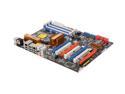
Pros: This dood advised the owner to purchase from NewEgg, and I then built the system for him. Slot Spacing Quad-SLI support Homegrown super-computer potential, thanks to space and support for up to 3 Tesla GPU compute boards. No interference between the RAM slots and the vid card, and all the drive headers are turned towards the edge, so big graphics cards don't hit those either. Flexible connection headers all over the place: P4 power can be 4-pin or 8; Main power can be either 20- or 24-pin; CPU fan header handles both 3- and 4-pin; and there's something else that escapes memory.
Cons: Floppy header, if you need it, like for RAID in XP, is in a dumb place near the back-bottom corner. ('Back' meaning relative to the whole case.) No LED on the mobo itself to indicate power. The full manual is on the disk, not hard-copy, so you'd better be familiar with rigging a BIOS by yourself before first boot, or have a second computer nearby. Alone, those are "quirks". But the board lost an egg because of the following: A constellation of wee circuit bits inhabits the space on the back side where an Intel-standard back plate might have to rest for a big cooler. They effectively block such a plate from sitting level on the board. They can be seen in NewEgg's own pic just to the bottom-right of the built in metal plate behind the socket. Also, since this was for a performance build with 4x HDD's in RAID, I encountered a resource issue with the ATA channels. See in "Other thoughts" at the ##.
Overall Review: Voltage droop issues have been somewhat addressed on the newest revisions, and/or with a BIOS update. The various 'easy' or 'automatic' performance settings are inscrutable, but I had no intention of overclocking. ## With all SATA ports populated, (4 HDDs, 1 optical combo drive, and 1 eSATA hooked up,) the IDE port was inactive. A supplemental storage HDD was attached there, and was never seen by the system. It took quite a bit of research and one wild guess to discover that the optical drive occupied all the logical space for IDE, even tho it's attached by SATA, as it runs in IDE mode, thereby overriding the IDE channel's ability to see another drive on the regular old IDE connector. This was very frustrating, and not referred to anywhere in the documentation. Almost gave only 3 eggs, not sure if I'm being generous with 4.
Impressive, but...
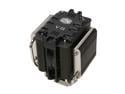
Pros: Cooling performance is very good. Nothing special for it's tier, but performs as desired. Not terribly noisy, unless the BIOS can't figure out how to control it. The speed dial back plate is a nice touch tho.
Cons: Installation is a PITA. Mechanically it's not so bad, but accounting for the thermal paste, it's really hard to get it lined up right on the mobo, hold it steady while you flip it all (or reach around the case), and then access the back of the mobo to secure it. You might think an enclosure with a cutout behind the mobo would be a help, but it leads you down a false sense of hope to put the mobo in first. It turns into a two-person job that way. It's much easier, tho still dodgy, to install CPU and this cooler on the mobo before it all goes in the box, cutout or no. The fan speed dial is a bit superfluous given that a decent motherboard will control the speed much better, and slower/quieter too. It's... how do I put this... BIG. Caveat emptor.
Overall Review: Gimicky but good. I got this for a client's custom build at his request, otherwise it's more show than I would pay for, given the wealth of cheaper, simpler, sometimes better options. I waffled between 3 eggs and 4, due to the installation malarkey, but once in it does what it sez on the tin, so I'm edging it for performance.