here!
here!
I’m your shopping assistant for PC builds, upgrades, and everything tech.
Got questions? Ask away!
Start a conversation
here!
I’m your shopping assistant for PC builds, upgrades, and everything tech.
Got questions? Ask away!
Start a conversation
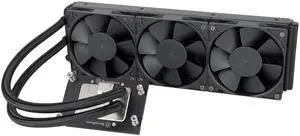
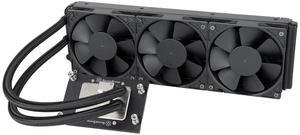
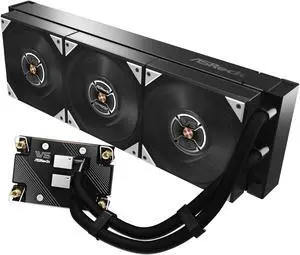

Engineers, designers, and professionals seeking efficient cooling for high-performance workstations will find a range of specialized fans and cooling systems here. This collection supports maintaining optimal temperatures to ensure stability and longevity of your critical computing hardware.
For workstation fans, static pressure is one of the most critical technical aspects since these fans often need to push air through tight fin arrays of heatsinks or dense radiators. Unlike airflow measured in cubic feet per minute (CFM), static pressure ensures the air forcefully moves through resistance without losing velocity, which is vital for effective cooling of high-performance CPUs and GPUs under sustained loads.
Fans rated with higher static pressure excel at maintaining consistent cooling in workstations where cooling shrouds, heat pipes, or liquid cooling radiators restrict airflow paths. This is especially important when cooling components like server-grade CPUs or ECC memory modules, where temperature stability directly impacts performance and hardware lifespan.
Professionals building high-end workstation rigs often integrate cutting-edge cooling solutions to manage thermal output under multi-threaded, intensive workloads. Leveraging the latest technologies such as liquid cooling loops paired with high static pressure fans can mitigate thermal throttling and maintain peak performance during long render times or complex simulations. For those working in AI, consider exploring the AI Workstation options that feature tailored cooling designs capable of handling the intense heat generated by powerful AI GPUs. Additionally, combining these fans with precision-engineered components listed under Workstation Components can help maintain system stability and maximize cooling efficiency.
Newegg shopping tip: When choosing workstation fans and cooling solutions, focus on airflow capacity (CFM) and noise levels to balance performance with quiet operation. Also, check compatibility with your case size and mounting options to ensure a proper fit.
Precision-engineered parts optimized for server-grade CPUs and ECC memory ensure stable, efficient thermal management under heavy multi-threaded workloads.
Harness next-gen liquid cooling and advanced airflow tech tailored for AI GPUs, keeping your neural nets running at peak performance without throttling.
Refine your search with filters targeting fan speed, noise levels, and cooling tech to find the perfect balance for your workstation’s unique thermal demands.
If you’re new to workstation cooling, the key is understanding that these fans and systems are designed to handle intense, prolonged workloads without overheating. Unlike typical PC fans, workstation cooling solutions prioritize reliability and quiet performance under heavy processing tasks like 3D rendering or scientific simulations. To begin, focus on cooling products that match the size and airflow requirements of your existing setup. For more tailored component options, check out Workstation Components, where you can find fans and coolers engineered specifically for these demanding environments.
AI workstations push GPUs and CPUs to their limits, generating exceptional heat that requires advanced cooling strategies. Many AI professionals opt for liquid cooling systems paired with high-performance fans to manage the thermal load efficiently. These setups avoid thermal throttling and maintain peak processing speeds during long training sessions or model runs. If you’re building or upgrading an AI workstation, consider state-of-the-art liquid coolers and airflow designs that target GPU heat zones. Discover specialized options with AI Workstation cooling gear optimized for these unique demands.
Content creators and designers often juggle resource-heavy software like video editors, CAD programs, and image processors, which can push workstation hardware to its thermal limits. Effective cooling in this scenario improves system longevity and keeps noise levels manageable during long creative sessions. Choosing fans with a balance of quiet operation and strong airflow ensures your workstation runs cool without becoming a distraction. Look for cooling solutions that support modular upgrades and customizable fan curves to better suit your creative workflow’s varying intensity.
Research more: Keeping your workstation cool is key to maintaining steady performance during heavy workloads. Check out Newegg Insider's buying guides for detailed insights on fan types, airflow optimization, and troubleshooting overheating issues before making your choice.
Last Updated: October 2026 | Newegg Workstation Fans and Cooling Buying Guide
Noctua fans are renowned for ultra-quiet operation with stable, efficient airflow which suits silent builds, while Corsair fans tend to offer higher airflow and RGB options but can be louder under heavy loads. It depends on whether you prioritize noise level or cooling power.
Multiple smaller fans usually provide more targeted airflow and better cooling flexibility in tight spots, but a single large fan can move more air quietly if you have enough clearance. For workstations with complex layouts, mixing sizes is often the best strategy.
Fan size depends on your case specifications, but common sizes include 120mm and 140mm. Make sure to check your case’s manual or product page to confirm the fan dimensions it supports.
Proper cooling helps keep critical components like the CPU and GPU running at optimal temperatures, preventing thermal throttling and extending hardware lifespan. Without effective cooling, your system may slow down or even shut off to avoid damage.
Check your workstation’s case specifications to see which fan sizes fit, then choose a fan with an adequate CFM (cubic feet per minute) rating to keep temperatures stable without making too much noise. Higher airflow fans cool better but can be louder.
If you work in a noise-sensitive environment or need concentration, quieter fans are a good investment, even if they cost extra. Otherwise, high-performance but louder fans might be better for max cooling on a budget.
Check for reviews that mention long-term use without failure, noise levels, and consistent airflow. Brands known for durable bearings and quality materials usually hold up better in demanding workstations.
Many users report noise, reduced airflow, or fans failing after heavy use. Look for comments about overheating prevention, fan speed control, and ease of replacement to make sure you're getting a fan that won't give you trouble down the line.
Make sure the fan is securely mounted and oriented to push air in the direction your case’s airflow is designed for—usually front to back or bottom to top. Also, keep cables tidy and away from the fan blades to reduce noise and improve efficiency.
You can definitely run several fans as long as your power supply and motherboard headers can handle the load. Matching fan speeds and airflow directions helps prevent turbulence and keeps your workstation running cooler.