• $30.39
  • Free 30-day Returns
  • Sold by Direct from manufacturerA-Tech
    Top Rated
    4.7 (356 seller ratings)

    Shipped by Direct from manufacturerA-Tech

    Price alert
    Newegg PC Builder
    Shop it at NeweggBusiness.

    Meet Your Seller

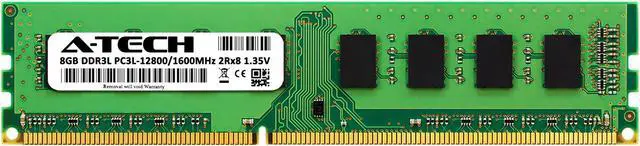
    8GB RAM Replacement for Micron MT16KTF1G64AZ-1G6, MT16KTF1G64AZ-1G6E1, MT16KTF1G64AZ-1G6P1 | DDR3 1600MHz PC3L-12800 DIMM 2Rx8 Desktop Memory

    • 8GB ( 1x 8GB Module ) | DDR3 1600 MHz ( PC3-12800 ) | DDR3 DIMM ( 240-Pin ) | Non-ECC UDIMM ( Unbuffered DIMM ) | 1.35V - DDR3 Low Voltage
    • Compatible Replacement for Micron MT16KTF1G64AZ-1G6, MT16KTF1G64AZ-1G6E1, MT16KTF1G64AZ-1G6P1
    • High performance Memory RAM upgrade designed for Desktop Computers
    • All modules undergo quality assurance testing to ensure dependable and reliable performance | Please verify the supported memory (RAM) specifications of your system prior to purchase to ensure compatibility
    • A-Tech provides a Lifetime Warranty for all orders & offers complimentary United States based Tech Support before, during, & after your purchase
    🔥Don't forget your OS, we have Windows 11 OEM, Download and USB versions available
    +
    +
    Overview
    Specs
    Reviews

    Any questions? Ask CelesteSM will help you find out quickly.

    An A-Tech Memory (RAM) upgrade is an easy, quick way to boost your system's performance by speeding up loading times, improving system responsiveness, and increasing your system's ability to handle higher workloads. Take on more and multitask with ease with a simple and affordable A-Tech Memory upgrade!

    Compatible Memory Module Replacement for Micron:
    MT16KTF1G64AZ-1G6
    MT16KTF1G64AZ-1G6E1
    MT16KTF1G64AZ-1G6P1


    Memory Specs
    Memory Size: 8 GB ( 1 x 8 GB Module )
    Memory Type: DDR3
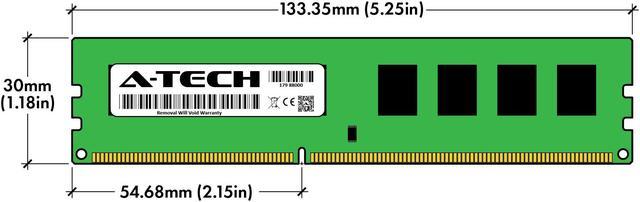
    Form Factor: DIMM ( 240 Pin )
    Speed: DDR3 1600 MHz ( PC3-12800 )
    ECC Type: Non-ECC UDIMM ( Unbuffered DIMM )
    Voltage: 1.35V

    Ensured Reliability
    All A-Tech Memory products are rigorously tested to ensure that your memory meets our stringent quality and performance standards.

    Lifetime Warranty
    Purchase with confidence knowing that all A-Tech orders are backed with our Lifetime Warranty.

    US Based Technical Support
    Need help? Have questions? Our 5 star United States based support team is here to help before, during, and after your purchase to make sure you are completely satisfied with your A-Tech Memory!

    Warranty & Returns

    Warranty, Returns, And Additional Information

    Warranty

    • Please contact the Seller directly for warranty information. Warranty information may also be found on the Manufacturer's website.
    • CONTACT

    Return Policies

    • Return for refund within: 30 days
    • Return for replacement within: 30 days
    • This item is covered by A-Tech Return Policy

    Manufacturer Contact Info

    LOADING...

    A-Tech 8GB DDR3L-1600 desktop memory is a single 240-pin, non-ECC unbuffered DIMM for compatible desktop PCs, including systems that use the listed Micron memory part numbers; verify your system’s supported RAM before buying.

    Recommended For

    • Owners of a compatible older desktop who need to replace a failed DDR3L 1600 MHz memory module and keep the existing PC in service.
    • Desktop users whose motherboard supports 8GB DDR3L UDIMMs and who want to add memory for everyday work, such as documents, email, and light multitasking.
    • Refurbishers or repair technicians maintaining older DDR3 desktop PCs who need a standard 240-pin, non-ECC, unbuffered module for a system that supports those specifications.
    • Users replacing or matching a Micron MT16KTF1G64AZ-1G6-family module in a desktop whose manufacturer confirms support for the module’s capacity, voltage, rank, and speed.

    Real-World Use Scenarios

    • On a compatible older desktop with limited memory, add this module for everyday office work—such as email, web browsing, and documents. If memory pressure is the slowdown, having more RAM available may make switching between those tasks smoother; the result also depends on the PC’s processor and storage.
    • For a DDR3 desktop used mainly for browsing and email, use the module to increase available memory when the system is running short. This may help keep browser tabs and everyday apps usable together, but it will not fix slow internet, an aging processor, or other causes of sluggishness.
    • On an older desktop used to watch streams or YouTube while browsing, adding memory may reduce slowdowns from having several apps open—especially when the current RAM is nearly full. It does not guarantee smoother video if the processor, graphics, or network connection is the limiting factor.
    • When keeping a compatible DDR3 desktop in service on a budget, use this module as a memory upgrade for light daily tasks rather than as a fix for every performance problem. Community reports describe older PCs feeling somewhat smoother after adding RAM, while noting that an SSD or a newer system may matter more when storage or processor performance is the bottleneck.