




 here!
I’m your shopping assistant for PC builds, upgrades, and everything tech.
Got questions? Ask away!
Start a conversation
here!
I’m your shopping assistant for PC builds, upgrades, and everything tech.
Got questions? Ask away!
Start a conversation






Any questions? Ask CelesteSM will help you find out quickly.
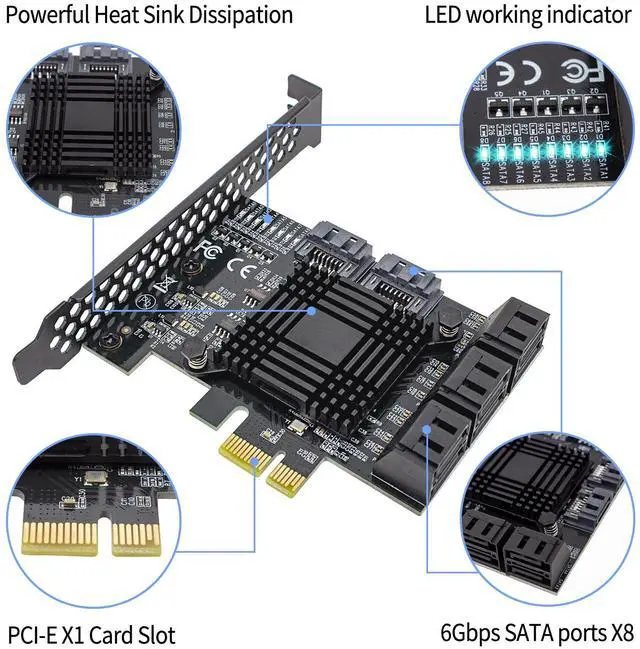
Description: These PCIe use JMB575 and ASM1064 chips to support SATA with 6 Gbit/s and are backward compatible with 1.5 Gbit/s and 3 Gbit/s. Integrated SATA port multiples that support FIS based switching to ensure maximum performance. Advantages: · Plug-in design can be fixed on the chassis, stability and reliability are greatly improved. · PCIe interface direct power supply mode, without external power cable, the mainboard power supply is free from external interference. · Reduce the number of adapters and transmission lines, effectively reduce interface interference and line loss, ensure data reliability, and improve work efficiency. AHCI1(PM Mode): The data stored in each individual hard disk. If several hard disks are inserted, several hard disks will be displayed. SPAN(BIG Mode): In this mode, the capacity of disk is the largest. But if the hard disk is damaged, the data will be lost. RAIDO(FAST Mode): Data will be stored on multiple hard disks to form a whole, the theoretical speed is twice that of a single disk. Installation Notes: 1. Before installing the SATA expansion card, please turn off the computer and disconnect the power supply. 2. Insert the SATA expansion card into the PCIE slot of the host, and then fix it to the chassis with screws. 3. Connect the hard disk with the expansion card through the SATA cable, and insert the hard disk into the SATA power splitter cable for power supply. 4. Reconnect all power cords and start the computer. 5. Install the SATA card driver. Please feel free to contact us if you have any questions about the product.


