



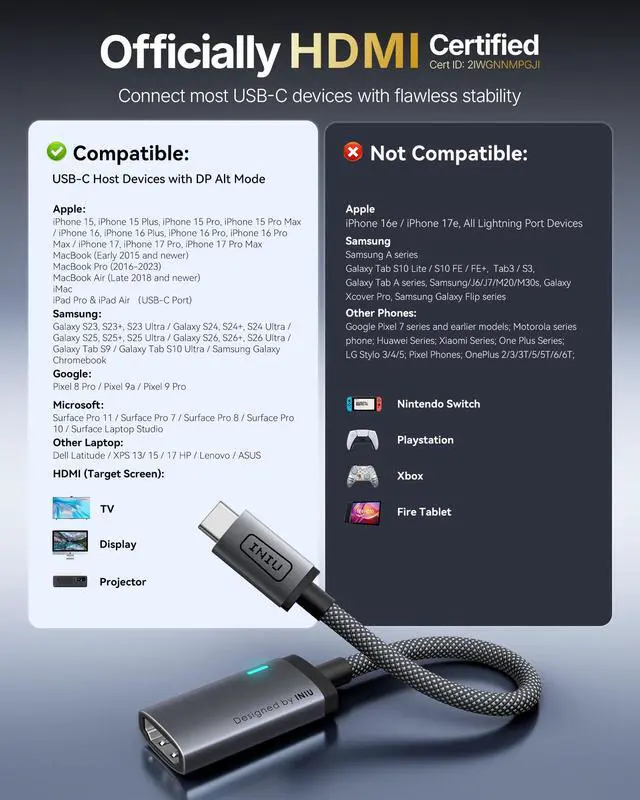


Compatibility List (Partial)
FAQ
What is DP Alt Mode? How do I know if my device supports it? It is a technology that enables video output via USB-C. If your device's official specifications mention "USB-C supports video output," "supports external displays," or "supports DisplayPort over USB-C," then it is compatible with this product.
My device has a USB-C port, but I'm not getting a response when I connect it. Is the product faulty?
Please confirm whether your device's USB-C port supports DisplayPort Alt Mode (DP Alt Mode). Not all USB-C ports support video output. If unsure, please refer to our compatible devices list or contact CS for verification.
Why is there only video but no sound when I connect my phone?
First, please confirm that the connected device (monitor/large screen) is equipped with speakers. Additionally, some Android phones only transmit the screen by default. Check your phone’s settings for "Screen Casting" or "HDMI Audio Output" to enable audio. Older models or systems may not support USB-C audio output.
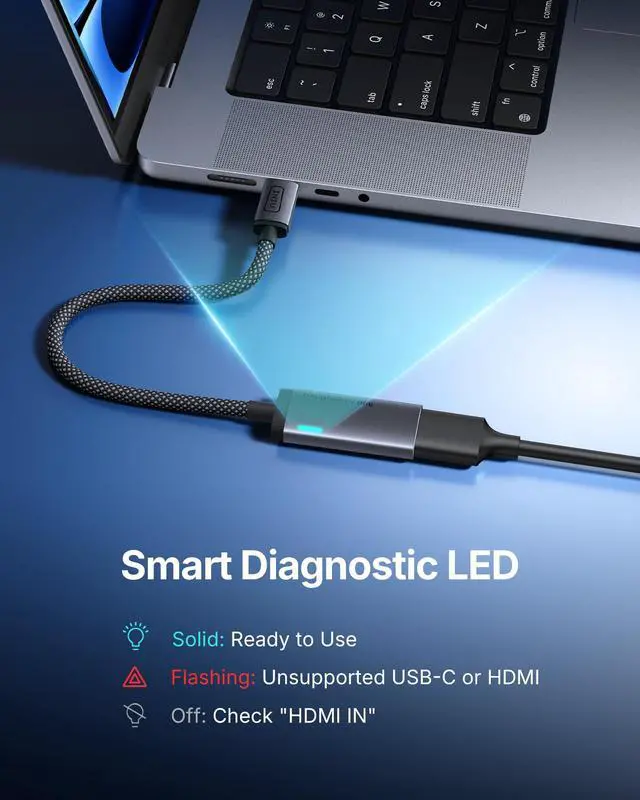
Why does the screen flicker or go black after connecting?
Possible causes: 1. Long (=4m) or low-quality HDMI cable causing signal instability. 2. Incompatible display refresh rate (set to 60Hz). 3. Loose USB-C connection. Fix: Use a shorter cable or re-plug. Contact support if issues persist.
Does this hub support charging?
No, it doesn't support charging.


Compatibility List (Partial)
| ? Note | Compatible only with USB-C devices supporting DisplayPort Alt Mode. |
|---|---|
| ? Apple | iPhone 15, iPhone 15 Plus, iPhone 15 Pro, iPhone 15 Pro Max / iPhone 16, iPhone 16 Plus, iPhone 16 Pro, iPhone 16 Pro Max / iPhone 17, iPhone 17 Pro, iPhone 17 Pro Max / MacBook (Early 2015 and newer), MacBook Pro (2016-2023), MacBook Air (Late 2018 and newer), iMac, iPad Pro / iPad Air |
| ? Samsung & Google | Samsung: Galaxy S23, S23+, S23 Ultra / Galaxy S24, S24+, S24 Ultra / Galaxy S25, S25+, S25 Ultra / Galaxy S26, S26+, S26 Ultra/ Galaxy Tab S9 / Galaxy Tab S10 Ultra / Samsung Galaxy Chromebook | Google: Pixel 8 Pro / Pixel 9a / Pixel 9 Pro |
| ? Microsoft & Dell | Microsoft: Surface Pro 11 / Surface Pro 7 / Surface Pro 8 / Surface Pro 10 / Surface Laptop Studio | Dell: Dell Latitude / XPS 13 / 15 / 17 |
| ? HP | EliteBook 840 G9, 845 G9, 860 G9 / Spectre x360 16t-aa000 / Pavilion Plus 16t-ab100 / ENVY x360 14 (2024) / Chromebook X360 / Pavilion Aero 13 |
| ? Lenovo & ASUS | Lenovo: ThinkPad X1 Carbon Gen 12 / Yoga 770 / ThinkPad E15 / ThinkPad Z13 AMD G1 / ThinkPad X13s Gen1 / Legion Slim 7i (16" Gen8) / ThinkPad P51 | ASUS: Zenbook S 14 OLED / Vivobook S 15 / TUF Gaming FA507NV / Chromebook |
| ? HDMI Screens | HP: ENVY 27-inch UHD, EliteDisplay S340 | Philips: 288P6LJEB, 34-Inch S340 | Samsung: Various models including M70C, Odyssey Neo G9, Odyssey Neo G8 | LG: 27GN950, 27GP950-B, 43UD79-B, 27MU88 | ASUS: ROG Swift OLED PG32UCDP, XG27UQ, MG28UQ, ROG Swift PG32UQXR |
| ? HDMI Screens | Dell: G3223Q, U2723QE, U3818DW, UltraSharp U2419HC | Acer: Predator XB283K, Predator X34 GS | BenQ: EX2710U, SW321C, PD3200U, SW271 | Lenovo: ThinkVision P27pz-30, ThinkVision P32u-10 | Gigabyte: AORUS FO32U2P, G34WQC, M32U |
| ? Phones & Consoles | iPhone 16e, iPhone 17e / Google Pixel 7 series and earlier models / Galaxy Tab S10 Lite, S10 FE, FE+ | Nintendo Switch / PS5 / Xbox |
| ? Laptops | VivoBook L203MA Thin / VivoBook 15 Thin and Light Laptop / ZenBook 13 Slim Laptop / 100e Chromebook 2nd Gen / Ideapad L340 Gaming Laptop / 2-in-1 11.6" Convertible Chromebook Touchscreen Laptop (2020) / 15.6" HD Touchscreen Laptop / 15" FHD Laptop / 14" Touchscreen Home and Business Laptop / Aspire 5 Slim Laptop |
FAQ
What is DP Alt Mode? How do I know if my device supports it? It is a technology that enables video output via USB-C. If your device's official specifications mention "USB-C supports video output," "supports external displays," or "supports DisplayPort over USB-C," then it is compatible with this product.
My device has a USB-C port, but I'm not getting a response when I connect it. Is the product faulty?
Please confirm whether your device's USB-C port supports DisplayPort Alt Mode (DP Alt Mode). Not all USB-C ports support video output. If unsure, please refer to our compatible devices list or contact CS for verification.
Why is there only video but no sound when I connect my phone?
First, please confirm that the connected device (monitor/large screen) is equipped with speakers. Additionally, some Android phones only transmit the screen by default. Check your phone’s settings for "Screen Casting" or "HDMI Audio Output" to enable audio. Older models or systems may not support USB-C audio output.
Why does the screen flicker or go black after connecting?
Possible causes: 1. Long (=4m) or low-quality HDMI cable causing signal instability. 2. Incompatible display refresh rate (set to 60Hz). 3. Loose USB-C connection. Fix: Use a shorter cable or re-plug. Contact support if issues persist.
Does this hub support charging?
No, it doesn't support charging.