




 here!
here!
I’m your shopping assistant for PC builds, upgrades, and everything tech.
Got questions? Ask away!
Start a conversation
here!
I’m your shopping assistant for PC builds, upgrades, and everything tech.
Got questions? Ask away!
Start a conversation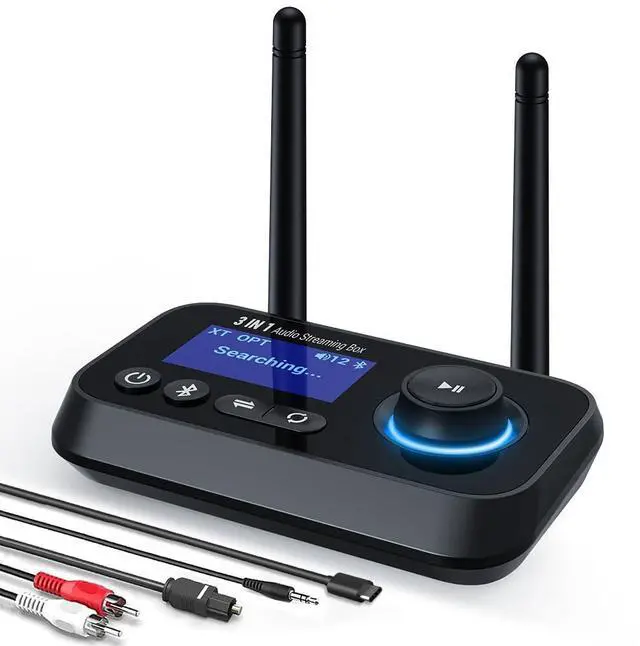



Any questions? Ask CelesteSM will help you find out quickly.

Q1. Cannot connect to optical cable and RCA at the same time.
A: In three modes (TX/RX/BYPASS), optical is default. In the case of optical fiber insertion, if AUX is connected at the same time, AUX will take precedence, the machine will automatically recognize AUX and display it. But RCA cannot be used with optical fiber at the same time, you need to unplug the unused cable, otherwise both will not work.
Q2: Cannot connect to my device.
A: Please confirm:
1. You have selected the correct mode.
2. your Bluetooth device was in pairing status and that the both devices are within 1m during pairing.
Q3: The Bluetooth audio transmitter is connected to my TV via fiber optic but there is no sound.
A:Please check you have set PCM on the TV. In general, you will find the audio mode in the TV settings and click "Settings - Sound - Digital Audio Output - Select "PCM"".
Q4: The connection is unstable and easy to disconnect.
A: Please initialize the Bluetooth transmitter, and then reconnect again to see whether there is still the same problem.
Transmitter initialization: Long press the Bluetooth identification button to disconnect, then turn off and restart.
Q5: There is a delay.
A: The delay is also related to the connected devices, and surrounding Bluetooth devices can also affect signal transmission. It is recommended to turn off other surrounding Bluetooth devices and try to connect to other devices to confirm if the same problem persists.

Longer Range Transmit

2 Antenna Bluetooth 5.3 Transmitter & Receiver*1
3.5mm Aux Cable*1
Male Rca Cable*1
Opt Cable*1
Charging Cable*1
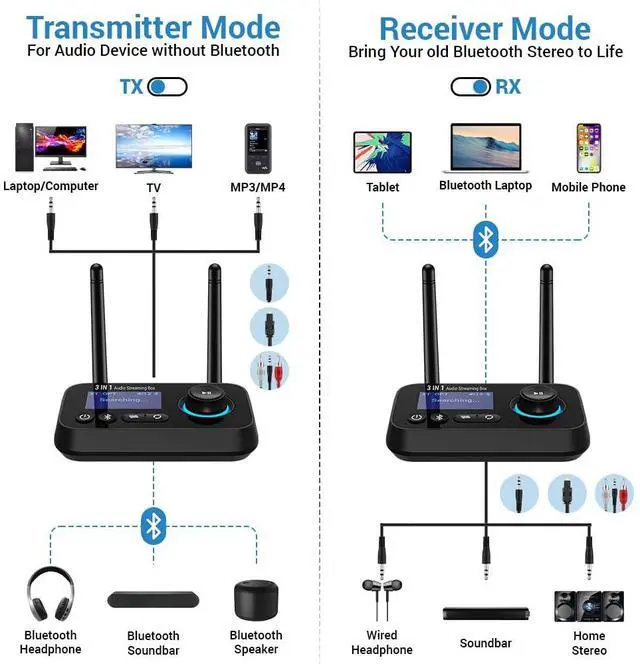
Featuring bluetooth 5.3 technology, you can enjoy wireless audio from non bluetooth tv/pc by connecting your bluetooth headphones or earbuds, streaming audio by connecting your bluetooth phone or tablet to your wired speakers or car stereo system. Say goodbye to tangled cords.


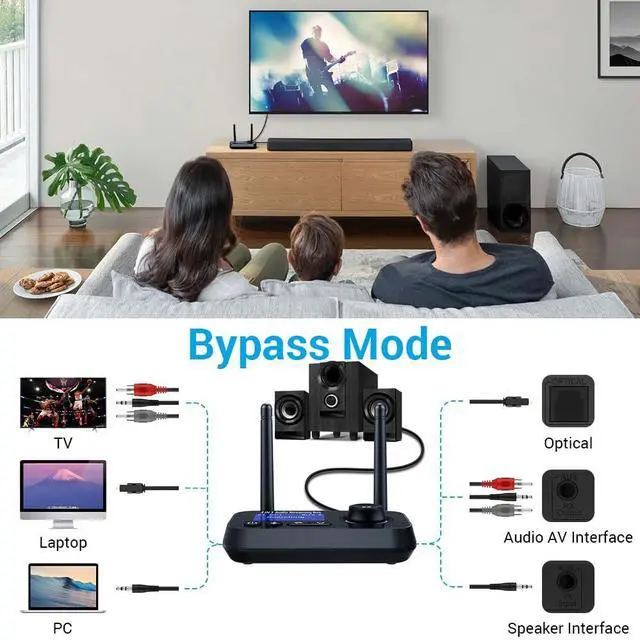
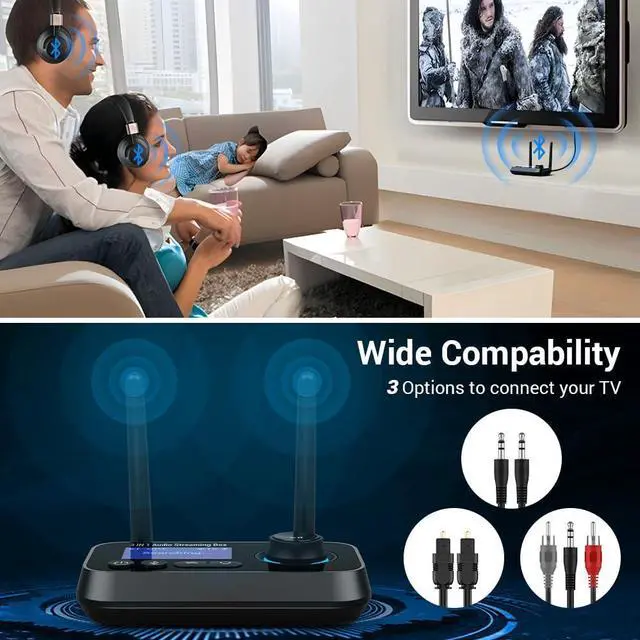
With aux, rca, opt 3 port this bluetooth splitter can match kinds of old tvs, home stereos. No need to buy a new one.

When you connect bluetooth adapter to tv through optical cable, it requires setting PCM.
Generally, in TV settings, find the audio mode and click on Settings - Sound - Digital Audio Output - Select "PCM".

Frequently Asked Questions:
q1: Can't connect?
a1:
1. Check if paired the device you were previously paired.
2. Ensure that your bluetooth device is in pairing status, and the two devices are within 1m while pairing.
3. Connect other devices and confirm whether there is the same problem.
q2:Connected but speaker/headphones no sound?
a2:
1.Make sure the audio interface is connected correctly( In TX mode, connect AUX/OPT port beside the TX input. In RX mode, connect AUX/OPT port beside the RX output.)
2.If you use the opt connect, enure TV audio format is set to PCM.
3. Reconnect or try other devices.
q3: There is a delay when using?
a3:
Make sure there isn’t any interference around. Ensure that your device supports low latency and keep the devices near each other with minimal obstructions.
Q1. Cannot connect to optical cable and RCA at the same time.
A: In three modes (TX/RX/BYPASS), optical is default. In the case of optical fiber insertion, if AUX is connected at the same time, AUX will take precedence, the machine will automatically recognize AUX and display it. But RCA cannot be used with optical fiber at the same time, you need to unplug the unused cable, otherwise both will not work.
Q2: Cannot connect to my device.
A: Please confirm:
1. You have selected the correct mode.
2. your Bluetooth device was in pairing status and that the both devices are within 1m during pairing.
Q3: The Bluetooth audio transmitter is connected to my TV via fiber optic but there is no sound.
A:Please check you have set PCM on the TV. In general, you will find the audio mode in the TV settings and click "Settings - Sound - Digital Audio Output - Select "PCM"".
Q4: The connection is unstable and easy to disconnect.
A: Please initialize the Bluetooth transmitter, and then reconnect again to see whether there is still the same problem.
Transmitter initialization: Long press the Bluetooth identification button to disconnect, then turn off and restart.
Q5: There is a delay.
A: The delay is also related to the connected devices, and surrounding Bluetooth devices can also affect signal transmission. It is recommended to turn off other surrounding Bluetooth devices and try to connect to other devices to confirm if the same problem persists.
2 Antenna Bluetooth 5.3 Transmitter & Receiver*1
3.5mm Aux Cable*1
Male Rca Cable*1
Opt Cable*1
Charging Cable*1
Longer Range Transmit
Featuring bluetooth 5.3 technology, you can enjoy wireless audio from non bluetooth tv/pc by connecting your bluetooth headphones or earbuds, streaming audio by connecting your bluetooth phone or tablet to your wired speakers or car stereo system. Say goodbye to tangled cords.
With aux, rca, opt 3 port this bluetooth splitter can match kinds of old tvs, home stereos. No need to buy a new one.
When you connect bluetooth adapter to tv through optical cable, it requires setting PCM.
Generally, in TV settings, find the audio mode and click on Settings - Sound - Digital Audio Output - Select "PCM".
Frequently Asked Questions:
q1: Can't connect?
a1:
1. Check if paired the device you were previously paired.
2. Ensure that your bluetooth device is in pairing status, and the two devices are within 1m while pairing.
3. Connect other devices and confirm whether there is the same problem.
q2:Connected but speaker/headphones no sound?
a2:
1.Make sure the audio interface is connected correctly( In TX mode, connect AUX/OPT port beside the TX input. In RX mode, connect AUX/OPT port beside the RX output.)
2.If you use the opt connect, enure TV audio format is set to PCM.
3. Reconnect or try other devices.
q3: There is a delay when using?
a3:
Make sure there isn’t any interference around. Ensure that your device supports low latency and keep the devices near each other with minimal obstructions.
warmThis bluetooth transmitter receiver with 2 antenna has no battery inside, connect the power supply before use.
Frequently Asked Questions:
Q1. Cannot connect to optical cable and RCA at the same time.
A: In three modes (TX/RX/BYPASS), optical is default. In the case of optical fiber insertion, if AUX is connected at the same time, AUX will take precedence, the machine will automatically recognize AUX and display it. But RCA cannot be used with optical fiber at the same time, you need to unplug the unused cable, otherwise both will not work.
Q2: Cannot connect to my device.
A: Please confirm: 1. You have selected the correct mode. 2. your Bluetooth device was in pairing status and that the both devices are within 1m during pairing.
Q3: The Bluetooth audio transmitter is connected to my TV via fiber optic but there is no sound.
A:Please check you have set PCM on the TV. In general, you will find the audio mode in the TV settings and click "Settings - Sound - Digital Audio Output - Select "PCM"".
Q4: The connection is unstable and easy to disconnect.
A: Please initialize the Bluetooth transmitter, and then reconnect again to see whether there is still the same problem. Transmitter initialization: Long press the Bluetooth identification button to disconnect, then turn off and restart.
Q5: There is a delay.
A: The delay is also related to the connected devices, and surrounding Bluetooth devices can also affect signal transmission. It is recommended to turn off other surrounding Bluetooth devices and try to connect to other devices to confirm if the same problem persists.
Product Description:
Featuring bluetooth technology, you can enjoy wireless audio from non bluetooth tv/pc by connecting your bluetooth headphones or earbuds , streaming audio by connecting your bluetooth phone or tablet to your wired speakers or car stereo system. Say goodbye to tangled cords.
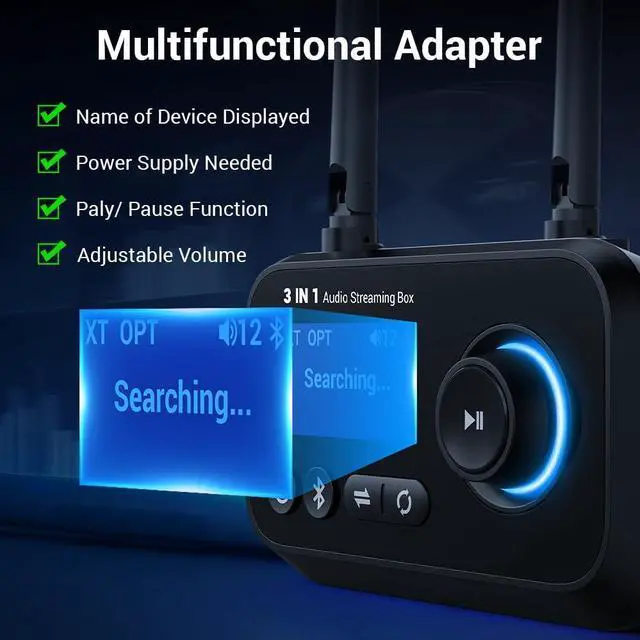
Dual antenna, LCD screen, multi-functional knob, low latency, aux/rca/optical port, you will have a great wireless experience with this bluetooth transmitter receiver.
Features:
Bluetooth Transmitter Mode: Via bluetooth connect, connecting bluetooth device headphones or earbuds and enjoy audio from your non-bluetooth tv/pc.
Bluetooth Receiver Mode: Via bluetooth connect, connecting bluetooth smartphone, tablet, laptop and play audio on your non-bluetooth sound system/speakers/soundbars.
Bypass Mode:Wire connect, connect tv and speakers/soundbars/stereo by wires,enjoy great audio from your own music system.
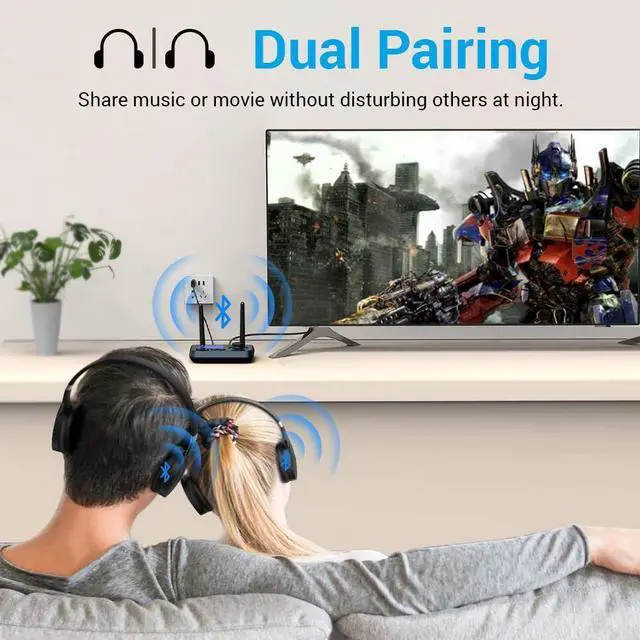
Connect Two Devices: You can easily link two wireless earphones or speakers simultaneously in tx mode.
Intuitive Lcd Screen: With lcd screen you can konw the status of clearly. Every step will shows on the display.
2 Antenna: With 2 antenna, longer and stronger transmit can be achieved. Enjoy stronger and clearer signal in the house.
Bluetooth Transmit: Connect your headphones or earbuds so you can listen to music wirel



