Are you an E-Blast Insider?

Shop without retyping payment details. Secure shopping made faster.
Check out with PayPal.
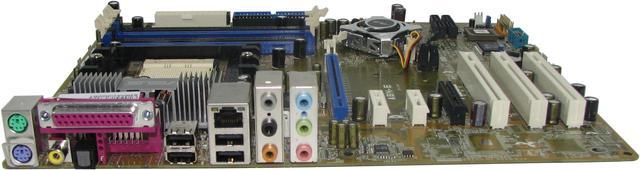
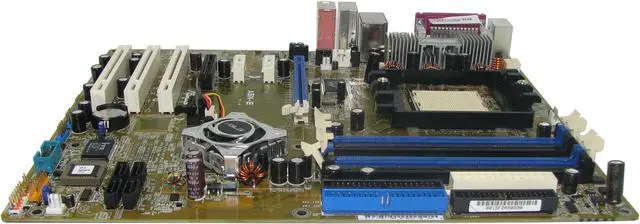
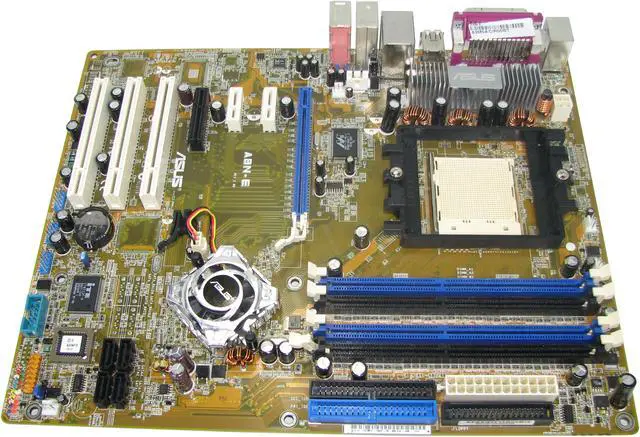
ASUS A8N-E 939 NVIDIA nForce4 Ultra ATX AMD Motherboard
OUT OF STOCK.
- NVIDIA nForce4 Ultra
- Athlon 64 X2 / Athlon 64 FX / Athlon 64
- DDR 400
Specs
Reviews
Learn more about the ASUS A8N-E
| Brand | ASUS |
|---|---|
| Model | A8N-E |
| CPU Socket Type | 939 |
|---|---|
| CPU Type | Athlon 64 X2 / Athlon 64 FX / Athlon 64 |
| FSB | 1000 MHz |
| Chipset | NVIDIA nForce4 Ultra |
|---|
| Number of Memory Slots | 4×184pin |
|---|---|
| Memory Standard | DDR 400 |
| Maximum Memory Supported | 4GB |
| Channel Supported | Dual Channel |
| PCI Express x16 | 1 x PCI Express x16 |
|---|---|
| PCI Express x4 | 1 x PCI Express x4 |
| PCI Express x1 | 2 x PCI Express x1 |
| PCI Slots | 3 x PCI Slots |
| PATA | 2 x ATA100 4 Dev. Max |
|---|---|
| PATA RAID | NV RAID 0/1/0+1 JBOD |
| SATA 3Gb/s | 4 x SATA 3Gb/s |
| SATA RAID | NV RAID 0/1/0+1 JBOD |
| Onboard Video Chipset | None |
|---|
| Audio Chipset | Realtek ALC850 |
|---|---|
| Audio Channels | 8 Channels |
| Max LAN Speed | 10/100/1000Mbps |
|---|
| PS/2 | 2 |
|---|---|
| LPT | 1 |
| USB 1.1/2.0 | 4 x USB 2.0 |
| S/PDIF Out | 1 x Optical, 1 x Coaxial |
| Audio Ports | 6 Ports |
| Onboard USB | 3 x USB 2.0 connectors support 6 ports |
|---|
| Form Factor | ATX |
|---|---|
| Dimensions (W x L) | 12.0" x 9.6" |
| Power Pin | 24 Pin |
| Package Contents | A8N-E |
|---|
| Date First Available | March 15, 2005 |
|---|
Warranty & Returns
Warranty, Returns, And Additional Information
Warranty
- Limited Warranty period (parts): 1 year
- Limited Warranty period (labor): 1 year
- Read full details
Return Policies
- Return for refund within: 30 days
- Return for replacement within: 30 days
- This item is covered by Newegg.com's Standard Return Policy
Manufacturer Contact Info
- Manufacturer Product Page
- Manufacturer Website
- Support Phone: 510-739-3777 x5110
- Support Email: rma@asus.com
- Support Website
- View other products from ASUS
LOADING...
LOADING...


Pros: I bought this incredible board based upon the good reviews I read. Of course I did my homework FIRST and even reviewed Asus’s online forum as well. I also downloaded the user manual BEFORE I received the motherboard. This was so I would be familiar with the motherboard BEFORE I installed it. Upon installing the motherboard in a completely new rig and Viola! Booted and posted on the very first try. Tweaked some CMOS settings and works even better. Did NOT install nvidia firewall or nvidia IDE drivers. NEVER install those! Those give you the BSOD. Even installed and successfully used Asus bios updater. Worked like a charm. My board came with 1010 bios. Flashed it to1011 in a few seconds. No hassles, no tears and no tissues needed. Board is feature rich and easy to use. Onboard cooling fan is not too bad either. Cannot hear it above my other case fans. Many fan connectors on board as well. Easy to understand manual and instructions make sense (if you read them!)
Cons: Do yourself a favor: Please read ALL the specifications before buying anything especially this item. That way you won’t have to cry and complain about this motherboard not having Firewire. I am so bored with all the whiners indicating this doesn’t have Firewire. Who cares! If you need that open then buy one that does! Deal with it or buy a motherboard that does have what you need. This is an easy solution to the braindonors that slam this amazing board for one reason or another.
Overall Review: Don’t believe ANY of the negative reviews here on Newegg. I would wager that 97% of the alleged DOA motherboards, etc.,are actually due to sloppy installations from noobs that have no business building their own rig. They should give it up and purchase a D*ll. I have NEVER had a bad motherboard or video card EVER! Regarding installing the drivers from the cd: don’t load the nvidia firewall or the IDE drivers. These will cause the BSOD. In fact, go to ndivia.com and download-install the newest drivers from there! This goes for your video cards as well. Yes, you need to go into CMOS and disable ALL the items you aren’t going to use. This includes the PEG link and other nefarious selections. This will allow your motherboard to operate faster and more efficiently. Don’t understand any of it? ASK FOR HELP and READ THE MANUAL. I guarantee you won’t have any problems if you do these steps. Furthermore, I never overclock anything…I would rather buy faster components than fry my CPU