• $73.98
  • Free 30-day Returns
  • Sold by VFDGHTA

    Shipped by VFDGHTA

    Price alert
    Shop it at NeweggBusiness.

    Meet Your Seller

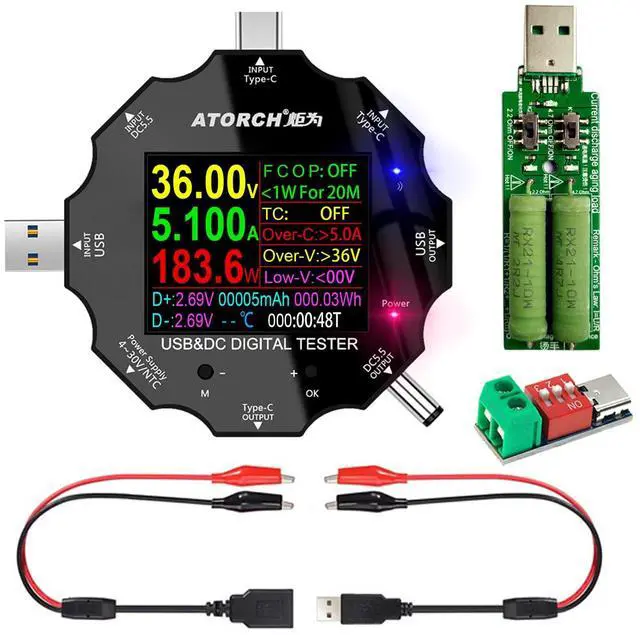
    USB C Tester, 3 in 1 Type C DC5.5 USB Meter USB Load Color Screen IPS Digital Multimeter,Voltage,Current,Power,Resistance,Capacity Detector,with Clip Cable Support PD2.0/PD3.0,QC2.0/QC3.0

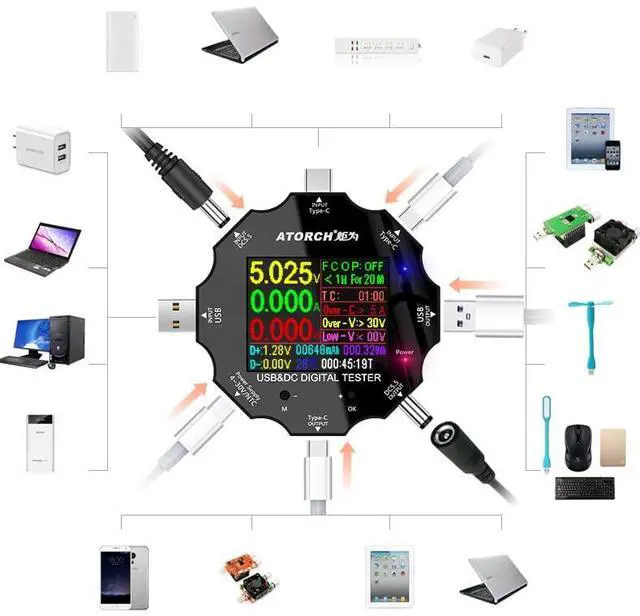
    • High PrColor screen - 8 interfaces - Support USB, Type-C, DC5.5, micro USB. It can measure the voltage and current changes during the operation/charging process of various DC inverters such as mobile phones, notebooks, desk lamps, routers, set-top boxes, etcracy display. Its measurement accuracy reaches 0.00001.
    • Wide ApplicationsWith the USB tester, you are able to test notebooks, car emergency power supplies, routers and other DC products, monitoring current, voltage, power, capacity, power and other state of charge in real time.
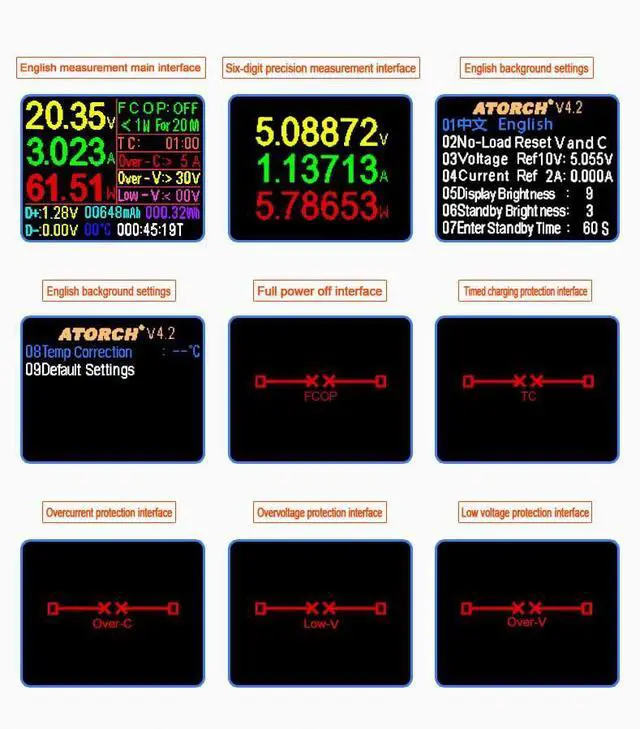
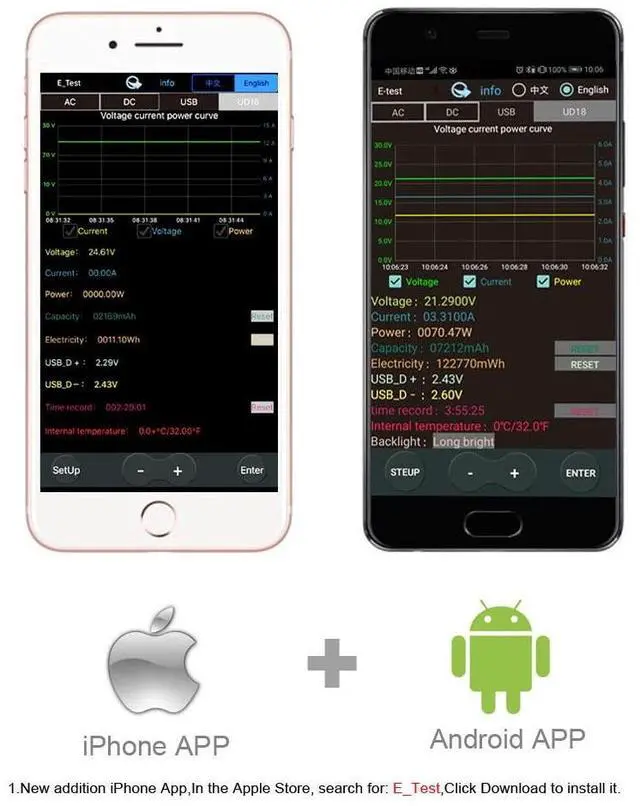
    • The tester and mobile phone enable to realize APP. And charging status, various measurement data & graph can be transmitted and viewed on your phone. You can switch different measurement interfaces by pressing the button.
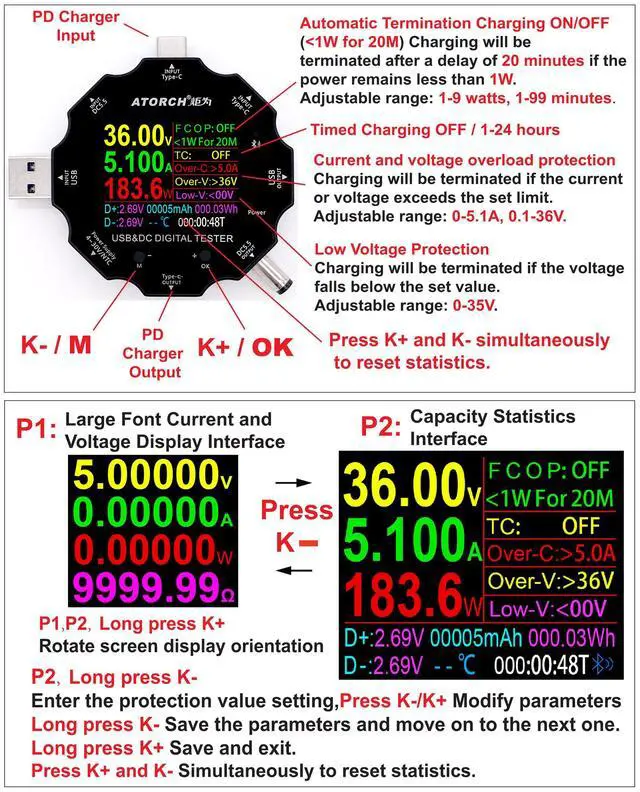
    • Multi FunctionsFunctions include screen flip, fast charge recognition, energy capacity detection, temperature measurement, accuracy measurement, two-way current measurement and other data tests(temperature probe is not included).
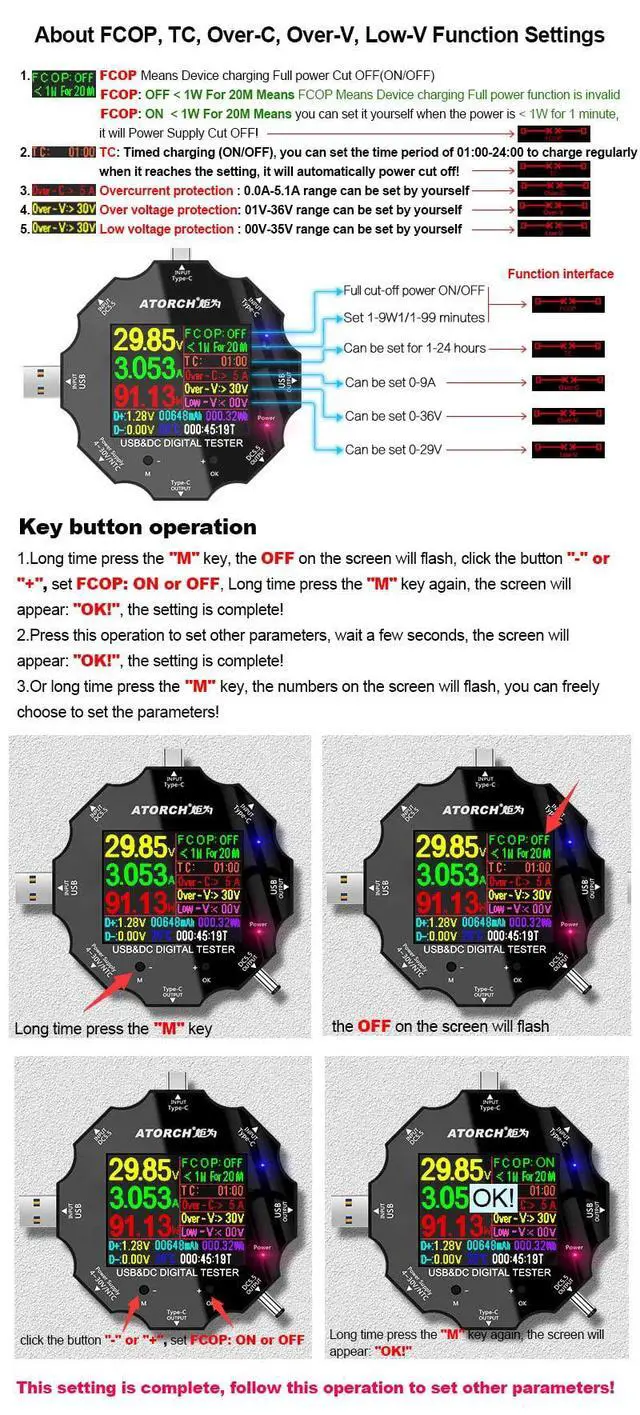
    • Safety ProtectionFeatured with over-voltage protection, over-current protection, low-voltage protection, charging time setting and auto-off function, the meter can detect safely and maximally protect the appliances from damaging.
    +
    +
    Overview
    Specs
    Reviews

    Any questions? Ask CelesteSM will help you find out quickly.

    4

    • Note:
    • Please remove the protective film before use.
    • The PD charger will only output voltage after communication. When testing the PD charger, the device must be connected to the "USBC OUT".
    • The working voltage of the USB resistor load should not exceed 5V, and it should not be used for more than 2 minutes without active heat dissipation. When working, it will generate high temperature and do not touch it. It is normal for the high temperature to cause the green layer of the resistor to fall off.
    • Please read the user manual carefully before usage.
    • Due to manual measurement, there may be deviation.
    • Due to lighting, the picture and material object may slightly differ in color, please in kind prevail.

    The Type-C PD charger is not displayed when plugged into the USB meter:

    PD is a two-way communication charging protocol. The charger must establish communication with the powered device to output voltage, so it is not displayed when plugged into the meter alone.

    Type-C PD is not displayed when plugged into electrical equipment:

    most of the Type-C line PD communication pins CC1 and CC2 are only connected to one of them, resulting in failure to communicate and power on. Solution Turn over the data cable and try again. Try to use the same brand of Type-C cable.

    Most of the CC1 and CC2 pins of the Type-C line PD communication are only connected to one of them, causing the end of the meter to be plugged into the instrument and it is impossible to communicate and power. The solution is to turn any one of the plugs into the meter and try again. Try to use the Type-C line of the same brand.

    1

    • Voltage/Current measurement range: 3.60V~32.00V/0.00~5.10A
    • USB load : 5V 1A/2A/3A Limit 15W (do not exceed the use)
    • Capacity/Power accumulation range: 0~99999mAh/0~999.99Wh
    • Power measurement range: 000.00~163.00W
    • Impedance measurement range: 1~999.9O
    • Temperature measurement range: 0~80°C
    • Timing range: 999hours 59minutes 59seconds
    • Input interface: Type-C/Micro USB/USB
    • Timing charging reminder setting: countdown 24-hour arbitrary setting
    • USB D+ D- Voltage range: 0V~2.99V
    • Mobile phone full charging reminder threshold parameters: <2W/0.5 hour
    • Refresh time: > 500mS/times
    • Measurement rate: about 0.5 times/sec
    • Alarm mode: siren sound+ prompt display
    • Screen: 1.8inches 128*160 color screen
    • Self-consumption current: <0.025A
    • Operating temperature: -10~+60°C
    • Item size/weight(tester only): 6.2*6.2*1.4cm / 2.44*2.44*0.55in /34g / 1.19oz
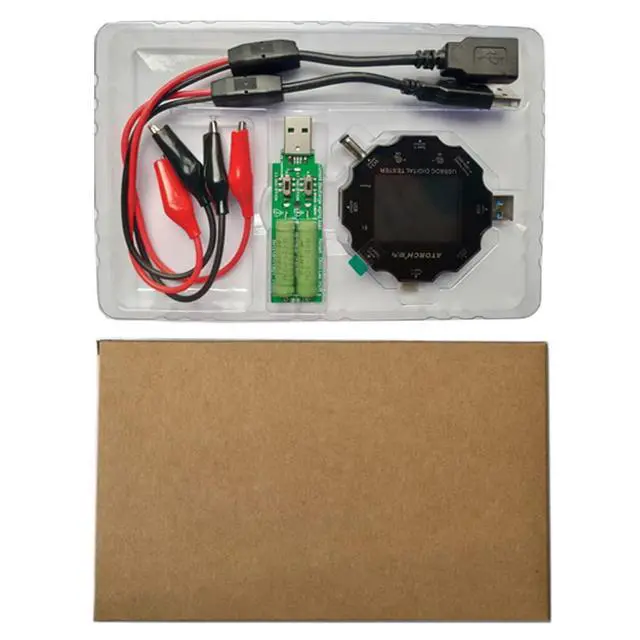
    • Packing List: USB Tester X 1,Crocodile Clip X 2, USB Load X 1, Fast Charging Protocol Trigger X 1

    1

    How to Adjust Screen Brightness

    1. The device is disconnected from the power input,
    2. Press and hold the "M" key,
    3. Plug in the power supply and the setup menu will appear.
    4. Press + to select 05 Display Brightness
    5. Press and hold the + key until the set parameter value flashes.
    6. Press the + key to write the parameters you need.
    7. Long press the + key to save.
    8. Disconnect power and restart.

    the circuit board of the vvv2
    2
    1
    4

    • Note:
    • Please remove the protective film before use.
    • The PD charger will only output voltage after communication. When testing the PD charger, the device must be connected to the "USBC OUT".
    • The working voltage of the USB resistor load should not exceed 5V, and it should not be used for more than 2 minutes without active heat dissipation. When working, it will generate high temperature and do not touch it. It is normal for the high temperature to cause the green layer of the resistor to fall off.
    • Please read the user manual carefully before usage.
    • Due to manual measurement, there may be deviation.
    • Due to lighting, the picture and material object may slightly differ in color, please in kind prevail.

    The Type-C PD charger is not displayed when plugged into the USB meter:

    PD is a two-way communication charging protocol. The charger must establish communication with the powered device to output voltage, so it is not displayed when plugged into the meter alone.

    Type-C PD is not displayed when plugged into electrical equipment:

    most of the Type-C line PD communication pins CC1 and CC2 are only connected to one of them, resulting in failure to communicate and power on. Solution Turn over the data cable and try again. Try to use the same brand of Type-C cable.

    Most of the CC1 and CC2 pins of the Type-C line PD communication are only connected to one of them, causing the end of the meter to be plugged into the instrument and it is impossible to communicate and power. The solution is to turn any one of the plugs into the meter and try again. Try to use the Type-C line of the same brand.

    1

    • Voltage/Current measurement range: 3.60V~32.00V/0.00~5.10A
    • USB load : 5V 1A/2A/3A Limit 15W (do not exceed the use)
    • Capacity/Power accumulation range: 0~99999mAh/0~999.99Wh
    • Power measurement range: 000.00~163.00W
    • Impedance measurement range: 1~999.9O
    • Temperature measurement range: 0~80°C
    • Timing range: 999hours 59minutes 59seconds
    • Input interface: Type-C/Micro USB/USB
    • Timing charging reminder setting: countdown 24-hour arbitrary setting
    • USB D+ D- Voltage range: 0V~2.99V
    • Mobile phone full charging reminder threshold parameters: <2W/0.5 hour
    • Refresh time: > 500mS/times
    • Measurement rate: about 0.5 times/sec
    • Alarm mode: siren sound+ prompt display
    • Screen: 1.8inches 128*160 color screen
    • Self-consumption current: <0.025A
    • Operating temperature: -10~+60°C
    • Item size/weight(tester only): 6.2*6.2*1.4cm / 2.44*2.44*0.55in /34g / 1.19oz
    • Packing List: USB Tester X 1,Crocodile Clip X 2, USB Load X 1, Fast Charging Protocol Trigger X 1

    1

    How to Adjust Screen Brightness

    1. The device is disconnected from the power input,
    2. Press and hold the "M" key,
    3. Plug in the power supply and the setup menu will appear.
    4. Press + to select 05 Display Brightness
    5. Press and hold the + key until the set parameter value flashes.
    6. Press the + key to write the parameters you need.
    7. Long press the + key to save.
    8. Disconnect power and restart.

    the circuit board of the vvv2
    2
    1

    Material: Electronic material

    Color: Black

    Voltage measurement range: 3.60V~32.00V

    Current measurement range: 0.00~5.10A

    USB load : 5V 1A/2A Limit 10W (do not exceed the use)

    Capacity accumulation range: 0~99999mAh

    Power accumulation range: 0~999.99Wh

    Power measurement range: 000.00~163.00W

    Impedance measurement range: 1~999.9

    Temperature measurement range: 0~80°C

    Timing range: 999hours 59minutes 59seconds

    Input interface: Type-C/Micro USB/USB

    Timing charging reminder setting: countdown 24-hour arbitrary setting

    USB D+ Voltage range: 0V~2.99V

    USB D- Voltage range: 0V~2.99V

    Mobile phone full charging reminder threshold parameters: <2W/0.5 hour

    Refresh time: > 500mS/times

    Measurement rate: about 0.5 times/sec

    Alarm mode: siren sound+ prompt display

    Screen: 1.8inches color screen

    Screen resolution : 128*160

    Self-consumption current: <0.025A

    Operating temperature: -10~+60°C

    Working humidity: 10~80 (no doubt)

    Working pressure: 80~106kPa

    Item weight(tester only): 34g / 1.19oz

    Item size: 6.2*6.2*1.4cm / 2.44*2.44*0.55in

    Package weight:

    With crocodile clip: 135g / 4.6oz

    Package size:

    With crocodile clip: 20*10*1.7cm / 7.88*3.94*0.7in

    Warranty & Returns

    Warranty, Returns, And Additional Information

    Warranty

    • Please contact the Seller directly for warranty information. Warranty information may also be found on the Manufacturer's website.
    • CONTACT

    Return Policies

    • Return for refund within: 30 days
    • Return for replacement within: 30 days
    • This item is covered by VFDGHTA Return Policy

    Manufacturer Contact Info

    LOADING...