

Your Browsing History

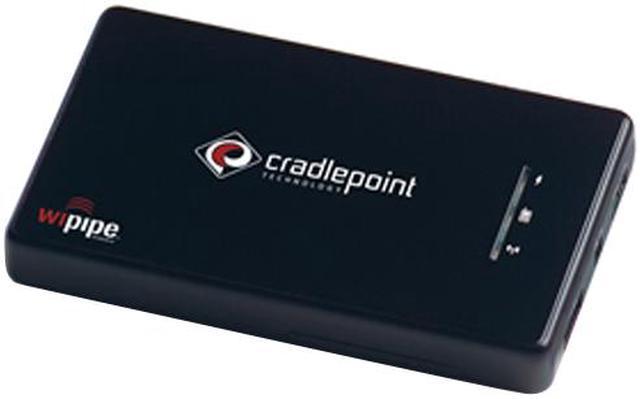
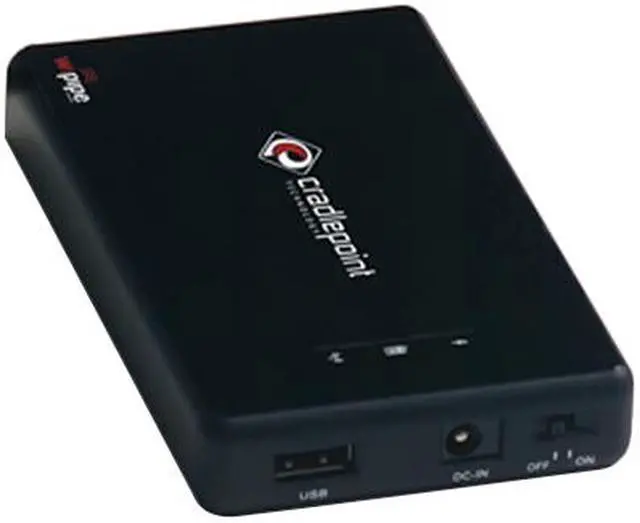


Cradlepoint Black Personal Wi-Fi Hotspot w/ 3G&4G Ready / WiPipe Powered (PHS300)
- IEEE 802.11 b/g
- WiFi Extension To Cellular Broadband
- Built-In Li-Ion Battery Provides
Overview
Specs
Reviews (56)
See all Q & A 
Any questions? Our AI mode will help you find out quickly.
Try me now
Take your wireless wherever you go with the PHS300 Personal Wi-Fi Hotspot from CradlePoint! All you have to do is to plug a cellular modem or compatible mobile phone into the PHS300 and turn it on. Within seconds, you will have a reliable Wi-Fi network and the ability to connect to any Wi-Fi-enabled devices.
Weighing less than four ounces and measuring just 4.7" x 2.8" x 0.8", the pin-sized PHS300 won’t add much to a traveler’s load. Since security is just as important on the road, WEP and WPA/WPA2 encryption are included. There is also an SPI firewall for added protection. Plus, the WiPipe technology supports multiple and concurrent VPN pass-through sessions for great security. The plug ‘n’ play solution walks you through setup and installation, taking all the guess work out of setting the PHS300.
Take your wireless wherever you go with the PHS300 Personal Wi-Fi Hotspot from CradlePoint! All you have to do is to plug a cellular modem or compatible mobile phone into the PHS300 and turn it on. Within seconds, you will have a reliable Wi-Fi network and the ability to connect to any Wi-Fi-enabled devices.
Weighing less than four ounces and measuring just 4.7" x 2.8" x 0.8", the pin-sized PHS300 won’t add much to a traveler’s load. Since security is just as important on the road, WEP and WPA/WPA2 encryption are included. There is also an SPI firewall for added protection. Plus, the WiPipe technology supports multiple and concurrent VPN pass-through sessions for great security. The plug ‘n’ play solution walks you through setup and installation, taking all the guess work out of setting the PHS300.
Weighing less than four ounces and measuring just 4.7" x 2.8" x 0.8", the pin-sized PHS300 won’t add much to a traveler’s load. Since security is just as important on the road, WEP and WPA/WPA2 encryption are included. There is also an SPI firewall for added protection. Plus, the WiPipe technology supports multiple and concurrent VPN pass-through sessions for great security. The plug ‘n’ play solution walks you through setup and installation, taking all the guess work out of setting the PHS300.
 Wi-Fi CertifiedThe cradlepoint PHS300 features compatibility with 802.11b and 802.11g wireless devices to preserve existing wireless network investment, while Wi-Fi certification assures interoperability with similarly certified products.
 Easy to UseThe cradlepoint PHS300 features plug ‘n’ play solution so you can easily connect all your WiFi enabled devices by simply plugging in your activated USB data modem and turning on the PHS300.
 Solid SecurityPowered by WiPipe technology, the cradlepoint PHS300 supports WEP, WPA and WPA2 encryption for highly secured data transfers on your wireless network.
 Wi-Fi CertifiedThe cradlepoint PHS300 features compatibility with 802.11b and 802.11g wireless devices to preserve existing wireless network investment, while Wi-Fi certification assures interoperability with similarly certified products.
 Easy to UseThe cradlepoint PHS300 features plug ‘n’ play solution so you can easily connect all your WiFi enabled devices by simply plugging in your activated USB data modem and turning on the PHS300.
 Solid SecurityPowered by WiPipe technology, the cradlepoint PHS300 supports WEP, WPA and WPA2 encryption for highly secured data transfers on your wireless network.
Warranty & Returns
Warranty, Returns, And Additional Information
Warranty
- Limited Warranty period (parts): 1 year
- Limited Warranty period (labor): 1 year
- Read full details
Return Policies
- Return for refund within: Non-refundable
- Return for replacement within: 30 days
- This item is covered by Newegg.com's Replacement Only Return Policy.
- Read full return policy for details.
Manufacturer Contact Info
- Manufacturer Product Page
- Manufacturer Website
- Support Phone: 1-208-424-5054
- Support Email: [email protected]
- Support Website
- View other products from CradlePoint, Inc.
LOADING...
LOADING...