here!
I’m your shopping assistant for PC builds, upgrades, and everything tech.
Got questions? Ask away!
Start a conversation
here!
I’m your shopping assistant for PC builds, upgrades, and everything tech.
Got questions? Ask away!
Start a conversation



Any questions? Ask CelesteSM will help you find out quickly.


https://ae01.alicdn.com/kf/S90f5f6b10a2e4daca3795643b8fef8f0S.jpg
https://ae01.alicdn.com/kf/S5134bf2aa81a4ffab8b3341ebeea0c1bK.jpg
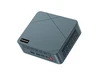
The BMAX B3 Pro is a compact Windows 11 Pro mini PC with an Intel N4500 processor, 8GB LPDDR4 memory, and a 256GB SATA SSD. It is suitable for everyday computing, office applications, web browsing, media playback, and space-saving desktop setups.
| Attribute | Value |
|---|---|
| Best For | Compact mini-PC setups using an Intel N4500 processor with Bluetooth 5.0 connectivity |
| Processor And Platform | Intel N4500 processor platform |
| Wireless Connectivity | Bluetooth 5.0 for compatible wireless peripherals and devices |
| Model Identifiers | BAMX B1 Plus |
Q: Is the BMAX B3 Pro N4500 better than an Intel N100 mini PC?
A: Choose an Intel N100 mini PC for faster multitasking, heavier web use, and longer-term everyday performance. The BMAX B3 Pro is a reasonable choice when its compact 270 g design, dual HDMI outputs, 4K@60Hz support, Windows 11 Pro, and storage expansion are more important than maximum processing speed. The N100 has four cores and four threads, while the N4500 has two cores and two threads; aggregated benchmark data also shows a substantial N100 performance advantage.
Q: Should I buy the BMAX B3 Pro N4500 instead of a cheaper N4020 mini PC?
A: The BMAX B3 Pro is the better fit for users who want newer Jasper Lake hardware, 4K@60Hz output, dual HDMI, and broader storage expansion. An N4020 mini PC can cover basic email, document editing, and light streaming, but both processors have two cores and two threads, so the BMAX should be selected mainly for its newer platform and system features rather than a large multitasking advantage.
Q: Is the BMAX B3 Pro N4500 enough for office work and 4K streaming?
A: Yes, the BMAX B3 Pro is suited to basic office work, web browsing, video calls, and media playback when workloads remain light. Its N4500 supports 4K output at 60Hz and hardware video features, while the included 8GB RAM and 256GB SSD provide a usable entry-level Windows configuration. Users running many browser tabs, virtual machines, demanding creative applications, or sustained multitasking should choose a higher-tier mini PC.
Q: Should I choose the BMAX B3 Pro N4500 or a higher-performance N5095 mini PC?
A: Choose the BMAX B3 Pro N4500 for a smaller, lower-power system focused on browsing, office applications, streaming, and basic home use. Choose an N5095 mini PC for more simultaneous applications and heavier CPU workloads because the N5095 has four cores and four threads, compared with the N4500's two cores and two threads. The N5095 platform generally requires a larger cooling and power design, so it is less focused on extreme portability.
Q: Is this mini PC suitable for office work, note-taking, and online meetings?
A: Yes. It is suitable for everyday office tasks such as web browsing, document editing, email, note-taking, and video meetings. The Intel N4500 processor and 8GB RAM are best for light multitasking rather than demanding professional workloads. Because the product specifications do not list a built-in webcam or microphone, video meetings require an external webcam, headset, or USB audio device.
Q: Is this mini PC a good travel work computer?
A: It can work well as a portable desktop because it weighs about 270g and supports dual-band Wi-Fi and Bluetooth 5.0. However, it is not a complete mobile computer: you must also carry a display or use a compatible TV, keyboard, mouse, power adapter, and any required webcam or headset. It is most suitable for travel between fixed workspaces rather than working anywhere without accessories.
Q: Can it connect to two monitors or a 4K display?
A: The product lists two HDMI ports and support for 4K at 60Hz, so it is designed to connect to HDMI displays and can support a 4K display at the stated refresh rate. The listing does not specify the exact resolution and refresh-rate limits when both HDMI ports are used simultaneously, so users needing a guaranteed dual-monitor configuration should verify that detail before purchase.
Q: Can the storage be expanded, and is 256GB enough?
A: The included 256GB SATA SSD is adequate for Windows, office applications, documents, and moderate everyday use, but it may fill quickly with large media files or many applications. The specifications list one M.2 2280 SATA slot and one M.2 2280 PCIe NVMe slot for additional or replacement storage. The listing does not state that the 8GB LPDDR4 memory is upgradeable, so buyers should treat the RAM as fixed unless the manufacturer confirms otherwise.
Q: Is this mini PC suitable for gaming?
A: It is suitable mainly for basic games, browser games, older titles, and games that run well on low graphics settings. The Intel N4500 processor and integrated Intel UHD Graphics are not designed for demanding modern games, high frame rates, virtual reality, or advanced 3D workloads. Buyers seeking a gaming system should choose hardware with a more powerful processor and dedicated graphics.
Q: Is the BMAX B3 Pro suitable for basic office work, note-taking, and schoolwork?
A: Yes. The Intel N4500, 8GB RAM, 256GB SSD, and Windows 11 Pro are suitable for web browsing, documents, email, online learning, and light multitasking. It is not intended for demanding editing, intensive multitasking, or modern gaming.
Q: Is the BMAX B3 Pro a good choice for 4K video playback or a basic living-room PC?
A: It can be suitable for basic media playback because it supports HDMI output and 4K@60Hz on paper. However, community reports show that real-world playback and browsing experience can vary with the operating system, browser, cooling, and background tasks. It should not be treated as a high-performance media or gaming system.
Q: Is the BMAX B3 Pro suitable for continuous use, such as a server or always-on home PC?
A: It may handle light continuous tasks, but it is not the safest choice for sustained heavy workloads without confirming its cooling design. Reddit discussions about BMAX B3 systems raise concerns about small fans, thermal throttling, and long-term reliability. For 24/7 use, a better-cooled mini PC is preferable.
Q: Can the BMAX B3 Pro storage be expanded if 256GB is not enough?
A: Yes, according to the supplied product specifications, it includes M.2 SATA and M.2 NVMe expansion support. This makes storage expansion more practical than replacing the entire PC, although users should verify the exact slot configuration before purchasing a drive.
Q: What are the main trade-offs of buying the BMAX B3 Pro instead of a newer mini PC?
A: The main trade-off is low cost and compact size versus limited processing headroom, uncertain long-term cooling performance, and potentially slower multitasking. The BMAX B3 name is also used across configurations with different processors, so buyers should confirm that the listing specifically contains the Intel N4500, 8GB LPDDR4, and 256GB SSD configuration.