




 here!
here!
I’m your shopping assistant for PC builds, upgrades, and everything tech.
Got questions? Ask away!
Start a conversation
here!
I’m your shopping assistant for PC builds, upgrades, and everything tech.
Got questions? Ask away!
Start a conversationShipped by Newegg
 Hot Seller


Any questions? Ask CelesteSM will help you find out quickly.
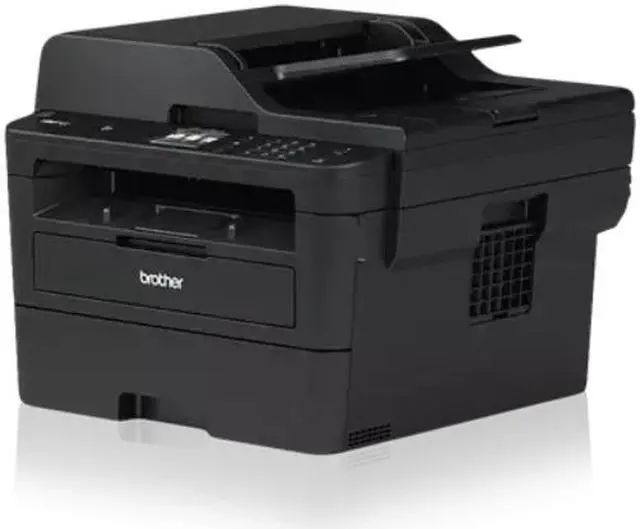
The Brother DCP-L2640DW is a compact monochrome laser multifunction printer with print, scan, and copy features, best suited for home offices and small teams that need fast black-and-white document output, automatic duplex printing, a 50-sheet ADF, and flexible USB, Ethernet, or Wi-Fi connectivity.
Q: Is this better than an inkjet for frequent document printing?
A: Yes for mostly black-and-white document printing. The Brother DCP-L2640DW is the better fit when you print contracts, forms, schoolwork, or office documents regularly and want fast output, automatic duplex printing, and lower maintenance than a typical cartridge inkjet. An inkjet still makes more sense if you also need color graphics or photo printing.
Q: Who should choose this over a basic single-function laser printer?
A: Choose the DCP-L2640DW over a print-only laser if you regularly need to scan or copy multi-page documents and want those functions in one device. Its 50-sheet ADF, duplex printing, and network connectivity make it more practical for home office and small office workflows than an entry-level print-only model. A single-function laser is the better fit only when you want the simplest setup and do not need scanning or copying.
Q: When is a lower-tier monochrome laser enough instead of this model?
A: A lower-tier monochrome laser is enough when you mainly print occasional text documents and do not need an ADF, copying, or built-in scanning. The DCP-L2640DW is the stronger choice when your workflow includes stacks of originals, shared use over Wi-Fi or Ethernet, and regular duplex printing. In short: print-only needs favor a simpler model, while document handling favors this multifunction unit.
Q: When is a higher-tier office printer worth paying for instead of this one?
A: Pay more for a higher-tier office printer when you need features this model is not built around, such as duplex scanning through the ADF, fax, a larger touchscreen, heavier shared-office use, or more advanced workflow features. The DCP-L2640DW is the better value when your priority is reliable black-and-white printing, scanning, and copying for a small team or home office without stepping up to a larger office-class machine.
Q: Should I get this instead of a USB-only printer for home or office use?
A: Yes if more than one person prints, if you use laptops or phones, or if the printer will sit away from one main computer. The DCP-L2640DW supports USB, Wi-Fi, and Ethernet, so it fits shared and flexible setups better than a USB-only printer. A USB-only model is still reasonable for a single-user desk where network and mobile printing are not important.
Q: Is the Brother DCP-L2640DW a good fit for a home office?
A: Yes for a document-focused home office. It combines fast monochrome printing, automatic duplex printing, a 50-sheet ADF, and wired or wireless networking in a compact class. It is best for people who mostly print contracts, invoices, shipping labels, schoolwork, and other black-and-white documents. It is less suitable if you need color output, fax, or higher-capacity paper handling for heavier shared-office use.
Q: Is it good for printing forms, invoices, and school documents?
A: Yes. This model is well suited to routine black-and-white paperwork because it offers up to 36 ppm print speed, 1200 x 1200 dpi output, automatic two-sided printing, and copying and scanning from a 50-sheet ADF. That makes it a practical choice for forms, worksheets, text-heavy packets, and everyday office documents. The main limitation is that it does not print in color, so charts, photos, or color-coded materials may be better on a color inkjet or color laser model.
Q: What are the main trade-offs versus an inkjet printer?
A: The main advantage over an inkjet is better suitability for frequent black-and-white document printing: laser output is typically faster for text, avoids ink-drying issues, and is often preferred for crisp business documents. The trade-off is that this printer is monochrome only, so it is not the right choice for color graphics or photo printing. Buyers choosing between inkjet and this model are usually deciding between lower-friction document printing and the flexibility of color.
Q: Who should choose this instead of a larger office laser printer?
A: Choose the DCP-L2640DW if you need a compact shared printer for light to moderate office use and want print, scan, and copy without stepping up to a heavier business-class machine. A larger office laser printer is the better choice if you need features this model does not emphasize, such as fax, larger multipurpose capacity, duplex scanning, bigger touch controls, or higher sustained volume across multiple users.
Q: Can it handle envelopes and occasional specialty media, or is it mainly for plain paper?
A: It can handle more than plain paper for occasional jobs. The manual feed slot is intended for envelopes and specialty media, which is useful for mailing tasks or one-off forms. That said, this is still primarily a document printer, and user feedback suggests envelope performance may be less consistent than standard paper printing. It is a good fit for occasional envelope use, not for high-volume specialty-media workflows.
Q: Is the Brother DCP-L2640DW a good fit for a home office or small office focused on black-and-white documents?
A: Yes, it is a practical fit for home offices and small teams that mainly print, scan, and copy black-and-white documents. The core strengths are fast mono printing, automatic duplex printing, a 50-sheet ADF, a 250-sheet paper tray, and USB, Ethernet, and Wi-Fi connectivity. The main limitation is that it is a monochrome model, so it is best for text-heavy workflows rather than color graphics or marketing materials.
Q: Who is the Brother DCP-L2640DW best suited for?
A: It is best suited for buyers who want a compact monochrome laser all-in-one for routine document work: letters, forms, invoices, schoolwork, and general office paperwork. It makes the most sense for users who need print, scan, and copy in one device and want wired or wireless setup options. It is less suitable for buyers who need color output or advanced scan automation.
Q: What are the main trade-offs of the Brother DCP-L2640DW?
A: The main trade-offs are in scanning and connectivity expectations. It supports automatic duplex printing, but community discussion shows buyers can confuse that with duplex scanning; this model does not have a true duplex ADF scanner. Some discussion also points to setup or Wi-Fi reliability issues in certain environments, so Ethernet or USB may be the safer choice if stable network printing matters more than wireless placement.
Q: Is the Brother DCP-L2640DW worth buying if you scan multi-page documents often?
A: It can be worth buying if your scanning needs are mostly single-sided stacks through the ADF or occasional flatbed scans. It is a weaker fit if you regularly scan double-sided originals and want that process to be automatic, because the model does not provide true duplex scanning through the feeder. For scan-heavy workflows, that limitation is an important buying decision point.
Q: Should you choose the Brother DCP-L2640DW if you specifically want easy wireless setup?
A: Choose it for wireless use only if Wi-Fi convenience is more important than guaranteed simplicity. The printer supports Wi-Fi, but Reddit discussion includes cases of disconnects and Windows setup friction. If you want the same model with fewer network-related variables, using Ethernet or USB is the lower-risk setup path.


