



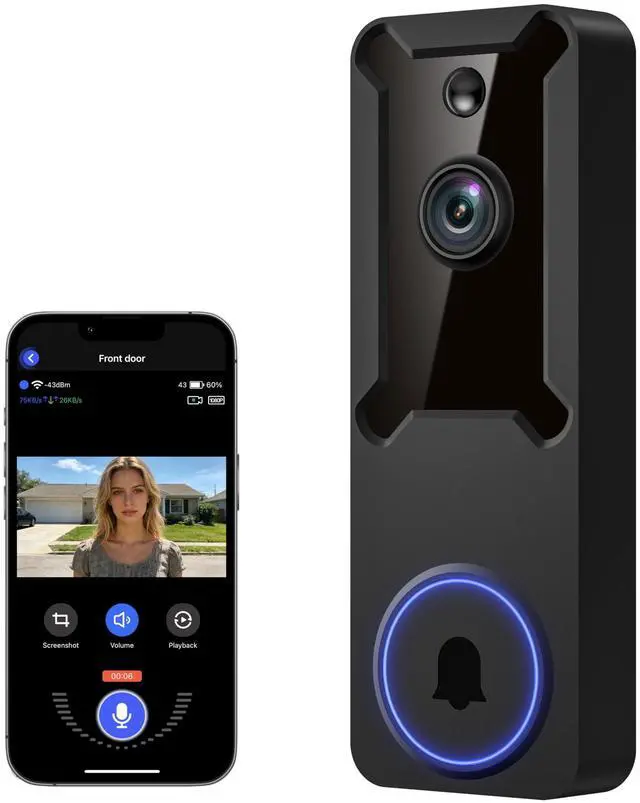
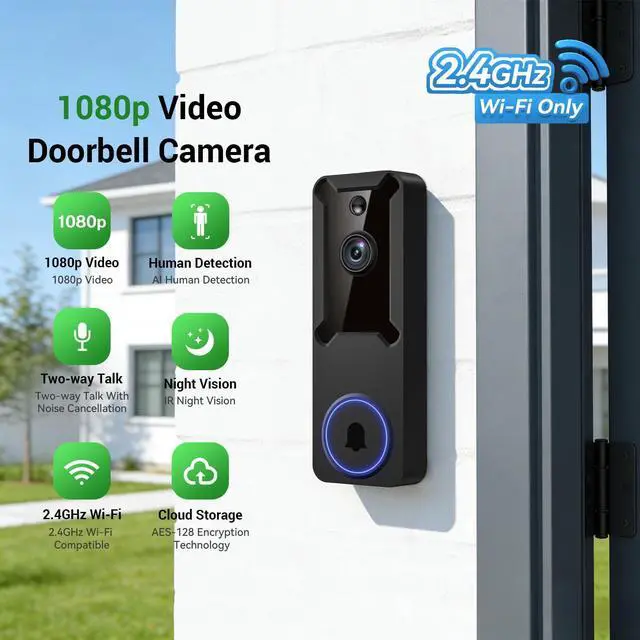


1080p Wireless Dome Security Camera, No Separate Receiver Included, Night Vision, AI Human Detection, 2.4GHz Wi-Fi Only, Cloud Storage Sold Separately

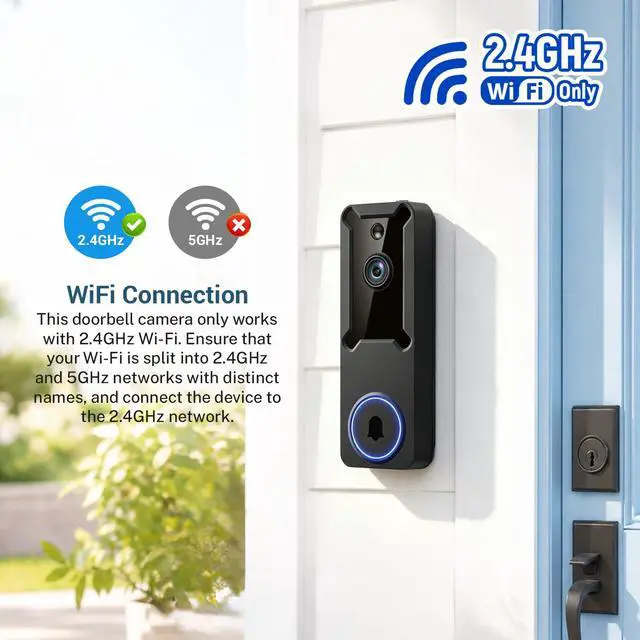
Stable 2.4GHz Wi-Fi Connection: Specially engineered for 2.4GHz networks to provide steady, interruption-free connectivity for your outdoor dome camera. (Note: Does not support 5GHz Wi-Fi.)
Wide-Angle Lens Coverage: Capture more monitoring area with a wide-angle view for live and recorded video.
Real-Time Notifications: Receive instant phone alerts when your dome security camera detects motion or triggered activities nearby.
All-Inclusive Security Setup: Features a powerful 5200 mAh battery and an indoor receiver to strengthen your security.
Straightforward Charging: Remove the insulation strip and use the supplied USB cable to charge. Works with standard DC 5V 1A/2A chargers (charger not included).
Motion Sensing Alerts: Receive immediate alerts on your smartphone as soon as activity is detected at your front door.
Pre-Capture Video Feature: Cloud users capture the earliest moments of motion, ensuring complete coverage.

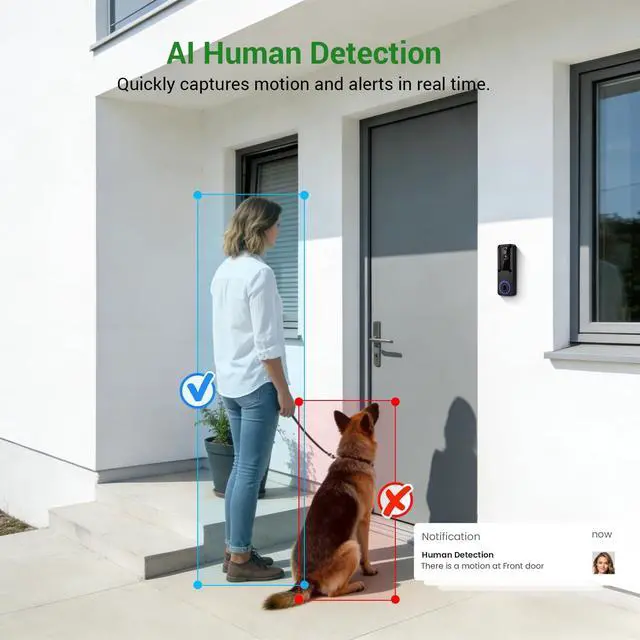
Accurate AI Human Detection
Smart AI focuses on detecting people while ignoring animals and passing vehicles.
Note: setting the human detection accuracy: Among the three options of low, medium, and high, we recommend selecting medium. High is the strictest detection level, which means the device will only trigger when it is 100% certain the moving object is a human. However, there is a chance the device may fail to identify the human figure, resulting in you not receiving a notification.

Two-Way Communication
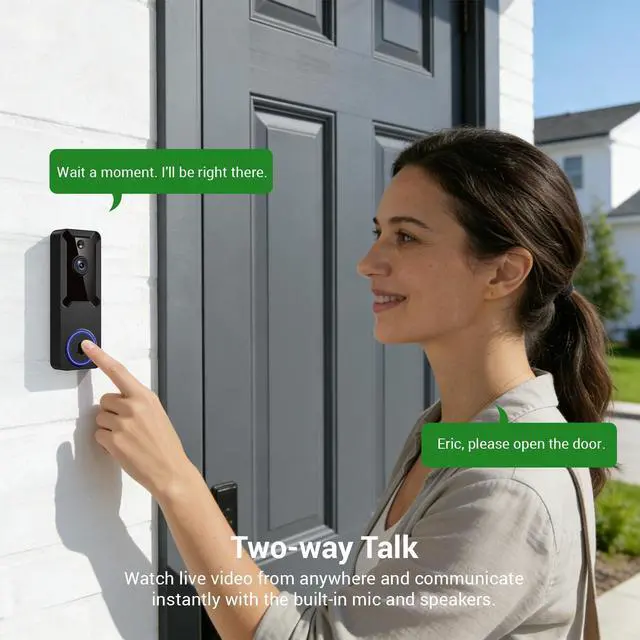
Speak to guests and delivery personnel directly through the built-in speaker and microphone.

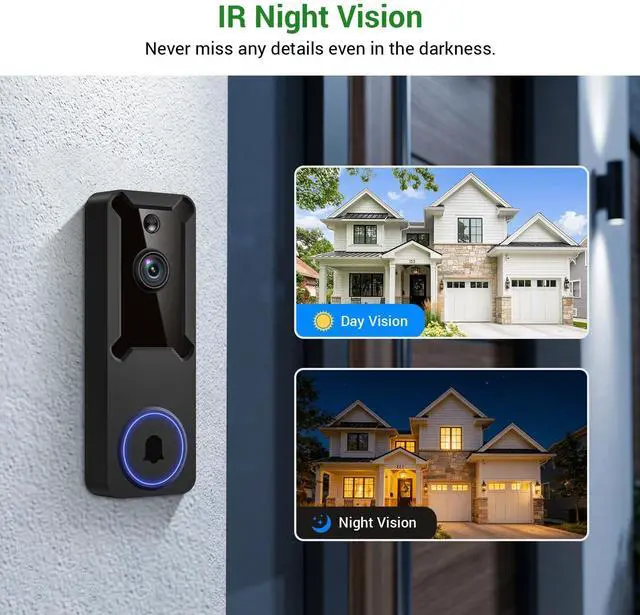
Enhanced Night Vision Performance
With four IR LEDs and an advanced sensor, see clearly even in total darkness.

Secure Cloud Storage Options(Sold separately)
Protect your recordings with AES-128 encryption and enjoy a 3-day trial with full video access. (Sold separately)
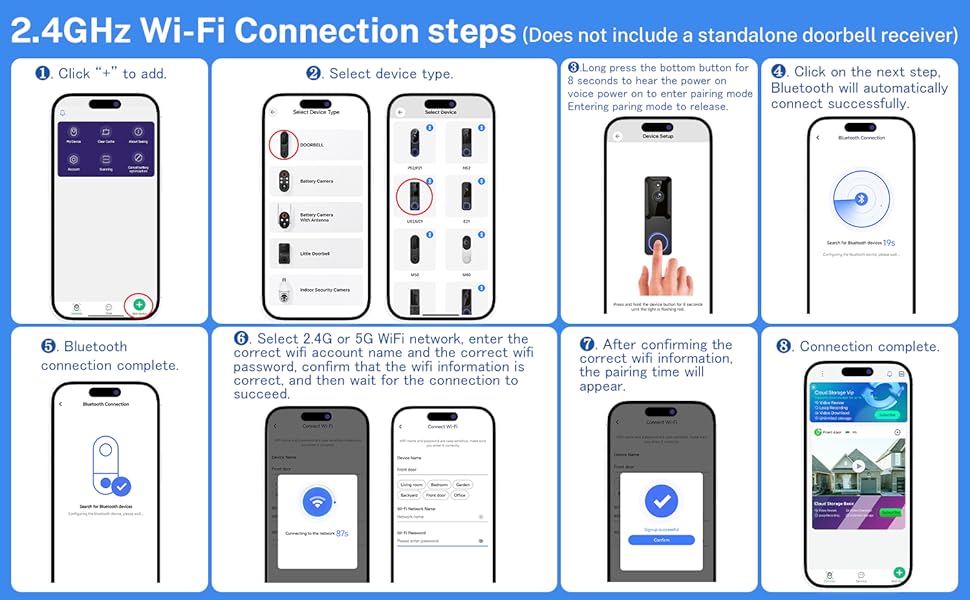
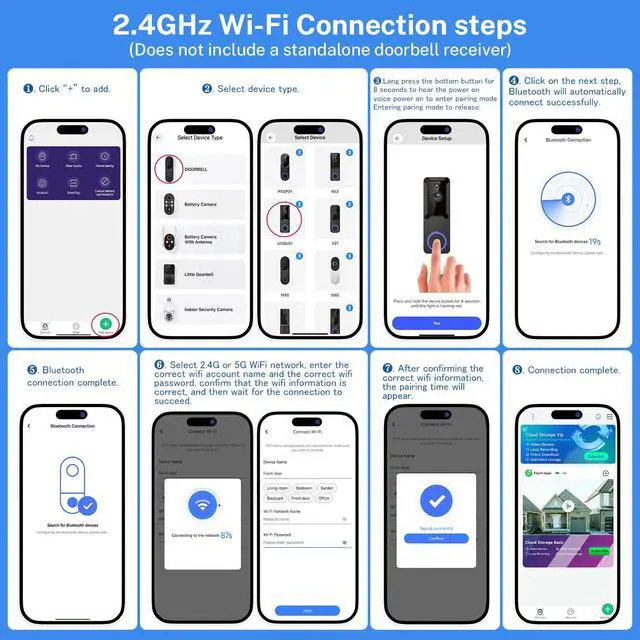
2.4GHz Wi-Fi Connection steps
Troubleshooting network connection issues:
(1) The doorbell camera only supports 2.4GHz Wi-Fi. Please connect it to a 2.4GHz network.
(2) Double-check that you’ve entered the correct Wi-Fi name and password.
(3) Check the distance between the camera and your Wi-Fi router; keep the camera within 33 feet (10 meters) of the router.
(4) Please enable Bluetooth on your phone—you don’t need to pair it with the device, just make sure Bluetooth is turned on.
(5) If you’ve changed your Wi-Fi password or the camera has disconnected, please reset the camera’s Wi-Fi connection:
Press and hold the doorbell button until the camera resets, then re-add the camera to the same app account.
Please note: This doorbell does not include a DingDong receiver.
FAQs
1.Does this doorbell come with an indoor chime? Is the volume adjustable?
A1:This video doorbell does not come with an indoor doorbell receiver. You can adjust the volume in the doorbell’s app.
2.Why is there a slight sound delay? Is it defective?
A2:A tiny sound delay is normal for WiFi wireless doorbells due to network transmission, it is not a product quality issue. You can adjust the volume to make the ringtone louder for better reminder.
3.Do I need a SD card for this camera?
A3:No need for an SD card. The doorbell camera stores videos in the cloud, and you get a free trial of this.
4.How many users can view the doorbell camera at the same time?
A4:The main account can allow access to the device for 8 other accounts. While 3 users can watch the video simultaneously, only one can use the intercom at a time.
5. Can the doorbell camera connect to 5GHz Wi-Fi networks?
A5: No, this doorbell camera only connects to 2.4GHz Wi-Fi. Please ensure when you have both 2.4GHz and 5GHz Wi-Fi network, each with a distinct name for a successful connection.
1080p Wireless Dome Security Camera, No Separate Receiver Included, Night Vision, AI Human Detection, 2.4GHz Wi-Fi Only, Cloud Storage Sold Separately
Stable 2.4GHz Wi-Fi Connection: Specially engineered for 2.4GHz networks to provide steady, interruption-free connectivity for your outdoor dome camera. (Note: Does not support 5GHz Wi-Fi.)
Wide-Angle Lens Coverage: Capture more monitoring area with a wide-angle view for live and recorded video.
Real-Time Notifications: Receive instant phone alerts when your dome security camera detects motion or triggered activities nearby.
All-Inclusive Security Setup: Features a powerful 5200 mAh battery and an indoor receiver to strengthen your security.
Straightforward Charging: Remove the insulation strip and use the supplied USB cable to charge. Works with standard DC 5V 1A/2A chargers (charger not included).
Motion Sensing Alerts: Receive immediate alerts on your smartphone as soon as activity is detected at your front door.
Pre-Capture Video Feature: Cloud users capture the earliest moments of motion, ensuring complete coverage.
Accurate AI Human Detection
Smart AI focuses on detecting people while ignoring animals and passing vehicles.
Note: setting the human detection accuracy: Among the three options of low, medium, and high, we recommend selecting medium. High is the strictest detection level, which means the device will only trigger when it is 100% certain the moving object is a human. However, there is a chance the device may fail to identify the human figure, resulting in you not receiving a notification.
Two-Way Communication
Speak to guests and delivery personnel directly through the built-in speaker and microphone.
Enhanced Night Vision Performance
With four IR LEDs and an advanced sensor, see clearly even in total darkness.
Secure Cloud Storage Options(Sold separately)
Protect your recordings with AES-128 encryption and enjoy a 3-day trial with full video access. (Sold separately)
2.4GHz Wi-Fi Connection steps
Troubleshooting network connection issues:
(1) The doorbell camera only supports 2.4GHz Wi-Fi. Please connect it to a 2.4GHz network.
(2) Double-check that you’ve entered the correct Wi-Fi name and password.
(3) Check the distance between the camera and your Wi-Fi router; keep the camera within 33 feet (10 meters) of the router.
(4) Please enable Bluetooth on your phone—you don’t need to pair it with the device, just make sure Bluetooth is turned on.
(5) If you’ve changed your Wi-Fi password or the camera has disconnected, please reset the camera’s Wi-Fi connection:
Press and hold the doorbell button until the camera resets, then re-add the camera to the same app account.
Please note: This doorbell does not include a DingDong receiver.
FAQs
1.Does this doorbell come with an indoor chime? Is the volume adjustable?
A1:This video doorbell does not come with an indoor doorbell receiver. You can adjust the volume in the doorbell’s app.
2.Why is there a slight sound delay? Is it defective?
A2:A tiny sound delay is normal for WiFi wireless doorbells due to network transmission, it is not a product quality issue. You can adjust the volume to make the ringtone louder for better reminder.
3.Do I need a SD card for this camera?
A3:No need for an SD card. The doorbell camera stores videos in the cloud, and you get a free trial of this.
4.How many users can view the doorbell camera at the same time?
A4:The main account can allow access to the device for 8 other accounts. While 3 users can watch the video simultaneously, only one can use the intercom at a time.
5. Can the doorbell camera connect to 5GHz Wi-Fi networks?
A5: No, this doorbell camera only connects to 2.4GHz Wi-Fi. Please ensure when you have both 2.4GHz and 5GHz Wi-Fi network, each with a distinct name for a successful connection.