




 here!
I’m your shopping assistant for PC builds, upgrades, and everything tech.
Got questions? Ask away!
Start a conversation
here!
I’m your shopping assistant for PC builds, upgrades, and everything tech.
Got questions? Ask away!
Start a conversation



Any questions? Ask CelesteSM will help you find out quickly.


We want to ensure your holiday shopping this year is hassle-free. That’s why we’re automatically extending our return policies on almost every product! For purchases placed between November 1st, 2026 and December 31, 2026 you will have until January 31, 2027 to return your product.
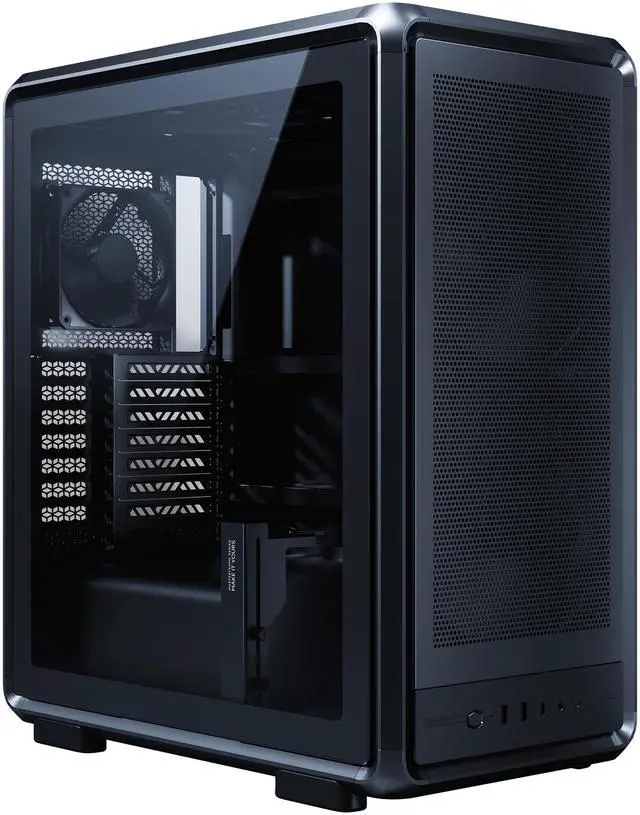
The Cooler Master MasterFrame 500 Mesh is a premium ATX mid-tower PC case built for high-airflow gaming and creator systems, best for users who want a modular open-frame style, dual 200mm front intake fans, and support for large GPUs, tall air coolers, and broad motherboard compatibility.
| Attribute | Value |
|---|---|
| Best For | High-airflow mid-tower desktop builds that need Mini-ITX to E-ATX motherboard support, long GPUs (up to 390mm) and multi-fan or large-radiator cooling |
| Chassis & Materials | SGCC steel chassis with magnetic side panels and dust filters for easier maintenance and serviceability |
| Motherboard And Expansion | Supports Mini-ITX through E-ATX (includes ATX, Micro ATX, Mini DTX, SSI CEB) with 8 expansion slots |
| Cooling And Fans | Air cooling; supports up to 8 fans with mounts: front 3×120mm, top 3×120mm, rear 1×120mm, bottom 1×120mm; external data notes ARGB fan support |
| Radiator Support | Radiator support: front up to 360mm, rear up to 120mm, top up to 600mm (enables front 360mm AIO installation) |
| GPU And Drive Clearance | Supports GPUs up to 390mm long, CPU coolers up to 190mm tall, and includes 1 internal 2.5" drive bay |
| Battery And Power | Bottom-mount power supply support with max PSU length 235mm |
| Front I O And Features | Front I/O includes USB-C 3.2; interior is customizable and includes magnetic side panels plus dust filters for maintenance |
| Dimensions & Weight | Chassis dimensions 21.4 H × 10.3 W × 18.5 D inches; item weight 22 Pounds |
| Model Identifiers | Cooler Master MF500M-KHNN-S00 (Model Name: MF 500 Mesh) |
| Packaging | Package dimensions 37.592 L × 57.9882 W × 65.405 H centimeters; package weight 13.993 Kilograms; package quantity 1 |
Q: Should I buy the Cooler Master MasterFrame 500 Mesh or the HAF 500?
A: Choose the MasterFrame 500 Mesh if you want a more modular, open-frame style case with easier access, stronger customization potential, and a 190 mm CPU cooler height limit. Choose the HAF 500 if you want a more conventional enclosed airflow case with broader storage support, a dedicated GPU fan, dust filters, and slightly longer GPU clearance at 410 mm. In short: MasterFrame 500 Mesh fits builders prioritizing modding flexibility and open access, while HAF 500 fits builders who want a traditional high-airflow tower with more built-in structure.
Q: Is the MasterFrame 500 Mesh worth it over a lower-cost airflow case like the Lian Li Lancool 215?
A: The MasterFrame 500 Mesh makes more sense if you value modularity, open-frame access, premium construction, and support for more experimental layouts. A case like the Lancool 215 is the more practical choice if your goal is strong airflow at a lower price with a standard mid-tower layout. Reviews of the Lancool 215 consistently frame it as a value-focused airflow case, while MasterFrame 500 Mesh is positioned more as a customization platform than a budget airflow buy.
Q: Should I choose the MasterFrame 500 Mesh or a higher-tier enclosed case like the Corsair 5000D Airflow?
A: Choose the MasterFrame 500 Mesh if you want an open, builder-centric chassis for custom layouts, easy hardware access, and visual emphasis on the frame itself. Choose the Corsair 5000D Airflow if you want a more mainstream enclosed case with established cable-management workflows, broad AIO compatibility, and a simpler path to a tidy everyday build. The trade-off is that MasterFrame 500 Mesh leans into customization and accessibility, while the 5000D Airflow leans into conventional usability and polished enclosure design.
Q: Is the MasterFrame 500 Mesh a better choice than the smaller MasterFrame 400 Mesh?
A: Choose the MasterFrame 500 Mesh when you need full ATX or E-ATX support, more room for large GPUs, and a larger platform for open-frame cooling setups. Choose the MasterFrame 400 Mesh when you want the same FreeForm design direction in a smaller footprint centered on Micro-ATX or Mini-ITX builds. The 500 is the better fit for maximum compatibility and expansion, while the 400 is the better fit for builders who want similar modularity with less overall case volume.
Q: Is the MasterFrame 500 Mesh a good choice for portability-focused builds, or is it better for performance-first desktop builds?
A: The MasterFrame 500 Mesh is better suited to performance-first desktop builds than portability-focused builds. Its strengths are large-component support, open access, dual 200 mm intake fans, and room for multiple large radiators. If you expect to move the system often or want a smaller footprint, a compact case will usually be the better match. The MasterFrame 500 Mesh is the stronger fit when cooling flexibility, hardware access, and build experimentation matter more than minimizing size.
Q: Is this case a good choice for a high-airflow gaming build?
A: Yes, if your priority is strong out-of-box airflow and room for large components. The MasterFrame 500 Mesh includes two 200mm front intake fans, supports up to seven fans, and fits GPUs up to 390 mm tall/long envelope with a 190 mm CPU cooler height limit. It is a better fit for performance-focused gaming builds than for compact or quiet-first builds, because its open, mesh-heavy design favors cooling and hardware visibility over noise isolation.
Q: Will it fit an E-ATX motherboard, a large GPU, and a tall air cooler?
A: Usually yes, and that is one of its main buying reasons. Based on the provided specifications, it supports E-ATX-class boards, GPUs up to 390 mm, CPU air coolers up to 190 mm, and PSUs up to 235 mm. That makes it suitable for larger gaming or workstation parts, but buyers should still verify exact motherboard width, radiator thickness, and cable clearance if using oversized components together.
Q: Is it good for custom liquid cooling or future upgrades?
A: Yes, it is a strong option for builders planning upgrades. The case supports multiple fan positions, front radiators up to 360 mm, and a modular open-frame layout intended for flexible configurations and panel changes. It is more suitable for enthusiasts who may swap cooling hardware or change the build layout over time than for buyers who want a simple, closed, low-maintenance case.
Q: Who is this case best suited for?
A: It is best suited for PC builders who want cooling headroom, large-part compatibility, and visible customization potential. It makes the most sense for gaming, showcase, and modding-oriented builds. It is less suitable for users who care most about a compact footprint, maximum storage capacity, or noise-dampened operation, since the design emphasis is airflow and modularity rather than silence or drive-heavy expansion.
Q: How does it compare with a more mainstream airflow case like the Corsair 4000D Airflow?
A: The MasterFrame 500 Mesh is the better pick if you want larger stock intake fans, broader clearance for oversized hardware, and a more modular, showcase-style chassis. A mainstream airflow case such as the 4000D Airflow is usually the simpler choice for standard ATX builds, especially if you value a more conventional layout and easier decision-making around fit. In short: choose the MasterFrame 500 Mesh for flexibility and large-hardware headroom, and a mainstream airflow case for a more typical mid-tower experience.
Q: Who is the Cooler Master MasterFrame 500 Mesh best suited for?
A: It is best suited for builders who want a high-airflow ATX case with extra room for large parts and some layout flexibility. Based on the product specs, it supports E-ATX-class boards, GPUs up to 390 mm, CPU coolers up to 190 mm, dual 200 mm front intake fans, and multiple radiator positions. It makes more sense for performance-focused or showcase builds than for compact or budget-first builds.
Q: Is the MasterFrame 500 Mesh a good choice for large GPUs and modern high-power builds?
A: Yes, it is a practical choice if GPU clearance is a priority. The listed 390 mm GPU length limit, 190 mm CPU cooler clearance, and included GPU support bracket make it better suited than many tighter mid-towers for large graphics cards and bulky air coolers. It is a stronger fit for compatibility headroom than for minimum size.
Q: What are the main trade-offs of buying the MasterFrame 500 Mesh?
A: The main trade-off is size and emphasis on flexibility over compactness. Community discussion around the case focuses on its large footprint and distinctive modular design, while the product data points to broad hardware and cooling support rather than space efficiency. It is easier to justify if you want room for big components, modding, or radiator options; it is harder to justify if your priority is a smaller or simpler case.
Q: Is the MasterFrame 500 Mesh worth buying if airflow is your top priority?
A: It is a reasonable buy for airflow-focused builders because it comes with two 200 mm front intake fans pre-installed and supports up to seven fans plus 360 mm front radiators. The design is clearly oriented toward strong intake and broad cooling compatibility. The decision depends less on whether it can move air and more on whether you also want its larger, modular chassis.
Q: Is the MasterFrame 500 Mesh a good replacement for a standard mid-tower?
A: It can be, but only if you want more internal clearance and a more unconventional frame layout. Compared with a typical mid-tower, its value is in hardware headroom, airflow-focused stock setup, and customization potential. If you just need a conventional ATX case with basic compatibility, this may be more case than necessary.






