


Your Browsing History


Daniel S.
Joined on 03/22/11
0
0
product reviews
- 5
Great machine, but lacks..
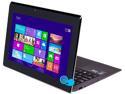
ASUS Taichi21 Intel Core i7 4GB 256GB SSD 11.6" FHD Touchscreen 2-in-1 Ultrabook/Tablet (Taichi21-DH7)
Pros: Probably best in it's class when it comes to design. The keyboard is outstanding. It's the only ultrabook/convirtable that has two screens and a 256 Gb SSD - large SSDs adds to the price, but are finally coming down in price. 11.1" screen, 64-bit o.s., writing stylus - all make this a strong machine. Networking is dual band; has BT 4.0, 2 USB 3.0 ports, 3rd gen i7 processor, and comes with several nice accessories - stylus, USB Ethernet connector, USB VGA connector, and a soft cover.
Cons: Asus missed the mark for a couple of reasons - both displays rate only 215 Nits in brightness - Asus has laptop displays that are very bright at 400 Nits and great for out door reading. The other downside is that it only comes with 4 Gb of RAM; they should have offered 8 Gb of RAM. One key thing to understand is that you cannot upgrade the RAM or SSD because all of the components are soldered directly onto the motherboard. There's no way to upgrade these devices. Also, Asus advertises a case for the Asus Taichi called the Taichi Suit, which looks like a definite accessory the you would want to purchase to protect the hefty cost of this machine - but, try to find one - you can't buy them. Even Asus cannot sell you one or tell you who actually has them. Another issue with the Asus Taichi is that you cannot find one to actually touch and feel to see if you would like or be able to tolerate the keyboard for your typing pleasure - which you might use a lot of the time if you are replacing your desktop or taptop with this device. The battery life is poor as it is with all the ultrabook laptops. Trying to get information from the Asus website or even trying to find out how to contact them is very difficult. Optional accessories are very difficut to locate and purchase right now. Asus also makes mention of a Asus Taichi machine with a 13" display, which is what I wanted, but there's no clue when or if this will ever be available.
Overall Review: It's a nice machine, but better ones are coming out - larger SSDs, larger amount of RAM, brighter displays with higher NIT ratings, newer low voltage/wattage processors.
2/14/2013See more detail
Cannot Get CineRAID to Answer the Phone
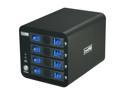
CineRAID CR-H458 Hardware RAID 0, 1, 10, 3 and RAID 5, Support 4 x 3.5" Hot Swappable Drive Bays USB 3.0 eSATA RAID SubSystem
Pros: This product looks interesting. Want to find out if it can also be used as a NAS storage device connected to a router.
Cons: Tried to call the companying at the phone number that is listed on their website and the phone rings and rings until it gets disconnected.
Overall Review: Wonder if this company is still in business and if they dumped a bunch of their product to Newegg. Also wondering if the rebate offered would actually get processed; same with support if something goes wrong and the warranty support.
12/20/2012See more detail
Great Mobo
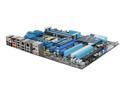
ASUS P8P67 DELUXE (REV 3.0) LGA 1155 Intel P67 USB 3.0 ATX Intel Motherboard with UEFI BIOS
Pros: There are a great deal of nice features on this mobo. I really like the new EFI BIOS - gives you some graphical representations of the mobo readings, plus you can use the keyboard and mouse. Overall, I like this mobo.
Cons: The mobo is a bit flimsy IMHO as compared to what I thought from the Newegg Video. It will flex when you push memory and cards in the various slots. I found that the back plate did not match up very well with my case and is also a bit flimsy - it does not sit flat with all of the ports. It requires both the 8-pin and 24-pin power connectors inserted. It took me sometime to realize this - I though the instructions were indicating one or the other - pictorially. I found that my 2 graphics cards loosely fitted in the PCI-E slots. Also, they provide two front panel pin connector collectors to make it easier for you to connect to first and then more easily connect to the mobo. It was definitely easier, but the connectors did not fit toghet to the board, so I went with the individual connections to the mobo. The USB3.0 header that came with the case also fit very loosely, with bothers me.
Overall Review: The mobo manual have a list of qualified vendors for memory, but that list was created before January 2011 - the date is listed as January 2011. I did not see an updated list available, when I called they said to check with the memory vendor. It was interesting to me that certain memory was only supported in the 2-DIMM mode. The list showed support columns for 1-DIMM, 2-DIMM, and 4-DIMM support. I ended up going with G.SKILL memory that indicated that it was certified for Intel i7 and P8P67 mobos. I currently have 16GB of RAM - probably way more than necessary, but I thought I would experiment on how various configurations affect how it runs. The board supports 32 MB RAM, but could not find faster sticks to match - only 24 MB RAM - I didn't look very hard though.
7/5/2011See more detail
Powerful and Quiet
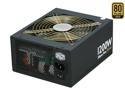
Cooler Master Silent Pro Gold - 1200W Power Supply with 80 PLUS Gold Certification and Semi-Modular Cables
Pros: This psu is powerful and quiet. I like the modular power cabling because it allows you to keep the case clear of cables that you do not need. I purchased this psu to match my CM HAF X case. I just felt that the psu would better fit the case - no a key decision maker for most, but that was my thinking after reading all of the reviews. I like the fact that it does have a power switch - not all do. It would have been nice if they also provided some extension cables for the larger cases - bigger PSUs can imply the use of bigger cases - more power consuming components - extensions for the 8-pin and 24-pin power cables would have been nice to have to keep the wiring neat.
Cons: Yes, it's a pricy psu. The instructions are weak. The 24-pin power connector came broken into a 4-pin tied to a 20-pin lead. I'm use to the 24-pin connectors that you break off what you don't need. CM has the 4-pin and 20-pin separate for some reason. I was putting in the 20-pin first and after putting in the 4-pin, found that the 4-pin was loose. What the instructions don't tell you is that there's a small lip on the 4-pin connect that, when put in first, is used to hold it down after the 20-pin connector is inserted. It's always the small details that these manufacturers tend to leave out - assuming that everyone knows everything about their technologies.
Overall Review: Make sure you spec out your psu supply needs before purchasing. I was surprised that with my mobo and two high-end graphics cards that a 1000W psu was suggested for best performance and protection of the components. Configuration: ASUS P8P67 Deluxe mobo; 2-ASUS GTX560 Ti DCII, 4 6gb HDs, 2-BD/DVD writers, 1 mult-media card reader, Noctua NH-D14.
7/5/2011See more detail
Almost a Masterpiece Case
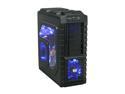
Cooler Master HAF X Blue Edition - High Air Flow Full Tower Computer Case with Windowed Side Panel and USB 3.0
Pros: After researching cases for a month, I decided to purchase the Cooler Master HAF X Blue Edition. First, I like blue better than read - my preference. I was looking for something roomy and easy to work with and this case met that goal. I liked that front panel ports facie the front as opposed to sitting on the top. I also was wanted the air intake grills to have dust filters that could be cleaned. Then I was looking for a case that had adequate cooling fans - this case has 4 lg quiet fans. Beaware that the front panel button that turns off the fan lights is only connected to the front fan. All of the other fans have push buttons inside the case that can be used to turn the fan lights off, but you will need to open the case for that. I like that it had a bracket to support a pair of hefty graphics cards, but because of the positioning of the graphics cards, as instructed by the mobo instructions (ASUS P8P76), the bracket could not be mounted in a way that did not case door to hit.
Cons: If you are purchasing this case because of the access hole behind the motherboard, be aware, when using the ASUS P8P67 mobo that the opening is not big enough to be able to mount an after-market cpu cooler. The 2 of the mobo cooler mounting holes do not fully clear the case's back opening. I think that this was a poor design on Cooler Masters part. They missed it "by that much". The fan power cables were kind of short if you planned on plugging the cables directly into the mobo and not use the 4-pin connectors to the power supply - so purchase some fan extension cables and a couple of fan "Y" cables with your purchase - otherwise you will have to run to a local store for some or wait for them to be delivered, if ordered on line. My mobo requires both the 24-pin and 8-pin power to be connedted. CM gives you an extension cable for the 8-pin power cable, but not the 24-pin connector. If you want to wire up you case nicely, you might want to get a 24-pin power extension cable also.
Overall Review: Overall, it's a great case. The case says that you can add 3 optional fans at the top, in the graphic card bracket and one next to the HDs. I ordered some additional fans and found that the top 200mm fan would not fix because of the front panel wires running into the case were in the was. The 80mm fan did not fix in the graphic card bracked as indicated in the instructions. All of the extra fans that I purchased were CM fans - thinking that they would provide a better fit - same manufacturer. The 5.25 devices in the front bays fit a bit loosely and you can see into the case between the components. They were very easy to install, however. So were the HDs. I like that this case had a USB 3.0 header for the 2 USB3.0 ports on the front - but it fits loosely on the mobo, which bothers me. On other thing, two of the wheels keep falling apart making the case stand unstable. Have contacted CM for replacement wheels. No confirmation from CM after three weeks if parts will be sent.
7/5/2011See more detail
seller reviews
- 1
Nice Product, No Instructions
I've been having a conversation with ASUS regarding the M.2 port where this SSD (M6G 128GB m.2 SATA SSD PX-128M6G-2242 ) card goes; and both ASUS gives not useful instructions for installation of the card except to point out where it is, and the card came with no instructions. I bit frustration since the ASUS support person specifically recommend this model as compatible with their motherboard. The card fits into the slot, but it just hangs there with no support. There is a support post on the motherboard, but its position and configuration are not helpful to the proper installation of the card. I can see the first good earthquake shaking the card out of the slot. It's just hanging there like a springy diving board.
On-time
Delivery
Product
Accuracy
Customer Service
Satisfactory
12/16/2014See more detail