

Your Browsing History


Peter D.
Joined on 11/20/01
0
0
product reviews
- 31
Woop Woop!
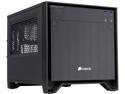
Corsair Obsidian Series 250D (CC-9011047-WW) Black Brushed Aluminum and Steel Mini-ITX Computer Case ATX (not included) Power Supply
Pros: Fits GFX cards up to 10.5" in length, magnetic clinging dust filters fitted to intake air vents, can fit LONG psu's with no prejudice. I did use the modular Corsair H1000i psu and it fit fine.
Cons: It could have come with the full compliment of 3 more case fans as it already has the mounts for them. USB 3.0 front panel ports are inverted so anything being plugged in needs to be inserted upside down. HD cage could use more fan cooling. Good luck getting ATI/AMD GFX solutions to fit as most are too long for the 10.5" limit but almost every Nvidia card fits without a problem (see overview pictures as it looks like a EVGA GTX 780 is depicted in the pictures)
Overall Review: I was initially not sure if the larger/longer 1kw+ psu's would be able to fit, but no problem. great tool-less mounting design! HD cage has rear access and can hold (2) 2.5" drives and (2) 3.5" drives all accessible from the rear. They could use more ventilation though as my drives are reporting slightly warm operating temps of 46-48c. Some of the thumb screws are very tight fitting, but simply adding 3-in-1 oil to the threads of them made them as smooth as ball bearings.
11/23/2014See more detail
Uhoh.
Patriot Signature 4GB 200-Pin DDR2 SO-DIMM DDR2 800 (PC2 6400) Laptop Memory Model PSD24G8002S
Pros: Arrived in one piece?
Cons: Bought two sticks for my two NT330i nettops. BSOD's both pc's with these 4gb sticks. Works fine with generic 2gb sticks. Maybe a incompatibility???
Overall Review: I will try to use these sticks in some other PC to verify product is good, but for now it looks like a incompatibility as I tested two identical sticks in two identical machines using win 7 64 bit OS and this combination BSODS both machines.
1/19/2011See more detail
confusion clarification on refresh rate
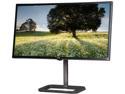
LG 31MU97-B Black 31" Digital Cinema 4K 4096 x 2160 IPS LED Monitor 17:9 10-Bit Color Depth Dual Color Space with AdobeRGB 99.5%, VESA Mountable USB 3.0 HDMI DisplayPort Headphone Out
Pros: Supports high resolution modes
Cons: only up to 30 Hz refresh through HDMI Only on Display Port is 60 Hz refresh supported and this is with only a high quality cable. Not all DP cables are created equal. Took me 3 tries/ 3 different cables before I sustained a stable display with no random signal drops.
Overall Review: Only using the DP ( display port ) is 60 Hz refresh supported. I have found that even using some cables that say they are DP 1.4 compliant that I would get random drops of signal. Aggravating!!!! After trying 3 different brands I found one that works! From reading other reviews on this cable other users found that it too also started dropping the signal months later. Jury is still out on a good quality DP cable.
7/31/2015See more detail
Excellent GFX solution without doubt
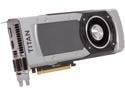
EVGA 06G-P4-3793-KR G-SYNC Support GeForce GTX TITAN BLACK Superclocked Signature 6GB 384-Bit GDDR5 PCI Express 3.0 SLI Support Video Card
Pros: Small package, efficient, quiet cooler, uses only 41 amps so a 850 watt psu is usually more than adequate. Works without any hiccups, silent as can be, performs better than expected.
Cons: Expensive as hell, CUDA acceleration was not as dramatic as I thought it would be.
Overall Review: After reading many reviews on the AMD products that had failed rather quickly and without warning, I'm a Navy vet and I prefer my equipment to be rock solid and reliable, so I looked elsewhere. While this may not be the fastest card that is out there, nothing this small and this quiet exists in the AMD product line and I am working with a Mini ITX form factor, so it's a no brainer to choose this reliable GFX solution. Other AMD solutions were too physically large to fit too.
1/5/2015See more detail
Awesome PSU
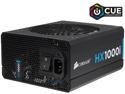
CORSAIR HXi Series HX1000i 1000W 80 PLUS PLATINUM Haswell Ready Full Modular ATX12V & EPS12V SLI and Crossfire Ready Power Supply with C-Link Monitoring and Control
Pros: Very well built modular PSU. Very quiet fan. Fan designed only to run when power consumption is >400W. Plenty of wires. I'm using this with an EVGA Stinger 97 mini itx mobo fitted with an i7-4790k. I don't have a graphics card installed yet, so the fan doesn't even turn on, even with heavy CPU load and by all means the psu still stays cool.
Cons: As others have stated, plugging in the ATX power connector is a bear. The connector plastic is formed right to spec, but to achieve superior electrical connectivity, the metal connectors are a real tight fit. To reduce stress to the motherboard connector when mating, I suggest taking the disconnected ATX power wire and mating it to the motherboard whilst the motherboard is not in the case yet. I placed my motherboard on the dining room table with a piece of cardboard under it so it would not scratch the table and also provide some support to the mobo. Then I inserted the ATX power connector into the motherboard. IT will not seat and lock into place. Then with the help of a LARGE standard screwdriver, apply downward force to the plastic BODY of the wire connector starting from one side of the connector body, slowly working your way to the other side until the connector locks into place and Viola! All done! Then mount the motherboard into your case as needed, route the ATX wire to the PSU and plug in the ATX modular cord into the PSU. Note: You may need to use that standard screwdriver again to seat/ lock the other end into the PSU.
Overall Review: Corsair company: this is a tight fit to most mobo's but using good engineering practices it works fine for me and I don't need any replacements. As cases are getting smaller, perhaps Corsair could provide a "short cable" solution so we don't have to cable manage an extra 18" of not needed cable lengths in these mini itx cases. I cannot comment on the monitoring software which uses a Usb port on the PSU as my build does not push this PSU to anywhere near it's limits. I tend to overbuild on the PSU engineering side of things as being an aerospace tech, this is where I see most PC failures/ deficiencies.
11/23/2014See more detail
Redlines my i7-4790k and bounces it off the temp limiter!
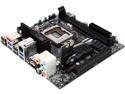
EVGA Z97 Stinger Wi-Fi LGA 1150 Intel Z97 HDMI SATA 6Gb/s USB 3.0 Mini ITX Intel Motherboard
Pros: All I can say is WOW! I have spent weeks trying to achieve the best overclock on some of my builds and this- using this motherboard is crazy simple, just a single setting for adjusting the overclock. Usually I had to adjust 3 or 4 different clock ratios to achieve what this board does in one setting. On top of it, I have never in my life been able to achieve a 500 Mhz OC using a stock cooler and the only reason I can't even go higher is that the CPU is throttling down due to thermal stress limits- yep, not a single lockup, it simply throttles down.
Cons: only one M.2 port and that is used for the wifi /BT module. This could use a 4th fan header. It does have 3 fan headers that can handle 1 amp each and are of the 4/3 pin variety. (1) psu fan header, (1) case fan header, and (1) cpu fan header. Considering this is meant for the performance/enthusiast crowd, most cases use 3 or more fans. EVGA could have thoughtfully dropped a couple of y adapters for sharing fan headers. I am getting my soldering iron out and making my own harness to tap into an unused PSU HD power connector so I can make use of the (3) other case fan locations on my Corsair Obsidian 250D PC case
Overall Review: Simply amazing performance in something the size of a dessert plate of a form factor. Having a temperature display built onto the mobo is an awesome feature that allows you to simply look through a window on the case to monitor CPU temps.
11/23/2014See more detail