

Your Browsing History


Brandon R.
Joined on 06/24/08
0
0
product reviews
- 23
I bought 6 of these
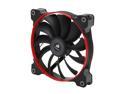
Corsair Air Series AF140 140mm Quiet Edition High Airflow Case Fan Single Pack(CO-9050009-WW)
Pros: -Great Asthetics -Whisper Quiet -Color rings which can also be custom painted Overall the quality is great and I have no complaints, but install and swapping out the rings can be tricky, if not frustrating. I have 6 of these fans plus another 2 120mm AF quiet fans hooked into an NZXT 10 port fan hub, all mounted in a Corsair 750d.
Cons: -Rubber mounts make install difficult without proper technique, see other thoughts for tips -Color rings are fragile, easy to snap, difficult to remove, see other thoughts -Blue ring is more of a teal, doesn't really match other blue PC parts on the market -Color rings aren't reversible and can only be mounted on the front of fan, so if you for instance use it as an intake in the bottom of your case, the ring will face downward and you can't see it. -Fan wire lengths in a full tower case will be too short if trying to extend from the opposite side of the case, for instance the rear fan would never reach a fan controller in the front of my 750d. Just bear that in mind.
Overall Review: I have 6 of these mounted in a Corsair 750d, 1 in the rear, 2 in the front and 3 on the top. Now those of you familiar with this case know that Corsair says you can only mount triple 120mm AF/SP fans in the top, actually you can mounts triple 140s without obstructing the top drive, but I don't know if a triple 140 radiator would work. Given that I've installed 6 of these, here are my tips to make the install less painful. I honestly had blisters after trying to work all the screws through the rubber mounts, so learn from my mistakes. - Pre-drive screws through fan mounts before mounting in your case, it's easier -Use a high torque screw driver (fat handle) to easily drive the screws through the rubber fittings, the difference is huge in how much easier it is. -DO NOT remove ring with your fingers, or lift on the ring from any point other than the corners where it snaps in. Too much force anywhere else will easily snap the rings, which happened to me in one instance. A flat head screw driver is a must. Insert the flat head driver from the corner to pop the rings out. Overall I'd recommend these fans.
1/30/2014See more detail
Not liking the design.
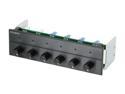
Black 6 Channel Multi Fan Controller
Pros: It works. LEDs are nice.
Cons: Case fans take 4 pins, zalman fans and this unit take 3. Therefore, I can only control my zalman cpu cooler (9700). I need to see if I can get adapters. It sticks out. So as of now, it's counter sunk in my case (Xclio A380) so I can close the door on the front. So it looks like you know what. It doesn't even fit right in the bay and has about 1 mm around the edges where light comes through. Overall, the fit sucks, and no matter what case you have, you will have gaps between the unit and case. Just expect it.
Overall Review: Go with the electronic unit! (MC-2?) Stay away. There are better products, I assure you. Just find something with a better design. And anything that doesn't protrude out far is nice. The knobs will interfere with many drive bay doors.
7/16/2008See more detail
Completely Quiet
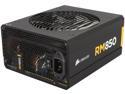
CORSAIR RM Series RM850 850 W ATX12V v2.31 and EPS 2.92 80 PLUS GOLD Certified Full Modular Active PFC Power Supply
Pros: -Completely quiet, no coil whine -Great cables. Some people don't like them because they say they're too stiff or difficult to maneuver. Ribbon cables are like that. But the advantage is that they can lay flat against each other and stack, overall taking up less space. Plus, they flex and will keep their shape, so you can mold them as you like. Only thing I didn't like was the 24 pin main power, as that was divided up into two cables with wires going to different plugs, which is unnecessary and actually makes that cable bulkier. But this is minor. -Packaged VERY well, unlike the Corsair 750d case I bought
Cons: Had a problem with my mobo and I couldn't figure out if this thing was actually on. I used the paperclip test, which is where you connect the green wire to a black ground wire, tested a fan and found out the PSU was ok. Considering this thing is dead silent whether on or off, a small, subtle indicator light somewhere would be helpful for troubleshooting.
Overall Review: Going to use this to power SLI GTX770s.
2/7/2014See more detail
Update Driver for faster speeds
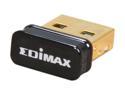
EDIMAX EW-7811Un 150 Mbps Wireless IEEE 802.11b/g/n Nano USB Adapter
Pros: Very small and cheap
Cons: See below
Overall Review: Originally this thing was pulling less than 1mbps whereas my laptop was pulling 25+mbps off my wifi. I updated the driver and now it pulls in anywhere from 5mbps - 10mbps. If you have slow internet, this would probably be ok. But if you're paying for 15+mbps speeds, you don't want to bottle neck what you're paying for through a poorly performing wifi adapter. Because of the poor speed, I'm not going to use this. It's basically a waste of money.
2/7/2014See more detail
Comes with fan extensions
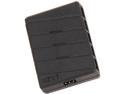
NZXT Grid Ten Port Fan Hub
Pros: - Comes with 3 fan extensions, 1 is male to male so not very useful. The other two are 4 pin extensions, maybe around 8". -White light is nice, but not too bright or distracting. Just let's you know the little black box is there and receiving power.
Cons: -Molex power connector is a bit cheap. The pins were pushing out when I tried to connect it. Not a big problem though.
Overall Review: I use this to power 6 Corsair AF 140 quiet edition fans and 2 Corsair AF 120 quiet edition fans. Those fans don't need controllers because they already run at low enough speeds, so this little accessory cleaned up the install and saved me $100 on unnecessary fan controllers. Overall great buy!
2/7/2014See more detail
Works well
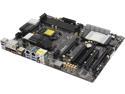
ASRock Z87 Extreme6 LGA 1150 Intel Z87 HDMI USB 3.0 ATX Intel Motherboard
Pros: -Dark brown PCB, matches black cases well -UEFI is easy to use -Everything works
Cons: - Good luck troubleshooting the online bios update if it can't connect through your router. I gave up and just downloaded the bios manually. It was just as easy. -Computer was running too fast. Seriously, the windows clock was running at twice the normal speed. It was like the system was on a caffeine high. I had to pop out the mobo battery to clear the CMOS, and that fixed the problem.
Overall Review: I originally thought this motherboard was dead, or that my new PSU was dead, because it showed no sign of life. This is my 3rd PC build, but the first one where I tried to boot up without the CPU. It hadn't arrived yet and I figured the board would light up or give some sign of life without it. Nope. Make sure the CPU is installed before you try testing. There isn't a lot of variance between motherboards aside from hardware features. The big difference is in the software - the BIOS/UEFI and other utilities. If these don't work well, the board is useless. I've had no issues with this board and the software seems pretty solid. I know others have spoken of problems but maybe ASROCK has worked that out now.
2/7/2014See more detail