
Your Browsing History


MICHAEL M.
Joined on 10/04/03
0
0
product reviews
- 6
fix the flicker
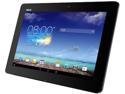
ASUS TF701T-B1-GR 2GB Memory 32GB Flash Storage 10.1" 2560 x 1600 Tablet Android 4.2 (Jelly Bean)
Pros: @ Yianni G.: The screen flicker is a known software bug. Here is how to FIX it :). It was driving me crazy too! 1. Go to settings -> power settings 2. Toggle the dynamic savings on and off, ending with Off. It doesn't matter if the setting is off to start - turn it on, wait a few seconds, then turn it off again. This fixes the flicker until the next reboot.
Cons: It comes with a flicker bug
Overall Review: Once I figured out the flicker solution (shown on YouTube by Franklin) I too was getting increasingly annoyed. But a few months ago, I found this solution and it works completely for me. Now this is my go-to tablet!
2/19/2014See more detail
Impressive CPU And GPU
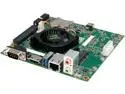
NVIDIA Jetson TK1 Development Kit
Pros: * Fast, HQ graphics with the best OGL drivers in existance. * Faster than AMD AM1 processors for most benchmarks at 1/5 the board power (36W vs 7W) * Surprisingly good Linux support - Gimp, LibreOffice, HPLIP, printers, USB Webcam (Logitech C610) all worked with minimal fuss * Max power draw I've seen has been < 12W DC * Tools from NVidia like Vision Works promises great opportunities
Cons: * Fan is a little noisy * Beta GPU driver needs stability fixes * RAM is shared with GPU, so 2GB is not enough for desktop + memory intensive apps. * 16GB storage is a hassle. 32GB would have been better.
Overall Review: If you live on the bleeding edge, get this board. Nothing else ships with the K1, and it is surprisingly competitive with the Core i3 and AMD AM1 parts. I have been using this board as my only home desktop for weeks. If seems to run faster than my $1500 Core i7 laptop - probably because its graphics are faster than the HD4000 in the i7; also possibly due to shared memory.
5/13/2014See more detail
Second time is the charm
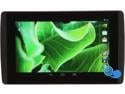
EVGA TEGRA NOTE 7 Tablet - 16GB Flash, 1GB RAM Quad Core NVIDIA Tegra 4
Pros: * The precise and responsive stylus is a game changer. Using it with a 7" tablet is more accurate and satisfying than using a finger on a 10" tablet. Much easier to "click" on small web elements for example. Also, keeps the screen clean when eating a pastrami sandwich. * Surprisingly effective pressure/width sensitivity with stylus. * Awesome graphics. No lag or stutter. Tegra effects like cloth, reflections, dynamic lighting, particles, and rag doll physics. * Fast. Really, really, fast. It beats the 2.3Ghz S800 Note 3 in Antutu - for $500 less. * Great, near-stock Android experience. The few tweaks they did make - like power saving and screen adjustments - are very useful. * Works great with the cover accessory. Really handy to pull out the stylus, set it at an angle, and then proceed with afore mentioned pastrami sandwich over lunch while fast-browsing the internet. The tablet turns on/off when you open/close the cover. * Front-mounted speakers sound great! Nice and loud, with satisfying mid-range and even some bass. It is great to be able to hear a car coming up from your left rear when playing a racing game instead of having to cup your hand around the back to hear anything. * SD Card expansion - I currently popped in a Class 10 32GB card which cost me $25. This is almost as fast as internal storage, yet $175 less than what Apple charges. I hate that Nexus and iDevices don't have SD slots. I expect the move-to-SD feature from the Shield is coming to this tablet, and I know from experience that it works great. This is effectively a 48GB device. I want to try a 64GB card next! * HDMI out. Hey, Google and Apple, are you listening? * Surprisingly good build quality * Screen is better than 2012 N7, and quite bright (~420nits). * Rear camera is actually quite good - good colors, and better than the 2013 N7. See laptop mag for a comparison. * Great price
Cons: * I have been spoiled by a 300PPI ASUS TF701T, so this screen at 213PPI is noticeably less sharp. But I'd keep the three-times-the-nexus-7-2 frame rates than have a higher resolution. * The stylus can "skip" on occasion. There you are, sketching beautifully, and then suddenly your line just stops and restarts. Hopefully this can be fixed in upcoming OTA updates.
Overall Review: I had to return my first unit, as it was defective. Then NewEgg cancelled my replacement and issued a refund. So I got to order again. Apparently I got a unit from the 3rd or 4th lot that NewEgg received. This unit is seems much better assembled with better fit and finish. It doesn't have any flex at all, and it doesn't gets very warm even after hours of 3D gaming. The only thing that bothers me is the stylus skip noted in the cons; hopefully that will be fixed in an OTA update. I am certainly much happier with this than I would have been with anything else. Now many of my friends want one. If you do get this, *do* get the protective cover. It will save the glass [it's not saphire, folks] and it adds a lot of utility.
12/14/2013See more detail
fiddly to install, but very useful afterwards
EVGA Tegra Smart NOTE 7 Smart Cover (M013-00-000032)
Pros: * great viewing position options * work in concert with magnets in note * auto on/off when opening or closing cover * nice feel
Cons: * hard to install and remove * cover came partially disassembled and we had to figure out how to fix the tiny parts - instructions were of no use.
Overall Review: It would be great if we could easily add our remove the cover. Sometimes during use it is very desirable to get rid of the bulk. Doing so is time consuming and requires one to keep track of a delicate strip of plastic that is easily lost. Would have preferred a snap or magnet mechanism instead. But - do get the cover to avoid screen scratches!
12/1/2013See more detail
Amazing Speed and Quality
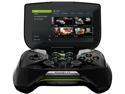
NVIDIA SHIELD Portable
Pros: Extremely fast. Antutu benchmarks 41,362. Compare this with the best competition so far - the QC S800 at around 32,500. The controller is has excellent precision and build quality. I found myself spending hours on games I had lost interest on due to poor tablet controls. Web browsing is near-modern-laptop speed. Sound is loud, has good base, and distortion-free even at high levels. I am finding it difficult to tear this away from my 7 year-old son, who is in serious techno-lust for this thing. The display surprisingly roomy, as a full-screen mode removes the lower and upper menus that cut into a typical android tablet.
Cons: I wish it had a front-facing camera for video chatting. But I knew it didn't going in.
Overall Review: This is basically a top-notch controller (usually ~$60-150) with better-than-a-flagship phone parts (usually $600-$800) for $300. My kids like my tablets and smartphone, but they like this far more.
8/1/2013See more detail
Awesome Speed
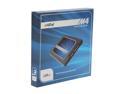
Crucial M4 2.5" 128GB SATA III MLC 7mm Internal Solid State Drive (SSD) CT128M4SSD1
Pros: I installed this on my home system [quad-core, 3.2GHz Phenom (black) with 8GB RAM, NVIDIA graphics, Kubuntu 12.04) and did a detailed comparison. I found the SSD on average ~300% of HDD startup speed after about a week burn-in time. The best improvement was starting Chrome cold - it is now about 7x faster (1s versus 8). I have converted my 4 systems to Crucial SSD's withing the month due to the fantastic speed improvements, and have ordered a notebook - a System 76 Gazelle Pro - with a 256GB Crucial SSD pre-installed. I'm never going back.
Cons: As mentioned, the SSD appears to learn after installation. Therefore, at first my OS had weird glitches and missing or corrupt images. I thought for a bit about giving the SSD up, despite massive speed improvements. But after about a week, all that disappeared. I'm guessing this is because the SSD was marking bad blocks. It also appears to optimize performance for frequently used apps, as startup seems significantly faster then after initial installation. However, this may be an effect of the initial tuning instead of a specific optimization. I use this as a system disk, and keep a spinning disk RAID for bulk data storage. It's still too expensive for that kind of mass storage.
Overall Review: If you get this and you get quirky behavior, reboot a few times and access your favorite apps. After a while, things seem to speed up and the glitches are gone.
6/13/2012See more detail
seller reviews
- 1
Good service but poor communication
The title pretty much sums it up. We got our product in a reasonable amount of time (1 week), but the shipping notification didn't give us any information. We were starting to wonder if we'd get the product at all. Then one week later, it showed up. It was a cheap accessory, so maybe they provide better tracking with more expensive items.
On-time
Delivery
Product
Accuracy
Customer Service
Satisfactory
3/9/2015See more detail