
Your Browsing History


Mr. G.
Joined on 12/28/04
0
0
product reviews
- 30
Quality case
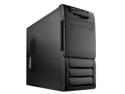
Rosewill R5601-BK 0.8mm Japanese Cold Rolled Steel Screw-less Dual 120mm Fans ATX Mid Tower Computer Case
Pros: I bought this case for the dual 12 cm fans. There is a filter over the front fan. Nice touch. The fans are mounted in there own plastic cage that clips into the case. No screws and low noise. Quality built case with no sharp edges that my hands could find. This is my first screw-less case. Smartadze is right about the drive rail rubber mounts. With the rails attached, the drive slides in the cage with just enough resistance to give you the feel that it is a good fit. Then just clicks right in. Everything went together very easy, (all from Newegg of course!), powered up, and loaded OS first time with no problem. This case has a lot of convenience little features that I would think you'd normally find on a case costing twice as much.
Cons: No MB tray that slides out? I was grasping for straws comparing this case to my Coolermaster Praetorian. The price went up by fifteen buck after I bought it. That is okay for me because I got it cheaper, but the next guy has got to pay more. Supply and demand?
Overall Review: The power wires for the rear fan were too long. I removed the fan from its cage and wrapped the wiers around the fan. Then reinstalled the fan into its' cage pulling the lead wire through one of the existing slots in the fan cage close to the mother board. I cut the slot a little more to prevent the wires from being pinched between the fan frame and cage. Worked out perfect because I didn't have all of the excess wire to tie off somewhere. The optic drive rails mount to the drives' mounting holes with little tabs. This set up also slides nicely into the case. There is a flip-down door that hides the optics drive. You push the external button on the front of the case that pushes the drives' eject button behind the cases' front panel. Of course this opens the optic drive tray which pushes through the flip down door. Pretty ingenious.
3/23/2008See more detail
Not compatable
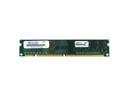
PQI POWER Series 256MB PC 133 Desktop Memory Model MS3856UOE
Pros: High density chips for newer machines. Even though I rated it only "average", never really got to use the memory sticks to give a fair rating. Newegg ships incredibly fast!
Cons: Only read half the rated capacity. Found info on my MB where the high density chips are not compatable. Do a search on your MB model # first to verify.
6/9/2006See more detail
Reveiw part duex
Rosewill R5601-BK 0.8mm Japanese Cold Rolled Steel Screw-less Dual 120mm Fans ATX Mid Tower Computer Case
Pros: Price to performance is very good. I like the tool less design. Handy to have the USB ports up at the top front panel. Good cooling with two quiet 120mm fans. The telescoping side air duct works great for drawing in outside air for the CPU cooler. The bottom front vent is easily removable to access the filter for cleaning.
Cons: These cons are minor considering how much case you get for the price: This case is used on the kids computer and I find the louvered vents closed quite often. A mesh grate to cover the filter instead of the louvers would be nice. That way the air doesn't get restricted due to inadvertently closing the louvers. The side panel is a bit finicky to put on the case. Have to line it up just right the get the RF fingers to engage AND get the lock hasp to line up with slot on the back edge of the panel. Then you slide the pane forward about 1/2 an inch.
Overall Review: This is what prompted me to write again: I have a older 3.4 G single core P4 CPU with a stock cooler OC'd to 3.57G. Every now and then I would find the computer turned off. I always leave my PC's up and running. The CPU had over temped on me and shut the computer down. No damage to the system. This was my own fault. I hadn't cleaned the filters in over four months. Got the filters clean and been keeping up with them for the past two months and no shut downs. Point is, if you are using this case for air cooling a hot running overclocked CPU (not that my P4 is seriously overclocked), ensure you keep the filters clean. Or it will get hot inside the case. Hope this helps!
3/2/2009See more detail
Good Set-up
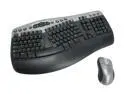
Microsoft Wireless Optical Desktop Pro (2.0)
Pros: It is a good combo for me. Had it for over three years. Computer runs 24/7. Mouse has never failed me. Replaced batteries twice in the mouse and once in the keyboard. I am not a gamer.
Cons: Cannot think of any. Uuummmm.....It isn't self cleaning?
Overall Review: I've read that some people have had problems with the RF receiver having to be close to the mouse. You need to make sure the receiver can "see" the mouse. My receiver is mounted with velcro under the corner section of the desk top and pointed at the keyboard/mouse roll-out tray. My tray has a pencil holder that mostly blocks the line-of-sight of the mouse except one for a one inch gap. With the tray pulled all the way out, and the mouse at the farthest end of the tray, the mouse still works fine. No dead zones or points where it quits working. That distance is over four feet.
12/18/2008See more detail
My third Speck iPod case
Speck iPod nano ToughSkin Case Model NN3-CLR-TS
Pros: This is the third Speck iPod case I've bought. Sorry the first guy didn't like it. I slid the screen protector in after the iPod. I will say that my Second Gen was easier to slide into the case. The company got smart and put a silicon protector on the back of the clip stud so your iPod doesn't get scratched. I had to put chaffing (teflon) tape on my Second Gen's iPod stud.
Cons: It was a pain to slide it on the wifes' Third Gen, but worth it.
3/23/2008See more detail
Second pair
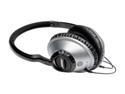
Bose® Around-Ear Headphones
Pros: This is the second pair. the last pair were stolen. My wife uses them when she jogs. They are light enough to stay on her head. Good base response.
Cons: Don't sound as good as a pair of Stax high-end head phones I listened to before. Smaller sound stage and not as good at imaging. That is the reason I gave them only 4 eggs.
Overall Review: Would buy them again for general listening. The wife just throws them in her backpack and haven't broke them yet. She abused the first pair for over two years.
3/23/2008See more detail