

Your Browsing History


Ellie C.
Joined on 01/02/11
0
0

product reviews
- 20
This is my favorite.
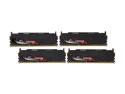
G.SKILL Sniper Series 16GB (4 x 4GB) DDR3L 1600 (PC3L 12800) Low Voltage Desktop Memory Model F3-12800CL9Q-16GBSR1
Pros: Fast Stable 16 GB of ram 7.9 on windows experience I have had NO skipping, NO lock ups, NO issues at all with it. Looks COMPLETELY awesome.
Cons: The only issue some one may have is that 1. They scratch easily 2. The heat sinks on them seem like aluminum and MAY bend eaily, I'm careful so I didn't have an issue with that but these are some completely awesome sticks. Runs W7 Pro @ 10% memory used.
Overall Review: Using in a EVGA Z68 SLI motherboard I love these sticks and I will definately buy again if any issues.
10/23/2011See more detail
It's a lie.
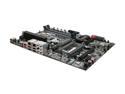
EVGA Z68 SLI 130-SB-E685-KR LGA 1155 Intel Z68 SATA 6Gb/s USB 3.0 Intel Motherboard
Pros: Black, easy to mount, lights on the mobo, EXCELENT manual, Helped VERY VERY much with my build, 3 Slots.
Cons: I couldn't find that "e-sata" by the satas but the huge problem is how it was advertise. IT'S A LIE! THERE IS NOT 3 FULL x16's. IT's x16, x8 x4, And because of how close the x16 and x8 are, you have to plug your dual slot GPU into an x4, They CLEARLY lied saying 3 x16's when you only get ONE, Use the picture and read the motherboard it says x8 and x4, even the manual says it.
Overall Review: Can I still trust newegg?
10/18/2011See more detail
Great card, beware of the software
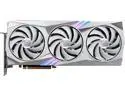
MSI Gaming GeForce RTX 4080 16GB GDDR6X PCI Express 4.0 ATX Graphics Card RTX 4080 16GB GAMING X TRIO WHITE
Pros: Fast Looks great MSI Afterburner is garbage Quiet RGB is persistent. You can set it and uninstall MSI Control Center Large metal plate in the GPU keeps the card from warping
Cons: MSI Control Center collects data Power hungry Low headroom for overclocking The manual doesn't explain the dual bios switch The card is large and heavy
Overall Review: The card came very well packaged, so props to whoever packaged it at Newegg! Inside the carrier box is the graphics card retail box loaded with tons of marketing! Inside is a black box that slides out. Opening that up, you'll find an average small size mouse pad. I likely won't be using it except for maybe my laptop. The actual contents of the box include the graphics card, mouse pad, 12v 16-pin PCI cable adapter, GPU support bracket (not shown in the photo) and a small instruction booklet for installation. In the last photo is the MS Gaming X Trio White RTX 4080 pictured next to a Gigabyte Auris 4070 TI, which I'm returning, but it still shows a size comparison. Setting up the card is straightforward. I use a vertical mount by Cooler Master that holds the weight flawlessly without needing to rest on the bottom of my o11 Dynamic. There was a bit of difficulty trying to understand the dual bios switch. By default, it's set to "quiet." MSI afterburner recognised the GPU instantly. And here comes the annoying part. MSI Afterburner controls everything on the GPU except the RGB LEDs. For that, you need MSI Control Center, which makes me wonder why? Why not just integrate the function into MSI Afterburner? Spending almost $1400 isn't enough. Now they collect your data and sell that too. Opening the application, you have to download separate modules called "Feature Sets". There are many shown in the list; Mystic light, Smart priority, Game highlights, MSI Companion, Gaming Mode, Graphics Fan Tool, Lan Manager, Smart Image Finder, System Diagnosis, True color, User Scenario, and MSI Router. "Graphics Fan Tool" is absolutely pointless. It has a mode that puts the fans at 100% for 30 seconds to "quickly cool the GPU"; however, you're unable to activate it again for 5 minutes!? Just why. Honestly, there isn't really anything in that app worth using outside of the "Mystic Light" to control the RGB, and even then, all the lights on the card appear far too white. There are no deep hues on the card. Going into settings on the MSI Control Center app at the bottom is an option to "Allow MSI to collect, process, and use your product information to improve your user experience" where you can turn that off. Power-wise, at idle, the card sits at 25-35w of power draw and heats up rather quickly at idle to over 35c in low ambient temperatures around 15c. It's a bit disappointing, especially for the size. Trying to overclock the card is rather difficult as it quickly gets voltage-limited and power limited. At most, I got +200 on memory and +150 on the core. I could get +165 on the core without touching the voltage, but at that point, the card is drawing well over 320w at load and dropping it back a little bite to 150 keeps the card under 300w. Overall, it's a great card that beats Gigabyte's garbage software, but MSI Control Center is a redundant disaster that shouldn't exist.
3/8/2023See more detail
Great little screwdriver!
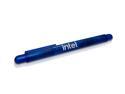
Intel Gift - Screwdriver (Blue)
Pros: It's free first of all it works 2 flat heads, and 2 cross heads.
Cons: A lot of people stated it's just flat heads, that's false. It's just EXTREMELY stiff and hard to take apart!
Overall Review: Grab some pliers, pull the screw driver bits out, grab a nail file and just shave the body of the screw driver down a little bit. Fits perfectly now!
4/23/2021See more detail
Finally upgraded from 60 hz monitor!
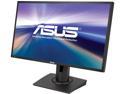
ASUS MG248Q Black 24" 144Hz 1ms(GTG) Adaptive-Sync (Free Sync) LCD/LED Gaming Monitor, HDMI 1920x1080, w/ Asus Excusive GamePlus and Flicker Free Technology, Pivot&Height Adjustment, Built-in Speakers
Pros: This coming from a 60 hz monitor user, please keep that in mind. - The stand is super sturdy - The display is super bright - Very affordable - Came with the Display port cable! - The ability to wall mount, raise, lower, adjust is what sold me on this. - 144 hz! Duh. Overall, the colors are great. Little bit faded compared to an IPS but not very noticeable. Seems almost as if the backlighting is too strong. The set up for running 144 hz was very simple. I play mostly CS:GO which is why I wanted to upgrade from my 60 hz (overclocking that to 70) to a 144 hz monitor. There is no wobble, doesn't take up much space, and the aesthetics of the monitor is also pleasing.
Cons: -The sound quality for the built in speakers is just atrocious. I usually don't care much for monitor speaker quality, however it sounds much like it's a mono speaker from an old iPhone. - Newegg also will not price match this monitor to the price at another online Eseller, which was selling this for $50 cheaper at time of purchase. However the shipping was cheaper through Newegg. - The built in cross-hairs are more a gimmick. You get a pre-made selection of about 4 crosshairs which cannot be modified, nor can you make your own. However that's not much of an issue since I was paying for a 144 hz monitor, not much else.
Overall Review: I would definitely recommend this monitor to people looking for a low budget 144 hz monitor! It's great for the price, not a lot of gimmicky features that most companies use to up-sale a product for more than what it's really worth. I have not used the AMD Free Sync since I'm using Nvidia graphics cards so I cannot say much about that. That being said, for FPS games, this monitor is a must if you're on a budget.
3/29/2017See more detail
I bought two!
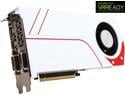
ASUS GeForce GTX 970 4GB GDDR5 PCI Express 3.0 SLI Support Graphics Card TURBO-GTX970-OC-4GD5
Pros: First let me state I loved this card so much I had to buy two. I moved from an Asus GTX 780 SLI to the 970 SLI for the slight performance boost it brought - and it really brought it! The card is 4 GB, despite the complaints about only 3.5 GB usable, I have had no issues using 4 GB on the card. The card runs very cool and pretty quiet - sometimes. Overclocks like a beast! I'm at 1440 Mhz on the core with no issues whatsoever. The overall aesthetics of the card are wonderful. Let me make a note now that the shroud of the card is PLASTIC.
Cons: When I got the cards and put them in my system, I noticed a slight issue. The plastic cover that allows the fans to have dual (Top and bottom) intake were not secured fully and rattled, A LOT. I took charge and grabbed my dremel, since I had no screw driver small enough, and fabricated my own to tighten down the screws. Once they were tightened down I had no problem with noise. Contrary to popular belief about blower style cards, this card remains cooler then my previous GTX 780 SLI set up by Asus. Last con of the cards would be a lack of customization. There's no LED lights that shine; the only LED on the card is a single white LED that indicates power.
6/16/2015See more detail