
Your Browsing History


Charles S.
Joined on 09/26/02
0
0

product reviews
- 11
Great board that supports Windows and Ubuntu 18 Server without any issues
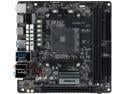
ASRock A320M-ITX AM4 AMD Promontory A320 USB 3.1 HDMI Mini ITX AMD Motherboard
Pros: - Support for Gen 2 Ryzen out of the box - Integrated video works great with G series Ryzens - Lots and lots of overclocking options in the BIOS ... much more than I need but nice to see the options. - Good board layout (it's ITX so you really don't have much room to mix things up) that fit perfectly into my Silverstone ITX case
Cons: - Included manual sucks. It really wasn't even a manual, just printed instructions that only focused on the hardware install piece. It may be a bit of a cost saver for the company, but the trend to make everything online assumes you have access to online content independent of the computer you're trying to build. - Headers for Power and HD activity LEDs are giving me problems. Power and rest buttons work fine though. Not sure if it's a board issue, bios setting I'm missing some where, or a case issue, but I had the LEDs working before with a previous ASRock motherboard installed. Now, nothing. I'll continue to troubleshoot. It's not a deal breaker though since the rest of the board is performing like a champ. EDIT (1/15/2019). The headers work fine, it was the case header connectors that were the issue. Bumping the rating to 5 eggs ... this board is a good deal.
Overall Review: - Intially booted up with a spare Western Digital SSD that had Win10 installed. That booted like a champ and Windows recognized all the different hardware without issues. Building this out as a Ubuntu 18 Server, so I plugged in the Ubuntu install usb drive and rebooted. Ubuntu install started up without issue and I was able to format the drive in ext4, and setup all the default parameters needed to get the server up and running. No issues with any of the hardware being detected and appropriate Linux drivers being install. I was a bit wary that this "new" hardware would have some problems with Linux, but the Ubuntu 18 server software had no issues.
1/15/2019See more detail
Good Airflow...but
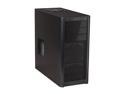
Antec Three Hundred Black Steel ATX Mid Tower Computer Case
Pros: Case is spacious and included fans pull air over the CPU and video card effectively. I’m actually seeing some of the coolest running temps on any CPU I’ve run. Cable management is decent with the included straps…need to get a bit creative in some areas to attach the straps though.
Cons: Case has no noise dampening on the hard drives. This makes even the quietest hard drives sound noisy due to the “wiggling” of the HD stylus noise being transferred directly to the case and amplifying the noise produced. The open front for the additional fans allows this noise to travel without dampening by the case.
Overall Review: Like the build quality, but I probably won’t buy again unless I can hide the case away in a closet to “hide” the noise.
1/16/2012See more detail
Good Case ... Some Tweaks Needed
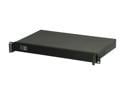
iStarUSA D-118V2-ITX Black Metal / Aluminum 1U Rackmount Compact Server Chassis
Pros: - All steel case is sturdy - Standard mini-ITX components fit, with some caveats - iStar quality matches other cases I've used
Cons: - No hardware to deal with case specific mounting options - Front fan location is poor - Header and USB cables are too long - CPU cooling options are nearly non-existent.
Overall Review: If you're in the market for a 1U case to host a self built mini-ITX motherboard system this is about the best I've found at this price point. iStar quality is similar to other iStar products which is overall good. A few design decisions and issues with this case though. 1. Heat management is always going to be a challenge in any 1U PC that uses "standard" PC components. This means airflow through the case needs to be as unobstructed as possible. The main/only way to get positive airflow through the case is with a separate pair of 40mm fans installed in the front of the case. The problem with this is the location is poor for several reasons. a. The position for the fans is directly next to the cables for the front headers and USB, which makes mounting the fans extremely difficult as well as cable routing b. The fan position is directly in front of where most ATX power connectors connect to the motherboard and memory is located. This means that the fans literally blow into a flat wall and have to travel around the memory to get to the CPU and other things that need cooling in the case, which is a poor design There is space on the front of the case where the fans could be located where this wouldn't be an issue, so it is something iStar could do. Also, only basic memory DIMMs will fit. No memory DIMMS with heatsinks will fit. 2. Extremely long front header and USB cables. These cables are long enough to connect to another motherboard located in another case next to this one. Cable management is already tough in this size case and iStar didn't do the user any favors with this setup. These cables could be cut in half and even then they'd be long. 3. No rear motherboard knockout panel. Since 1U PCs are non-standard for the knockouts that come with most motherboards, I didn't expect anything special but I had to buy a mesh screen that is compatible with this case from a third party to protect the rear connections from inadvertent "fingers" where they shouldn't go. Used wire clippers and a Dremel to make it all tidy. A lot of work for the return. 4. CPU cooling. The 3rd party options for this are nearly non-existent. I tried the 1U server Active cooling CPU Cooler Copper HeatSink QM1UA-AM4, but the copper block came into contact with capacitors on the motherboard and did not seat flush on the CPU making it a non-starter. It also sounded like a vacuum cleaner while it ran. The ID-COOLING IS-30 30mm Height Mini-ITX Low Profile Cooler, actually did fit (barely). However, it is not ideal since the design needs enough clearance above the 92mm fan to pull air in and push it toward the cooling fins. I ended up attaching four soft pads to the corners of the fan to ensure there was an air gap between the fan and case lid to allow air to flow. It wasn't as loud as the QM1UA-AM4 but, it wasn't quiet. 5. The Flex ATX power supply fit, but again the cables were way too long. Not sure why vendors do this. To fit everything in the case I actually cut off the SATA/MOLEX cord and capped the ends of those cables with heat shrink. NOTE to Power Supply Vendors. All power supplies should be modular now. Having to deal with the spaghetti situation that comes with non-modular supplies has got to end. 6. Mounted a single slot GT1030 video card in the case because my CPU doesn't have a discrete graphics and I also wanted to reduce the CPU heat load if I threw anything graphically challenging at it. Used a 5cm flexible PCIe x16 cable to connect it to the board. The slot fit the video card just fine, but there are NO options to hold the far end of the card in place in any way. I ended up mounting a rubber standoff to the case to hold the card up and keep the GPU fan clear of the case. I may look to create a custom design using some block plastic, and some screws or glue, to keep everything solid and in place Final thoughts. This will never be a "quiet" PC with the current components available to cool it, which is a shame. I could design a straight forward CPU cooler for this which is much more effective and quieter than the options currently out there. There could be a much larger market for this size case if there were vendor options. The only other option I see for this kind of case to make it quiet is to use laptop parts, which is a whole other challenge to deal with. If you want something quiet, you'll have to go with a 2U. Included pictures to show how it came together.
11/29/2022See more detail
Good performer for the Money
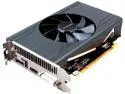
SAPPHIRE PULSE Radeon RX 570 4GB GDDR5 CrossFireX Support ITX Graphics Card 100412P4GITXL
Pros: - Good performance for most 1080p games - Fits ITX case without issue (Cooler Master Elite 110) - 256-bit memory ensures refresh rates are maintained
Cons: - Runs a bit hotter than expected in games and video encoding. Make sure you have good ventilation for your ITX case (i.e. cable management & airflow). - A bit louder than expected, but based on the thermals I can see why the fan needs to spin more.
Overall Review: Solid 1080p gaming card if you're on a budget (honestly who isn't?). Would recommend as long as good air flow is available for your case.
12/30/2019See more detail
More room than I realized
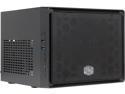
COOLER MASTER Elite 110 RC-110-KKN2 Midnight Black Steel / Plastic Mini-ITX Tower Computer Case
Pros: Quality construction, rounded edges, big thumb screws on back, lots of Hard Drive, and video card possibilities
Cons: USB 3.0 front cord is too long. Included zip ties are too small.
Overall Review: This case surprised me. I have a mini ITX motherboard that I transplanted from a half height case to this case to take advantage of the full height I needed with a higher end video card. I was well aware of the depth limits so I got one of the newer cards that was both shorter and didn't require separate power. Pairing this case with my existing SFX power supply gave me even more space to work with. There was one thing about the case and one about my power supply that didn't work quite the way I desired. First, the case comes with a front USB 3.0 cable that is waaaay too long. I get that these may be the 'standard' they get from their supplier, but the distance from the front of the case to any mITX motherboard is only a few inches. The USB cable is well over a foot in length and due to its stiffness is hard to hide out of the way. Second was my power supply. SFX is definitely the way to go with these cases, even though they can handle ATX. But, regardless of size, get a modular power supply. All the extra cables from my standard supply were a pain to try to hide and I needed bigger zip ties to pull it off. All and all this case is highly recommended.
2/27/2017See more detail
Bad Power Button
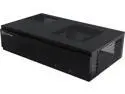
SILVERSTONE MILO Series ML06B Steel Body Mini-ITX Media Center/ HTPC Computer Case with Aluminum Front Panel
Pros: Good low profile case.
Cons: Need to carefully buy components to fit. Power supply cables are a challenge. A flat cable option would work better in this case. Second case I bought and after a little over a month of usage the power button no longer works.
2/12/2015See more detail