
Your Browsing History


Lewis R.
Joined on 01/03/13
0
0
product reviews
- 3
Qck+ is Great

SteelSeries QcK+ Mouse Pad
Pros: Durable, in ways you can't quite imagine. I've spilled coffee and soda on mine and I don't see any stains, but I did start cleaning it immediately. Large (odd that newegg doesn't have the dimensions) It's roughly 17-19in wide, 14-16in tall, and about 3-5mm thick High Quality Cloth It's a fairly smooth surface compared to other Mouse pads, and probably has a significantly high knit count which adds to it's durability.
Cons: The logo is made from a different material than the rest of the mouse pad, so if you go over with your mouse it may disrupt tracking though since it's in the bottom left corner the odds of you tracking over it are fairly low. I simply just rotated my mouse pad so the logo was at the top right. btw logo takes up about a 2inx3in space Not worth taking an egg off though considering how large the mouse pad is, it's fairly easy to avoid the logo.
Overall Review: I've used this for 2 Season of Competitive Team Fortress 2, and play many other FPS's with roughly a 9in/360 on this mousepad with 0 problems. I've had this mouse pad for around 6 months, and I am just starting to notice some wear and tear on the mousepad. I expect this to last about 1.5-2.5 years before it should be replaced.
4/21/2013See more detail
Qck+ is Great
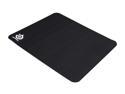
SteelSeries 63003SS QCK+ Mouse Pad
Pros: Durable, in ways you can't quite imagine. I've spilled coffee and soda on mine and I don't see any stains, but I did start cleaning it immediately. High Quality Cloth It's a fairly smooth surface compared to other Mouse pads, and probably has a significantly high knit count which adds to it's durability. Size This thing is HUGE, just make sure you have room for it. It has a larger surface area than most 20" LCD Monitors.
Cons: The logo is made from a different material than the rest of the mouse pad, so if you go over with your mouse it may disrupt tracking though since it's in the bottom left corner the odds of you tracking over it are fairly low. I simply just rotated my mouse pad so the logo was at the top right. btw logo takes up about a 3inx3in space Not worth taking an egg off though considering how large the mouse pad is, it's fairly easy to avoid the logo.
Overall Review: I've used this for 2 Seasons of Competitive Team Fortress 2, and play many other FPS's with roughly a 12in/360 on this mousepad with 0 problems. I've had this mouse pad for around 7 months, and I am just starting to notice some wear and tear on the mousepad. I expect this to last about 1.5-2.5 years before it should be replaced. Also been using a Logitech G400 mouse with this as well for most of that 7 months. Wouldn't recommend this for LANs at friends/your house it takes a lot of space.
4/27/2013See more detail
Best Mouse period
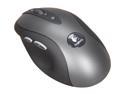
Logitech G400 Black 8 Buttons 1 x Wheel USB Wired Optical Gaming Mouse
Pros: -Ever since late 2011 they switch the sensor in this mouse to a non angle snapping one. -1000Hz -3600DPI literally overkill no body except people who want to brag need more than this -Design Fits insanely comfortable to your hand, all the buttons are pretty well placed, looks nice, and the finish is perfect -Price This mouse can do everything $100 mice can except, interchangeable weights/less buttons not to mention you can usually find this Mouse for $30-$40 on a fairly regular basis. -Cord Pretty light weight and more than long enough to stretch across my desk with ease
Cons: -Cord It's light weight enough that it CAN be easily damaged, mine hasn't though so not a problem -Firmware it's impossible to update, but that isn't an issue tbh
Overall Review: I've owned this mouse for 7 months, 0 issues Some Credibility I have -Played competitive Team Fortress 2, and CS:S -Computer Science Major (I spend A LOT of time using computers, and learning about hardware) -Computer Repair Technician (I've even repaired this mouse among others for people) Also use this mouse with the Steel Series Qck+ mousepad oh and just to make sure people see this, even though someone else posted this "if you look at all the negative reviews of this mouse, they cite universally one problem: the dreaded intermittent USB disconnection. This happens because the cord of this mouse is extremely light. This was a design choice to keep the cord's weight from moving the mouse after you let it go, which occurs frequently with other mice. Unfortunately, this light cord has a flimsy connection with the board in the g400's guts. TO KEEP THIS PROBLEM FROM HAPPENING TO YOU: 1. Place the mouse wherever you're going to be using it, and plug it into your computer's USB port 2. pull the mouse down to the lowermost extremities of your mousepad / mouse surface. Now pull the mouse out another 6-8 inches out, and scotch tape the middle of the mouse cable to the underside of your desk 3. Enjoy having an awesome mouse for the next few years The purpose of this fix is to greatly reduce tension in the cord, minimizing stress on aforementioned flimsy connection"
4/27/2013See more detail