

Your Browsing History


Donald S.
Joined on 09/24/08
0
0
100%
product reviews
- 82
Why pay more?
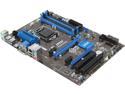
MSI Z87-G41 PC Mate LGA 1150 Intel Z87 HDMI USB 3.0 ATX High Performance CF Intel Motherboard
Pros: I have completed two builds using this motherboard, and I have to say I am pleased with the results. It is a basic, no frills, easy to work with board that does not cost a lot and currently comes with a rebate. The major pros are the Military Class 4 components, plus ESD protection, EMI protection, and the new glass fabric moisture resistant PCB. All the important features I look for are present such as a USB 3.0 header for the front panel, heatsinks on the VRM, angled AND vertical SATA III connectors (very nice, I must say), and a very good UEFI. Both builds are running BIOS ver 1.4. I ran both builds through the ringer with Prime95, MemTest86, and Unigine Heaven. I looped the Unigine Heaven benchmark while running Prime95 Blend test for eight hours to ensure maximum stability and I had no issues with either build. This motherboard supports Realtek Gigabit Ethernet, using the "G" variation of the chip, which is Realtek's latest. The onboard ALC 887 analog-only audio is decent but won't win any contests...however it is not relevant to me since I have a Creative Sound Blaster Z in my personal machine anyway. I have learned from my 22 years of building PCs that simplicity is beautiful, and the more features you get increase the price, the complexity, and the chance of failure or other unusual problems. Some times it really pays to go the more basic (but not TOO basic) motherboard route if you have a high end sound card, no need for overclocking, prefer high end single GPU solutions, and have no need for onboard WiFi/BT or other items that you probably do not want. If this fits you...then why pay more?
Cons: Really, only one con and this is easily circumvented if you know what you are doing when building a PC. This motherboard makes use of six mounting holes...not nine like on true full size ATX motherboards. That means a lot of flex at the edge of the board. This means when you insert your RAM, you do it outside the case on a hard flat surface (preferably on a anti-static mat). It also means when plugging in the main ATX power connector that you support the PCB from underneath with your fingers to prevent flex. To attempt to insert RAM or the main ATX power connector in any other fashion is to risk damaging the PCB which shows up as supposedly DOA boards or non-working DIMM slots. You can always tell via the reviews from other folks complaining of non-working DIMM slots that you are working with a six hole board--most often they do not realize the caveats I just outlined and cause their own hardware failures and then blame the manufacturer.
Overall Review: I am glad that MSI has released a basic no frills (and no unneeded extra fluff) motherboard that caters to someone who has a high end sound card and powerful single GPU setup with no desire to overclock. Here are the two builds: My personal RIG: Core i7-4770K at default clock 16 GB (2 x 8 GB stick) Crucial Ballistix Elite DDR3-1866, CL 9, 1.5V EVGA GeForce GTX 780 Super Clocked Creative Sound Blaster Z Samsung 840 Pro 256GB as OS/primary drive Samsung 830 256 GB as secondary/gaming drive Western Digital Blue 7200 RPM 1TB as mass storage Corsair H110 water cooler Cooler Master HAF XM case Seasonic X-Series Gold Certified 650W modular PSU ASUS DVD/RW Windows 8.1 64 bit retail Build for friend: Core i5-4570 8 GB (2 x 4GB sticks) Team Vulcan DDR3-1600 CL 9, 1.5V Seagate hybrid 1TB 7200 RPM hard disk Power Color Radeon HD 7870 GHz Edition ASUS DVD/RW Cougar Archon case Seasonic S12 II 620 Watt PSU, Bronze Certified Using onboard Realtek sound and Ethernet Windows 7 64bit OEM
12/14/2013See more detail
Buyer beware
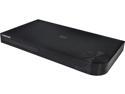
Samsung 3D Wi-Fi Blu-Ray Disc Player
Pros: First things first...I did not buy this at Newegg. I bought it from elsewhere, but I feel compelled to relate my experiences. First, the pros are that it does indeed support dual band WiFi, has a dual core processor, is compact, and has a nicely designed Smart Hub interface. Firmware updates are relatively frequent...about one every two months. Played the BD disks I threw at it very well, and up converts DVDs too.
Cons: Where to start... Upon hooking this BD Player up I had no trouble getting the Smart Hub working and subscribing to Hulu Plus, etc. At first, there were a couple of minor issues such as losing connectivity (the TV program would not load, and the player would flash the message to check my internet connection). I brushed them off, although I tried wireless AND wired and still got the same message from time to time. Fast forward a month or so to the first F/W update. The only change I noticed from the first F/W update was that the connection got even more flakey. I started suspecting the player was at fault since my internet connection was stable. As a test, I ran Hulu Plus in a browser window on my PC and the same program also on the Samsung player. The player would error out that there was a connectivity issue while the PC would continue to play the video. AHA! Caught ya. I continued to live with this issue figuring another F/W update would resolve it. No such luck. No only did the connectivity continue to be flakey, but NOW the player was turning itself OFF at random intervals. Not good. Time to take it back, which I did. Fortunately I was able to get an in store credit and purchase a Sony which has exhibited none of the issues I described. One final con is the intrusiveness of the Smart Hub into your viewing habits. You must agree multiple times to allow Samsung to use your viewing habits data and allow them to use it for any purpose they see fit or you cannot use the Smart Hub. No opting out.
Overall Review: I expected far better from Samsung. After some web research, I find that my player is not defective per se, but has a continuing F/W issue. I did perform a full reset of the player and Smart Hub after each F/W update to be sure that I was giving the player a fair shot at acting properly. I wished this player worked properly as it was innovative and had a pretty user interface. Judgement: DO NOT BUY. RUN AWAY SCREAMING.
1/23/2014See more detail
Rock stable server motherboard--Long Term Use Review
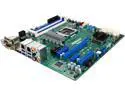
ASRock Rack C236M WS Micro ATX Server Motherboard LGA1151 Intel C236
Pros: --24x7x365 stability --Well laid out with no clearance issues I have encountered --PCI-E x16, x8, x4, and x1 slots giving a great deal of compatibility with enterprise level hardware --On board debug LED --All solid long life Japanese capacitors --VRM heatsink is bolted down just like it should be...no push pins with springs here! --Dual Intel LAN --PS/2 keyboard connector --BIOS was easy to setup
Cons: There are no cons I have ever run into
Overall Review: I strongly recommend this product if you need a reliable and stable server or workstation setup. This board is a work horse. Mine has been in service over a year now running continuously, coming down only to facilitate regular maintenance or upgrades to the server. The server runs headless and is being to host Ubiquiti UniFi Video as a NVR managing 10 cams recording full time at 1080p 15PFS and performs double duty as well running a Ubiquiti UniFi Wireless controller I also own the older variation of this platform...the C226M WS motherboard and it has displayed 100% stability as well. That board is still in service as well, up and running for nearly 2 years as of this writing. I look forward to the C246M WS that is being released soon. I expect the same level of reliability, given AsRock Rack's track record. My server setup: AsRock C236M WS Crucial DDR4-2133 ECC 16GB (2x8GB sticks) Xeon 4c/8t E3 1275 v5 CPU Intel PCI-E x4 i350-F2 dual channel fiber adapter Samsung 850 EVO as boot/OS/server software drive 4 x 6 TB Seagate Surveillance drives in software RAID array using mdadm (RAID 10) Seasonic Focus Plus 550W PSU Corsair H60 AIO water cooler Ubuntu Linux Server 16.04.3 x64
8/18/2018See more detail
Awesome and extremely stable mobo
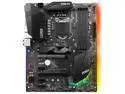
MSI H370 GAMING PRO CARBON LGA 1151 (300 Series) Intel H370 HDMI USB 3.1 ATX Intel Motherboard
Pros: -- Great pricing--high level of workmanship for the money and I ditched a Super Micro Z370 motherboard for this one so.... -- Heavy duty VRM with ultra long life black caps -- Audio solution is top notch. I literally could not tell the difference between the on board audio and my Sound Blaster Z when it came to my Trance. -- Nahimic 2+ is included for sound shaping, including headphone surround gaming which works quite well -- Highly compatible with my RAM kit...G.Skill RipJaws V DDR4-2666 CL15 1.2V -- Withstood 24 hours of Prime95 Blend AND Furmark running simultaneously which I consider the ultimate stability check combination -- Bling if that is your thing...not mine so I turned off the little blinky lights... -- The H370 chipset now has native USB 3.1 Gen2...no need for AsMedia here -- Heatsinks on the VRM area are BOLTED down! -- So many FAN headers I was not feeling the least bit worried about what fan cable would reach where...something I usually have to account for in any build. -- UEFI is superb. Fan control and degree of granularity is second to none. -- Comes with RGB LED cable and Corsair Link cable to the Corsair Link control box if you use that
Cons: -- I cannot find any cons. Really, I cannot.
Overall Review: My setup is: MSI H370 Gaming Pro Carbon Core i7-8700K G.Skill DDR4-2666 RipJaws V at CL15 1.2V XMP Profile 1 PNY GeForce 1080Ti M.2 Samsung 960 Pro 1TB PCI-E 3.0 x4 NVME M.2 Samsung 951 512GB PCI-E 3.0 x4 AHCI Corsair H110i water cooler and using the Corsair Link cable/software EVGA G3 750W Gold PSU
4/18/2018See more detail
Stable, but VERY PICKY motherboard with other oddities
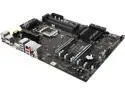
SUPERMICRO MBD-C7Z370-CG-L-O LGA 1151 (300 Series) Intel Z370 HDMI USB 3.0 ATX Intel Motherboard
Pros: Well built...8 layer PCB I believe Well done audio subsystem...flawless listening Cooper Bussman power delivery...definitely server grade stuff Very little switching going on...which means little bandwidth sharing between devices UEFI does have better explanations on the settings compared to other brands of mobos I have used No frills...no bling...everything you need and NOTHING you do not...just the way I personally like it
Cons: UEFI fan control granularity is many generations behind the competitors. Don't expect to do much fan tweaking. Confusing settings as well in this section. For the price, a EMI shield over the ALC1220 CODEC would have been nice MOSFET heatsinks are push pinned down...not bolted down and should be at this price level Unbelievably picky with RAM! I could not use a G.Skill RipJaws V set at DDR4-2666 CL15 1.2V via XMP. It would misread the XMP profile and set the RAM to 1.35V. Upon manually setting the proper voltage I experienced instability that was not RAM related--leaving the voltage at 1.35V would result in similar instability that only showed up on ultra heavy gaming like Doom at 4K. Come to find out this very common RAM is not on the QVL and further not many sets of enthusiast RAM have been vetted by Super Micro. I stuffed in a set of DDR4-2400 CL16 that happened to be a Crucial set that was on the QVL and that did work and did not present stability issues....however there is no way I am going to have that RAM 24x7 in my gaming machine. UEFI processor microcode is older and the Spectre mitigation(s) are not present...no BIOS updates on the website. Further, the latest version of the UEFI allows a Core i7-8700K to throttle under heavy Prime95 testing despite being all voltages and temps being in the "green". This issue was mitigated by other manufacturers but not Super Micro. The M.2 slots, due to the limited resource sharing going on, are PCI-E ONLY. No SATA allowed.
Overall Review: Although the hardware is high quality, there are just too many tradeoffs here. The UEFI is not up to snuff if you are used to MSI/ASUS/Gigabyte. The RAM compatibility is the biggest issue, and betrays Super Micro's primary mission which is server grade stuff. I do not recommend this motherboard at this time. Fortunately, this stuff is correctable via BIOS updates. For me, I had to return this motherboard as I was looking at having to buy more and expensive RAM in order to meet this picky board's requirements.
4/18/2018See more detail
Very stable RAM!
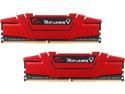
G.SKILL Ripjaws V Series 16GB (2 x 8GB) 288-Pin DDR4 SDRAM DDR4 2666 (PC4 21300) Desktop Memory Model F4-2666C15D-16GVR
Pros: XMP setting working immediately with my MSI H370 Gaming Pro Carbon motherboard. After a number of tests with MemTest86 and Prime95 I am certain the RAM is good. Came with a case sticker...kinda nice since that shows an attention to detail.
Cons: No cons. Price, perhaps, but that is the market not G.Skill
Overall Review: This RAM will work with your Intel CPU and AMD Ryzen CPU. I have cross confirmed in two different systems to be certain.
4/18/2018See more detail