
Your Browsing History


Daniel Q.
Joined on 11/07/01
0
0
product reviews
- 13
Easy as pie
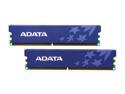
ADATA 2GB (2 x 1GB) DDR2 800 (PC2 6400) Dual Channel Kit Desktop Memory Model AD2U800B1G5-DRH
Pros: - Works immediately, no config or BIOS tweaks necessary - Operates at 1.8V - Reasonably fast - Inexpensive
Cons: - Heatspreaders not the very best - Lax timings at 800MHz (5-5-5-18)
Overall Review: Work great in a 4GB/4-DIMM system on a GigaByte P965-DS3 rev 1.0, even though the two other DIMMs are different brand (OCZ) and timings.
1/23/2008See more detail
Almost great
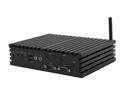
JetWay HBJC371F35W-T40E-B AMD A50M (Hudson M1) Barebone
Pros: No fans or moving parts 4 working front-mount serial ports Great support in Ubuntu Linux Adequate speed/performance Good networking capabilities (dual gigE) Simple to assemble with 2.5" SSD
Cons: Thermal design/build quality
Overall Review: Assembled and had it working with Ubuntu 12.04.02 LTS very quickly. HOWEVER after an hour or so I noted the system was unstable (random reboots) and after eliminating other causes, I found that CPU/GPU temps had climbed to >105C. I took everything apart and found a small gap between the CPU thermal pad and the case protrusion (mesa) which acts as a heatsink. Clearly the tolerances or design were incorrect, as these parts should have been touching to transfer the heat. Even a low-power CPU like this needs contact for thermal transfer! I removed the motherboard, applied thermal compound to fill the gap, reinstalled and CPU temp went down to 71C. The board has been stable ever since. I've recently added an external fan to blow air over the case just to be safe, and CPU temps now hover in the low 60s. Obviously Jetway needs to address this issue - either the case machining is incorrect on my unit, or else it's a problem with all of them. If I order another one, I'll check and see if the same issue exists.
5/20/2013See more detail
Mediocre, but good value
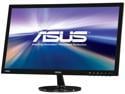
ASUS VS Series VS247H-P 24" (Actual size 23.6") Full HD 1920 x 1080 60Hz HDMI VGA DVI-D SPLENDID Modes Widescreen LED Backlight LCD Monitor
Pros: Low price, no dead pixels, good size, reasonably fast response time, HDMI and DVI inputs, moderate power consumption
Cons: Poor colors with limited ability to adjust, poor vertical viewing angle
Overall Review: Using HDMI (not sure about DVI), default color calibrations (even sRGB) are terrible, and the menu adjustments are of limited help. Gamma is way off at high IRE and color accuracy is pretty poor. Poor vertical viewing angle makes it even harder to adjust. I'm not a color snob, but it was difficult to even get my background photo on the Windows desktop to look at all realistic. After several sessions fussing with modes (standard seems best), brightness, contrast, and desktop color settings in Windows, I've got it barely acceptable. Gaming performance is fine.
3/29/2014See more detail
Great spacious case
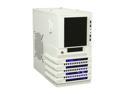
Thermaltake Level 10 Series Level 10 GTS Snow Edition White SECC ATX Mid Tower Computer Case
Pros: Spacious. Toolless install. Quasi-hot-swap 3.5" bays. Plenty of room for long GPU cards. Plenty of pass-throughs and space for MB cable management. Fits bottom power-supply fan-down with tall feet and a bottom intake-filter. Good cooling with front 200mm and back 140mm. Pre-drilled top-holes for 2x120/140mm fans. Fit my H100 240mm watercooler on the top without mods.
Cons: Wider than standard mid-tower. Front fan blue LEDs a bit bright. Plastic bits a bit flimsy-feeling (but I haven't broken anything).
Overall Review: Very satisfied so far. Cool and quiet build i7-4770K + 7950 + Seasonic 850W PS.
12/13/2013See more detail
Huge upgrade over stock cooler
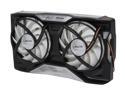
ARCTIC Accelero TT II VGA Cooler - nVidia & AMD, Dual Quiet 92mm PWM Fans, SLI/CrossFire
Pros: 20C lower temps on MSI 7950 and nearly silent compared to stock leaf-blower.
Cons: Large - blocks 3 slots. Tricky semi-blind installation. Tightening screws flexes the videocard PCB a liitle. Mounting holes very slightly misaligned with PCB holes. Not enough memory heatsinks for 7950 (need 12, 11 included)
Overall Review: Great cooler for a reasonable price. I can overclock an extra 5-10% vs stock at 20C lower temps in FarCry3 and ditch my headphones to boot. Installation is a little tricky with the spacers and making sure the copper makes good contact with my recessed GPU. Obviously there are some mounting compromises since this is compatible with so many GPUs.
12/13/2013See more detail
So far so good
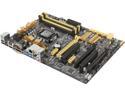
ASUS Z87-A LGA 1150 Intel Z87 HDMI USB 3.0 ATX Intel Motherboard
Pros: Good layout. Lots of USB3 & SATA6 ports. Plenty of space for large coolers. PS/2 conn. HDMI, displayport, DVI, and SPDIF optical out. MANY overclocking options. Configurable VRM and fan profiles. UEFI BIOS works well. Built-in programmable fan controllers work well.
Cons: Gimmicky software "Asus AI tweak". Almost _too_ configurable - so many options it's tough to understand the effect of each setting.
Overall Review: It's been a while since I've bought a MB. My last was an ASRock P55-Pro used with an overclocked i5-750. This MB is quite a change. The UEFI BIOS is organized quite differently from the old Award days, and I found the vast array of overclocking options somewhat confusing. For example, I wanted to clock all the cores the same, set a manual voltage, and clock the RAM at a supported (but not JEDEC) rate. This was possible, but required finding all the settings independently all over the BIOS. Thankfully you can save different profiles so you don't have to start over for every tweak. The configurable VRM is nice, but I'll need to read more on how to properly use it. Windows software works fine but is a bit gimmicky with the eye-candy.
12/13/2013See more detail