


Your Browsing History


Cody A.
Joined on 10/02/08
0
0
product reviews
- 10
Amazing Performance / Price Value

PowerColor Radeon HD 3870 512MB GDDR3 PCI Express 2.0 x16 CrossFireX Support Graphics Card AX3870 512MD3-PH
Pros: Cheap Price Great Cooling (OC'd Max Heat = 65c) Low Power Consumption Quiet Fan (Below 85%)
Cons: DDR3 Memory (Get the DDR4 if you can afford it) Loud at 100% Fan Speed (What isn't though)
Overall Review: Team Fortress 2 ~ 100+ FPS (All Settings High, No AA / AF) CSS ~ 300+ FPS (All Settings High, No AA / AF) DoD:S ~ 300+ FPS (All Settings High, No AA / AF) Fallout 3 ~ 50+ FPS (All Settings Ultra, No AA / AF) Portal ~ 160 FPS (All Settings High, No AA / AF) Half-Life 2 ~ 140 FPS (All Settings High, No AA / AF) Half-Life 2: Ep 1 ~ 160 FPS (All High Settings, No AA / AF) Half-Life 2: Ep 2 ~160 FPS (All Settings High, No AA / AF) Fable ~ 300+ Fps (All Settings High, AA / AF Maxed) CoD4: Multi ~ 100+ Fps (Everything Maxed, No AA / AF) Guild Wars ~ 300+ FPS (All Settings High, AA / AF Maxed) Overclocked: 825 / 890
1/1/2009See more detail

Microsoft 9VV-00001 Black 7 Buttons 1 x Wheel USB Wired Laser Habu Gaming Mouse
Pros: Nice DPI Switching Abilities Blue Glow Light to Mid Weight
Cons: The cording in the front of the mouse isn't very good, I paid for one of these a while back and have returned it directly to Microsoft a total of Six times now. Of course all of them where free but still I've gone through 6 mice with the same problem on all, horrible cording.
Overall Review: This is a bad product when compared to other that razer has, When it works the mouse is wonderful though.
12/27/2008See more detail
It's an enclosure.
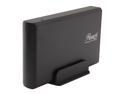
Rosewill RX35-AT-SU BLK Aluminum 3.5" Black SATA USB 2.0 External Enclosure
Pros: Cost
Cons: - Installation process is a pain. - Noise
Overall Review: The only time this was a problem for me is when I was installing my hard drive for the first time, it simply was too difficult to get some of the holes to line up correctly. Other than that due to how it's built all of the vibrations from a hard drive that is installed into this enclosure are transferred to whatever it is sitting on, if I turn it on and leave it on I can feel my hard drive humming away so I leave it powered off when I'm not using it to solve that problem.
7/19/2015See more detail
Perfect
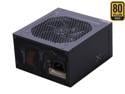
SeaSonic X Series X650 Gold (SS-650KM Active PFC F3) 650W ATX12V V2.3/EPS 12V V2.91 SLI Ready CrossFire Ready 80 PLUS GOLD Certified Full Modular Active PFC Power Supply New 4th Gen CPU Certified Hasw
Pros: Build Quality Brand Silence
Cons: Power connectors are a bit confusing at first.
Overall Review: The power connectors are a bit confusing to get used to due to how they separated them and labeled them on the unit itself (Motherboard / Motherboard 4/8pin). Consulting the manual for the first install will fix this problem and it will probably never be an issue after that but this is the only problem with the unit thus far. I purchased this to replace the Corsair HX650 which I had already returned to Corsair due to an issue with it's fan controller, the replacement that they sent me squealed terribly so I ended up buying the X-650 which if I had to guess is the model the HX650 is based on considering the OEM provider for it is SeaSonic. The X-650 has worked flawlessly thus far with my GTX 760 and now R9 390X with an overclocked 4690K. While monitoring my power draw I'm never over 440w for the whole PC even under benchmark / stress test loads and this power supply has remained silent for all of it.
7/19/2015See more detail
Great so far
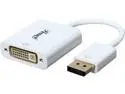
Rosewill RCDC-14034 DisplayPort Male to DVI Female Adapter
Pros: Price
Cons: Color, I wish it wasn't white, if it was black I would be happier just due to it appealing more visually but fortunately I only have to see it for a few minutes every so often.
Overall Review: I've purchased 3 of these and am using them with my 390X, overall they function correctly however I cannot get more than 2 to work at a time with my 390X limiting me to a total of 3 displays and having to utilize on-board connections and my 4690K to drive two of my other displays.
7/19/2015See more detail
Works as intended
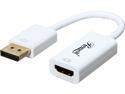
Rosewill RCDC-14033 DisplayPort Male to HDMI Female Adapter
Pros: Price
Cons: Color, I wish it was black, it doesn't matter at all in terms of performance but having all black peripherals and cables and seeing this white thing coming out the back doesn't look visually appealing.
Overall Review: I have ordered two of these so far and they work as intended, however with my 390X I cannot use more than 2 of them as one of the displays chooses not to work, this is likely an issue with drivers or the video card itself but for most people 3 monitors is enough while I'm running with 5 so my situation is a bit different.
7/19/2015See more detail