
Your Browsing History


Mickey W.
Joined on 05/28/02
0
0
product reviews
- 17
Great FM2+ CPU
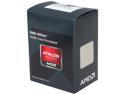
AMD Athlon X4 860K - Athlon X4 Kaveri Quad-Core 3.7 GHz Socket FM2+ 95W Desktop Processor (BLACK EDITION) - AD860KXBJABOX
Pros: Fast, Stable, Easy to install
Cons: None so far
Overall Review: Bought to replace an A10-7850K and ASUS motherboard lost due to an unexpected blackout. Since the computer had a 7870 Radeon card in it and we weren't using the onboard video this Athlon CPU was a cheaper replacement while I waited for AMD to replace the CPU (that is why I buy always the retail version for the better warranty). Everything runs just like before and I didn't even have to re-verify Windows. AMD replaced my A10-7850K but I will just keep that CPU as a spare since the Athlon works so well.
4/19/2016See more detail
Almost Perfect
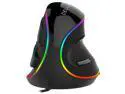
DELUX Wired Ergonomic Mouse, RGB Vertical Optical Mouse with 6 Programmable Buttons, 4000 DPI and Removable Palm Rest, Ergonomic Gaming Mouse Reduces Hand and Wrist Pain (M618PLUS RGB-Black)
Pros: Reduced wrist pain RGB color Most of the extra buttons are out of the way
Cons: Mouse cursor moves constantly, a few pixels at a time so that the computer would never go into sleep mode or use the screen saver
Overall Review: I used this vertical mouse for several weeks but had to give up on it due to the constant movement of the cursor. I have a rig with two large 4K monitors and I want the displays to turn off or use the screen saver but the drifting cursor movement prevents the energy saving (and display saving) timer from activating. I tried adjusting the DPI but that didn't fix the problem. The mouse itself fits well in my hand and most of the "extra" buttons are out of the way. I don't end up with incorrect clicks very often, but one is the page forward/back button. The RGB effects are simple and acceptable. The use of the vertical mouse relieved most of my wrist pain. I was a computer programmer for over 40 years, starting with punched cards and was one of the first users of PCs in the US Air Force back in the early 1980's. We didn't have ergonomic desks back then and just used existing office tables to do coding. As a result I've had carpal tunnel since 1986. For years I had to wear a brace while using the mouse. I was able to take the brace off while using this vertical mouse. I may try another vertical mouse in the future if I find one that doesn't drift.
12/11/2021See more detail
Premium Motherboard

ASRock X570 Phantom Gaming X AM4 AMD Premium X570 ATX AMD Motherboard
Pros: X570 supports more PCI-e lanes to allow 2 M2 drives without reducing GPU lanes. Was in stock during the May motherboard shortages. WiFi 6 support. More SATA ports than others in this class. Two USB 2.0 internal headers.
Cons: Did not have second USB 3.0 20-pin internal header. All-in-one M2 heatsink and southbridge fan cover. Have to remove all PCI-e cards in order to remove heatsink/fan cover.
Overall Review: When I decided to replace my Crosshair VII Ryzen 7 2700X system I looked hard at motherboards capable of supporting the Ryzen 9 CPUs properly. Knowing that I had two NVMe M2 drives eliminated the lower end X570 MBs. I started purchasing pieces of my system in late April. My first choice MB went Backorder after I put it in my cart. I then ordered two other MBs on the phone with the assurance of the sales agent that they were in stock, only to have them go backorder too. Two weeks of checking every day and I finally scored this highly rated ASRock motherboard. The all-in-one heatsink/fan cover is a pain but one that I should only have to deal with once. As I have a Thermaltake Core X9 case motherboard fit and installation were a snap. Thermaltake should never have discontinued the X9 and X5, they are the best cases for hardware nuts. The X9 has four front USB 3.0 ports and I had to purchase an internal hub with power supply to support my total of six front mounted USB 3.0 (4 from the X9 and two from a new 5.25in panel). I took advantage while my system was open to add in three additional RGB fans to go with the 4 already mounted on my AIO cooler and case top. The system booted right up on first try using a cloned M2 drive with the Windows that had been on my older system (then replaced the activation code with the one from a new copy so the original copy can remain with the Ryzen 2700X and MB). I replaced the ASUS drivers with ASRock where necessary and tweaked my new memory to 3400 speed. I will push the memory to rated speed after it is burned in. No problems with the system since build. Very Happy. Fix the heatsink/fan cover and it would be even better. New components AMD Ryzen 9 3900X ASRock X570 Phantom Gaming X GSkill Trident Neo DDR4 3600 2X16GB Media Dashboard Front Panel Darkflash MR120 RGB fans and controller Thermaltake 200mm RGB fan Windows 10 Professional HP 950 1TB NVMe TLC M.2 drive Pioneer APS-SEQ-2T 2TB NVMe QLC M.2 Drive Existing components Thermaltake Core X9 case MSI GeForce 1080 Duke Seasonic Focus 850 P/S ASUS Blu-ray R/W drive 500GB 2.5in SATA SSD 60GB 2.5in SATA SSD (dedicated Windows Cache) 3TB 3.5in SATA HD
7/8/2020See more detail
Good RGB Fans
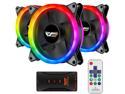
darkFlash Aurora DR12 3IN1 PRO 120mm Addressable RGB LED Case Fan Kit Compatible with ASUS Aura Sync High Performance Speed Controllable Colorful Fans with Controller and Remote
Pros: Bright Colors Decent Air Volume Quiet
Cons: Must be connected to the controller, so BIOS fan control is lost. EDIT: - hooked up to my motherboard, worked with my onboard RGB just fine. That is more than I can say about my RGB DDR4 memory from Team, which slowly drifts off-sync over time.
Overall Review: So I have 5 of these in my Core X9 case (two attached to my AIO cooler). Lights up the case well and the Core X9 is huge. Air movement is good and fans are quiet at mid speed settings. Have worked flawlessly for 10 months now. Do not have them connected to my ASUS Crosshair Hero VII motherboard, just use the remote when I want to change the theme. Have purchased 5 sets so far for the 4 computers in the house and will add some more in the future.
6/21/2020See more detail
Core Cube Cases Are Great for Builders
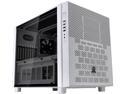
Thermaltake Core X5 Tempered Glass Snow Edition E-ATX Stackable Cube Chassis CA-1E8-00M6WN-00
Pros: - Room to work in. - horizontal motherboard - supports multiple long GPUs - supports short or long P/S - lots of places to put HD/SSDs - still supports external drives/bay adapters - tempered glass windows on both sides
Cons: - Instruction manual could have been clearer. Big manual but only one or two lines of English per page, rest is translations. - Front supports 200mm fan but only comes with a 120mm. Second 120mm front fan position does not have screw holes for two screws so it can only be fastened with 2. - white paint is prone to flaking around screw holes - thumbscrews were hard to put in many of the screw holes - screwless drive pins tend to fall out - accessories box is hidden in the drive bay above the P/S
Overall Review: I got this during a 30% off clearance so it was less than $115 and I still have a rebate to send in. This is my second Thermaltake Cube case. I have my build in a Core X9. Used this Core X5 for my youngest's new Ryzen 2 build. I like the smaller size of the X5 compared to the X9. Both are a big handful to move so plan carefully when building. I built this one directly in my son's bedroom on some TV trays rather than in the basement workshop so I wouldn't have to carry the works up the stairs. Since I had already done my build in the X9 I didn't spend enough time with the manual's case images. Be sure to move the bottom power supply rail to the right position to support the unit. I didn't do that initially so I had to take the drive bay out in order to get the P/S in and then the screw holes didn't align and the drive bay would not go back in. After looking over the diagram I removed the P/S and moved the support rail. I put the P/S back in and then realized that the drive bay could not be put back with the P/S already mounted. So out it went for the second time. Installing the HD and SSD was easy but the screwless pins tended to pop out of the rubber holders so I ended up using screws anyway. Motherboard mounted without a hitch as the tray supports just about any board. The front panel cables are more than long enough. Wasn't sure that I liked having USB 2 and USB 3 on the front but not all MBs have dual USB 3 connections. The Gigabyte X470 Aorus Gaming 7 WiFi had two Gen1 and one Gen2 connections so that was covered. I adjusted the top rails to hold 120mm fans and radiators as they come from the factory spaced for 140mm. The slots in these rails are a bit wide so you may find that some fan screws fall through. I angled my fans slightly to prevent this. Once you finish the build the glass side panels make a RGB motherboard a real showcase. I added two strings of RGB lights and the case glows like a mini Christmas tree. Beautiful. Build - Core X5, AMD Ryzen 2700X, Gigabyte X470 Aorus Gaming 7 WiFi AM4, Corsair Vengeance LPX 32GB (8x4) DDR4 3000, Gigabyte Aorus GTX 1070 Ti, Eluktro Pro-X G2 500GB NVMe M.2 SSD, OCZ 480GB Trion 150 SSD, Seagate Barracuda 2TB HD, EVGA SuperNova 750 G2 Modular Power Supply, ASUS BW-16D1HT Blu-ray Burner, generic front panel USB 3/eSata/SD reader/fan controller.
7/22/2018See more detail
Great Deal on a Great Big View
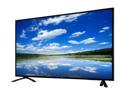
Acer EB0 Series EB490QK Black 48.5" IPS 60Hz, 3840x2160 4K UHD LED/LCD Monitor, Acer ComfyView Technology, Flickerless Technology, BlueLightShield Technology, Low Dimming Technology, VESA Mountable, Built in Speakers
Pros: 4K large screen, DisplayPort, all cables provided, price
Cons: Legs, Firmware Update, package.
Overall Review: I've owned computers since a 1979 TRS-80 and been a computer programmer for the last 38 years. I've run everything from monochrome monitors to multiple LCD displays. A 27 inch 2K display convinced me that for higher resolutions small screen size is a definite no-no. For the last 5 years I've used 3 different 4K televisions for my home system, going from a 40 inch Seiki to a 43 inch Vizio to eventually a 50 inch Vizio. While the TVs provided the screen size I needed, they lacked the sharpness of a traditional monitor and I was forced to use 150% scaling . As I got older my eyes needed something better. I kept looking but either the monitors for sale were too expensive or too small. Just when I'd given up this Acer display appeared in a Newegg flyer and on sale for $405, equal to or less than the 32 inch models available. It lacks Free-sync but I own an Nvidia GTX-1080 so I didn't need the support for an AMD video card. Using the DisplayPort 1.2 I get a rock-solid 60hz image without using scaling. If there are any negatives to mention they are: 1) I don't care for the way the feet are on the display. The feet force me to move the monitor forward on the desk because of the wide footprint, so it sits closer than the Vizio did. 2) There doesn't appear to be any way to update the firmware. Nothing on Acer's website and no useful hits on a Google search. 3) DisplayPort settings are for 1.1 and 1.2 only. 4) Package/shipment - The monitor showed up with a 4-6in crack in the screen but was replaced through Newegg's RMA process. The whole process from delivery of the first monitor to receipt of the replacement took almost 4 weeks but in the end I was 100% satisfied. I didn't take off any eggs for no Free-sync or limited DisplayPort because I knew what they were when I ordered. I always check reviews and do searches for items before I buy. I'll never understand why some reviewers subtract ratings for anything that is in the listed specifications they don't like. After all if you go out and buy a Ford Mustang you don't complain that it won't haul full sheets of plywood in the trunk.
3/31/2018See more detail
seller reviews
- 2
Very fast delivery.
Only issue was with the giant mousepad. I have purchased a few of these from different vendors for the many PCs in my house. This was the first one that was folded instead of rolled up and it has been days since I set it up and it still has major wrinkles in it. I hope they will go away.
On-time
Delivery
Product
Accuracy
Customer Service
Satisfactory
6/25/2021See more detail
NO Response from Seller
I bought this receiver and the price went down twice before it even arrived. I requested that the seller adjust the price for at least the first decrease since the order screen showed price-matching on it. However despite multiple emails and having Newegg contact the seller I didn't get a reply of any sort. I can't recommend the seller for that reason alone. The receiver is a very good unit but is taller than most so make sure your cabinet can hold it. It works well with my new Ultra HD Blu Ray and 4K TV.
On-time
Delivery
Product
Accuracy
Customer Service
Satisfactory
1/14/2018See more detail