
Your Browsing History


Albert F.
Joined on 07/20/04
0
0
product reviews
- 9
40th Anniversary CPU
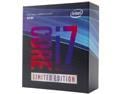
Intel Core i7 8th Gen - Core i7-8086K Coffee Lake 6-Core 4.0 GHz (5.0 GHz Turbo) LGA 1151 (300 Series) 95W BX80684I78086K Desktop Processor Intel UHD Graphics 630
Pros: 5.3 ghz all cores ran stable for 24 straight hours bench marking stress testing. I am running it now at 5.2 to keep it a little cooler. This bumps up the performance of my Titan Xp too.
Cons: You can get to 5.0 on most 8700Ks coming out right now so the extra cabbage you spend is not the best value.
Overall Review: When I received the CPU originally it was opened and a finger print on the chip. Contacted NewEgg customer service immediately and got another one sent out. As far as NewEgg customer service goes 5 stars all the way.
6/25/2018See more detail
Doesn't power up drives
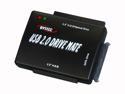
BYTECC BT-300 USB 2.0 to IDE / SATA Adapter
Pros: Using internal power, opened the case i was able to power up my old IDE drives I had lying around and check them for important data before I formatted them.
Cons: Had to use internal power cables to power up 3.5" and older IDE drives, maybe the power brick is defective? No instructions, connections are not tight. It will also not power up the 2.5" Drive.
6/24/2008See more detail
40yrs of building PC's I chose this power supply to overclock my 8086K Limited Edition CPU to 5.2mhz on all cores

EVGA SuperNOVA 850 G+, 80 Plus Gold 850W, Fully Modular, FDB Fan, 10 Year Warranty, Includes Power ON Self Tester, Power Supply 120-GP-0850-X1
Pros: 10 Year EVGA Warranty Modular More braided cables than I can use! Black with durable connectors. Tight tolerances in power delivery. When I ask for voltage of 1.410 I get it and my overclock on all cores is Quiet under stress loads Tie wraps and screws for mounting included Did I mention the 10-year warranty? Great price/Value My rig as reported by CPUZ CPU Name Intel® Core™ i7-8086K CPU @ 4.00GHz Threading 1 CPU - 6 Core - 12 Threads Frequency 5198.75 MHz (52 * 99.98 MHz) - Uncore: 4898.8 MHz Multiplier Current: 52 / Min: 8 / Max: 50 Architecture Coffee Lake / Stepping: U0 / Technology: 14 nm CPUID / Ext. 6.E.A / 6.9E IA Extensions MMX, SSE, SSE2, SSE3, SSSE3, SSE4.1, SSE4.2, EM64T, VT-x, AES, AVX, AVX2, FMA3, TSX Caches L1D : 32 KB / L2 : 256 KB / L3 : 12288 KB Caches Assoc. L1D : 8-way / L2 : 4-way / L3 : 16-way Microcode Rev. 0x84 ► Spectre (CVE-2017-5715) Patched ◄ TDP / Vcore 95 Watts / 1.416 Volts Temperature 79 °C / 174 °F Type Retail (Stock Frequency : 4000 MHz) Cores Frequencies #00: 5198.75 MHz #01: 5198.75 MHz #02: 5198.75 MHz #03: 5198.75 MHz #04: 5198.75 MHz #05: 5198.75 MHz
Cons: -Not Free -No EVGA Badge to stick on your PC
Overall Review: - I would recommend this to anyone looking for reliability & performance with value and longevity (10-year warranty) - People often overlook what is arguably the most important aspect of computing, consistent clean power at rated levels.
6/22/2018See more detail
If your looking for range this is for you.
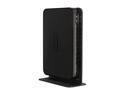
NETGEAR WNDR3700-100NAS V.5 Wireless Gigabit Open Source Router/ USB port Rangemax 2.4/5 GHz Simultaneous N600 Dual Band IEEE 802.11a/b/g/n, IEEE 802.3/3u/3ab
Pros: 8 anntennas do provide for a stronger signal throughout my house. I have mine in the basement and now have excellent N signal, whereas I had a weak (but adequate) signal before, my wife is now streaming video and I am a gamer so the QoS really works great. WoW, BF bc2 run great while the wife is streaming Netflicks or HG TV. Wireless transfers between systems now go 4 to 10 times as fast depending where I am in the house. Setup was easy, firmware update was easy. Admin password change much quicker than with my previous Netgear Router.
Cons: Setup software provided does not run on 64 bit systems, you need to view the .pdf for install instructions. One touch connect with Netgear USB N adapter was unsuccessful after 5 attempts, had to configure that manually. Saving changes takes alot longer than previous Netgear Model but there was only 1 radio setting.
Overall Review: My old Netgear Wireless Router was solid, but range in my house was not "perfect". I now have eliminated my gig switch and run that directly through my router another hop eliminated. MY wife says her internet experience is better, I have not been able to prove that. I can say the router negotiates with my DSL provider twice as fast as before.
4/16/2010See more detail
Gi-normus
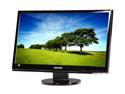
SAMSUNG 24" FHD LCD Monitor 5 ms D-Sub, DVI, HDMI SyncMaster 2494HM
Pros: Gi-normus, bright, no dead pixels, no power brick, ability to turn off power to the internal brick, (need to turn this switch on to operate its in the back, glass touch settings on front panel will not wear out. I never thought there would be a big difference between a 23 and 24" but there is, forget the 23 go the 24. Good base it does not wobble.
Cons: 30-50 dollars more than the competition. no swivel. Newegg does not ship in a box but uses the box it comes in, not great if UPS leaves stuff at your door, Hey look im a 24 inch LCD monitor! Instructions suck, refered to them to learn how to turn the thing on, found the switch in the back of the monitor then used the glass touch on button which is sweet, by the way.
Overall Review: 3rd Samsung I have owned, I have a 15, 19 and now the 24, over the past 7 years and they are all still working.
2/5/2010See more detail
Not Enterprise Class
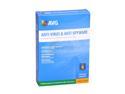
AVG Antivirus+Antispyware 9.0 2Year
Pros: Low cost, pretty box catches viruses that it is aware of usually.
Cons: Support seems to go to sleep at 5pm. Have this installed at a 600 desktop site, it cannot seem to get rid of the conflicker virus, systems continually get reinfected and realtime does not seem to work or this variant has AVG's number. No scan tool or utility to remove many viruses.
Overall Review: Or we may not know how to correctly use the product, that is where support comes in.
1/14/2010See more detail