

Your Browsing History


JAMIE K.
Joined on 02/14/02
0
0
100%
100%


product reviews
- 112
H150 IPro

Corsair Hydro Series, H150i PRO RGB, 360mm. 3 X 120mm ML PWM Fans, Advanced RGB Lighting & Fan Control w/ Software. Liquid CPU Cooler. CW-9060031-WW. Support: Intel 2066, AMD AM4.
Pros: Pros +Quiet +Plenty of cooling +Good Controls +Highest Quality AIO Edited now I have a new case. The biggest advise I can give to you guys is make sure you have a case that can accommodate it. 1) if mounting at the top, I would make sure you mounting holes/rails are offset towards the cases left side. Such as is the Fractal Define R6 otherwise you may have clearance issues with the motherboard. It took me longer to do this review, due to size requirements of my original case. I had to do some modifications to it first for this 3-fan unit to fit into my case. Please see cons. The installation is easy if you have large enough of a case. As with any radiator, you really need to be careful not to damage the unit. Honestly, I recommend that you buy a new case that is designed to have internal water cooling, then there is no doubt that it will fit. The CPU mount was very easy and comes with both AMD and intel brackets that are standard to the Asutek pump cooling head, and the Rubber tubes from the radiator are just the right mailability to for the tubes to your case. I have always been leery of AIO’s because of substandard parts being used in pumps. I am also leery of them being inside my case. However, if disaster is going to happen it doesn’t matter where it is. Well if it fails, at least the AIO is covered by Corsair's 5 year warranty I must hand it to Corsair, they are really becoming a dominant player in the PC market. I am especially impressed with the overall quality of their products. This is no exception, and I want to thank them for sending me this unit for testing. The customization and control with the software is really wonderful, you can control the pump speed, the fans and of course the LED. Plus it has a lot of monitoring points plugged into the software much like hardware monitor does. I hope that they can continue with the development and make it so I can shrink it down on monitor my system...I believe with ICUE this is supposed to happen soon. I have grown accustom to the Corsair controls easily, and even though in this case I do not care about the RGB lighting, I think that when I do buy a new case, the RGB controls will be a great touch So this Rad is Plenty big to cool any CPU, in fact most 240"s will cool just about any CPU, but I really wish they could put some sort of wattage rating on these items, to help out the consumer. My temps are very cool at idle at around 38-45 C, but I do recommend getting some Gelid high performance thermal paste as it really helped the thermals. I can keep full load stress testing under 70C and the fans are at 60%
Cons: Cons -needs a lot of space Initially in my first case the only place I could mount it was at the top. Where I ran into the biggest problems was the 2” depth of the unit. This caused clearance issue with my motherboard heatsinks, and I think this will be a common issue with a lot of cases. In my new Fractal Design R6 there is ample room! in either the front ot he top.
Overall Review: My biggest question to Corsair is this, are all the parts in this unit similar metals, as in all aluminum? And plastic. That is important, and I think we all would like to know. Only time will tell how long this unit will last as the pumps are always the first thing to fail once installed. I will report back if there are ANY failure Corsair, you can be sure of that! Corsair, I Really would like to see you put out some arctic white units of this series. I know white cases are really becoming popular because we are all getting tired of Black
6/5/2018See more detail
Asus Customer support
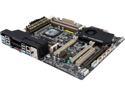
ASUS Sabertooth X79 LGA 2011 Intel X79 USB 3.0 ATX Intel Motherboard
Pros: The motherboard is a great. It is super fast, but will soon be obsolete. My system is 1.5 years old and my system has failed. But the M/B ended up being good. This is a followup review. Turns out it was a pulsing 5vds in the power supply that was causing the issue.
Cons: ASUS America Customer support needs some serious revamping. It is the worst experience I have ever had with a company....EVER. It is no wonder EVGA is coming out so strong, with their warranties and superfast customer service, ASUS better wakle up.
Overall Review: Asus customer support/ technical support though I had a bad M/B too so I wont fault them there. It is their RMA process. They deliberately have their RMA system set up to be as difficult as possible. I decided to do an advanced RMA by having a hold put on my CC for $360.00 . Their form had to be FAXED to them, because they are living in the1990's. 4 days later they reply to me stating they could not read my CC number on lousy form. They couldn't call me or take the CC over the phone. Or accept an electronic signature on the form they sent to me, that was made for an electronic signature. Four more days pass before I get information saying that my RMA has been processed again (on a Thursday). By now my customer is angry at me for the delay. I paid extra to get my board overnighted, and what do they do instead of sending out on Thursday it takes them another 2 days to ship it. It was send on Monday, and I got it Tuesday. 3 weeks for an advanced RMA is Ridiculous.
3/17/2014See more detail
Crucial DDR5 PRO 32 GB Kit

Crucial Pro Overclocking 32GB (2 x 16GB) DDR5 6400 (PC5 51200) Desktop Memory Model CP2K16G64C32U5B
Pros: Pros + No LEDs + Aesthetics are nice + 2 profiles for Intel and AMD + Good timings low latency + Warranty Since I run an AM5 platform, I did not feel the need to overclock anymore than what the EXPO profile was set at because 6000 or 8000 is the sweet spot due to the infinity fabric. Due to owning a 7800X3D I did not want to push the chip too hard and risk the 3D Cache overheating. This ram kit save my bacon though as my business computer died, and I had to upgrade it, so I was able to move my Klev ram to the work computer and use this in the gaming system. It has run flawlessly so far, and what I really like is the profiles are set where they should be frequency wise. Even if the Bios settings get messed up the Ram is set at the proper speeds for the computer. That is not the case for most older Ram kits. Overclocking RAM is really a waste of time, unless it is running in a 2T state. The performance gain is probably 2% at best from my experiences. Overclocking in general is a thing of the past from CPU's to Video cards, so I just go with what is stable and give me the best consistent performance, now. Over the years I have had many dealings with Crucial and all of them have been positive, and their RMA warranty service is quite good. That is hard to find these days.
Cons: Cons - Had to flash Bios to work On the first run I was not able to get this ram to post, but once I updated the bios everything was fine on my Asrock B650 Taichi.
Overall Review: Thoughts-Conclusion The elephant in the room is price, but this is not Just Crucial, it is all RAM. I am unsure who is gouging us gamers so badly, but it has to stop. As it stands, building a good gaming system is becoming cost prohibitive thanks to AI. Honestly, I would wait for Ram prices to come down, but if you need some Ram now, you really can't go wrong with the RAM, especially if you are tired of LEDs and want a nice white aesthetic.
12/30/2025See more detail
Crucial P310 Review
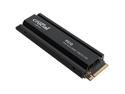
Crucial P310 M.2 2280 2TB PCI-Express 4.0 x4 3D NAND Internal Solid State Drive (SSD) CT2000P310SSD5
Pros: + 5-year warranty + Outstanding heat sink + Company always stands behind its product.
Cons: - Had troubles with bios of my motherboard.
Overall Review: The p310 Gen 4 is a cost-effective 2TB Drive that has a decent profile. The Gen 5 T700 is 2x as tall. Even though I tried to install it internally, I ran into an issue with my (B650e TAICHI) Only swapping the drive out with my FAST games drive (Crucial T700), It was formatted externally, but it would only go into the bios incorrectly and prevented me from doing anything because of the USB drivers never initialized. I will work to resolve this issue and update my review accordingly, I will start with a bios update. For now, I had to run it via external USB, and it ran just as good as my Crucial External X9 USB Backup drive. See above picture. For now, trust the numbers of the other reviews.
5/31/2025See more detail
Crucial portable x9 2TB = Portable and Speedy storage
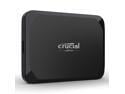
Crucial X9 2TB Portable SSD - Up to 1050MB/s Read - PC and Mac, Lightweight and small - USB 3.2 External Solid State Drive - CT2000X9SSD9
Pros: Pros: + Compact high capacity + High quality + Low thermals + External high speed storage when internal is not an option. + Crucials warranty service is very good.
Cons: Cons - Performs badly with many other connections or cable.
Overall Review: I did some serious benchmarking to see if the speeds that this drive claims are true. They are, in its complete stock configuration, as long as you are connected to USB 3.1 or higher. Without going into a long and drawn-out review about why cables matter, lets keep it simple today. No matter what you connect, it is of the utmost importance you vet your cables. They are the number one point of failure. Also, not all cables are made well. In my life experience, only about 25% of cables are made to the specs they are supposed to be. I do think it was a bit cheap of Crucial to only include a 6 cable. It is at least a great quality cable that allows the advertised transfer speeds. Testing the Crucial 2TB drive started out fine because I tested it with the stock cable, and it did in fact reach the read speeds as advertised, easily besting most other external media. Kudos to Crucial there. I love the fact there is no other power required, and the unit seems to run cool. I would think if you had a very new camera, this would be a good storage backup for pictures to download to. Furthermore, I can also envision attaching this to a Steam Deck with some Velcro for additional storage. It would also be a good backup for your laptop and maybe light video work, but it really lacks enough capacity for that. Overall, for the price I think this fills its niche and if you need more storage but cannot expand internally, then this is a good option. If I have the choice though, I am going to upgrade the hardware internally first if it is a reasonable price. So, this unit could be used as a stop gap measure if you were waiting for prices to come down on larger drives. I am sure there are longer cables out there that might work with this drive, but I tried numerous USB-C cable that I had, and they did not live up to expectations. This included USB-C to USB 3.0 The standard that this cable is USB-C 3.2 GEN 2, I cannot overstate the importance of the cable you use. To reach the speed that this drive is capable of, you MUST have a 3.2 gen 2 certified cable. If you want one longer than 9 inches, then you will need to buy one because all my older USB-C cables could barely reach 32 Gb/s. Also remember, as the distance of the cable gets longer, the speeds will go down as well. I did not have a USB-C 3.2 hub that I could try this out on, but for people with desktop computers, that is what I would attach it to. In case it is not obvious, you cannot reach the advertised speeds connecting this drive to USB 3.0, or 3.1. It must be a Thunderbolt / USB 3.2 so check your port information carefully before you buy this item! USB 3.1 I was getting about half the read speed performance out of my X570 motherboard when connected directly to the rear panel I/O with a pretty hefty USB to USB-C cable, version is unverified so it maybe USB 3.1 gen 2. Follow these steps, verify you port you are plugging into is USB 3.2 Gen, it can be either USB-C or USB 3.2 SS. Remember, cable length will slow down the data transfer and hub might as well. Make sure you buy a very good, shielded cable, you can usually tell by the thickness of a cable because the thicker ones will use heavier gauge wire, which offers less resistance. To recap: USB 3.0, USB 3.1 Gen 1, and USB 3.2 Gen 1 are all names for the same standard and thus transmit at the same speed of 625MB/s. USB 3.1 Gen 2 and USB 3.2 Gen 2 are the same and transfer at 1.25GB/s. And USB 3.2 Gen 2x2 is the fastest at 2.5GB/s. Hopefully, this review helps you understand better what you need to get the best performance out of this drive. If it fills your niche, dont be afraid to pull the trigger, Crucial makes a great product and their warranty service is second to none.
7/18/2024See more detail
Eggspert Review devolo Magic 2 LAN
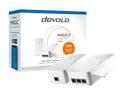
devolo Magic 2 LAN triple Starter Kit
Pros: + Simple to install + Instructions are good + No need to mess with anything in the router for setup. As an A+ certified technician that has worked for major Telecom companies, I am quite familiar with how these devices work. For the beginner that has a special case and does not want to use wireless, this would be a PROBABLY be a good solution. I appreciate the ease of use and I recommend when setting up the second unit to let it sync close by to the first outlet. This will ensure that the units know how to talk to each other and any updates needed will complete. Also look in the instructions an alternating red/white light can indicate an update, but also a poor connection to each other over the wires. If you unplug the unit during an update, you just lost your unit. Also, make sure you DO NOT plug it into a surge suppressor or UPS because they have line filters that will block communication of the unit!
Cons: - The cost is too high for this unit. - Performance is not close to spec on the box. - Size of unit - No wireless extender! - The second unit only has one ethernet connection This unit performed below my standards and expectations, especially for the price point. Honestly, this unit seems to be just a bare-bones setup with minimalistic features. That would be fine if it didn't block the second plug on my outlet! Also, why does it only have ONE ethernet on the second unit? Why not THREE or at least TWO like the other unit?
Overall Review: TESTING CONCLUSION Half the speed as my Shielded CAT-6E Cables, see proof attached. My distance from the demarcation point to the plug is Approx 100ft In my testing, yours will vary depending on the location of the unit, distance and noise on the wires are the largest hindrances of these types of units and can dramatically lower the speeds and can even cause data corruption, and is why I do not recommend them except in certain circumstances, like a remote room that is a pain to run some cable in or use it as a temporary solution. The problem I have is that in today's times there are much better and smaller options available. I am not happy that the unit does not swivel, I have many outlets that are upside down, and if this unit could even just go 90 and 180 and lock that would be fine. But WHY is it so LARGE that it blocks the other outlet? Look I have been a Neweggspert for a long time and I try to be fair to a product they ask me to review, but unfortunately at this price point, I cannot recommend it because it does not have enough ethernet ports let alone any wireless extension?? My testing conditions are quite good and this unit still barely kept up with my wireless 5Ghz from my Asus Blu Caves that are pretty old. So here is what killed any recommendation of the product for me. I was able to get the unit to work down in my basement, but when I placed it in my detached garage only 40ft away from the demarcation all I got was "poor connection" error lights. I will assume it is a wiring issue, but since my Garage is less than 20 years old it should be up to all electrical codes. Attached are two snippets of my testing, the slower one is this unit. Conclusion Not impressed and cannot recommend it unless you have a fringe situation that wireless cannot fix, the problem for this Devolo unit is some competitors offer more features for less money, that also use power lines if you do not want to run a cable. As far as I can tell, the casing of this unit is way oversized for what the product should be as I KNOW there are smaller electronics packages out there. I would go back to the drawing board again from an engineering standpoint and lower the price.
10/3/2022See more detail
seller reviews
- 3
velco
Best velco ever and at a good price
On-time
Delivery
Product
Accuracy
Customer Service
Satisfactory
6/16/2018See more detail
As described
great fans
On-time
Delivery
Product
Accuracy
Customer Service
Satisfactory
5/22/2018See more detail
Very Nice People
I was asked if I could do a review, because a product was new. They were very honest and answered my questions.
On-time
Delivery
Product
Accuracy
Customer Service
Satisfactory
4/23/2014See more detail