
Your Browsing History


Jeffrey B.
Joined on 02/07/06
0
0
product reviews
- 11
Good quality, excellent value
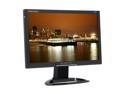
SCEPTRE X20WC-Gamer Black 20.1" 5ms Widescreen Glare HD (HDCP) LCD Monitor 300 cd/m2 800:1, US Warranty
Pros: Friggen huge! I upgraded from a 19" to this for gaming. I was amazed at how much larger the screen was. My gaming experience is so better on a widescreen monitor. Zero dead pixels upon delivery and nearly three weeks later I still have yet to find a dead pixel. For the price, this is the best widescreen monitor on the market right now.
Cons: As with many other reviewers, I too agree with the shakey stand. It's not unstable nor flimsy, it's just too narrow to fully support the width of the monitor. Yes, the monitor will barely shake when typing or when printing but that is easily fixed with attaching a couple of home-made struts to both sides of the monitor. Speakers. What speakers? Never used them, never will.
Overall Review: For playing games in widescreen and for viewing DVD's on the home PC; this monitor is perfect. A lot of other apps seem to leave a some blank space on the screen. However, if you're going widescreen and on a budget, buy this. I'm completely satisfied.
10/6/2006See more detail
Stands the test of time
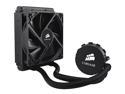
CORSAIR Hydro Series H50 120mm Quiet Edition Liquid CPU Cooler - Intel Only (CW-9060006-WW)
Pros: I've owned this cooler for well over a year and I haven't had any troubles with it whatsoever. Its quiet, cools my OC'd QX6850 just fine, and it looks cool. It has stood the test of time with my rig and I'm sure in many others.
Cons: MB removal, big whoop. Go big or go home.
Overall Review: It keeps my QX6850 OC'd @ 3.33 at a stable 25c and well under 50c during 100% load. Last summer the room temperature of my apartment got over 95f at times but my proc never exceeded 60c under full load. One of the best PC investments I've ever made.
3/3/2011See more detail
Best HSF for the price
CORSAIR Hydro Series H50 120mm Quiet Edition Liquid CPU Cooler - Intel Only (CW-9060006-WW)
Pros: Very cool temps, small footprint, good price, and extremely quiet. Keeps my OC'd 6850 (3.33) at 28C at idle and just under 65C during an hour long stress test while remaining virtually silent. And, believe it or not, the thermal compound that's already applied to the heatsink kicks A! Wouldn't worry about using another thermal paste.
Cons: Hope you don't have any plans for a while if this is an upgrade. The install can be pretty time consuming. The instructions are also weak. Visit the Corsair website for clearer instructions and You-Tube some installation videos prior to installation. This should give you a clearer idea of the task at hand.
Overall Review: For those of you with an LGA 775 chipset: If you're upgrading from a Zalman 9000 series HSF you won't need to remove the motherboard. Simply use the Zalman under motherboard support bracket. It works and is a huge time saver! Also, when installing the radiator and fan, do so one bolt at a time. Should save you from some frustration. Hope this helps!!!
5/26/2010See more detail
Best tuner I've ever purchased
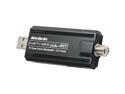
AVerMedia H826-AK AVerTV Hybrid Volar Max - TV Tuner Kit for Windows
Pros: Easy install, excellent playback quality, great price: Simply plug it in and Win7 (prem or better) installs the driver in under ten seconds. After looking through the included quick setup guide for a minute or two, the Media Center setup was a breeze as well. Within 20 minutes all of my cable analog and 28 add'l clear-QAM HD channels were all up and running.
Cons: None with Win7 prem 64-bit edition
Overall Review: I've been through five or more tuners over the years looking for the best one and I think I've found it with this device. This humble USB tuner provides excellent data to my sound and video hardware for a TV viewing experience on my PC second to none: especially since my cable provider offers the local stations in Clear-QAM in addition to traditional analog signals. This hybrid device picks up both with a single coaxial connection. HDTV rules! Final thoughts: If you're looking to get the best Win7 and Media Center experience out of your PC or lap-top, I highly recommend picking up this tuner.
2/27/2010See more detail
Best RAM for the buck
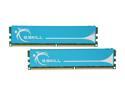
G.SKILL 4GB (2 x 2GB) DDR2 1066 (PC2 8500) Dual Channel Kit Desktop Memory Model F2-8500CL5D-4GBPK
Pros: Great price and free shipping!!! Works as advertised with a quick BIOS change. Way faster than DDR2 800 on a Vista 64 rig. Outstanding tech support from G.Skill.
Cons: Had to configure the memory settings in the BIOS. No biggy, it only took a minute or two. I'm also kinda dissapointed that it won't mow my lawn.
Overall Review: I have an Nividia 780i board with an Intel QX6850 proc and this RAM runs like a champ at stock speeds. I've tried to overclock with only minimal gains. To keep my system steady I've found that it wasn't worth the OC. 1066mhz @2.1V, 5-5-5-15 works the best for me. BTW: since my upgrade from DDR2-800 to DDR2-1066, my vista index score is a solid 5.9. (whatever that means, huh?)
5/18/2009See more detail
No doubt, the best air cooler
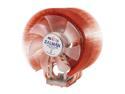
ZALMAN CNPS9700 LED 110mm 2 Ball CPU Cooler
Pros: Keeps my OC'd QX6850 @ 3.33ghz 10 to 15 degrees C colder than the Intel stock cooler. Works better than advertised!
Cons: The install is straight foward, however, very time consuming. I had to remove the motherboard from system to install this bad boy. If you're doing a new build and have this cooler in mind, don't wait like I did. It's a heck of a lot easier to install this during the initial build rather than later as an upgrade. This cooler is also rather large and can be pretty loud at 100% in an un-insulated case. A total no-go for a HTPC.
Overall Review: Don't touch the cooler fan while its running. It will draw blood. Trust me, I'm "that guy."
3/30/2008See more detail