
Your Browsing History


Douglas H.
Joined on 01/02/07
0
0
product reviews
- 12
It's wind tunnel-ish!
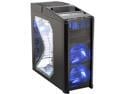
Antec Nine Hundred Black Steel ATX Mid Tower Computer Case with Upgraded USB 3.0
Pros: Good ventilation, Huge 20cm fan, plenty of drive space, bottom mounted PSU, removable drive bays, water cooling inlets, adjustable fan speeds, top mounted power/reset/USB/IEEE, side window, extra fan mounts, the list goes on...
Cons: Cable routing can be a bit of a pain, no tooless drive install, can be noisy when all fans are maxed out, top cover not easy to remove, power cable might not reach CPU...
Overall Review: I bought this case for better ventilation and it does the job well. I dropped my CPU temps by 5 degrees and GPU by 4. Cable routing can be trouble some, but the newer revision of the case does provide two openings left of the drive bays that aren't pictured. The new version also has ports for water cooling tubing that replace the rear grill right of the expansion slots. All 12cm fans have blue LEDs as well. Overall I feel it's a good case. It might take some modifications to get it just right. The biggest con I had was my 4pin CPU cable wouldn't reach with the Antec SmartPower mounted. I was planning on replacing it though so no big deal. This case can be made awesome with some minor modifications to the motherboard tray, so if you're handy with a dremel go for it.
10/26/2007See more detail
Easy Set-up,plenty of features
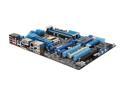
ASUS P8Z68-V PRO/GEN3 LGA 1155 Intel Z68 HDMI USB 3.0 ATX Intel Motherboard with UEFI BIOS
Pros: Very simple set-up. Took me about 30mins to get everything hooked up and powered. A little on the high end of the price range, but you get a lot for the money. PCIe 3.0, USB 3.0, 4 x 6GB/s ports. UEFI BIOS is interesting coming from the old menus, but a welcomed changed. Came with current BIOS, and drivers on install disk. One-click overclock to 4.3Ghz!
Cons: Bluetooth connection is a little gimmicky I think, and don't really see a need for it. Some people have had issues connecting Sandforce SSDs to the Marvell controlled 6GB/s ports, but shouldn't have any problems connecting to the native Intel ports. Install CD has some extra bloatware if you choose to install everything, but it's pretty easy to pick and choose just what you want.
Overall Review: I'm running this board with a i5-2600K, 8GB 1600DDR3, Corsair Force GT 120GB SSD, and Windows 7 64-bit. Install went smooth. Boot-up is ~20sec. New system is super quick and should be good for a couple of years to come.
2/19/2012See more detail
Decent Keyboard that's cheap
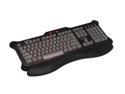
Saitek PZ30AUR 104 Normal Keys 4 Function Keys USB Wired Standard Eclipse Red Backlit Keyboard
Pros: Under 40 bucks, somewhat small footprint, red backlighting, adjustable palm rest, good key action, relatively quite, simple.
Cons: small footprint means small typing area, no-frills keyboard, no media keys (I don't use them though),.
Overall Review: I got this keyboard after my Microsoft Ergo 4000 started acting up. Keys stopped working or they were acting like they were stuck. I also used a Logitech MX 3200 at work. Out of these three keyboard I like the logictech the best, however, for the price this makes a decent addition/replacement. I wanted a backlit keyboard. I don't really used any media keys except volume which this has, and maybe the instant calculator key but it's not hard to get to with a short cut/hotkey. Compared to the Microsoft ergo 4000 this keyboard is small. my hand feel a little cramped on it, but not like a laptop keyboard. Overall I think it was a good buy. I just hope it hold up well. I saw the other reviews about the painted on letter and could really care less. get some model paint and you're back in business.
11/4/2008See more detail
Not Samsung Memory
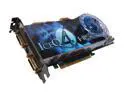
HIS Radeon HD 4850 512MB GDDR3 PCI Express 2.0 x16 Graphics Card H485QS512P
Pros: Good card
Cons: shorter overclocking ceiling
Overall Review: Just updating my previous review. This card does not used Samsung Memory modules. Instead it is outfitted with Qimonda memory modules. Performance is still great, but doesn't use the same components as the Turbo or Turbo-X cards.
9/25/2008See more detail
Best card for the money IMO
HIS Radeon HD 4850 512MB GDDR3 PCI Express 2.0 x16 Graphics Card H485QS512P
Pros: New RV770 chip, Samsung memory (0.8ms latency), aftermarket cooler that exhausts out of the case, lots of overclocking headroom. Runs games very well, can overclock to HD4870 performance levels, should be awesome in crossfire.
Cons: Stock fans speed settings need to be adjusted, Drivers could be better, catalyst control center is a little cumbersome, not supported by all overclocking utilities (ATItool)
Overall Review: I bought this card to replace my aging x1950pro. This card provides more than twice the performance for just a little bit more power. The cooler works wonders when the fan speed is set right (I have it at 35% idle, 85% load). Overclocking by CCC tops out at 700Mhz for the core and 3rd party utilities don't always work, but that will be fixed in time. Drivers could be more optimized as well, but they're pretty darn good now. System set-up: Antec 900, [email protected], 2Gb DDR2-800, HIS HD4850 IceQ, Asus P5B (will be replaced when LGA1366 comes out), Seasonic M-12 600W, etc.
9/15/2008See more detail
So far so good
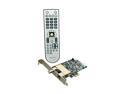
DViCO FusionHDTV7 Dual Express DUAL HDTV/Analog TV Tuner Card W/PVR
Pros: displays both digital and analog QAM TV channels, software fairly easy to use, only two connections to make, dual tuner (see other thoughts)
Cons: Channels changes can be kind of slow, digital music channels won't display background image, Analog TV kind of fuzzy.
Overall Review: I got this to watch TV on my new 28" monitor. I'm attempting to build an entertainment computer for both gaming and HTPC functions. Installations of both hardware and software was easy. The software is relatively easy to use and set-up, although some things are not intuative. The EPG didn't work for me, but that a function of Comcast and not the card. One quirk is that I haven't been able to display two digital channels at once. I might be missing something in the settings, and will update if I can remedy this. I believe you might need to install the multicard drivers to use the dual display(duh on my part if this is the case). Overall the card performs as is advertised. XP home, [email protected], 2Gb DDR2-800 G.Skill, Sapp x1950pro, Asus P5B mobo, 150Gb HHD
8/7/2008See more detail